It is currently Sun Aug 09, 2026 10:04 pm


All times are UTC - 5 hours [ DST ]


Post new topic Reply to topic  [ 13 posts ] 
Author Message
 Post subject: New and inexperienced with Gimp - need quick answers
PostPosted: Thu Aug 18, 2011 12:26 am  (#1) 
Offline
New Member

Joined: Aug 18, 2011
Posts: 4
Hi Everyone! I'm very new to Gimp and have only just figured out how to add layers to one particular page in a multiple page document. Now that I've been able to add what I needed to that one page, I need to print all 19 pages of the document? I haven't been able to find a straight answer and I have absolutely no computer skills - is there a button or something or am I just too simple to use this application? Thanks in advance!!! :)

Kristy


Share on Facebook Share on Twitter Share on Orkut Share on Digg Share on MySpace Share on Delicious Share on Technorati
Top
 Post subject: Re: New and inexperienced with Gimp - need quick answers
PostPosted: Thu Aug 18, 2011 1:24 am  (#2) 
Offline
Script Coder
User avatar

Joined: Oct 25, 2010
Posts: 4812
Gimp handles images, and not documents? What kind of "document" are you talking about?

_________________
Image


Top
 Post subject: Re: New and inexperienced with Gimp - need quick answers
PostPosted: Thu Aug 18, 2011 6:31 pm  (#3) 
Offline
GimpChat Member
User avatar

Joined: Apr 18, 2011
Posts: 620
Location: New York
do you mean pdf's??

Attachment:
Screenshot-Import from PDF.png
Screenshot-Import from PDF.png [ 68.4 KiB | Viewed 3639 times ]


you can import only some pages or all
and import them as layers or separate images

_________________
Ubuntu 24.04.1, Kernel i686, 6.8.0-52-generic
python3 v3.12.3 ----- GIMP - ver 2.10.38


Top
 Post subject: Re: New and inexperienced with Gimp - need quick answers
PostPosted: Thu Aug 18, 2011 6:53 pm  (#4) 
Offline
GimpChat Member
User avatar

Joined: Apr 18, 2011
Posts: 620
Location: New York
and printing is found right under the File menu.
there's Print Setup which lets you choose the size of the paper you will be printing to, then the Print menu item which will let you choose the elements you will communicate to your printer.

I'm no expert, but even I can get away with some simple printing. what is the problem?

_________________
Ubuntu 24.04.1, Kernel i686, 6.8.0-52-generic
python3 v3.12.3 ----- GIMP - ver 2.10.38


Top
 Post subject: Re: New and inexperienced with Gimp - need quick answers
PostPosted: Thu Aug 18, 2011 7:20 pm  (#5) 
Offline
Global Moderator
User avatar

Joined: May 16, 2010
Posts: 16153
Correct me if i am wrong but i am guessing you have one very tall image you want printed as pages in a PDF file?

Gimp-2.7.3 has that capability now. :)

Image

_________________
Image


Top
 Post subject: Re: New and inexperienced with Gimp - need quick answers
PostPosted: Fri Aug 19, 2011 10:37 pm  (#6) 
Offline
New Member

Joined: Aug 18, 2011
Posts: 4
Appreciate all the replies. I physically opened a 19 page pdf file in Gimp, manipulated the last page (i.e. added a logo) and saved the file as .xcf. I wanted to put this file into a pdf so I could distribute it to my sales staff and clients. I think I'm approaching this all wrong. Will try a few of the suggestions above. Thank you.


Top
 Post subject: Re: New and inexperienced with Gimp - need quick answers
PostPosted: Fri Aug 19, 2011 11:00 pm  (#7) 
Offline
Global Moderator
User avatar

Joined: May 16, 2010
Posts: 16153
Actually you could have just re-saved it as a PDF then. :)

_________________
Image


Top
 Post subject: Re: New and inexperienced with Gimp - need quick answers
PostPosted: Sat Aug 20, 2011 1:15 am  (#8) 
Offline
GimpChat Member
User avatar

Joined: Apr 09, 2011
Posts: 1764
Rod wrote:
Actually you could have just re-saved it as a PDF then. :)

thats what I would have done...Imean you get multiple file options to save it in so why not


Top
 Post subject: Re: New and inexperienced with Gimp - need quick answers
PostPosted: Sun Aug 21, 2011 9:05 pm  (#9) 
Offline
New Member

Joined: Aug 18, 2011
Posts: 4
and that's exactly what I thought could be done, re-save as a pdf, but when I try to 'Select File Type (By Extension), there is no .pdf option. If I simply type .pdf after the file name, I encounter the following message - 'The given filename does not have any known file extension. Please enter a known file extension or select a file format from the file format list.' Is the .pdf file extension known as something else in Gimp?


Top
 Post subject: Re: New and inexperienced with Gimp - need quick answers
PostPosted: Mon Aug 22, 2011 12:09 am  (#10) 
Offline
Global Moderator
User avatar

Joined: May 16, 2010
Posts: 16153
Just export layers to images (google for "sg-save-all-layers.scm" — a script that automates that) and use something like gscan2pdf to create PDF from images.
You are probably better off using other means of editing your PDF files other than Gimp.
I have just read up on this and libpoppler enables Gimp to open PDF files, but it looks like there is not anything to save it in this format.You have to export it to another program such as Open Office, Inkscape ,or Scribus both of which are freeware. :)

basically because Gimp is not a vector based editor.

Summer of Code is probably where this will end up being worked on in the future.When...who knows.

_________________
Image


Top
 Post subject: Re: New and inexperienced with Gimp - need quick answers
PostPosted: Mon Aug 22, 2011 12:43 am  (#11) 
Offline
Global Moderator
User avatar

Joined: May 16, 2010
Posts: 16153
Okay here the best solution i have found.
Download and install Xnview freeware
Download and install Ronyasoft PDF printer freeware
Open the PDF doc as layers.
Edit it add layers whatever
Go to file/export layers as separate pngs (you need the script) here
http://registry.gimp.org/node/18440
or Saulgoode has one somewhere i think.
Now close Gimp and open XnView
Open all your png files.
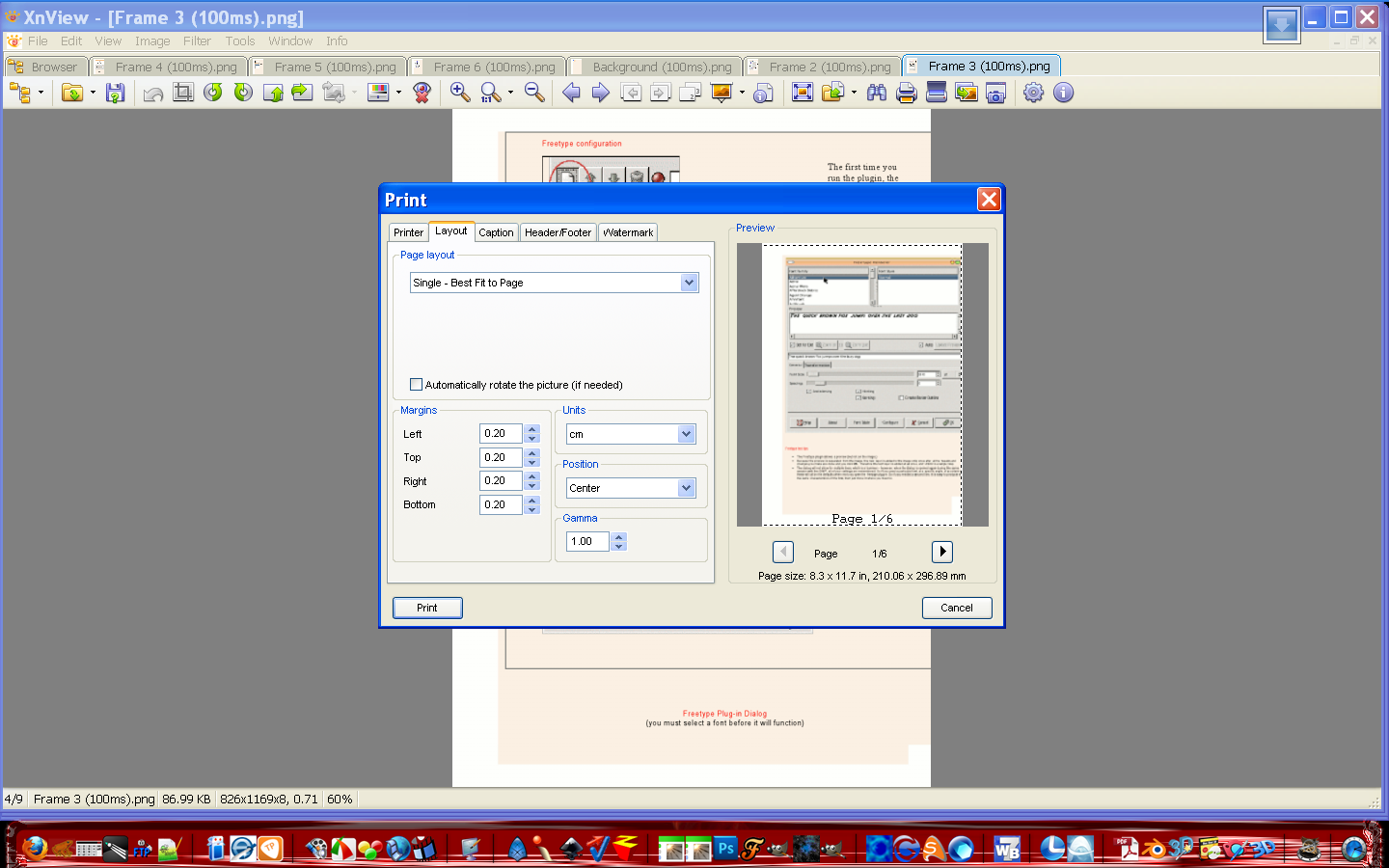
Now go to file/print opened images this dialog will open...
Image
select ronyasoft as your printer and 1-whatever your pages are and select print.
Ronyasoft will ask for a place and name to save as (the save dialog will open)
Save it with the name you want and there you go.

_________________
Image


Top
 Post subject: Re: New and inexperienced with Gimp - need quick answers
PostPosted: Mon Aug 22, 2011 12:49 am  (#12) 
Offline
New Member

Joined: Aug 18, 2011
Posts: 4
Thank you so much for your detailed reply, I really appreciate the time you've taken to help me. One of the guys I work with here is pretty handy will all this type of stuff so I'll show him your comments above and see what he can do (way out of my comfort zone). Thanks again!


Top
 Post subject: Re: New and inexperienced with Gimp - need quick answers
PostPosted: Mon Aug 22, 2011 1:51 am  (#13) 
Offline
Global Moderator
User avatar

Joined: May 16, 2010
Posts: 16153
You may want to use Saulgoodes script as it is SCM not python like the other one i listed.Unless you have Python installed in your Gimp. :)

Not sure where Saul keeps his scripts now though so you will have to find it..
Never mind i found it.
; This program is free software; you can redistribute it and/or modify
; it under the terms of the GNU General Public License as published by
; the Free Software Foundation; either version 2 of the License, or
; (at your option) any later version.
;
; This program is distributed in the hope that it will be useful,
; but WITHOUT ANY WARRANTY; without even the implied warranty of
; MERCHANTABILITY or FITNESS FOR A PARTICULAR PURPOSE.  See the
; GNU General Public License for more details.

;; Command is installed in "File->Save all layers..."
;;
;; A template string should be provided which fits the form: prefix~~~~.ext
;; where prefix is a character string (optionally null).
;;       ~~~~ represents the digits of the frame number, one ~ per digit
;;       ext is the filename extension (which also specifies the format)
;; the tildas are optional and four digits will be assumed if omitted.
;; an extension of .png is assumed if one is not provided
;; the period is significant, if PNG is not to be assumed
;;
;; A checkbox provides the option of using the layernames for the
;; filenames. The extension given in the template is used to determine
;; the file type. Animation settings (delay and frame disposal) are not
;; included as part of the filename.
;;
;; When saving to GIF files, the GIMP's default values are used to
;; convert to INDEXED mode (255 color palette, no dithering).
;; Note: this is done on a layer-by-layer basis, so more colors may result
;; than if the entire image were converted to INDEXED before saving.


(define (sg-save-all-layers orig-image drawable
                                    template
                                    rename?)
  (define (get-all-layers img)
    (let* (
        (all-layers (gimp-image-get-layers img))
        (i (car all-layers))
        (bottom-to-top ())
        )
      (set! all-layers (cadr all-layers))
      (while (> i 0)
        (set! bottom-to-top (append bottom-to-top (cons (aref all-layers (- i 1)) '())))
        (set! i (- i 1))
        )
      bottom-to-top
      )
    )
  (define (save-layer orig-image layer name)
    (let* (
        (image 0)
        (buffer "")
        )
      (set! buffer (car (gimp-edit-named-copy layer "temp-copy")))
      (set! image (car (gimp-edit-named-paste-as-new buffer)))
      (when (and (not (= (car (gimp-image-base-type image)) INDEXED))
                 (string-ci=? (car (last (strbreakup name "."))) "gif"))
        (gimp-image-convert-indexed image
                                    NO-DITHER
                                    MAKE-PALETTE
                                    255
                                    FALSE
                                    FALSE
                                    "")
        )
      (gimp-file-save RUN-NONINTERACTIVE image (car (gimp-image-get-active-layer image)) name name)
      (gimp-buffer-delete buffer)
      (gimp-image-delete image)
      )
    )
  (let* (
      (layers nil)
      (fullname "")
      (basename "")
      (layername "")
      (format "")
      (layerpos 1)
      (framenum "")
      (settings "")
      (default-extension "png")
      (extension "png")
      (orig-selection 0)
      )
    (gimp-image-undo-disable orig-image)
    (set! orig-selection (car (gimp-selection-save orig-image)))
    (gimp-selection-none orig-image)

    (set! extension (strbreakup template "."))
    (set! extension (if (> (length extension) 1)
                      (car (last extension))
                      default-extension))
    (when (= (string-length extension) 0)
      (set! default-extension "png"))
    (when (= rename? TRUE)
      (set! format (strbreakup template "~"))
      (if (> (length format) 1)
        (begin
          (set! basename (car format))
          (set! format (cdr format))
          (set! format (cons "" (butlast format)))
          (set! format (string-append "0" (unbreakupstr format "0")))
          )
        (begin
          (set! basename (car (strbreakup template ".")))
          (set! format "0000")
          )
        )
      )
    (set! layers (get-all-layers orig-image))
    (while (pair? layers)
      (if (= rename? TRUE)
        (begin
          (set! framenum (number->string layerpos))
          (set! framenum (string-append
                (substring format 0 (- (string-length format)
                                       (string-length framenum))) framenum))
          (set! fullname (string-append basename framenum))
          )
        (begin
          (set! fullname (car (strbreakup
                           (car (gimp-drawable-get-name (car layers))) "(")))
          (gimp-drawable-set-name (car layers) fullname)
          (set! fullname (car (gimp-drawable-get-name (car layers))))
          )
        )
      (set! fullname (string-append fullname "." extension))
      (save-layer orig-image (car layers) fullname)
      (set! layers (cdr layers))
      (set! layerpos (+ layerpos 1))
      )
    (gimp-selection-load orig-selection)
    (gimp-image-remove-channel orig-image orig-selection)
    (gimp-image-undo-enable orig-image)
    )
  )

(script-fu-register "sg-save-all-layers"
"Save all layers..."
"Save each layer to a file."
"Saul Goode"
"Saul Goode"
"11/16/2008"
""
SF-IMAGE    "Image"    0
SF-DRAWABLE "Drawable" 0
SF-STRING "Name Template (~ replaced by layer position)" "frame_~~~~.png"
SF-TOGGLE "Rename (ex: 'frame__0001')" TRUE
)

(script-fu-menu-register "sg-save-all-layers"
                         "<Image>/File/")


Just copy it into Notepad++ or save http://www.uam.es/personal_pdi/ciencias/fchamizo/linux/images/sg-save-all-layers.scm as - sg-save-all-layers-as-png.scm (save it to your desktop)
Place the file in your scripts folder then to use it, open Gimp or go to Filters/Script-Fu/refresh scripts and you will find the new filter under File/save all layers :)

_________________
Image


Top
Post new topic Reply to topic  [ 13 posts ] 

All times are UTC - 5 hours [ DST ]


* Login  


Powered by phpBB3 © phpBB Group