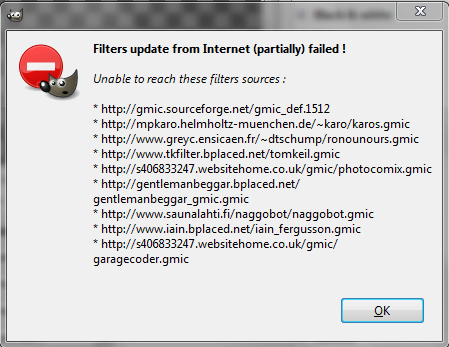
GMIC-ZWard check to see if your _gmic folder with curl.exe inside it is there.
Sounds like it's missing curl.
If it isn't there copy that folder from gimp-2.6\Plug-ins folder into gimp-2.8\Plug-ins folder.
Make sure gmic_gimp.exe and gmic.exe are both present in the plug-ins folder.
MATHMAP-Find the mathmap folder in gimp-2.6 and put a copy of it in gimp-2.8 folder.
PSPI -Works right out of the box. If you had a pspirc file in gimp-2.6 it was copied to gimp-2.8 for you.
All your Adobe plug-ins should run right off the bat.Make sure PSPI.exe is in the plug-ins folder also.
DYNAMIC LINK LIBRARIES (DLL)-Do this REMOVE all dll files from the YourUserFolder\.gimp-2.8\Plug-ins folder to another folder on your desktop.
Now restart Gimp-2.8 leaving all the EXE files in the .gimp-2.8\plug-ins folder.
When Gimp-2.8 starts it will tell you which dll files it needs. Write them down as you load it.
After its fully started, shut down and restart after placing those dll files back in the plug-ins folder.
That will fix your dynamic link libraries problem.
GIMP_HELP-Only got that to work by making sure all the dlls needed for it and the helpbrowser.exe were in the UserFolder\.gimp-2.8\Plug-ins folder, and the help package for 2.6 were installed into Gimp-2\share\gimp\2.0
ALL OTHER PLUG-INS- Can be searched via the gimp registry and found there or sometimes i do a search.com search for them. If you need it i have zipped all my plugins and can upload them for you.

The only file you will need to edit is the gurm.ini file.
You will have to add your own Shellout.py file also.
 Login
 Register
 Tweets
 FAQ
 Advanced Search







 and Mathmap has no filters in it. PSPI works though.