It is currently Tue Aug 11, 2026 2:32 am


All times are UTC - 5 hours [ DST ]


Post new topic Reply to topic  [ 6 posts ] 
Author Message
 Post subject: How can center the circle in canvas?
PostPosted: Fri Aug 01, 2025 1:46 am  (#1) 
Offline
GimpChat Member

Joined: Jul 26, 2025
Posts: 9
GIMP Version: 3.0.4
Operating System: Linux
OS Version: Debian 12 + Lxde (desktop)
GIMP Experience: New User


How can set the red circle in the center of white canvas?


Attachments:
center.png
center.png [ 1.69 KiB | Viewed 1414 times ]
Share on Facebook Share on Twitter Share on Orkut Share on Digg Share on MySpace Share on Delicious Share on Technorati
Top
 Post subject: Re: How can center the circle in canvas?
PostPosted: Fri Aug 01, 2025 2:19 am  (#2) 
Offline
GimpChat Member
User avatar

Joined: Mar 01, 2014
Posts: 14119
Location: Spain, Aragón
Set Crosshair guides. you move the circle layer to the centre. You will find it in View list.


Attachments:
crosshair.rar [927 Bytes]
Downloaded 29 times

_________________
Image

Gimp 2.10.30(samj) portable _ OS Windows 10 Home_ 64bits
Don’t be afraid to start over. It’s a new chance to rebuild what you want.
Top
 Post subject: Re: How can center the circle in canvas?
PostPosted: Fri Aug 01, 2025 2:34 am  (#3) 
Offline
GimpChat Member

Joined: Mar 04, 2011
Posts: 2610
I suspect there is more than just a single layer, white canvas, no transparency, circle in one corner.

However, taking the example as-is.

Add center line guides, I use a script, otherwise one at a time Image -> Guides -> Add (by percentage)
Make a selection around the circle and Edit -> Cut followed by Edit -> Paste As -> Single layer
Crop the new layer to size, Layer -> Crop Layer to content
Use the move tool, that shows a little center mark. Move to the guides center point.
Tidy up, kill the selection. merge layers.....

40 second example: https://i.imgur.com/OVjpSIo.mp4

I will attach the crosshairs Gimp 3 plugin. It is by teapot, see: https://www.gimp-forum.net/Thread-Cross ... f-ScriptFu
Unzip and put the folder containing the python .scm plugin in your Gimp 3 plugins folder.


Attachments:
crosshair-guides.zip [846 Bytes]
Downloaded 35 times
Top
 Post subject: Re: How can center the circle in canvas?
PostPosted: Sat Aug 02, 2025 5:23 pm  (#4) 
Offline
Global Moderator
User avatar

Joined: May 16, 2010
Posts: 16155
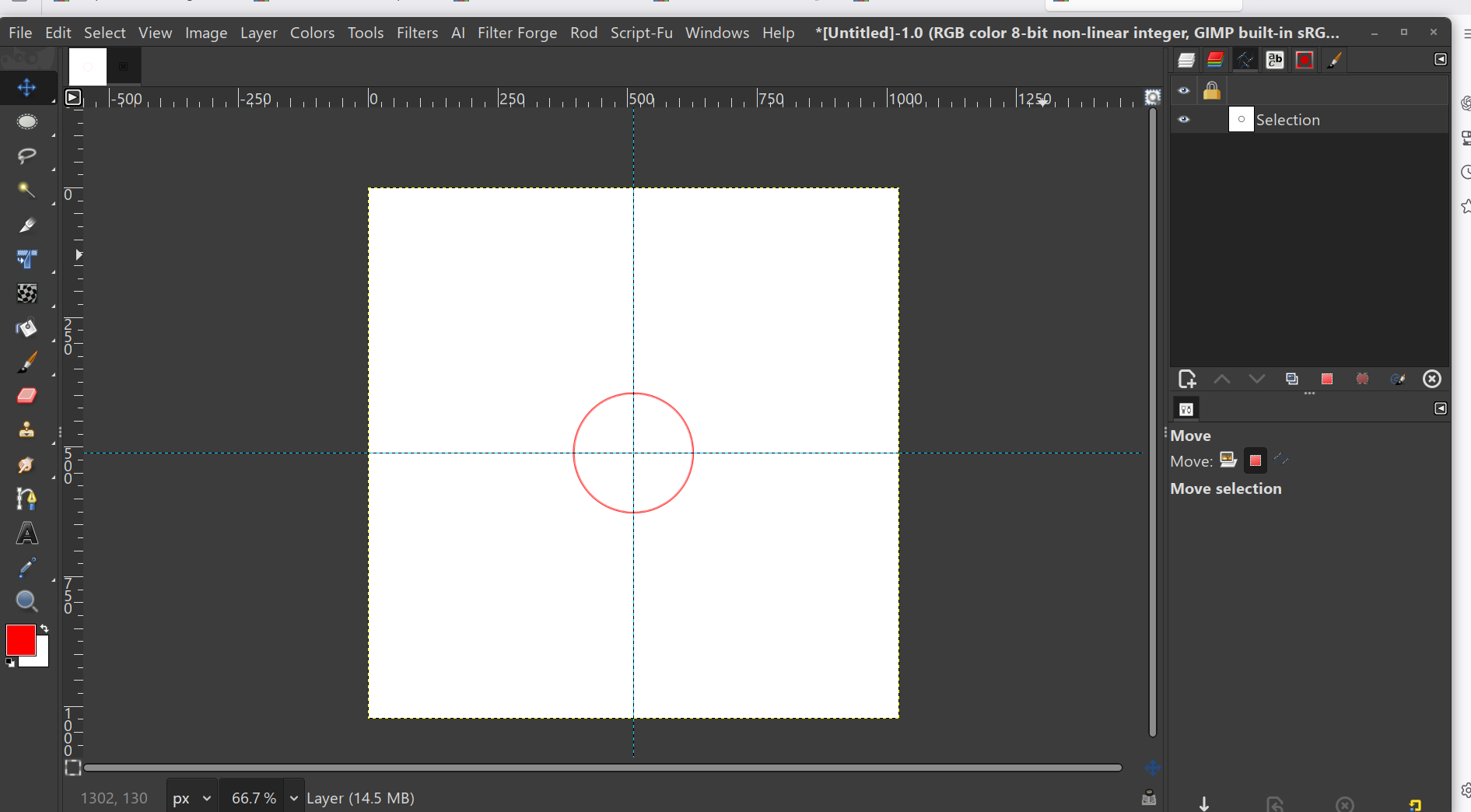
This is only if you are just trying to place a red circle in the center of an image.

1) Create a new image with a white background.
2) Change FG color to red. FF0000
3) Create a new TRANSPARENT layer.
4) Create your crosshair center guides, Image>Guides> Crosshair Guides v3
make sure snap to guides is activated under the VIEW menu.
5) Make a perfect circular selection on the layer. Make sure the Ellipse Select tool is activated.
Select Fixed aspect ratio in the tool options for the Ellipse select tool. Place your mouse anywhere on the image and drag
6) Snap the selection to the center of the crosshairs.(move the selection), in your MOVE tool options area choose move selection.It is the little red icon next to the word move.
7) Select> To path. Stroke the path with red color. Path>Stroke Path, stroke with line or brush.
Select>none
8) While still having the layer with the circle selected, merge the layer down to the white bg layer.
Layer>Merge Down


That's pretty much it. That will give you a perfect red circle in the center of a white image.
Image

_________________
Image


Top
 Post subject: Re: How can center the circle in canvas?
PostPosted: Sun Aug 03, 2025 2:10 am  (#5) 
Offline
Global Moderator
User avatar

Joined: Apr 01, 2012
Posts: 8455
Location: On the other side of your screen
Assuming you have your circle on a transparent layer above the background layer.
If it is a white layer with the circle on it add another white layer and drop it to the bottom

Crop the circle layer to content.
Use the align tool that is already in gimp to centre vertically then horizontally (or horizontally then vertically) That will put it in the centre of your base image. Yes align is still in 3.0.4

Once you get your circle to the centre merge it to the other layer

_________________
Image
Free Fun Photo Editing & resources
Poems from the Lord
Gimp Newby
Gimp version 3.2.4 and GMIC-Qt 4.0.2 OS :- Windows 10 Home 64


Top
 Post subject: Re: How can center the circle in canvas?
PostPosted: Sun Aug 03, 2025 3:42 am  (#6) 
Offline
Global Moderator
User avatar

Joined: May 16, 2010
Posts: 16155
So many ways to do things in Gimp you have to love it. :)

Hope any of this helps you imager.

_________________
Image


Top
Post new topic Reply to topic  [ 6 posts ] 

All times are UTC - 5 hours [ DST ]


* Login  


Powered by phpBB3 © phpBB Group

