It is currently Sun Aug 16, 2026 12:53 am


All times are UTC - 5 hours [ DST ]


Post new topic Reply to topic  [ 4 posts ] 
Author Message
 Post subject: Is There A Script That Does This?
PostPosted: Wed Jul 10, 2013 12:38 pm  (#1) 
Offline
GimpChat Member
User avatar

Joined: Feb 14, 2012
Posts: 426
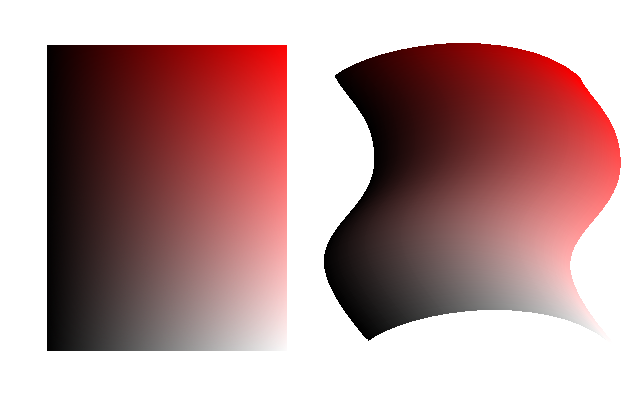
I'm wondering if there is a script that can sample a color from a layer bellow and then place in under another pixel of the same value on the layer bellow to the right.

Image

I know there is the sg-contour-fill script but that only works on a horizontal plane and not verticle as well.

pegzy


Share on Facebook Share on Twitter Share on Orkut Share on Digg Share on MySpace Share on Delicious Share on Technorati
Top
 Post subject: Re: Is There A Script That Does This?
PostPosted: Wed Jul 10, 2013 2:53 pm  (#2) 
Offline
Script Coder
User avatar

Joined: Oct 25, 2010
Posts: 4812
Define "pixel of the same value". For me a pixel on the right is defined by two values (x,y) that cannot be determined from just the x or the y (or even both) of the corresponding pixel on the left.

_________________
Image


Top
 Post subject: Re: Is There A Script That Does This?
PostPosted: Wed Jul 10, 2013 4:21 pm  (#3) 
Offline
Script Coder
User avatar

Joined: Jul 14, 2010
Posts: 697
Looks like either a displace map or curve bend applied twice (with a 90 degree rotation between) might do it.

Or mathmap if you had the mapping formula.

Or are you thinking to use the two images as a displacement map for a third image, assuming that the two images you provided have the same number of uniquely coloured (RGB) pixels (~16Mpix)

-Rob A>

_________________
Image
Fantasy Cartography and Mapping by RobA


Top
 Post subject: Re: Is There A Script That Does This?
PostPosted: Wed Jul 10, 2013 8:23 pm  (#4) 
Offline
GimpChat Member
User avatar

Joined: Feb 14, 2012
Posts: 426
I made those images by doing a gradient of black to white from left to right on a layer, and on another layer above it a red to white gradient from top to bottom and the layer is set to multiply mode. Each image has the same pixel values but not repeating either horizontally or vertically. Its somewhat easy to create the image on the right using a brush of 3 pixels width and then seting up the pencil tool with two kinds of dynamics and using it on a curved path. Each image has an array of pixel colors that are not the same either vertically or horizontaly. Therefore if there was a script that could like find a pixel value of one layer and copy the pixel below it (lets say a photo) and then place that (photo) pixel in the same place on the pixel value of the bent image it would be a good way to fill areas and bending photos both horizontally and vertically.

pegsi


Top
Post new topic Reply to topic  [ 4 posts ] 

All times are UTC - 5 hours [ DST ]


* Login  


Powered by phpBB3 © phpBB Group