It is currently Sat Aug 15, 2026 6:18 pm


All times are UTC - 5 hours [ DST ]


Post new topic Reply to topic  [ 14 posts ] 
Author Message
 Post subject: Rectangular select with circular and elliptical corners
PostPosted: Thu Jul 25, 2013 9:17 am  (#1) 
Offline
GimpChat Member
User avatar

Joined: Nov 16, 2011
Posts: 5127
Location: Metro Vancouver, BC
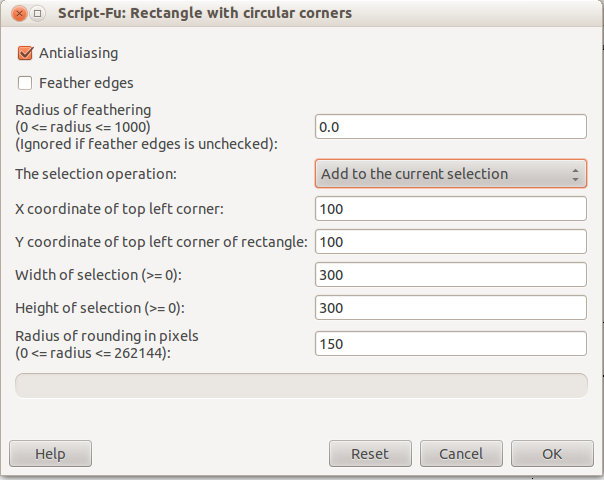
Rectangular select with circular and elliptical corners
I just noticed this brilliant new script at the Registry.
The uses are endless! :bigthup

_________________
Image
Gimp 2.8.18, Linux, median user
Gimp Chat Tutorials Index
Spirit Bear (Kermode)


Share on Facebook Share on Twitter Share on Orkut Share on Digg Share on MySpace Share on Delicious Share on Technorati
Top
 Post subject: Re: Rectangular select with circular and elliptical corners
PostPosted: Thu Jul 25, 2013 10:37 am  (#2) 
Offline
GimpChat Member
User avatar

Joined: Jul 17, 2012
Posts: 2769
i dont find this very intuitive

how does it work ?


Top
 Post subject: Re: Rectangular select with circular and elliptical corners
PostPosted: Thu Jul 25, 2013 10:56 am  (#3) 
Offline
GimpChat Member
User avatar

Joined: Nov 16, 2011
Posts: 5127
Location: Metro Vancouver, BC
Open an image, 800x600 px.
Select all, Shrink selection 200 px, from border.
Select | Rectangle with circular corners.
Try each selection operation starting with, add to selection, using the following coordinates.

Image

Now try it with an oval selection the full 800x600 px canvas size.
Shrink the oval selection by 100 px.
Try each selection operation using the same coordinates.

_________________
Image
Gimp 2.8.18, Linux, median user
Gimp Chat Tutorials Index
Spirit Bear (Kermode)


Top
 Post subject: Re: Rectangular select with circular and elliptical corners
PostPosted: Thu Jul 25, 2013 11:17 am  (#4) 
Offline
Script Coder
User avatar

Joined: Oct 25, 2010
Posts: 4812
The difference with "Select/Rounded rectangle"?

_________________
Image


Top
 Post subject: Re: Rectangular select with circular and elliptical corners
PostPosted: Thu Jul 25, 2013 11:28 am  (#5) 
Offline
GimpChat Member
User avatar

Joined: Nov 16, 2011
Posts: 5127
Location: Metro Vancouver, BC
ofnuts wrote:
The difference with "Select/Rounded rectangle"?
The difference is the 100 radius limit of 'Select Rounded Rectangle'. The author has an explanation at the registry. The bugzilla link is worth a look as well.

_________________
Image
Gimp 2.8.18, Linux, median user
Gimp Chat Tutorials Index
Spirit Bear (Kermode)


Top
 Post subject: Re: Rectangular select with circular and elliptical corners
PostPosted: Thu Jul 25, 2013 1:27 pm  (#6) 
Offline
Script Coder
User avatar

Joined: Jul 14, 2010
Posts: 697
How about just jumping to quickmask, applying a blur, then threshold (or clamp levels) and out of quickmask.

Elliptical is possible using a blur with different X/Y values, and threshold (or levels) at values other than 50%

Voila, rounded corners on your selection.

If you want it smoother (i.e. for stroking) change the selection to a path first...

It's what I've always done.

-Rob A>

_________________
Image
Fantasy Cartography and Mapping by RobA


Top
 Post subject: Re: Rectangular select with circular and elliptical corners
PostPosted: Thu Jul 25, 2013 3:00 pm  (#7) 
Offline
Global Moderator
User avatar

Joined: May 16, 2010
Posts: 16158
This is a great script for lazy folks such as myself though Rob. :)

_________________
Image


Top
 Post subject: Re: Rectangular select with circular and elliptical corners
PostPosted: Thu Jul 25, 2013 4:09 pm  (#8) 
Offline
GimpChat Member
User avatar

Joined: Jul 17, 2012
Posts: 2769
@RobA: i tried it, and its quite an elegant technique !

RobA wrote:
How about just jumping to quickmask, applying a blur, then threshold (or clamp levels) and out of quickmask.
what are/is clamp levels ?


Top
 Post subject: Re: Rectangular select with circular and elliptical corners
PostPosted: Thu Jul 25, 2013 8:04 pm  (#9) 
Offline
GimpChat Member
User avatar

Joined: Sep 22, 2012
Posts: 2089
Location: US
wow, i didn't know we needed a script to make a rectangular selection with
rounded corners! wow
With the current gimp selection tools I can create every shape i need, even a perfect circle with Rectangle select.
The main argument of the script author in his bug report is that limitation to 100 pixels doesn't work on big images. What's wrong with scaling up a selection using the Scale tool? Make rounded rectangle on a small scale then scale it up! This way we have 8 control nodes and real-time preview, with this script i can't see anything before i actually execute it.

Rounding corners by Ry and Rx is nice, but who needs such a precision?
Engineers would probably use AutoCAD, designer - AI or Inkscape, anyway.

BTW, in AI and Inkscape rounded corners with ridiculous 262144 px x/y values
doesn't make any sense. Both will throw you back to where it does make sense, 400 or so.


Top
 Post subject: Re: Rectangular select with circular and elliptical corners
PostPosted: Thu Jul 25, 2013 8:10 pm  (#10) 
Offline
GimpChat Member
User avatar

Joined: Jul 17, 2012
Posts: 2769
*wishes to have a camera, so he can show K1te a movie of Esper deleting the script from his Gimp folder*

:mrgreen:


Top
 Post subject: Re: Rectangular select with circular and elliptical corners
PostPosted: Thu Jul 25, 2013 8:21 pm  (#11) 
Offline
GimpChat Member
User avatar

Joined: Sep 22, 2012
Posts: 2089
Location: US
Esper wrote:
*wishes to have a camera, so he can show K1te a movie of Esper deleting the script from his Gimp folder*

:mrgreen:


Does anybody know where I can get a script to make straight lines in gimp? :mrgreen:


Top
 Post subject: Re: Rectangular select with circular and elliptical corners
PostPosted: Fri Jul 26, 2013 10:02 am  (#12) 
Offline
Script Coder
User avatar

Joined: Jul 14, 2010
Posts: 697
Esper wrote:
what are/is clamp levels ?


Just use the levels tool and slide the white and black in equal amounts rather than the threshold. It doesn't do too much in this case, but I will sometimes to this rather than threshold as threshold makes things jaggy (but if you convert to a path before stroking/filling then it doesn't matter).

An even easier technique for rounding all corners of a selection equally is to grow the selection by the desired radius, shrink the selection by 2x that, then grow it again by the desired radius.

The only caveat is that when growing or shrinking you might loose pieces of the selection depending on the source shape.

-Rob A>

_________________
Image
Fantasy Cartography and Mapping by RobA


Top
 Post subject: Re: Rectangular select with circular and elliptical corners
PostPosted: Fri Jul 26, 2013 3:10 pm  (#13) 
Offline
GimpChat Member
User avatar

Joined: Jul 17, 2012
Posts: 2769
RobA wrote:
An even easier technique for rounding all corners of a selection equally is to grow the selection by the desired radius, shrink the selection by 2x that, then grow it again by the desired radius.
mind blown :mrgreen:


Top
 Post subject: Re: Rectangular select with circular and elliptical corners
PostPosted: Fri Jul 26, 2013 3:15 pm  (#14) 
Offline
GimpChat Member
User avatar

Joined: Aug 28, 2012
Posts: 3060
Location: Idk where I am.
Esper wrote:
*wishes to have a camera, so he can show K1te a movie of Esper deleting the script from his Gimp folder*

:mrgreen:

HyperCam is a good option. :>

_________________
Image
Reality is a lovely place...But I wouldn't wanna live there.


Top
Post new topic Reply to topic  [ 14 posts ] 

All times are UTC - 5 hours [ DST ]


cron

* Login  


Powered by phpBB3 © phpBB Group