It is currently Sat Aug 15, 2026 2:30 pm


All times are UTC - 5 hours [ DST ]


Post new topic Reply to topic  [ 24 posts ]  Go to page Previous  1, 2
Author Message
 Post subject: Re: Can't get Gimp to open in Command Prompt in Windows
PostPosted: Fri Apr 18, 2014 8:29 am  (#21) 
Offline
GimpChat Member
User avatar

Joined: Jan 20, 2013
Posts: 14831
Location: roma, italy
it seems to be
gimp.exe
try that
otherwise try
gimp-bin.exe

_________________
"Where am I ?"


Top
 Post subject: Re: Can't get Gimp to open in Command Prompt in Windows
PostPosted: Fri Apr 18, 2014 8:39 am  (#22) 
Offline
GimpChat Member
User avatar

Joined: Apr 07, 2010
Posts: 14182
Image

_________________
Image


Top
 Post subject: Re: Can't get Gimp to open in Command Prompt in Windows
PostPosted: Fri Apr 18, 2014 10:32 am  (#23) 
Offline
GimpChat Member
User avatar

Joined: Jan 20, 2013
Posts: 14831
Location: roma, italy
Molly,
you should enter:
gimp.exe --verbose
(or
gimp-bin.exe --verbose)
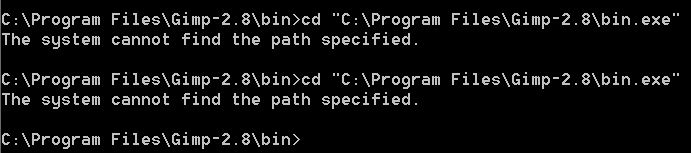
in your trials you omitted the magic word gimp....

_________________
"Where am I ?"


Top
 Post subject: Re: Can't get Gimp to open in Command Prompt in Windows
PostPosted: Fri Apr 18, 2014 10:44 am  (#24) 
Offline
GimpChat Member
User avatar

Joined: Jan 20, 2013
Posts: 14831
Location: roma, italy
dinasset wrote:
Molly,
you should enter:
gimp.exe --verbose
(or
gimp-bin.exe --verbose
)
in your trials you omitted the magic word gimp....


edit
once you have the correct directory active, i.e. you have on your screen
C:\Program Files\Gimp-2.8\bin>
enter
gimp.exe --verbose
(or
gimp-bin.exe --verbose
)

_________________
"Where am I ?"


Top
Post new topic Reply to topic  [ 24 posts ]  Go to page Previous  1, 2

All times are UTC - 5 hours [ DST ]


* Login  


Powered by phpBB3 © phpBB Group