It is currently Sat Aug 22, 2026 4:06 pm


All times are UTC - 5 hours [ DST ]


Post new topic Reply to topic  [ 12 posts ] 
Author Message
 Post subject: Casteljau used for 3rf order Bezier.
PostPosted: Wed Sep 14, 2016 11:59 am  (#1) 
Offline
GimpChat Member

Joined: Sep 13, 2016
Posts: 137
Hello
In ChitChat I made a link to all about Bezier-Curves OK here again:
http://pomax.github.io/bezierinfo/
Where you can learn nearly all about Bezier; with a lot of interactive pictures (Pages.js and Bezier.js) , very very nice for beginners as wel as experts (to become ;)

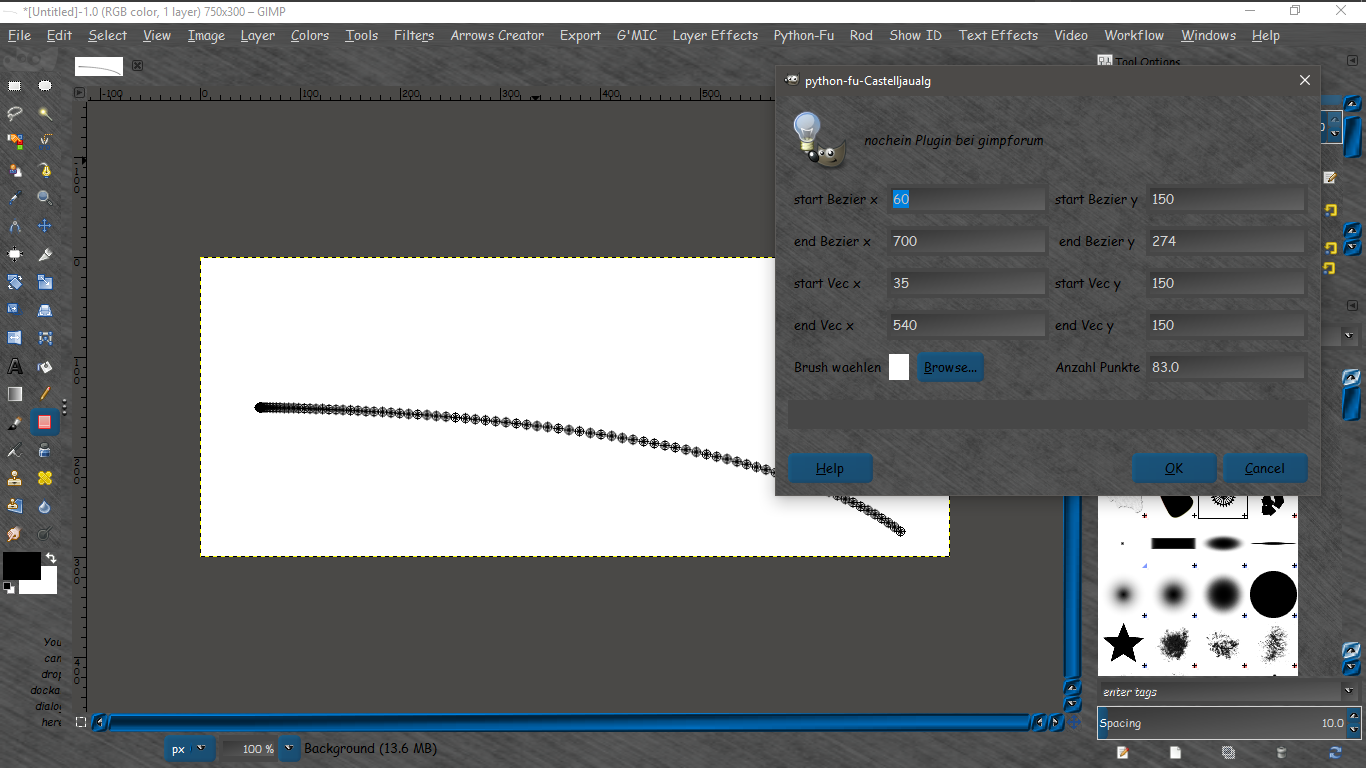
I was intrigued by the Casteljau-algorithm to compute points of a Bezier curve, implemented it in a PythonFu Plugin:
Attachment:
uebung_07a.zip [1.31 KiB]
Downloaded 179 times


And here a picture for some explanations:
Attachment:
bezier_test_03.png
bezier_test_03.png [ 150.27 KiB | Viewed 3013 times ]


OK, try as follows:
1. download the *.zip en unzip it either in existing plugin directory, Gimp looks at, or an new one and inform Gimp where to look to.
2. start Gimp and open say a new window (empty or not)
3. the plugin should occur under a Tab in the main window under PKHG ;-) with name: Casteljau alemein ..
4. first try if it works and aftwards play with the parameters

In the upper image you see the handles of a Path and what the Plugin does with not changed parameters (maybe the number of points around 200 say).

The Brush is not yet active, though you can push it, help to activate it for the plugin is appreciated

If the handle- vectors are set (anti-)symmetric and a vertical then the painted points are symmetrical too, if not, the number of point on one end may be much more or so ... try :yes

Comments are welcome ;-)

Peter


Share on Facebook Share on Twitter Share on Orkut Share on Digg Share on MySpace Share on Delicious Share on Technorati
Top
 Post subject: Re: Casteljau used for 3rf order Bezier.
PostPosted: Wed Sep 14, 2016 1:40 pm  (#2) 
Offline
Global Moderator
User avatar

Joined: May 16, 2010
Posts: 16164
Well that was fast. :)

Image

All the points seem to work well. I set it to go from the left to the right dropping slightly at the end. Fun to play with for sure.

Thank you. :)

_________________
Image


Top
 Post subject: Re: Casteljau used for 3rf order Bezier.
PostPosted: Wed Sep 14, 2016 2:34 pm  (#3) 
Offline
GimpChat Member

Joined: Sep 24, 2012
Posts: 275
Location: Scotland
First of all, welcome to the forum :)

I can hardly believe the good timing of your arrival and the subject you're talking about!
Perhaps you can advise me on the following:

Some time ago I implemented a G'MIC filter based on parametric quadratic transform, after reading a blog about it here: parameterized quadratic conformal transformation

This itself is based on a form of Bezier by the same author: e-bezier

The question I have is this: can the calculation be inverted so that rather than distributing source pixels to a new (x,y), we form a map of (x,y) locations from which to "pull" pixels from the source image?

As a start I created a simple 1-dimensional warp using inverse of the "e-bezier" function, but have no idea whether it can be done entirely (I'm sadly in no way a mathematician). I've tried contacting the blog author but so far received no reply.

Apologies for slightly hijacking your thread! It might be better to message directly instead of posting here...


Top
 Post subject: Re: Casteljau used for 3rf order Bezier.
PostPosted: Wed Sep 14, 2016 3:32 pm  (#4) 
Offline
Script Coder
User avatar

Joined: Oct 25, 2010
Posts: 4812
garagecoder wrote:
First of all, welcome to the forum :)

I can hardly believe the good timing of your arrival and the subject you're talking about!
Perhaps you can advise me on the following:

Some time ago I implemented a G'MIC filter based on parametric quadratic transform, after reading a blog about it here: parameterized quadratic conformal transformation

This itself is based on a form of Bezier by the same author: e-bezier

The question I have is this: can the calculation be inverted so that rather than distributing source pixels to a new (x,y), we form a map of (x,y) locations from which to "pull" pixels from the source image?

As a start I created a simple 1-dimensional warp using inverse of the "e-bezier" function, but have no idea whether it can be done entirely (I'm sadly in no way a mathematician). I've tried contacting the blog author but so far received no reply.

You hit the nail on the head with most BPT ideas... they look fine but their suitability to a graphic program is not demonstrated. For instance how do you manipulate E_splines in real life? The Bezier curves have anchors and handles that make it easy, so what is the equivalent for E-splines? How do you string several of them to create an arbitrary line? Are they preserved by an affine transform (rotation, scaling...).

BPT could be good with algebra (or with Mathematica) but some of his posts are surprising, and in any case many of this stuff is just playing with formulas and seeing what happens. If this had any real value it would be published in more formal settings. But of course, peer review could uncover problems. For instance, can you spot the problem in that one (it's totally obvious)?

_________________
Image


Top
 Post subject: Re: Casteljau used for 3rf order Bezier.
PostPosted: Wed Sep 14, 2016 3:45 pm  (#5) 
Offline
Script Coder
User avatar

Joined: Oct 25, 2010
Posts: 4812
PKHG wrote:
Hello
In ChitChat I made a link to all about Bezier-Curves OK here again:
http://pomax.github.io/bezierinfo/
Where you can learn nearly all about Bezier; with a lot of interactive pictures (Pages.js and Bezier.js) , very very nice for beginners as wel as experts (to become ;)

I was intrigued by the Casteljau-algorithm to compute points of a Bezier curve, implemented it in a PythonFu Plugin:
Attachment:
uebung_07a.zip


And here a picture for some explanations:
Attachment:
bezier_test_03.png


OK, try as follows:
1. download the *.zip en unzip it either in existing plugin directory, Gimp looks at, or an new one and inform Gimp where to look to.
2. start Gimp and open say a new window (empty or not)
3. the plugin should occur under a Tab in the main window under PKHG ;-) with name: Casteljau alemein ..
4. first try if it works and aftwards play with the parameters

In the upper image you see the handles of a Path and what the Plugin does with not changed parameters (maybe the number of points around 200 say).

The Brush is not yet active, though you can push it, help to activate it for the plugin is appreciated

If the handle- vectors are set (anti-)symmetric and a vertical then the painted points are symmetrical too, if not, the number of point on one end may be much more or so ... try :yes

Comments are welcome ;-)

Peter


My main question is why don't you use a Gimp path... Gimp paths are Bezier splines (or a string of such). From a path object it is easy to get the coordinates of the 4 points, which is a much better interface than entering 8 coordinates. Plenty of examples here. See in particular path-dump and path-csv.

Also, when you publish something on the Internet, English is the de facto language (for the UI, but also for code comments and function/variable names).

_________________
Image


Top
 Post subject: Re: Casteljau used for 3rf order Bezier.
PostPosted: Wed Sep 14, 2016 3:50 pm  (#6) 
Offline
GimpChat Member

Joined: Sep 24, 2012
Posts: 275
Location: Scotland
I was about to edit to say I've added the test bezier-based warp to filters in G'MIC under testing > garagecoder > Inverse Bezier Warp - it won't be available until David does an update so maybe tomorrow.

Yes it's clear a lot of it is just random trains of thought which could have many issues, but this one just appeals somehow... I like the idea of a fast controllable warp in G'MIC. Perhaps there are better ways but it's beyond my current ability :oops:

The method described does work to some degree but a properly interpolated warp would be so much nicer. Incidentally I did implement it (minus oversampling or any controls) under testing > garagecoder > PQCT example

Again this should really not be in this thread, I'll take further replies to PM - sorry!


Top
 Post subject: Re: Casteljau used for 3rf order Bezier.
PostPosted: Thu Sep 15, 2016 1:08 am  (#7) 
Offline
GimpChat Member

Joined: Sep 13, 2016
Posts: 137
ofnuts wrote:
My main question is why don't you use a Gimp path... Gimp paths are Bezier splines (or a string of such). From a path object it is easy to get the coordinates of the 4 points, which is a much better interface than entering 8 coordinates. Plenty of examples here. See in particular path-dump and path-csv.

Also, when you publish something on the Internet, English is the de facto language (for the UI, but also for code comments and function/variable names).

Clear, it is nothing more than using the Calsteljau function
More important is the link to the very nice description of Bezier, from easy to high level math!
And a lot of this is builtin in Gimp ;)

One part maybe interesting though, to use the Casteljau def ... with more than 4 points for higher order Bezier Curves ...; will try myself soon.

One thing in Gimp is, as it looks like, one can step in equal steps over a PATH ... (have built that too using only Gimp tools), this is NOT the case in this 'primitive' path filling method of the plugin I added in this thread.

What you may help me with is: how to activate the in the UI chosen brush for the plugin.
Read something that it is maybe (yet) impossible??? Context-problem???

EDIT:
Casteljau with longer input_list gave e.g. these points:
Attachment:
bezier_4th_order.png
bezier_4th_order.png [ 13.44 KiB | Viewed 2856 times ]


Top
 Post subject: Re: Casteljau used for 3rf order Bezier.
PostPosted: Thu Sep 15, 2016 2:31 am  (#8) 
Offline
Script Coder
User avatar

Joined: Oct 25, 2010
Posts: 4812
See my stroke-visible-paths script at the same place.

You can set the brush using pdb.gimp_context_set_brush(brush) but you normally don't need this. When you write a script that uses a single brush, you should assume that the current brush is what the user wants, so you don't need to ask for a brush. This gives more choices to the user than what you can do in your dialog. Furthermore for clean results you want to stroke the path in "line" mode but this is unfortunately not available through an API, so it's best left to the user (it's just a two-click operation).

_________________
Image


Top
 Post subject: Re: Problem with Brush more or less solved
PostPosted: Thu Sep 15, 2016 4:30 am  (#9) 
Offline
GimpChat Member

Joined: Sep 13, 2016
Posts: 137
Hallo,
The plugin is now made with English names and using Clipboard as BRUSH :)
To add checks etc .. to be done ...

First quick test:
Attachment:
bezier_PKHG.png
bezier_PKHG.png [ 71.86 KiB | Viewed 2835 times ]


EDIT:
A new revised version for really too higher order Bezier Curves.
Attachment:
CasteljauNew.zip [1.47 KiB]
Downloaded 109 times


not yet 100% waterproof ;)

The list of points may now be of greater than 4 (3rd order Bezier) it is a String-Parameter
which you may make longer or shorter to see the differences ... of the orders ...
The string is "evaled" and may be not suitable, therefore a try except is used.
A function for checking if an object is a list of 2d-points is used against errors from the input

Who knows a better solution; next version of Gimp will have probably numpy and then a lot of things may be done much nicer (and faster?!)...

Have to stop now (sports-evening) , will look tomorrow morning here ...
Good night and ciao
Peter


Last edited by PKHG on Thu Sep 15, 2016 12:33 pm, edited 1 time in total.

Top
 Post subject: Re: Problem with Brush more or less solved
PostPosted: Thu Sep 15, 2016 5:41 am  (#10) 
Offline
Global Moderator
User avatar

Joined: May 16, 2010
Posts: 16164
PKHG wrote:
Hallo,
The plugin is now made with English names and using Clipboard as BRUSH :)
To add checks etc .. to be done ...

First quick test:
Attachment:
bezier_PKHG.png

When ever you have a new version ready to submit just delete the old attachment via
User Control Panel button (top right) then select (on the left column) "Manage Attachments"
A list of your attachments will pop up and you can delete any you wish.

It is best to delete the old file and then attach the new one in the first post. Otherwise you get a huge list of attachments and someone is bound to download and install an incorrect version.

I hope all of that was clear enough for you to understand. If not just PM (Private Message) me about further instructions.

Thanks! :bigthup

_________________
Image


Top
 Post subject: Re: Problem with Brush more or less solved
PostPosted: Thu Sep 15, 2016 12:34 pm  (#11) 
Offline
GimpChat Member

Joined: Sep 13, 2016
Posts: 137
Rod wrote:
PKHG wrote:
Hallo,
The plugin is now made with English names and using Clipboard as BRUSH :)
To add checks etc .. to be done ...

First quick test:
Attachment:
The attachment bezier_PKHG.png is no longer available

When ever you have a new version ready to submit just delete the old attachment via
User Control Panel button (top right) then select (on the left column) "Manage Attachments"
A list of your attachments will pop up and you can delete any you wish.

It is best to delete the old file and then attach the new one in the first post. Otherwise you get a huge list of attachments and someone is bound to download and install an incorrect version.

I hope all of that was clear enough for you to understand. If not just PM (Private Message) me about further instructions.

Thanks! :bigthup


OK, will be done tomorrow ...

Hm, thinking about it, I should not delete the first version.
Reason: the first is suitable to play with 3rd order Bezier (with start- end- point and two vectors)
the last one is to examine to different orders of Bezier Curves ;-) and has a different UI
Attachment:
bezier_06.jpg
bezier_06.jpg [ 36.55 KiB | Viewed 1283 times ]

which is not optimal, could need help to make it clearer


Top
 Post subject: Re: Casteljau used for 3rf order Bezier.
PostPosted: Fri Sep 16, 2016 11:05 am  (#12) 
Offline
Global Moderator
User avatar

Joined: May 16, 2010
Posts: 16164
Perhaps a reset could be added. :)

_________________
Image


Top
Post new topic Reply to topic  [ 12 posts ] 

All times are UTC - 5 hours [ DST ]


* Login  


Powered by phpBB3 © phpBB Group