It is currently Sun Aug 23, 2026 1:10 pm


All times are UTC - 5 hours [ DST ]


Post new topic Reply to topic  [ 7 posts ] 
Author Message
 Post subject: Fire Animator in FX Foundry... How does it work?
PostPosted: Fri Jan 06, 2017 5:46 pm  (#1) 
Offline
GimpChat Member
User avatar

Joined: Jul 06, 2013
Posts: 2662
Location: California
I would like to know how the Fire Animator in the FX Foundry works.
Thanks. :)


Share on Facebook Share on Twitter Share on Orkut Share on Digg Share on MySpace Share on Delicious Share on Technorati
Top
 Post subject: Re: Fire Animator in FX Foundry... How does it work?
PostPosted: Sat Jan 07, 2017 7:01 am  (#2) 
Offline
GimpChat Member

Joined: Mar 04, 2011
Posts: 2613
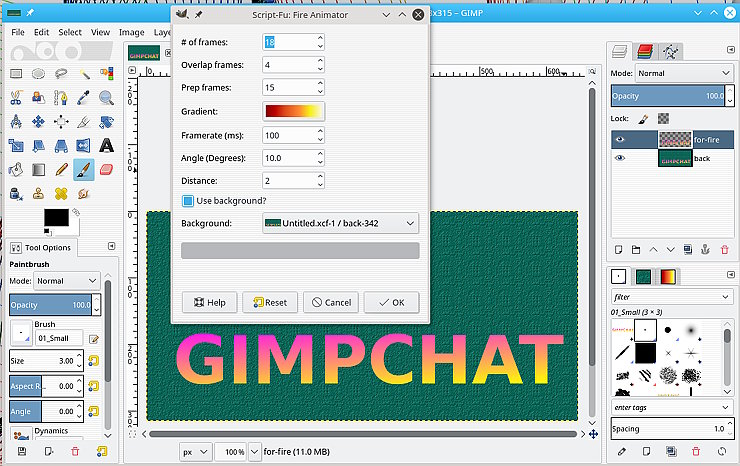
The basic is :- Use a layer with a transparent back. This example, coloured in text.

Attachment:
dialog.jpg
dialog.jpg [ 106.28 KiB | Viewed 4049 times ]

If you accept the defaults, then the result is an acceptable animation with a black background.
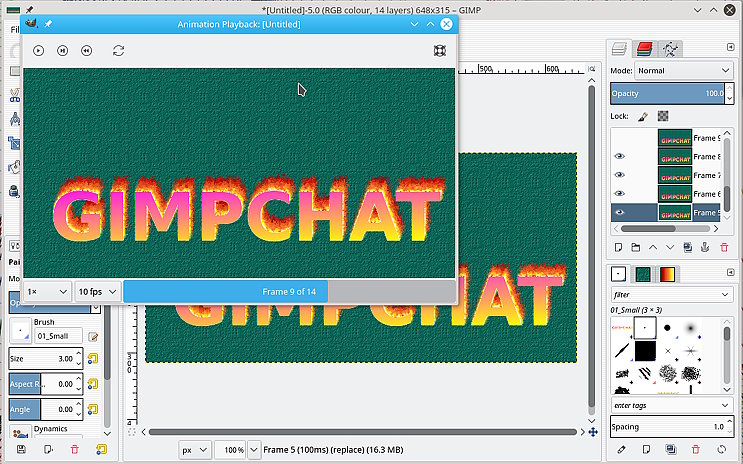
If a different background is used as in above example then with the default gradient 'incandescent' there is, IMHO, a nasty black edge. A slightly better gradient shown, you will have to make your own.

Even then some black creeps in, I had to delete the first 4 frames to get something reasonable.
Attachment:
animated.jpg
animated.jpg [ 117.28 KiB | Viewed 4049 times ]


Top
 Post subject: Re: Fire Animator in FX Foundry... How does it work?
PostPosted: Sat Jan 07, 2017 2:19 pm  (#3) 
Offline
GimpChat Member
User avatar

Joined: Jul 06, 2013
Posts: 2662
Location: California
rich2005 wrote:
The basic is :- Use a layer with a transparent back. This example, coloured in text.

Attachment:
dialog.jpg

If you accept the defaults, then the result is an acceptable animation with a black background.
If a different background is used as in above example then with the default gradient 'incandescent' there is, IMHO, a nasty black edge. A slightly better gradient shown, you will have to make your own.

Even then some black creeps in, I had to delete the first 4 frames to get something reasonable.
Attachment:
animated.jpg


Okay, cool. That's how it works with text and I get it. Is it the same way with an image?


Top
 Post subject: Re: Fire Animator in FX Foundry... How does it work?
PostPosted: Sat Jan 07, 2017 3:36 pm  (#4) 
Offline
GimpChat Member

Joined: Mar 04, 2011
Posts: 2613
mackenzieh wrote:
Okay, cool. That's how it works with text and I get it. Is it the same way with an image


Not without a bit of work on your part.
This script is seriously old, updated to Gimp 2.4, but that is all.
It does work work with Gimp 2.8.18 but that is about as far as it goes.

Attachment:
fire.gif
fire.gif [ 135.29 KiB | Viewed 4001 times ]


Top
 Post subject: Re: Fire Animator in FX Foundry... How does it work?
PostPosted: Sat Jan 07, 2017 3:54 pm  (#5) 
Offline
GimpChat Member
User avatar

Joined: Jul 06, 2013
Posts: 2662
Location: California
rich2005 wrote:
mackenzieh wrote:
Okay, cool. That's how it works with text and I get it. Is it the same way with an image


Not without a bit of work on your part.
This script is seriously old, updated to Gimp 2.4, but that is all.
It does work work with Gimp 2.8.18 but that is about as far as it goes.

Attachment:
fire.gif


That tells me nothing. Can you explain how the script works with an image please?


Top
 Post subject: Re: Fire Animator in FX Foundry... How does it work?
PostPosted: Sat Jan 07, 2017 4:05 pm  (#6) 
Offline
GimpChat Member

Joined: Mar 04, 2011
Posts: 2613
mackenzieh wrote:
That tells me nothing. Can you explain how the script works with an image please?


What is there to explain. As earlier post, you need some transparent areas in your image.

Whatever happened to giving it a try?

Attachment:
explained-before.jpg
explained-before.jpg [ 57.83 KiB | Viewed 3991 times ]


Top
 Post subject: Re: Fire Animator in FX Foundry... How does it work?
PostPosted: Sat Jan 07, 2017 4:20 pm  (#7) 
Offline
GimpChat Member
User avatar

Joined: Jul 06, 2013
Posts: 2662
Location: California
rich2005 wrote:
mackenzieh wrote:
That tells me nothing. Can you explain how the script works with an image please?


What is there to explain. As earlier post, you need some transparent areas in your image.

Whatever happened to giving it a try?

Attachment:
explained-before.jpg

In the reply that you had earlier, all I saw was the flaming Halloween jack o'lantern. You didn't say that transparent areas were needed in the image. Now that I see how you got the image to flame, I understand it now. Thanks, Rich. :)


Top
Post new topic Reply to topic  [ 7 posts ] 

All times are UTC - 5 hours [ DST ]


* Login  


Powered by phpBB3 © phpBB Group