It is currently Mon Sep 14, 2026 10:49 am


All times are UTC - 5 hours [ DST ]


Post new topic Reply to topic  [ 3 posts ] 
Author Message
 Post subject: Custom Font Edger for Gimp 2.10 Release 0.1
PostPosted: Tue Jun 01, 2021 1:00 pm  (#1) 
Offline
GimpChat Member
User avatar

Joined: Aug 08, 2016
Posts: 2870
Location: East Midlands of England
This is probably the most simple plug-in I have made but it can produce some interesting effects with custom font characters.

Attachment:
Custom_Font_Edger_v_0_1.zip [3.76 KiB]
Downloaded 172 times


Download, extract and add to your user plug-in folder.

Some brushes that you may find useful when working with Edger:

Attachment:
Brushes.zip [78.13 KiB]
Downloaded 129 times


Download, extract and add to your user brushes folder/s.

The filter dialog has only three (yes three) options:

Attachment:
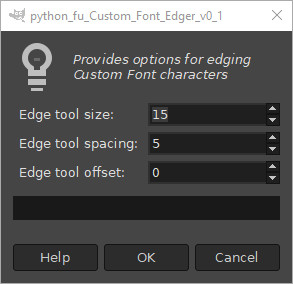
dialog01.jpg
dialog01.jpg [ 22.18 KiB | Viewed 2190 times ]


The plug-in allows you to control the paintbrush eraser along a path generated by the character alpha selection and erase chunks of the character.

The additional use of paintbrush dynamics and animated brushes allows room for a lot of experimentation; examples and dialog setting in the next post.

_________________
Image
"Let no one steal your dreams."
Paul Cookson

Custom Font Links
2.10 Tools
Character Paths
White Bases


Share on Facebook Share on Twitter Share on Orkut Share on Digg Share on MySpace Share on Delicious Share on Technorati
Top
 Post subject: Re: Custom Font Edger for Gimp 2.10 Release 0.1
PostPosted: Tue Jun 01, 2021 1:09 pm  (#2) 
Offline
GimpChat Member
User avatar

Joined: Aug 08, 2016
Posts: 2870
Location: East Midlands of England
First examples using a solid square brush and a solid circular brush:

Attachment:
SolidBrush_NoDynamics.png
SolidBrush_NoDynamics.png [ 116.21 KiB | Viewed 2187 times ]


Next a solid triangular brush without and then with the use of brush dynamics to add random rotation as the eraser travels along the path:

Attachment:
SolidBrush_NoDynamics_Dynamics.png
SolidBrush_NoDynamics_Dynamics.png [ 124.64 KiB | Viewed 2187 times ]


Next, two examples using an animated brush with different settings.

Attachment:
AnimatedBrush_Dynamics.png
AnimatedBrush_Dynamics.png [ 150 KiB | Viewed 2187 times ]

_________________
Image
"Let no one steal your dreams."
Paul Cookson

Custom Font Links
2.10 Tools
Character Paths
White Bases


Top
 Post subject: Re: Custom Font Edger for Gimp 2.10 Release 0.1
PostPosted: Tue Jun 01, 2021 1:14 pm  (#3) 
Offline
GimpChat Member
User avatar

Joined: Aug 08, 2016
Posts: 2870
Location: East Midlands of England
Last example double dipping with the animated brush to modify first the character border and then the interior of the character.

Have fun...

Attachment:
AnimatedBrush_Dynamics_Twice.png
AnimatedBrush_Dynamics_Twice.png [ 198.56 KiB | Viewed 2186 times ]


More, if you need it, on GimpLearn:

Edger on GimpLearn

_________________
Image
"Let no one steal your dreams."
Paul Cookson

Custom Font Links
2.10 Tools
Character Paths
White Bases


Top
Post new topic Reply to topic  [ 3 posts ] 

All times are UTC - 5 hours [ DST ]


* Login  


Powered by phpBB3 © phpBB Group
