It is currently Thu Aug 20, 2026 4:22 am


All times are UTC - 5 hours [ DST ]


Post new topic Reply to topic  [ 190 posts ]  Go to page Previous  1 ... 5, 6, 7, 8, 9, 10  Next
Author Message
 Post subject: Re: Arakne-path-shape-creator6d[new Shape Frame]
PostPosted: Mon Aug 11, 2014 7:34 pm  (#141) 
Offline
Script Coder
User avatar

Joined: Feb 18, 2011
Posts: 4826
Location: Bendigo Vic. Australia
the new Shape Frame has been added to the initial post

_________________
Image
No matter how much you push the envelope, it'll still be stationery.


Top
 Post subject: Re: Arakne-path-shape-creator6d[new Shape Frame]
PostPosted: Mon Aug 11, 2014 7:41 pm  (#142) 
Offline
GimpChat Member
User avatar

Joined: Dec 08, 2013
Posts: 1088
Thank you Graechan.

_________________
Image


Top
 Post subject: Re: Arakne-path-shape-creator6d[new Shape Frame]
PostPosted: Tue Aug 12, 2014 1:32 am  (#143) 
Offline
Script Coder
User avatar

Joined: Feb 18, 2011
Posts: 4826
Location: Bendigo Vic. Australia
Frame is a very nice addition to the plugin,

_________________
Image
No matter how much you push the envelope, it'll still be stationery.


Top
 Post subject: Re: Arakne-path-shape-creator6d[new Shape Frame]
PostPosted: Mon Aug 18, 2014 11:56 am  (#144) 
Offline
GimpChat Member
User avatar

Joined: Jan 13, 2011
Posts: 2648
Location: Poland
http://www.arakne.es/en/dessign/gimp-python-script-shape-creator-shapes/
Arch – Gothic:
Gothic arch, we can define the height of the curve of the arch, for proper operation the height must be greater than half the width of the selection.

ps. Only Quick Test: for Windows - unless an error - no choice for Type (only Gothic)

_________________
Image


Top
 Post subject: Re: Arakne-path-shape-creator6d[new Shape Frame]
PostPosted: Mon Aug 18, 2014 5:53 pm  (#145) 
Offline
GimpChat Member
User avatar

Joined: Mar 10, 2014
Posts: 845
thank MareroQ
I confirme only Gothic in Type
here a little test with ARCHES
Image
and now with FRAMES
Image


Top
 Post subject: Re: Arakne-path-shape-creator6d[new Shape Arch->Gothic]
PostPosted: Mon Aug 18, 2014 6:45 pm  (#146) 
Offline
Script Coder
User avatar

Joined: Feb 18, 2011
Posts: 4826
Location: Bendigo Vic. Australia
New Shape Arch->Gothic has been added,see initial post

_________________
Image
No matter how much you push the envelope, it'll still be stationery.


Top
 Post subject: Re: Arakne-path-shape-creator6d[new Shape Arch->Gothic]
PostPosted: Tue Aug 19, 2014 2:22 am  (#147) 
Offline
Script Coder
User avatar

Joined: Feb 18, 2011
Posts: 4826
Location: Bendigo Vic. Australia
new shape is easy to use and ideal for creating stained glass windows

_________________
Image
No matter how much you push the envelope, it'll still be stationery.


Top
 Post subject: Re: Arakne-path-shape-creator6d[new Shape Arch->Gothic]
PostPosted: Thu Aug 21, 2014 10:38 am  (#148) 
Offline
GimpChat Member
User avatar

Joined: Jan 13, 2011
Posts: 2648
Location: Poland
About what I asked for - and waited to:
Spiral:
Added a new type of spiral that can be defined by the number of turns or the distance between turns.


Attachments:
APSC.png
APSC.png [ 349.14 KiB | Viewed 1857 times ]

_________________
Image
Top
 Post subject: Re: Arakne-path-shape-creator6d[Improved Spiral Shape]
PostPosted: Thu Aug 21, 2014 9:28 pm  (#149) 
Offline
Script Coder
User avatar

Joined: Feb 18, 2011
Posts: 4826
Location: Bendigo Vic. Australia
The new spiral is a vast Improvement

_________________
Image
No matter how much you push the envelope, it'll still be stationery.


Top
 Post subject: Re: Arakne-path-shape-creator6d[Improved Spiral Shape]
PostPosted: Fri Aug 22, 2014 7:41 am  (#150) 
Offline
Global Moderator
User avatar

Joined: May 16, 2010
Posts: 16164
New shape "Ruler" available now.
http://www.arakne.es/en/dessign/gimp-py ... or-shapes/

_________________
Image


Top
 Post subject: Re: Arakne-path-shape-creator6d[Improved Spiral Shape]
PostPosted: Fri Aug 22, 2014 8:23 am  (#151) 
Offline
GimpChat Member
User avatar

Joined: Jan 20, 2013
Posts: 590
Thanks for sharing, Rod.

_________________
Image


Top
 Post subject: Re: Arakne-path-shape-creator6d[Improved Spiral Shape]
PostPosted: Fri Aug 22, 2014 10:32 am  (#152) 
Offline
GimpChat Member
User avatar

Joined: Mar 10, 2014
Posts: 845
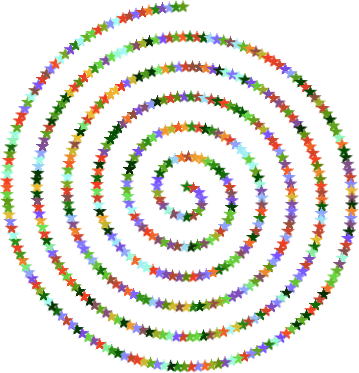
test with new improved spiral shape

Image

1. new trasparent layer

2.Filters>Path>Path Shape Creator
set: type= spiral
turns=Coil-by-turns-distance
numbers= 6
distance= 30

3.Paintbrush tool
set: brush= star size= 15 dynamics= random colors

4.Edit>stroke path
click on = Stroke with a paint tool ( be sure that the choice is Paintbrush) and click stroke


Top
 Post subject: Re: Arakne-path-shape-creator6d[Improved Spiral Shape]
PostPosted: Fri Aug 22, 2014 6:46 pm  (#153) 
Offline
Script Coder
User avatar

Joined: Feb 18, 2011
Posts: 4826
Location: Bendigo Vic. Australia
Marcello the new spiral is definitely much improved and more controllable

_________________
Image
No matter how much you push the envelope, it'll still be stationery.


Top
 Post subject: Re: Arakne-path-shape-creator6d[Improved Spiral Shape]
PostPosted: Fri Aug 22, 2014 6:49 pm  (#154) 
Offline
GimpChat Member
User avatar

Joined: Apr 07, 2010
Posts: 14182
Very cool Marcello. Hi Graechan

_________________
Image


Top
 Post subject: Re: Arakne-path-shape-creator6d[Improved Spiral Shape]
PostPosted: Fri Aug 22, 2014 7:30 pm  (#155) 
Offline
Script Coder
User avatar

Joined: Feb 18, 2011
Posts: 4826
Location: Bendigo Vic. Australia
Hello to you too Molly :twisted:

_________________
Image
No matter how much you push the envelope, it'll still be stationery.


Top
 Post subject: Re: Arakne-path-shape-creator6d [new Shape Ruler]
PostPosted: Sat Aug 23, 2014 12:54 am  (#156) 
Offline
Script Coder
User avatar

Joined: Feb 18, 2011
Posts: 4826
Location: Bendigo Vic. Australia
New shape Ruler:
Create rules, you can define the spacing and length of ticks and the alternation between long and short marks.
Image

_________________
Image
No matter how much you push the envelope, it'll still be stationery.


Top
 Post subject: Re: Arakne-path-shape-creator6d [new Shape Ruler]
PostPosted: Sat Aug 23, 2014 11:22 am  (#157) 
Offline
GimpChat Member
User avatar

Joined: Mar 10, 2014
Posts: 845
Molly and Graechan - thank you I like very much this plugin!


Top
 Post subject: Re: Arakne-path-shape-creator6d [new Shape Ruler]
PostPosted: Tue Sep 02, 2014 12:04 pm  (#158) 
Offline
GimpChat Member
User avatar

Joined: Jan 13, 2011
Posts: 2648
Location: Poland
New shapes - Checker:
Added new Tile B. This new shape use the width to define the height, the height value is ignored


Attachments:
Checker1.png
Checker1.png [ 420.19 KiB | Viewed 1745 times ]
Checker2.png
Checker2.png [ 125.01 KiB | Viewed 1745 times ]

_________________
Image
Top
 Post subject: Re: Arakne-path-shape-creator6d [new Shape Ruler]
PostPosted: Tue Sep 02, 2014 3:09 pm  (#159) 
Offline
GimpChat Member
User avatar

Joined: Mar 10, 2014
Posts: 845
New type TILE B in old shape Checker
Thanks MareroQ for the info
here a quick test
Image


Top
 Post subject: Re: Arakne-path-shape-creator6d [updated shape Checker]
PostPosted: Tue Sep 02, 2014 6:33 pm  (#160) 
Offline
Script Coder
User avatar

Joined: Feb 18, 2011
Posts: 4826
Location: Bendigo Vic. Australia
Updated initial post to include the updated Checker

_________________
Image
No matter how much you push the envelope, it'll still be stationery.


Top
Post new topic Reply to topic  [ 190 posts ]  Go to page Previous  1 ... 5, 6, 7, 8, 9, 10  Next

All times are UTC - 5 hours [ DST ]


* Login  


Powered by phpBB3 © phpBB Group