It is currently Sat Aug 15, 2026 2:31 pm


All times are UTC - 5 hours [ DST ]


Post new topic Reply to topic  [ 39 posts ]  Go to page Previous  1, 2
Author Message
 Post subject: Re: Multi Band Blending
PostPosted: Sat Apr 26, 2014 8:32 pm  (#21) 
Offline
Script Coder
User avatar

Joined: Feb 18, 2011
Posts: 4826
Location: Bendigo Vic. Australia
How about this one Molly
Image

_________________
Image
No matter how much you push the envelope, it'll still be stationery.


Top
 Post subject: Re: Multi Band Blending
PostPosted: Sun Apr 27, 2014 12:58 am  (#22) 
Offline
GimpChat Member
User avatar

Joined: Jun 02, 2013
Posts: 2090
molly wrote:
The Warrior wrote:
molly wrote:
Nice job warrior. I just can't get it to copy to the mask. I made a transparent layer, added a white layer mast, I then put a background layer above that one, then at the top I have the picture that I want to add to the layer below it.
Did you make a selection, if so what layer did you make the selection and what layer did you run the filter.
My filter dialogue opens but it hasn't got any info on it ,
[ Image ]

Doesn't matter what layer is selected. It figures it out. Here's a test .xcf you can try.

Warrior, I opened your xcf and the girl didn't blend into the background, was it supposed to, You can't see her unless you turn the background off then she isn't blended. Anyway, it is still annoying me that it isn't working for me.

Clearly, it isn't compiled correctly for your set up. You had this:

Image

And it should look like this:

Image

_________________
Image


Top
 Post subject: Re: Multi Band Blending
PostPosted: Sun Apr 27, 2014 1:17 am  (#23) 
Offline
GimpChat Member
User avatar

Joined: Jun 02, 2013
Posts: 2090
A few tests with different backgrounds. Obviously, backgrounds that are similar colors to the original will work best.

Original:

Image

Blends:

Image

The best one, with like colors to the original:

Image

Image

Image

_________________
Image


Top
 Post subject: Re: Multi Band Blending
PostPosted: Sun Apr 27, 2014 3:51 am  (#24) 
Offline
GimpChat Member

Joined: Mar 04, 2011
Posts: 2612
@molly
A little surprised that the plug-in is not working on your Fedora, compiled gimp plug-ins are generally quite forgiving. I compiled in AntiX debian and use in PCLOS which is rpm packaging.

@jamac4k
I compiled this in a AntiX (debian) and of course the problem was "glibconfig.h" not found. I believe the politically correct way is to reference the library paths using
CINCLUDES= `pkg-config --cflags glib-2.0` (backticks so that the paths are imported) then the rest of the line.
AFAIK nothing wrong with explicitly naming them, just saves a bit of copy/paste.

Just a feeling from one of Molly's posts. The mask is not a Gimp layer mask, it is just another layer, black on white. If you keep the layers top-to-bottom in the order; background, foreground, mask, then the plug-in picks them up in the correct order and generates a new layer.

example, separated the layers into images. left side is bg, fg, mask

Image


There might be an image size limit on this plugin, had to scale this one down for it to work.


Top
 Post subject: Re: Multi Band Blending
PostPosted: Sun Apr 27, 2014 4:44 am  (#25) 
Offline
GimpChat Member
User avatar

Joined: Apr 07, 2010
Posts: 14182
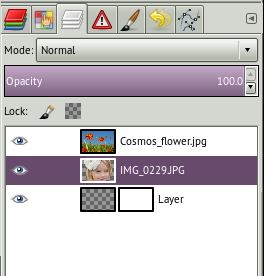
@Rich, This is what my layers look like. The BG is at the top, The middle one is the one I want to go into the BG. The bottom one, I made a transparent layer and added a layer mask. When I tried it I ran it on all the layers but nothing went into the layer mask and it was still white. Besides that it just made a copy of the center layer and added it to the top when I ran that first script I had.
Image

_________________
Image


Top
 Post subject: Re: Multi Band Blending
PostPosted: Sun Apr 27, 2014 4:44 am  (#26) 
Offline
GimpChat Member
User avatar

Joined: Dec 02, 2012
Posts: 203
Location: Cantabria, Spain
#rich2005:
The problem "glibconfig.h" not found I solved as it said upper, changing the lines in CINCLUDES, for Fedora19, of makefile. MBB runs properly.
In Debian7, exactly Point Linux, I hadn't to do any adjusment.

Hope this afternoon I could compile MBB for Mint15(32bits) and Sparky Linux (Debian testing).

_________________
Image


My Gimp rides on Antergos (Arch), Linux Mint, Debian and Fedora


Top
 Post subject: Re: Multi Band Blending
PostPosted: Sun Apr 27, 2014 4:51 am  (#27) 
Offline
GimpChat Member
User avatar

Joined: Apr 07, 2010
Posts: 14182
:ninja
I put my bg layer at the top, my center layer is the one I want added to the bg, and the bottom is my mask. I noticed on yours the mask is just a white layer.
This is what my layers look like
When I did run the filter with the first plug-in I had, it didn't put the girl on the mask, it just made a forth layer on the top with a copy of the girl. I just don't know what to say. The first plug-in I used gave a blank dialogue and the one I got from jamac4k won't show up in my gimp. I gave it the permissions and it just doesn't work.
Image

_________________
Image


Top
 Post subject: Re: Multi Band Blending
PostPosted: Sun Apr 27, 2014 4:58 am  (#28) 
Offline
GimpChat Member
User avatar

Joined: Dec 02, 2012
Posts: 203
Location: Cantabria, Spain
# Molly:
You must make a white layer mask and paint the shape in black. White color preseved part ot the top layer, the black shows the shape that we apply.


Attachments:
Selección_048.jpg
Selección_048.jpg [ 67.96 KiB | Viewed 1560 times ]

_________________
Image


My Gimp rides on Antergos (Arch), Linux Mint, Debian and Fedora
Top
 Post subject: Re: Multi Band Blending
PostPosted: Sun Apr 27, 2014 5:09 am  (#29) 
Offline
GimpChat Member
User avatar

Joined: Apr 07, 2010
Posts: 14182
Hey, I fixed the plug-in. HOW do I get the girl on to the mask? Do I copy it to the mask then run the filter?
Image

_________________
Image


Top
 Post subject: Re: Multi Band Blending
PostPosted: Sun Apr 27, 2014 5:14 am  (#30) 
Offline
GimpChat Member

Joined: Mar 04, 2011
Posts: 2612
molly wrote:
@Rich, This is what my layers look like. The BG is at the top, The middle one is the one I want to go into the BG. The bottom one, I made a transparent layer and added a layer mask. When I tried it I ran it on all the layers but nothing went into the layer mask and it was still white. Besides that it just made a copy of the center layer and added it to the top when I ran that first script I had.
[ Image ]


That is your problem. Have a look at the example. Your bottom layer needs to be just a regular layer, no layer mask, only black on white.
I just painted mine in, used the foreground layer with temporary reduced opacity as a guide. No need to be too particular as you would with a regular layer mask.
Then back to an earlier post.
either: all the layers have an alpha channel
or: none of the channels layers have an alpha channel
and: all the layers the same size.


Last edited by rich2005 on Sun Apr 27, 2014 5:34 am, edited 1 time in total.

Top
 Post subject: Re: Multi Band Blending
PostPosted: Sun Apr 27, 2014 5:20 am  (#31) 
Offline
GimpChat Member
User avatar

Joined: Apr 07, 2010
Posts: 14182
ok, that was the confusing part. It said layer mask, why not just say black layer, I did have them all set to transparent. I will start over, :teeth

_________________
Image


Top
 Post subject: Re: Multi Band Blending
PostPosted: Sun Apr 27, 2014 5:28 am  (#32) 
Offline
GimpChat Member

Joined: Dec 27, 2012
Posts: 393
Location: England
I can't get this to compile in Linux Mint 16. I get this error when I run make through terminal,

~/Desktop/gimp-mbb-778e757fac14 $ make
src/main.c:25:26: fatal error: libgimp/gimp.h: No such file or directory
#include <libgimp/gimp.h>
^
compilation terminated.
make: *** [src/main.o] Error 1

Looks like the problem is something to do with libgimp/gimp.h file, not that I've any idea what the file is or where it is.

I have change the line in the makefile as suggested by jamac4k, but still no luck with running make. And if I install the downloaded plugin I get the same results as Molly, all the options are greyed out on the filter's window.

_________________
Image

DeviantArt gallery


Top
 Post subject: Re: Multi Band Blending
PostPosted: Sun Apr 27, 2014 6:20 am  (#33) 
Offline
GimpChat Member
User avatar

Joined: Dec 02, 2012
Posts: 203
Location: Cantabria, Spain
# Caz:

I just compiled MBB for my Mint 15 32 bits.
I changed the lines in this way:

-I/usr/lib/i386-linux-gnu/glib-2.0/include
-I/usr/lib/i386-linux-gnu/gtk-2.0/include

If yor Mint 16 is 64 bit you must check in your SystemFiles >>/usr/lib/ and look for the equivalent folder to i386-linux-gnu and type then in the lines

_________________
Image


My Gimp rides on Antergos (Arch), Linux Mint, Debian and Fedora


Top
 Post subject: Re: Multi Band Blending
PostPosted: Sun Apr 27, 2014 8:09 am  (#34) 
Offline
GimpChat Member

Joined: Dec 27, 2012
Posts: 393
Location: England
Thanks for the info, jamac4k, I'm still not having much luck with compiling this plugin though.

I ran a search for i386-linux-gnu and came up with three files
Image

The first one on the left is empty and the location is not usr/lib. The one on the right is something to do with Nvidia and is at a different location to usr/lib. It's only the one in the middle that is at the right location but it is also related to Nvidia. Must admit I'm at a total loss as to which one of theses files I should change if any.

I'm running Linux Mint 16 64-bit and Gimp 2.8.10

_________________
Image

DeviantArt gallery


Top
 Post subject: Re: Multi Band Blending
PostPosted: Sun Apr 27, 2014 8:46 am  (#35) 
Offline
GimpChat Member
User avatar

Joined: Apr 07, 2010
Posts: 14182
Try this one Caz.


Attachments:
mbb plugin.7z [8.3 KiB]
Downloaded 71 times

_________________
Image
Top
 Post subject: Re: Multi Band Blending
PostPosted: Sun Apr 27, 2014 8:54 am  (#36) 
Offline
GimpChat Member
User avatar

Joined: Dec 02, 2012
Posts: 203
Location: Cantabria, Spain
# Caz.
You don't need look for i386-linux-gnu.
The question is if Mint16 has lib or lib64 in his File System. (or both, as Fedora)
Now I'm downloading a mint16(64) iso. When it finished and I mounted the iso in an usb, I'll cameback here to continue with this.

_________________
Image


My Gimp rides on Antergos (Arch), Linux Mint, Debian and Fedora


Top
 Post subject: Re: Multi Band Blending
PostPosted: Sun Apr 27, 2014 9:12 am  (#37) 
Offline
GimpChat Member

Joined: Mar 04, 2011
Posts: 2612
@Caz

Didn't you compile Gimp 2.8.x yourself, seem to recall something on those lines.

64 bit, so you should not need anything with i386 in the path. To me the error indicates that you do not have libgimp2.0-dev package installed.

I do not have a Mint anymore. This is on a solydk 64 bit VM I would think is similar.

http://www.imageno.com/4148hpdz8zd6pic.html sorry about the host, imgur is full ;)

Did you check
/usr/include and a little further along /usr/include/gimp-2.0/libgimp where gimp.h should be


Top
 Post subject: Re: Multi Band Blending
PostPosted: Sun Apr 27, 2014 10:37 am  (#38) 
Offline
GimpChat Member
User avatar

Joined: Dec 02, 2012
Posts: 203
Location: Cantabria, Spain
# Caz:
I was working with mint 16 64 bits, as rich2005 told you upper, only have to install libgimp2.0-dev on your system. After do it, perfectly can compile MBB without errors.

_________________
Image


My Gimp rides on Antergos (Arch), Linux Mint, Debian and Fedora


Top
 Post subject: Re: Multi Band Blending
PostPosted: Sun Apr 27, 2014 11:10 am  (#39) 
Offline
GimpChat Member

Joined: Dec 27, 2012
Posts: 393
Location: England
Thanks everyone, it was the lack of the libgimp2.0-dev package that was the problem. There was no gimp.h file to start with but once I installed the dev package it appeared and so I ran make and all went well.
Funny though, I thought libgimp2.0 was one of the packages I installed when I was compiling the latest version of Gimp, can't have done otherwise it would still be there.

_________________
Image

DeviantArt gallery


Top
Post new topic Reply to topic  [ 39 posts ]  Go to page Previous  1, 2

All times are UTC - 5 hours [ DST ]


* Login  


Powered by phpBB3 © phpBB Group