It is currently Thu Aug 20, 2026 4:47 pm


All times are UTC - 5 hours [ DST ]


Post new topic Reply to topic  [ 190 posts ]  Go to page Previous  1, 2, 3, 4, 5 ... 10  Next
Author Message
 Post subject: Re: Arakne-path-shape-creator5e
PostPosted: Mon Jun 02, 2014 7:35 pm  (#21) 
Offline
GimpChat Member
User avatar

Joined: Jul 17, 2012
Posts: 2769
this is indeed very cool and easier to use than 'Shape Paths'


Top
 Post subject: Re: Arakne-path-shape-creator5e
PostPosted: Tue Jun 03, 2014 4:49 am  (#22) 
Offline
GimpChat Member
User avatar

Joined: Jan 20, 2013
Posts: 14831
Location: roma, italy
Nidhogg wrote:
...
And it´s under Filters>Path, not Render >Path. Works flawlessly.

@dinasset, You do not need a tutorial. You pick the shape from drop-down list and edit values.
Changes are visible in preview window, takes a minute to get into it.


thanks, installed and used for the first time

Attachment:
first-trial-arakne.png
first-trial-arakne.png [ 100.6 KiB | Viewed 2083 times ]

_________________
"Where am I ?"


Top
 Post subject: Re: Arakne-path-shape-creator5e
PostPosted: Tue Jun 03, 2014 8:58 am  (#23) 
Offline
GimpChat Member
User avatar

Joined: Mar 10, 2014
Posts: 845
great plug-in! my first test v.6(with arrow)
THANK YOU ARAKNE
Image


Top
 Post subject: Re: Arakne-path-shape-creator5e
PostPosted: Tue Jun 03, 2014 10:04 am  (#24) 
Offline
Global Moderator
User avatar

Joined: Apr 01, 2012
Posts: 8457
Location: On the other side of your screen
Cool, Thank you
Image

_________________
Image
Free Fun Photo Editing & resources
Poems from the Lord
Gimp Newby
Gimp version 3.2.4 and GMIC-Qt 4.0.2 OS :- Windows 10 Home 64


Top
 Post subject: Re: Arakne-path-shape-creator5e
PostPosted: Tue Jun 03, 2014 3:54 pm  (#25) 
Offline
GimpChat Member
User avatar

Joined: Mar 10, 2014
Posts: 845
just a simple exerc.

this is the result

Image

and these are the settings

Image


Top
 Post subject: Re: Arakne-path-shape-creator5e
PostPosted: Wed Jun 04, 2014 2:45 am  (#26) 
Offline
GimpChat Member
User avatar

Joined: May 17, 2014
Posts: 1568
My try


Image


Yet another variation Marcello :clap :bigthup

_________________
Ella's gallery - YouTube


Top
 Post subject: Re: Arakne-path-shape-creator5e
PostPosted: Wed Jun 04, 2014 9:16 am  (#27) 
Offline
GimpChat Member
User avatar

Joined: Mar 10, 2014
Posts: 845
oh no, you broke the heart!!!!
How you did that..


Top
 Post subject: Re: Arakne-path-shape-creator5e
PostPosted: Wed Jun 04, 2014 12:31 pm  (#28) 
Offline
GimpChat Member
User avatar

Joined: May 17, 2014
Posts: 1568
Fortunately it’s not my heart that’s broken :)

I filled the shape with black >> duplicated it
Then used the free selection tool and made the zigzag line on one layer >> delete
Selection >> invert >> highlight the other layer >> delete
Now you have two halve hearts, with the move tool put the two parts where you like.
Merge down the two layers.
Alpha to selection >> shrink the shape (I did 2 pixels) and fill the selection with a pattern.

Hope your heart is not broken, Marcello! :roll:

_________________
Ella's gallery - YouTube


Top
 Post subject: Re: Arakne-path-shape-creator5e
PostPosted: Wed Jun 04, 2014 2:41 pm  (#29) 
Offline
GimpChat Member
User avatar

Joined: Mar 10, 2014
Posts: 845
Ella Louise thanks to share the simple but smart solution.
Not at all, my heart is all together!


Top
 Post subject: Re: Arakne-path-shape-creator5e
PostPosted: Thu Jun 05, 2014 1:59 am  (#30) 
Offline
GimpChat Member
User avatar

Joined: Mar 01, 2014
Posts: 14137
Location: Spain, Aragón
Thank you Arakne, your script is very useful. :tyspin . Here my first try


Attachments:
Flower1.jpg
Flower1.jpg [ 625.36 KiB | Viewed 1982 times ]

_________________
Image

Gimp 2.10.30(samj) portable _ OS Windows 10 Home_ 64bits
Don’t be afraid to start over. It’s a new chance to rebuild what you want.
Top
 Post subject: Re: Arakne-path-shape-creator5e
PostPosted: Thu Jun 05, 2014 2:41 am  (#31) 
Offline
GimpChat Member
User avatar

Joined: Jan 20, 2013
Posts: 14831
Location: roma, italy
SallyAnne, EllaLouise, Issabella, what wonderful outcomes!

_________________
"Where am I ?"


Top
 Post subject: Re: Arakne-path-shape-creator5e
PostPosted: Thu Jun 05, 2014 10:52 am  (#32) 
Offline
Global Moderator
User avatar

Joined: Apr 01, 2012
Posts: 8457
Location: On the other side of your screen
Brilliant, all of you.

_________________
Image
Free Fun Photo Editing & resources
Poems from the Lord
Gimp Newby
Gimp version 3.2.4 and GMIC-Qt 4.0.2 OS :- Windows 10 Home 64


Top
 Post subject: Re: Arakne-path-shape-creator5e
PostPosted: Fri Jun 06, 2014 8:24 am  (#33) 
Offline
GimpChat Member
User avatar

Joined: Jan 20, 2013
Posts: 590
Graechan, how can I control the size of the brush when I run the script?

_________________
Image


Top
 Post subject: Re: Arakne-path-shape-creator5e
PostPosted: Fri Jun 06, 2014 7:44 pm  (#34) 
Offline
Script Coder
User avatar

Joined: Feb 18, 2011
Posts: 4826
Location: Bendigo Vic. Australia
Carlos the script uses the active brush and size that you can set in your 'Tool Options'
Image

_________________
Image
No matter how much you push the envelope, it'll still be stationery.


Top
 Post subject: Re: Arakne-path-shape-creator6a[Added Grid, Tiles and 'Arrow Stick']
PostPosted: Mon Jun 16, 2014 2:28 am  (#35) 
Offline
Script Coder
User avatar

Joined: Feb 18, 2011
Posts: 4826
Location: Bendigo Vic. Australia
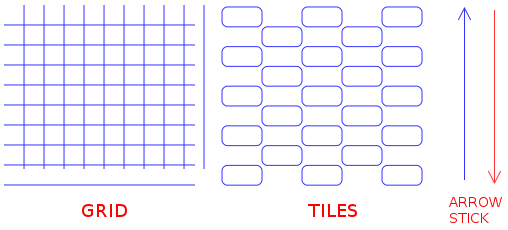
plugin has been updated to also create grids, tiles and an arrow stick
download link is on initial post
Image

_________________
Image
No matter how much you push the envelope, it'll still be stationery.


Top
 Post subject: Re: Arakne-path-shape-creator6a[Added Grid, Tiles and 'Arrow Stick']
PostPosted: Mon Jun 16, 2014 6:41 am  (#36) 
Offline
GimpChat Member
User avatar

Joined: Jan 20, 2013
Posts: 590
Thanks for the new version, Graechan.

_________________
Image


Top
 Post subject: Re: Arakne-path-shape-creator6a[Added Grid, Tiles and 'Arrow Stick']
PostPosted: Mon Jun 16, 2014 6:45 am  (#37) 
Offline
GimpChat Member
User avatar

Joined: Apr 07, 2010
Posts: 14182
I think I have the new one but I don't know how to make it work. Do I start with a selection? If I want an arrow, do I draw a line first or does the script draw it?
Do I use a transparent layer, I haven't got a clue how it works.

_________________
Image


Top
 Post subject: Re: Arakne-path-shape-creator6a[Added Grid, Tiles and 'Arrow Stick']
PostPosted: Mon Jun 16, 2014 7:06 am  (#38) 
Offline
GimpChat Member

Joined: Mar 04, 2011
Posts: 2613
It will work on a full canvas but better in a selection. The last few updates are more flexible and have scaling.

No need to draw anything first, just make a selection
The selection can be irregular, although this just marks the boundary

A couple of examples of the new shapes.

Image

sometimes you need to go and change one of the options to force it to refresh.

Remember there are 3 files now and a folder (also a locale folder if needed)
arakne-path-shape-creator6.py
araknepathshapecreatorshapes.py
pnt2d.py
shapes/


Top
 Post subject: Re: Arakne-path-shape-creator6a[Added Grid, Tiles and 'Arrow Stick']
PostPosted: Mon Jun 16, 2014 7:15 am  (#39) 
Offline
Global Moderator
User avatar

Joined: May 16, 2010
Posts: 16164
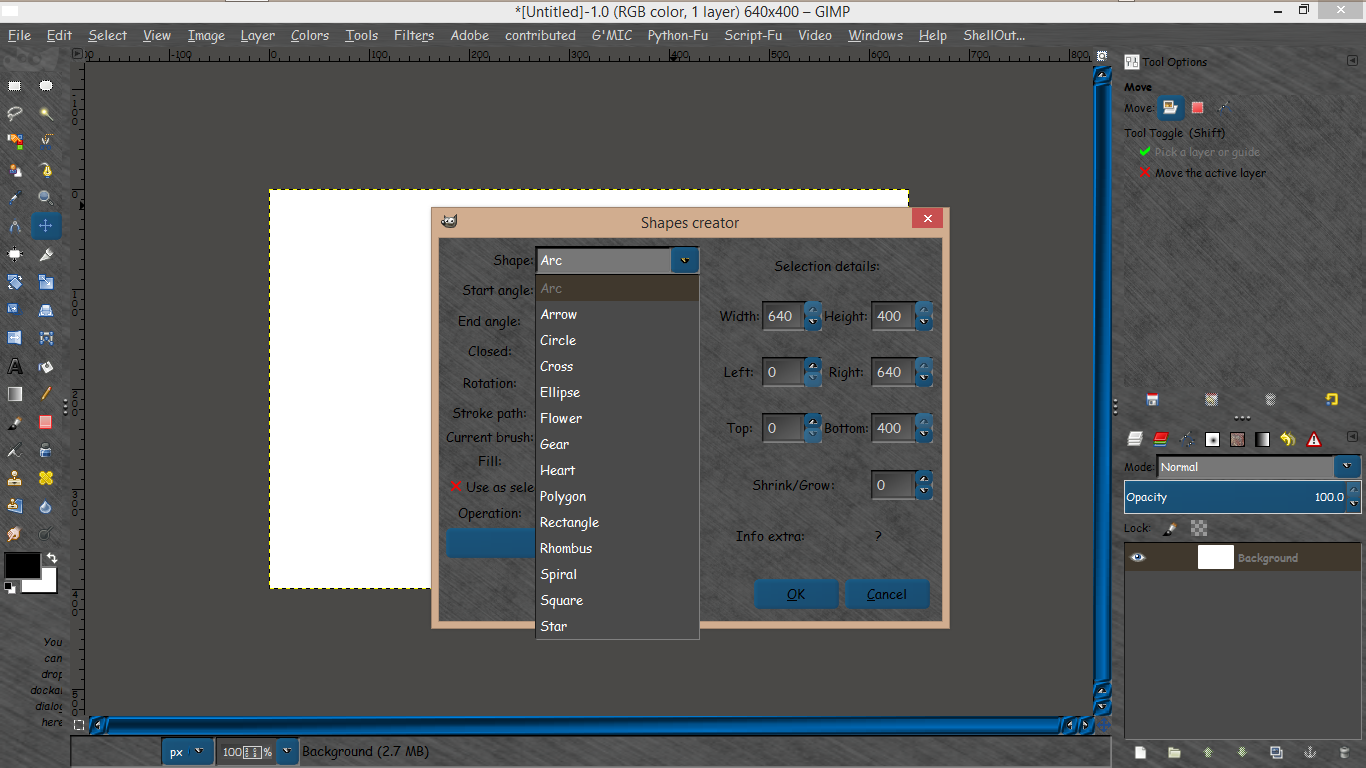
For some reason grids and tiles aren't available in my drop down.
I did update and restart GIMP.

Image

_________________
Image


Top
 Post subject: Re: Arakne-path-shape-creator6a[Added Grid, Tiles and 'Arrow Stick']
PostPosted: Mon Jun 16, 2014 8:29 am  (#40) 
Offline
GimpChat Member
User avatar

Joined: Apr 07, 2010
Posts: 14182
Thats what I get too Rod, then sometimes the other dialogue comes up.
Rich, I put all 3 .py scripts into my plug-in folder plus the shapes folder.
I go to sripts/shapes/duplicates a path the same as the one Rod posted.

_________________
Image


Top
Post new topic Reply to topic  [ 190 posts ]  Go to page Previous  1, 2, 3, 4, 5 ... 10  Next

All times are UTC - 5 hours [ DST ]


* Login  


Powered by phpBB3 © phpBB Group