It is currently Sun Aug 16, 2026 3:37 pm


All times are UTC - 5 hours [ DST ]


Post new topic Reply to topic  [ 48 posts ]  Go to page Previous  1, 2, 3  Next
Author Message
 Post subject: Re: Mosaics
PostPosted: Mon Sep 15, 2014 5:02 am  (#21) 
Offline
GimpChat Member
User avatar

Joined: Mar 01, 2014
Posts: 14130
Location: Spain, Aragón
Sallyanne, perhaps you had the foreground colour in white? This script is very nice. Thank you Graechan.

_________________
Image

Gimp 2.10.30(samj) portable _ OS Windows 10 Home_ 64bits
Don’t be afraid to start over. It’s a new chance to rebuild what you want.


Top
 Post subject: Re: Mosaics
PostPosted: Mon Sep 15, 2014 5:28 am  (#22) 
Offline
Global Moderator
User avatar

Joined: Apr 01, 2012
Posts: 8457
Location: On the other side of your screen
Tried it with the foreground black and white and it came out the same both times.

_________________
Image
Free Fun Photo Editing & resources
Poems from the Lord
Gimp Newby
Gimp version 3.2.4 and GMIC-Qt 4.0.2 OS :- Windows 10 Home 64


Top
 Post subject: Re: Mosaics
PostPosted: Mon Sep 15, 2014 7:38 am  (#23) 
Offline
GimpChat Member
User avatar

Joined: Apr 11, 2013
Posts: 57
Location: Scotland, Isle of Arran
Did you spend your pic the alpha channel?

_________________
Kubuntu 14.04, 14.10, Monitor HP ZR30w, Scanner Epson V300 photo


Top
 Post subject: Re: Mosaics
PostPosted: Mon Sep 15, 2014 8:53 am  (#24) 
Offline
Global Moderator
User avatar

Joined: Apr 01, 2012
Posts: 8457
Location: On the other side of your screen
Not sure what you mean Arran (That was the Cobble stone Mosaic filter)
This time I used the photo Mosaic
Image

_________________
Image
Free Fun Photo Editing & resources
Poems from the Lord
Gimp Newby
Gimp version 3.2.4 and GMIC-Qt 4.0.2 OS :- Windows 10 Home 64


Top
 Post subject: Re: Mosaics
PostPosted: Mon Sep 15, 2014 9:11 am  (#25) 
Offline
GimpChat Member
User avatar

Joined: Apr 11, 2013
Posts: 57
Location: Scotland, Isle of Arran
When you open a file, you have the choice to add an alpha canal (right-klick into the Layer panel. Then you can show transparancy.

My comment to your pic: it looks like from my room in prison ... :pshoot

_________________
Kubuntu 14.04, 14.10, Monitor HP ZR30w, Scanner Epson V300 photo


Top
 Post subject: Re: Mosaics
PostPosted: Mon Sep 15, 2014 3:08 pm  (#26) 
Offline
Script Coder
User avatar

Joined: Jul 14, 2010
Posts: 697
On this topic, we did some work on the Cartographers' Guild forum to make such a mosaic.

The thread is here: http://www.cartographersguild.com/tutor ... -gimp.html

I added a gimp brush (which probably aren't needed now that we have better brush dynamics) and some helper scripts to create paths for stroking (Post 40).

Here was my first attempt:
Image

and with the script laying out the tiles was much faster (I didn't bother with weathering):
Image

And an example by one member on how this can be used for photos, too (just posterize it first to get block of colour...)
Image

-Rob A>

_________________
Image
Fantasy Cartography and Mapping by RobA


Top
 Post subject: Re: Mosaics
PostPosted: Mon Sep 15, 2014 3:16 pm  (#27) 
Offline
GimpChat Member
User avatar

Joined: Mar 01, 2014
Posts: 14130
Location: Spain, Aragón
Rob, I think you have got Arran's idea about tiles following the contour. That is a wonderful work. My congrats :clap :coolthup

_________________
Image

Gimp 2.10.30(samj) portable _ OS Windows 10 Home_ 64bits
Don’t be afraid to start over. It’s a new chance to rebuild what you want.


Top
 Post subject: Re: Mosaics
PostPosted: Mon Sep 15, 2014 4:18 pm  (#28) 
Offline
GimpChat Member
User avatar

Joined: Sep 24, 2010
Posts: 12831
Definitely cool Rob; my bet is your Mosaic help script (need to re-install it; lost it with my last machine, may she rest in peace. lol). :)

_________________
Lyle

Psalm 109:8

Image


Top
 Post subject: Re: Mosaics
PostPosted: Mon Sep 15, 2014 6:27 pm  (#29) 
Offline
Script Coder
User avatar

Joined: Feb 18, 2011
Posts: 4826
Location: Bendigo Vic. Australia
Sallyanne if your grout ended up white then you are not using the 'Cobblestone Mosaic' script as it did not offer a choice of color i.e. gray cement grout only
Image

_________________
Image
No matter how much you push the envelope, it'll still be stationery.


Top
 Post subject: Re: Mosaics
PostPosted: Mon Sep 15, 2014 6:46 pm  (#30) 
Offline
GimpChat Member
User avatar

Joined: Apr 11, 2013
Posts: 57
Location: Scotland, Isle of Arran
@ RobA
I am lying flat on the floor, gasping after air and offering me now a really stiff Arran Malt Whisky. Absolutely great, especially the tutorial and pictures of the Maps on the cartographers website. I will come back to this, as I have an idea to draw a mosaiced map of a future Republic of Scotland.

I don't have much time this week, I have to bring my taxes in order. Horrible work.

_________________
Kubuntu 14.04, 14.10, Monitor HP ZR30w, Scanner Epson V300 photo


Top
 Post subject: Re: Mosaics
PostPosted: Mon Sep 15, 2014 8:24 pm  (#31) 
Offline
GimpChat Member
User avatar

Joined: Sep 22, 2012
Posts: 2089
Location: US
@ RobA very impressive!


Top
 Post subject: Re: Mosaics
PostPosted: Tue Sep 16, 2014 12:09 am  (#32) 
Offline
GimpChat Member
User avatar

Joined: Jan 20, 2013
Posts: 14831
Location: roma, italy
Excellent, RobA!
I'll try to read and apply your tut, later on today.

_________________
"Where am I ?"


Top
 Post subject: Re: Mosaics
PostPosted: Tue Sep 16, 2014 1:57 am  (#33) 
Offline
Global Moderator
User avatar

Joined: Apr 01, 2012
Posts: 8457
Location: On the other side of your screen
Graechan wrote:
Sallyanne if your grout ended up white then you are not using the 'Cobblestone Mosaic' script as it did not offer a choice of color i.e. gray cement grout only
[ Image ]

Actually I was using it . I had just downloaded the script.
I did it again today on a large photo. I added an alpha channel before running the script this time.
The result is too large to post here. I forgot to resize the photo, it is best viewed at the original size https://www.flickr.com/photos/115367823 ... 7/sizes/o/

_________________
Image
Free Fun Photo Editing & resources
Poems from the Lord
Gimp Newby
Gimp version 3.2.4 and GMIC-Qt 4.0.2 OS :- Windows 10 Home 64


Top
 Post subject: Re: Mosaics
PostPosted: Tue Sep 16, 2014 2:09 am  (#34) 
Offline
Global Moderator
User avatar

Joined: Apr 01, 2012
Posts: 8457
Location: On the other side of your screen
Maybe I didn't refresh.
here it is again after I resized the photo
Image

_________________
Image
Free Fun Photo Editing & resources
Poems from the Lord
Gimp Newby
Gimp version 3.2.4 and GMIC-Qt 4.0.2 OS :- Windows 10 Home 64


Top
 Post subject: Re: Mosaics
PostPosted: Tue Sep 16, 2014 2:22 am  (#35) 
Offline
Global Moderator
User avatar

Joined: Apr 01, 2012
Posts: 8457
Location: On the other side of your screen
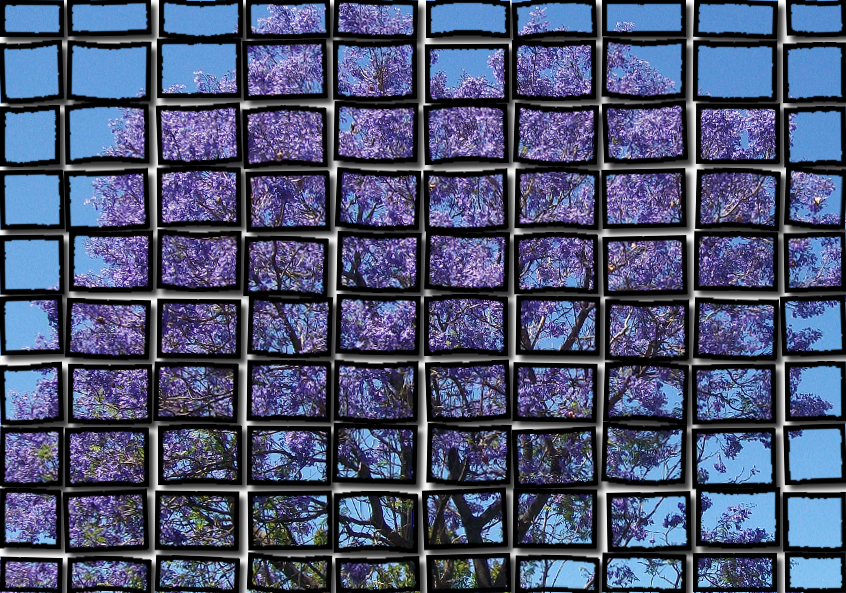
tried the jacaranda again
Image

_________________
Image
Free Fun Photo Editing & resources
Poems from the Lord
Gimp Newby
Gimp version 3.2.4 and GMIC-Qt 4.0.2 OS :- Windows 10 Home 64


Top
 Post subject: Re: Mosaics
PostPosted: Tue Sep 16, 2014 2:36 am  (#36) 
Offline
GimpChat Member
User avatar

Joined: Jan 20, 2013
Posts: 14831
Location: roma, italy
dinasset wrote:
Excellent, RobA!
I'll try to read and apply your tut, later on today.

sigh, too complex for my "simple" mind, I gave up!
I hope Graechan may be willing to make a new version of his (good) script to better follow the contour of the user's selection (the main figure, normally) like in ancient Roman style.
For the moment, I will keep on current Graechan's script.
But, anyhow, again my best congratulations to RobA!

_________________
"Where am I ?"


Top
 Post subject: Re: Mosaics
PostPosted: Wed Sep 17, 2014 8:51 am  (#37) 
Offline
Global Moderator
User avatar

Joined: Apr 01, 2012
Posts: 8457
Location: On the other side of your screen
Another
Image

_________________
Image
Free Fun Photo Editing & resources
Poems from the Lord
Gimp Newby
Gimp version 3.2.4 and GMIC-Qt 4.0.2 OS :- Windows 10 Home 64


Top
 Post subject: Re: Mosaics
PostPosted: Wed Sep 17, 2014 12:47 pm  (#38) 
Offline
GimpChat Member
User avatar

Joined: Jan 20, 2013
Posts: 14831
Location: roma, italy
sallyanne wrote:
Maybe I didn't refresh.
here it is again after I resized the photo
[ Image ]

this one is really fantastic, SallyAnne!
I see you enjoy creating mosaics!
Congrats...

_________________
"Where am I ?"


Top
 Post subject: Re: Mosaics
PostPosted: Wed Sep 17, 2014 12:54 pm  (#39) 
Offline
GimpChat Member
User avatar

Joined: Sep 24, 2010
Posts: 12831
lol

Looks like Sallyanne's got the bug now. My binge is over so hope I don't get drawn back in too. ;)

:)

_________________
Lyle

Psalm 109:8

Image


Top
 Post subject: Re: Mosaics
PostPosted: Wed Sep 17, 2014 11:02 pm  (#40) 
Offline
Script Coder
User avatar

Joined: Jul 14, 2010
Posts: 697
Using this ref: http://www.fontplay.com/freephotos/seve ... 406-02.jpg

I did some edge detection plus cleanup to get the petal areas, then selected them all and using my mosaic tile helper script created the path and stroked, using some brush dynamics. I should have set the spacing a bit higher as some of them merged together.

Added a textured BG, sampled the colour from the source image, and added some emboss and shadowing:
Attachment:
mosaic_flower_fp122406-02.jpg
mosaic_flower_fp122406-02.jpg [ 414.06 KiB | Viewed 1960 times ]


-Rob A>

_________________
Image
Fantasy Cartography and Mapping by RobA


Top
Post new topic Reply to topic  [ 48 posts ]  Go to page Previous  1, 2, 3  Next

All times are UTC - 5 hours [ DST ]


* Login  


Powered by phpBB3 © phpBB Group