It is currently Tue Aug 18, 2026 1:58 pm


All times are UTC - 5 hours [ DST ]


Post new topic Reply to topic  [ 44 posts ]  Go to page Previous  1, 2, 3  Next
Author Message
 Post subject: Re: Symbol display Script Rel3 [new menu options]
PostPosted: Thu Sep 26, 2013 6:25 am  (#21) 
Offline
Global Moderator
User avatar

Joined: Apr 01, 2012
Posts: 8457
Location: On the other side of your screen
Graechan you provided the menu. Where can I find it? I have looked through all my drop down menus in gimp and none of them start with 'font'
(I have the script)

_________________
Image
Free Fun Photo Editing & resources
Poems from the Lord
Gimp Newby
Gimp version 3.2.4 and GMIC-Qt 4.0.2 OS :- Windows 10 Home 64


Top
 Post subject: Re: Symbol display Script Rel3 [new menu options]
PostPosted: Thu Sep 26, 2013 6:52 am  (#22) 
Offline
GimpChat Member
User avatar

Joined: Apr 07, 2010
Posts: 14182
Sallyanne, in Gimp. try going to Gimp/ help/ plug-in browser, then type in the name of your script and it will show you where it is situated

_________________
Image


Top
 Post subject: Re: Symbol display Script Rel3 [new menu options]
PostPosted: Thu Sep 26, 2013 11:38 am  (#23) 
Offline
GimpChat Member
User avatar

Joined: Jan 20, 2013
Posts: 590
After install the script in my "script folder", then refresh the scripts, I can't find the script in "Fonts>Symbol Display". Please, can you explain me how to do to find it? Thanks.

_________________
Image


Top
 Post subject: Re: Symbol display Script Rel3 [new menu options]
PostPosted: Thu Sep 26, 2013 12:12 pm  (#24) 
Offline
GimpChat Member
User avatar

Joined: Apr 07, 2010
Posts: 14182
In Gimp. try going to Gimp/ help/ plug-in browser, then type in the name of your script and it will show you where it is situated

viewtopic.php?p=111585#p111585

_________________
Image


Top
 Post subject: Re: Symbol display Script Rel3 [new menu options]
PostPosted: Thu Sep 26, 2013 7:20 pm  (#25) 
Offline
Script Coder
User avatar

Joined: Feb 18, 2011
Posts: 4826
Location: Bendigo Vic. Australia
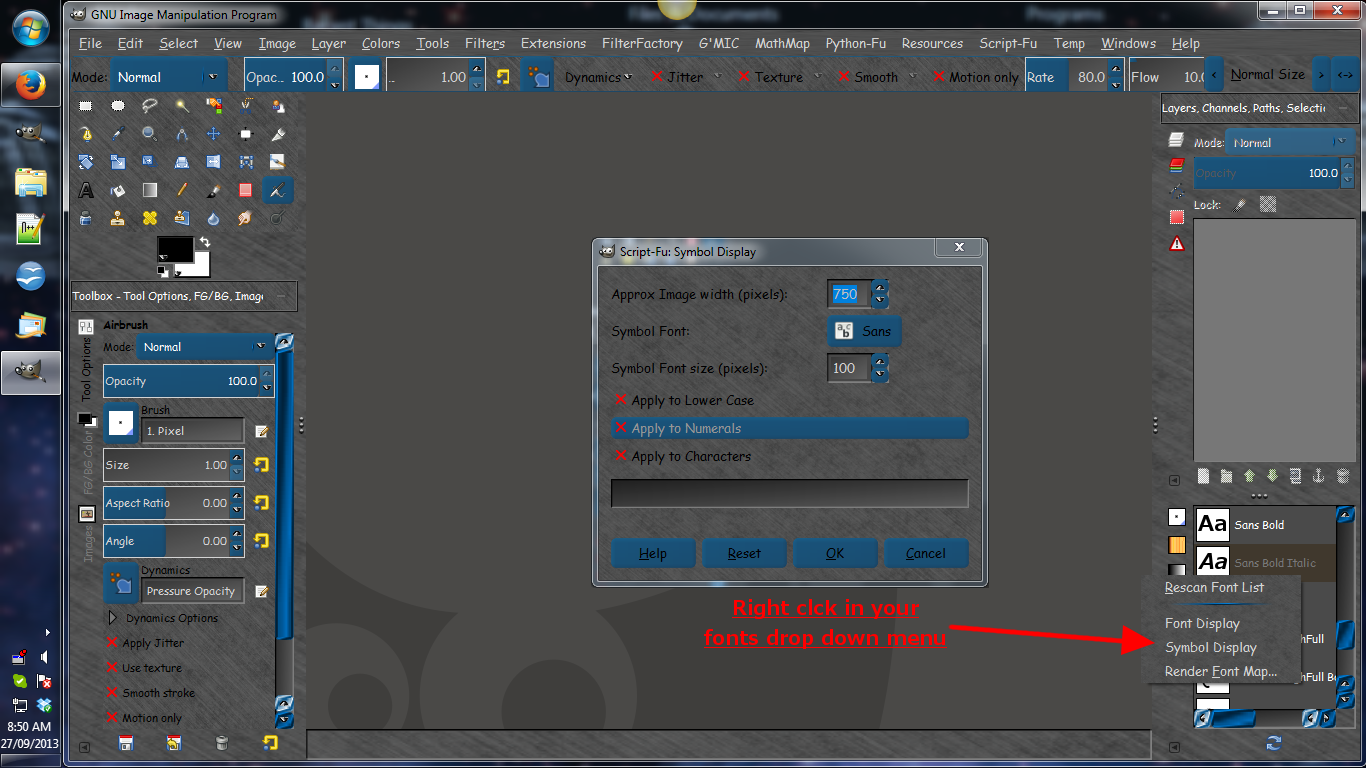
Hi Carlos Diniz I will try to explain where the Menu for Symbol Display is located

first you must open your 'Fonts dialogue' window as below↓

Image

Then right click to go to the Menu as below↓

Image

I hope this has been of some help :gimp

_________________
Image
No matter how much you push the envelope, it'll still be stationery.


Top
 Post subject: Re: Symbol display Script Rel3 [new menu options]
PostPosted: Thu Sep 26, 2013 9:42 pm  (#26) 
Offline
GimpChat Founder
User avatar

Joined: May 22, 2008
Posts: 5241
Location: Gimpville
I made a few changes to suit my needs but the script works great.

Image

Thanks!

_________________
“If you reach for the stars, you just might land on a decently sized hill.” - Stuart Hill


Top
 Post subject: Re: Symbol display Script Rel3 [new menu options]
PostPosted: Fri Sep 27, 2013 12:38 am  (#27) 
Offline
Script Coder
User avatar

Joined: Feb 18, 2011
Posts: 4826
Location: Bendigo Vic. Australia
GnuTux thank you for giving the script a tryout, maybe the changes you made are for the best
could you note them if they could improve the script for others

_________________
Image
No matter how much you push the envelope, it'll still be stationery.


Top
 Post subject: Re: Symbol display Script Rel3 [new menu options]
PostPosted: Fri Sep 27, 2013 6:34 am  (#28) 
Offline
GimpChat Member
User avatar

Joined: Jan 20, 2013
Posts: 590
Thanks Graechan. I've found it. Without your explain, it should be hard.
Now, I want know what to do with it. I thought I'll have the symbols immediatly. It means, what's the utility of the filter?

_________________
Image


Top
 Post subject: Re: Symbol display Script Rel3 [new menu options]
PostPosted: Fri Sep 27, 2013 3:30 pm  (#29) 
Offline
GimpChat Member

Joined: Oct 02, 2010
Posts: 106
Hallo, very good script. I find only that show some fonts correct other not. I have fonts with Japan, Sanskrit and Arabic character where not work. On other hand "Old English Text MT" work how should.
Thank you
Andrew


Top
 Post subject: Re: Symbol display Script Rel3 [new menu options]
PostPosted: Fri Sep 27, 2013 8:06 pm  (#30) 
Offline
Script Coder
User avatar

Joined: Feb 18, 2011
Posts: 4826
Location: Bendigo Vic. Australia
Carlos Diniz the script is for displaying dingbat fonts you have installed in your gimp from sources
such as Dafont
you can install these Dingbats much the same way as you install additional fonts in your user/fonts folder↓
Image


Abraess could you post a link to one of these fonts that do not work so I could look into your problem
if you are wanting to display a text font maybe 'Font Display' GIMP Scripts is what you should use

_________________
Image
No matter how much you push the envelope, it'll still be stationery.


Top
 Post subject: Re: Symbol display Script Rel3 [new menu options]
PostPosted: Sat Sep 28, 2013 3:21 pm  (#31) 
Offline
GimpChat Founder
User avatar

Joined: May 22, 2008
Posts: 5241
Location: Gimpville
Graechan wrote:
GnuTux thank you for giving the script a tryout, maybe the changes you made are for the best
could you note them if they could improve the script for others

I did a few things to customize the script for my needs, one was to increase the maximum width and font sizes. 1000px was just too small so I moved it to 2048px, which allows me to increase the font size to 300px-400px. Otherwise, the final image was narrow and too tall. Some of the dings are detailed so I like to preview larger versions of them.

Once I increased the size, I needed to increase the original letter size, which is hard coded to 20. I bumped that to 50. It would be nice to have this size be an option on the input screen.

I also added a few missing special characters: { } [ ] | ?

_________________
“If you reach for the stars, you just might land on a decently sized hill.” - Stuart Hill


Top
 Post subject: Re: Symbol display Script Rel3 [new menu options]
PostPosted: Sat Sep 28, 2013 3:51 pm  (#32) 
Offline
GimpChat Member
User avatar

Joined: Sep 24, 2010
Posts: 12832
While at Sourceforge, I did a search for dingbat and they shared the link below. Now way to dingbatty for me. lolol

http://californiafonts.com/category/din ... 4Aod-XAADw

_________________
Lyle

Psalm 109:8

Image


Top
 Post subject: Re: Symbol display Script Rel3 [new menu options]
PostPosted: Sat Sep 28, 2013 8:24 pm  (#33) 
Offline
Script Coder
User avatar

Joined: Feb 18, 2011
Posts: 4826
Location: Bendigo Vic. Australia
Thank you GnuTux for finding those oversights all will be addressed in Rel4 :oops:
Lyle thank you for the Link to those Dingbats, and the wingdings don't work even if copied direct to the font folder

_________________
Image
No matter how much you push the envelope, it'll still be stationery.


Top
 Post subject: Re: Symbol display Script Rel4 [Improvements per GnuTux]
PostPosted: Sun Sep 29, 2013 1:04 am  (#34) 
Offline
Script Coder
User avatar

Joined: Feb 18, 2011
Posts: 4826
Location: Bendigo Vic. Australia
Updated to Rel4 see initial post for changes

_________________
Image
No matter how much you push the envelope, it'll still be stationery.


Top
 Post subject: Re: Symbol display Script Rel4 [Improved Menu]
PostPosted: Tue Sep 09, 2014 12:43 am  (#35) 
Offline
Script Coder
User avatar

Joined: Feb 18, 2011
Posts: 4826
Location: Bendigo Vic. Australia
updated Rel4 again and added to GimpScripts see initial post for details

_________________
Image
No matter how much you push the envelope, it'll still be stationery.


Top
 Post subject: Re: Symbol display Script Rel4 [Improved Menu]
PostPosted: Tue Sep 09, 2014 11:32 am  (#36) 
Offline
GimpChat Member
User avatar

Joined: Mar 10, 2014
Posts: 845
TYVM Graechan!


Top
 Post subject: Re: Symbol display Script Rel4 [Improved Menu]
PostPosted: Tue Sep 09, 2014 12:31 pm  (#37) 
Offline
GimpChat Founder
User avatar

Joined: May 22, 2008
Posts: 5241
Location: Gimpville
Thanks, Graechan. Works beautifully and a real time saver.

Image

_________________
“If you reach for the stars, you just might land on a decently sized hill.” - Stuart Hill


Top
 Post subject: Re: Symbol display Script Rel4 [Improved Menu]
PostPosted: Tue Sep 09, 2014 12:44 pm  (#38) 
Offline
GimpChat Member
User avatar

Joined: Apr 07, 2010
Posts: 14182
How did you get the logos? I don't have that on the dialogue I just downloaded (Random Font Text)

_________________
Image


Top
 Post subject: Re: Symbol display Script Rel4 [Improved Menu]
PostPosted: Tue Sep 09, 2014 12:46 pm  (#39) 
Offline
GimpChat Founder
User avatar

Joined: May 22, 2008
Posts: 5241
Location: Gimpville
It's just called Open Logos, Molly.

http://www.dafont.com/openlogos.font

_________________
“If you reach for the stars, you just might land on a decently sized hill.” - Stuart Hill


Top
 Post subject: Re: Symbol display Script Rel4 [Improved Menu]
PostPosted: Tue Sep 09, 2014 12:49 pm  (#40) 
Offline
GimpChat Member
User avatar

Joined: Apr 07, 2010
Posts: 14182
:oops: O, then this is a different script. I just found it, called symbol displays... thanks :oops:

_________________
Image


Top
Post new topic Reply to topic  [ 44 posts ]  Go to page Previous  1, 2, 3  Next

All times are UTC - 5 hours [ DST ]


cron

* Login  


Powered by phpBB3 © phpBB Group