It is currently Mon Aug 17, 2026 8:07 am


All times are UTC - 5 hours [ DST ]


Post new topic Reply to topic  [ 44 posts ]  Go to page Previous  1, 2, 3
Author Message
 Post subject: Re: Symbol display Script Rel4 [Improved Menu]
PostPosted: Tue Sep 09, 2014 12:57 pm  (#41) 
Offline
Retired Staff
User avatar

Joined: May 22, 2008
Posts: 6946
Location: Somewhere in GIMP
One of the features I'd like to see in it is to have the dialog always on top so the font can be dragged and dropped to the font area in the dialog.

I was able to do that by marking Always on Top in the right-click menu but it was in Linux. Not sure if that feature is available in Windows.

Other than that request, the script is wonderful. :bigthup
Image

_________________
Image
World War IV will be fought with sticks and stones. - Albert Einstein


Top
 Post subject: Re: Symbol display Script Rel4 [Improved Menu]
PostPosted: Tue Sep 09, 2014 6:16 pm  (#42) 
Offline
Script Coder
User avatar

Joined: Feb 18, 2011
Posts: 4826
Location: Bendigo Vic. Australia
Sorry 'O' I do not understand the request, as the finished image has only one layer, please explain differently

_________________
Image
No matter how much you push the envelope, it'll still be stationery.


Top
 Post subject: Re: Symbol display Script Rel4 [Improved Menu]
PostPosted: Tue Sep 09, 2014 7:15 pm  (#43) 
Offline
Retired Staff
User avatar

Joined: May 22, 2008
Posts: 6946
Location: Somewhere in GIMP
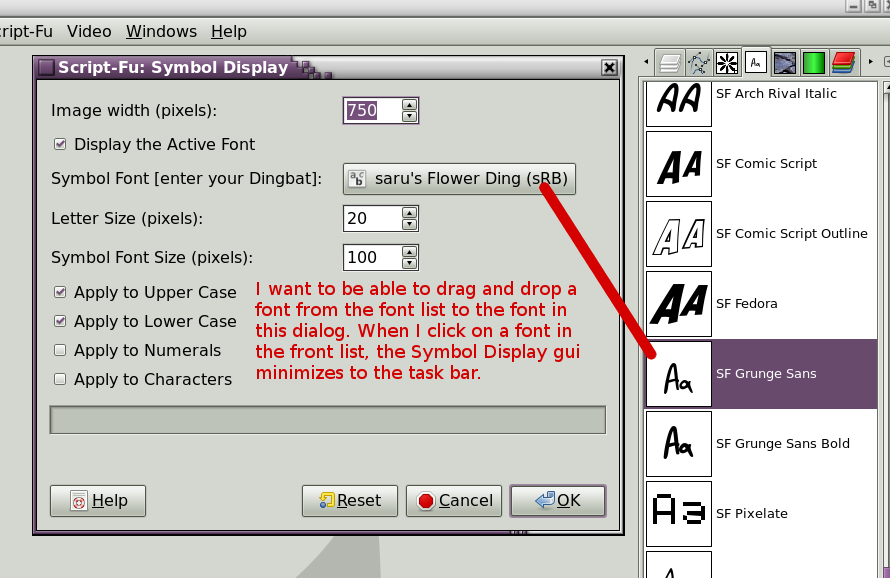
Maybe this will help explain. Sorry, a typo in there: front list = font list

Image

_________________
Image
World War IV will be fought with sticks and stones. - Albert Einstein


Top
 Post subject: Re: Symbol display Script Rel4 [Improved Menu]
PostPosted: Tue Sep 09, 2014 7:54 pm  (#44) 
Offline
Script Coder
User avatar

Joined: Feb 18, 2011
Posts: 4826
Location: Bendigo Vic. Australia
Image
with the menu selection above the font displayed will be 'SF Grunge Sans' because you have selected display the active font
If you set the font you wish to display as active then right click and select symbol display select display active font and select your other options
you'll be OK

or alternatively deselect 'Display the Active Font' and enter the font you wish to display in the font widget
then that font will be displayed despite whatever the active font is

_________________
Image
No matter how much you push the envelope, it'll still be stationery.


Top
Post new topic Reply to topic  [ 44 posts ]  Go to page Previous  1, 2, 3

All times are UTC - 5 hours [ DST ]


* Login  


Powered by phpBB3 © phpBB Group