It is currently Fri Aug 21, 2026 11:02 am


All times are UTC - 5 hours [ DST ]


Post new topic Reply to topic  [ 10 posts ] 
Author Message
 Post subject: PotraceSwitch
PostPosted: Tue Jan 06, 2015 9:07 am  (#1) 
Offline
GimpChat Member
User avatar

Joined: Jan 13, 2011
Posts: 2648
Location: Poland
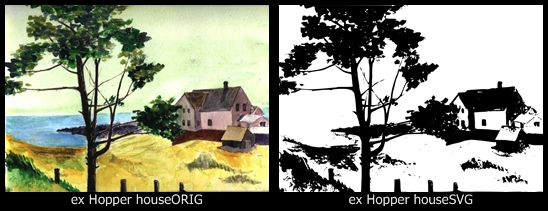
Next step for plug-ins PotraceSwitch (for Windows).
http://www.gimpchat.com/viewtopic.php?f=22&t=1161&hilit=potrace
Copy catalog potrace on disc C:/potrace; fle PotraceSwith_savebmp.py an PotraceSwith_opensvg.py to catalog plug-ins (in different case to edit potrace.bat and plug-ins).

I deleted older version plug-ins.


Attachments:
Potrplug.png
Potrplug.png [ 68.39 KiB | Viewed 3415 times ]
Potrexamp.png
Potrexamp.png [ 61.32 KiB | Viewed 3415 times ]

_________________
Image


Last edited by MareroQ on Fri Jan 23, 2015 5:14 pm, edited 1 time in total.
Share on Facebook Share on Twitter Share on Orkut Share on Digg Share on MySpace Share on Delicious Share on Technorati
Top
 Post subject: Re: PotraceSwitch_0.2
PostPosted: Tue Jan 06, 2015 1:25 pm  (#2) 
Offline
GimpChat Member
User avatar

Joined: Mar 10, 2014
Posts: 845
Thank you MareroQ
it's working very well!
Image


Top
 Post subject: Re: PotraceSwitch_0.2
PostPosted: Tue Jan 06, 2015 4:20 pm  (#3) 
Offline
Global Moderator
User avatar

Joined: May 16, 2010
Posts: 16164
Awesome! Thanks man. :)

Image

_________________
Image


Top
 Post subject: Re: PotraceSwitch_0.2
PostPosted: Tue Jan 06, 2015 5:07 pm  (#4) 
Offline
Administrator
User avatar

Joined: Aug 10, 2012
Posts: 14159
Location: Native to NYC living in Arizona, Gimp 2.8 - 3.0, Win 11 PC.
I must to be doing something wrong when installing this :tantrum , because I can't get it to work :help . :hehe

_________________
Image
"A wise man learns more from a foolish question than a fool can learn from a wise answer"
Image


Top
 Post subject: Re: PotraceSwitch_0.2
PostPosted: Tue Jan 06, 2015 5:21 pm  (#5) 
Offline
Global Moderator
User avatar

Joined: May 16, 2010
Posts: 16164
Wallace wrote:
I must to be doing something wrong when installing this :tantrum , because I can't get it to work :help . :hehe

Inside the zip you download are two folders. Copy the potrace folder to C directory and open the plug-ins folder and copy those two python files to your plug-ins folder. Restart GIMP and you will find the two plugins at Filters/Edge Detect/
First open the save as png filter and save the open image as a potrace.png file in the potrace folder.
Next open the save as svg filter and open the default potrace.svg file. The path will be exported as a new layer and path. I just stroked the path with a 1 pixel line (black) Of course you can do numerous things to the new imported path like use Ofnuts tools on it. :)

_________________
Image


Top
 Post subject: Re: PotraceSwitch_0.2
PostPosted: Tue Jan 06, 2015 5:26 pm  (#6) 
Offline
Administrator
User avatar

Joined: Aug 10, 2012
Posts: 14159
Location: Native to NYC living in Arizona, Gimp 2.8 - 3.0, Win 11 PC.
Rod wrote:
Wallace wrote:
I must to be doing something wrong when installing this :tantrum , because I can't get it to work :help . :hehe

Inside the zip you download are two folders. Copy the potrace folder to C directory and open the plug-ins folder and copy those two python files to your plug-ins folder. Restart GIMP and you will find the two plugins at Filters/Edge Detect/
First open the save as png filter and save the open image as a potrace.png file in the potrace folder.
Next open the save as svg filter and open the default potrace.svg file. The path will be exported as a new layer and path. I just stroked the path with a 1 pixel line (black) Of course you can do numerous things to the new imported path like use Ofnuts tools on it. :)

Thanks Rod. :oops:

_________________
Image
"A wise man learns more from a foolish question than a fool can learn from a wise answer"
Image


Top
 Post subject: Re: PotraceSwitch_0.2
PostPosted: Tue Jan 06, 2015 5:31 pm  (#7) 
Offline
Global Moderator
User avatar

Joined: May 16, 2010
Posts: 16164
Wallace wrote:
Rod wrote:
Wallace wrote:
I must to be doing something wrong when installing this :tantrum , because I can't get it to work :help . :hehe

Inside the zip you download are two folders. Copy the potrace folder to C directory and open the plug-ins folder and copy those two python files to your plug-ins folder. Restart GIMP and you will find the two plugins at Filters/Edge Detect/
First open the save as png filter and save the open image as a potrace.png file in the potrace folder.
Next open the save as svg filter and open the default potrace.svg file. The path will be exported as a new layer and path. I just stroked the path with a 1 pixel line (black) Of course you can do numerous things to the new imported path like use Ofnuts tools on it. :)

Thanks Rod. :oops:

No problem happy to help.

_________________
Image


Top
 Post subject: Re: PotraceSwitch_0.2
PostPosted: Thu Jan 08, 2015 11:22 am  (#8) 
Offline
GimpChat Member
User avatar

Joined: Mar 10, 2014
Posts: 845
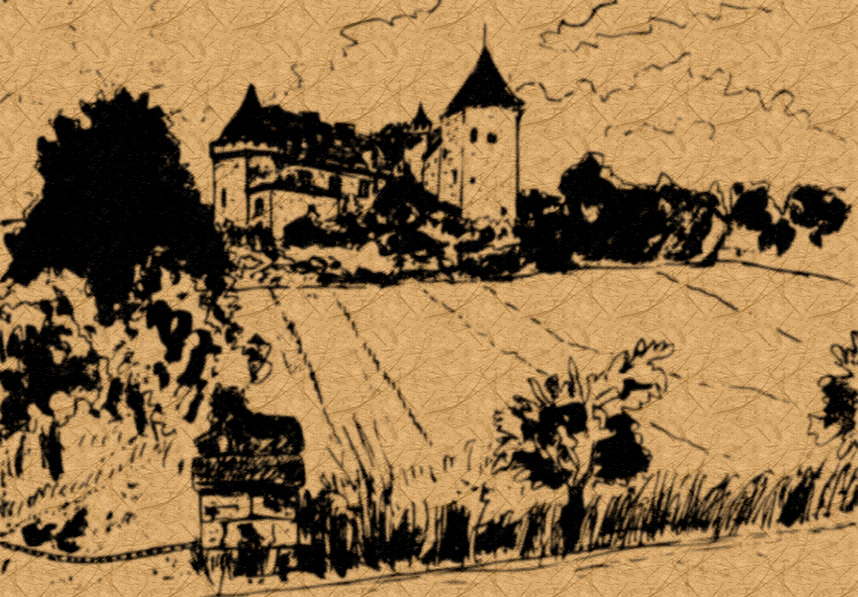
Image
potrace from watercolor and texture


Top
 Post subject: Re: PotraceSwitch
PostPosted: Fri Jan 23, 2015 5:17 pm  (#9) 
Offline
GimpChat Member
User avatar

Joined: Jan 13, 2011
Posts: 2648
Location: Poland
Next small step:
- the interactive development the edition of parameters (in notepad2),
- connection of two (the open and the save) to one file.

For edit parameters:
Download notepad2 - free and open source Notepad2 (Copyright © 2004-2011 Florian Balmer): http://www.flos-freeware.ch/notepad2.html
unzip (756 kb) and instal to C:\Notepad2.

Delete old version (PotraceSwith_savebmp.py, PotraceSwith_opensvg.py an potrace.bat)

Location Potrace -> C:\Potrace

Tear-off menus
http://docs.gimp.org/en/menus.html#gimp-menus-introduction


Attachments:
PotrSw 0.3.png
PotrSw 0.3.png [ 95.08 KiB | Viewed 3004 times ]
PotraceSwith_0.3.zip [146.44 KiB]
Downloaded 166 times

_________________
Image
Top
 Post subject: Re: PotraceSwitch
PostPosted: Fri Jan 23, 2015 8:31 pm  (#10) 
Offline
GimpChat Member
User avatar

Joined: Mar 10, 2014
Posts: 845
another great job! Thank you MareroQ!


Top
Post new topic Reply to topic  [ 10 posts ] 

All times are UTC - 5 hours [ DST ]


* Login  


Powered by phpBB3 © phpBB Group