It is currently Wed Aug 12, 2026 3:54 am


All times are UTC - 5 hours [ DST ]


Post new topic Reply to topic  [ 17 posts ] 
Author Message
 Post subject: Multiple Shadows Script for GIMP
PostPosted: Fri Nov 04, 2016 4:43 pm  (#1) 
Offline
Script Coder
User avatar

Joined: May 07, 2014
Posts: 4527
Location: Canada
Let's say you have multiple layers, and you want to drop shadow for all of them.
Here's a script that'll help with that.
Each layer will drop shadow on all layers below while making the appropriate cuts so that you're left with a single shadow layer that makes it look like all layers are casting shadows on each other at different depths.
Image
same sample as above but this time i outlined the text.
Image
To download, click here --> Multiple Shadows Script for GIMP

_________________
TinT


Last edited by trandoductin on Wed Nov 28, 2018 12:17 pm, edited 1 time in total.

Share on Facebook Share on Twitter Share on Orkut Share on Digg Share on MySpace Share on Delicious Share on Technorati
Top
 Post subject: Re: Multiple Shadows Script for GIMP
PostPosted: Fri Nov 04, 2016 9:43 pm  (#2) 
Offline
GimpChat Member
User avatar

Joined: Apr 08, 2010
Posts: 5420
Location: Northwest Ohio
It's a py plug in, darn it. I use mainly script-fu scripts as most py scripts don't play nice with my macgimp.


Top
 Post subject: Re: Multiple Shadows Script for GIMP
PostPosted: Sat Nov 05, 2016 2:09 am  (#3) 
Offline
Script Coder
User avatar

Joined: May 07, 2014
Posts: 4527
Location: Canada
Script-fu version is here.
Image

To download, click here --> Multiple Shadows (scm) Script for GIMP

_________________
TinT


Last edited by trandoductin on Wed Nov 28, 2018 12:14 pm, edited 1 time in total.

Top
 Post subject: Re: Multiple Shadows Script for GIMP
PostPosted: Sat Nov 05, 2016 3:12 am  (#4) 
Offline
Global Moderator
User avatar

Joined: May 16, 2010
Posts: 16156
Can you add the ability to work with layer groups also?

Image

_________________
Image


Top
 Post subject: Re: Multiple Shadows Script for GIMP
PostPosted: Sat Nov 05, 2016 11:26 am  (#5) 
Offline
Script Coder
User avatar

Joined: May 07, 2014
Posts: 4527
Location: Canada
Where's the word art script?
I want to use it to see what it generates before i attempt to play with groups since i have never done that before

_________________
TinT


Top
 Post subject: Re: Multiple Shadows Script for GIMP
PostPosted: Sat Nov 05, 2016 2:00 pm  (#6) 
Offline
Global Moderator
User avatar

Joined: May 16, 2010
Posts: 16156
trandoductin wrote:
Where's the word art script?
I want to use it to see what it generates before i attempt to play with groups since i have never done that before

Bytes and Pixels website is here. Lots of goodies waiting for you there. :)
http://www.bytes-and-pixels.com/

You want version 1.2 of the python filter
http://www.bytes-and-pixels.com/downloads/?did=13

_________________
Image


Top
 Post subject: Re: Multiple Shadows Script for GIMP
PostPosted: Sat Nov 05, 2016 2:04 pm  (#7) 
Offline
Global Moderator
User avatar

Joined: May 16, 2010
Posts: 16156
I could just do a new from visible in the filter but i want to be able to adjust text and their shadows separately after running the shadow filter.

_________________
Image


Top
 Post subject: Re: Multiple Shadows Script for GIMP
PostPosted: Sat Nov 05, 2016 5:05 pm  (#8) 
Offline
Script Coder
User avatar

Joined: May 07, 2014
Posts: 4527
Location: Canada
You can't move shadows around after the fact because my script creates shadow on top of shadows
like top layers would cast shadow to each layer below it creating illusion of different depths.
And it needs to make appropriate cuts using layers above the one that is being dropped shadow on and cuts out what isn't on the layer that is being casted on...
then very end it merges everything because it uses opacity at 100% then set opacity afterwards to users settings.
because I didn't want shadows to over lap each other and and with higher opacity at overlaps because it looks bad.
So you can't play with shadows once they're created.
Check out the examples it casts a different shadow that has different offset on each layer below it. if this final shadow layer is shifted/moved at all it would break.

_________________
TinT


Top
 Post subject: Re: Multiple Shadows Script for GIMP
PostPosted: Sat Nov 05, 2016 9:33 pm  (#9) 
Offline
Script Coder
User avatar

Joined: May 07, 2014
Posts: 4527
Location: Canada
I am having problems trying to work with layergroups.
layergroups is returned as layer and a drawable....
and the children are returned as ids which i don't know how add to my list of layers.
it's all very confusing to me right now.

_________________
TinT


Top
 Post subject: Re: Multiple Shadows Script for GIMP
PostPosted: Sat Nov 05, 2016 9:54 pm  (#10) 
Offline
Global Moderator
User avatar

Joined: May 16, 2010
Posts: 16156
trandoductin wrote:
You can't move shadows around after the fact because my script creates shadow on top of shadows
like top layers would cast shadow to each layer below it creating illusion of different depths.
And it needs to make appropriate cuts using layers above the one that is being dropped shadow on and cuts out what isn't on the layer that is being casted on...
then very end it merges everything because it uses opacity at 100% then set opacity afterwards to users settings.
because I didn't want shadows to over lap each other and and with higher opacity at overlaps because it looks bad.
So you can't play with shadows once they're created.
Check out the examples it casts a different shadow that has different offset on each layer below it. if this final shadow layer is shifted/moved at all it would break.

I gotcha. ;)

_________________
Image


Top
 Post subject: Re: Multiple Shadows Script for GIMP
PostPosted: Sun Nov 06, 2016 11:11 am  (#11) 
Offline
GimpChat Member
User avatar

Joined: Mar 23, 2012
Posts: 7388
Location: Göteborg at last!
Just logged in to let you know how fantastic you are tin!!! :hi5 I have thought something like this would be very useful for a long time but the thought kept dissolving in the stew that is my brain. Thank you! :tyspin :coolthup


Top
 Post subject: Re: Multiple Shadows Script for GIMP
PostPosted: Sun Nov 06, 2016 1:30 pm  (#12) 
Offline
Script Coder
User avatar

Joined: May 07, 2014
Posts: 4527
Location: Canada
Great! ;)

Next time you think of something like it and think it's great, you HAVE GOT to share it with the world although explaining it might be a challenge...but share anyways so anyone who understands can try to script it and turn it into reality.

_________________
TinT


Top
 Post subject: Re: Multiple Shadows Script for GIMP
PostPosted: Fri Jun 20, 2025 9:23 am  (#13) 
Offline
Global Moderator
User avatar

Joined: May 16, 2010
Posts: 16156
If anyone has this script please attach both the python and scm files here.
Thank you! :)

_________________
Image


Top
 Post subject: Re: Multiple Shadows Script for GIMP
PostPosted: Fri Jun 20, 2025 10:12 am  (#14) 
Offline
Administrator
User avatar

Joined: Aug 10, 2012
Posts: 14151
Location: Native to NYC living in Arizona, Gimp 2.8 - 3.0, Win 11 PC.
Rod wrote:
If anyone has this script please attach both the python and scm files here.
Thank you! :)

I have this one installed into GIMP 2.8
Attachment:
File comment: Script demo in gimp 2.8
Screenshot (2707).png
Screenshot (2707).png [ 385.66 KiB | Viewed 1715 times ]

Attachment:
Multiple_Shadows.scm [4.86 KiB]
Downloaded 47 times

_________________
Image
"A wise man learns more from a foolish question than a fool can learn from a wise answer"
Image


Top
 Post subject: Re: Multiple Shadows Script for GIMP
PostPosted: Fri Jun 20, 2025 11:10 pm  (#15) 
Offline
GimpChat Member
User avatar

Joined: Jan 13, 2011
Posts: 2648
Location: Poland
Image

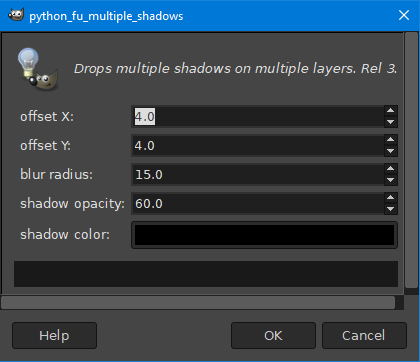
In menu:
Filters ➤ Light and Shadow ➤ Multiple Shadows...


Attachments:
Multiple_Shadows Rel.3.zip [1.97 KiB]
Downloaded 60 times

_________________
Image
Top
 Post subject: Re: Multiple Shadows Script for GIMP
PostPosted: Sat Jun 21, 2025 2:05 pm  (#16) 
Offline
GimpChat Member
User avatar

Joined: Oct 31, 2020
Posts: 2013
there's this really cool feature in GIMP 3 called applying drop shadow on a layer group and putting content in it and making a blank layer below all the text layers if there is text clipping.

Image


Top
 Post subject: Re: Multiple Shadows Script for GIMP
PostPosted: Sat Jun 21, 2025 2:34 pm  (#17) 
Offline
Global Moderator
User avatar

Joined: May 16, 2010
Posts: 16156
Thanks for adding the filters Wallace and MareroQ! Trying to keep up to date on where folks can find them. Many links for scripts are down. I do have most of the scripts and plugins from GimpScripts uploaded to Sourceforge in two large packages.
And thanks to Rich most from gimplearn as well. I have been going through the gimp scripts and plugins forums making sure any viable filter links are available, or they get attached to their threads. Thanks everyone for your help!

Contrast i will look into that. :)

_________________
Image


Top
Post new topic Reply to topic  [ 17 posts ] 

All times are UTC - 5 hours [ DST ]


* Login  


Powered by phpBB3 © phpBB Group