It is currently Sat Aug 15, 2026 5:33 am


All times are UTC - 5 hours [ DST ]


Post new topic Reply to topic  [ 9 posts ] 
Author Message
 Post subject: outliner
PostPosted: Mon Jul 30, 2012 10:29 am  (#1) 
Offline
GimpChat Member

Joined: Jul 07, 2012
Posts: 18
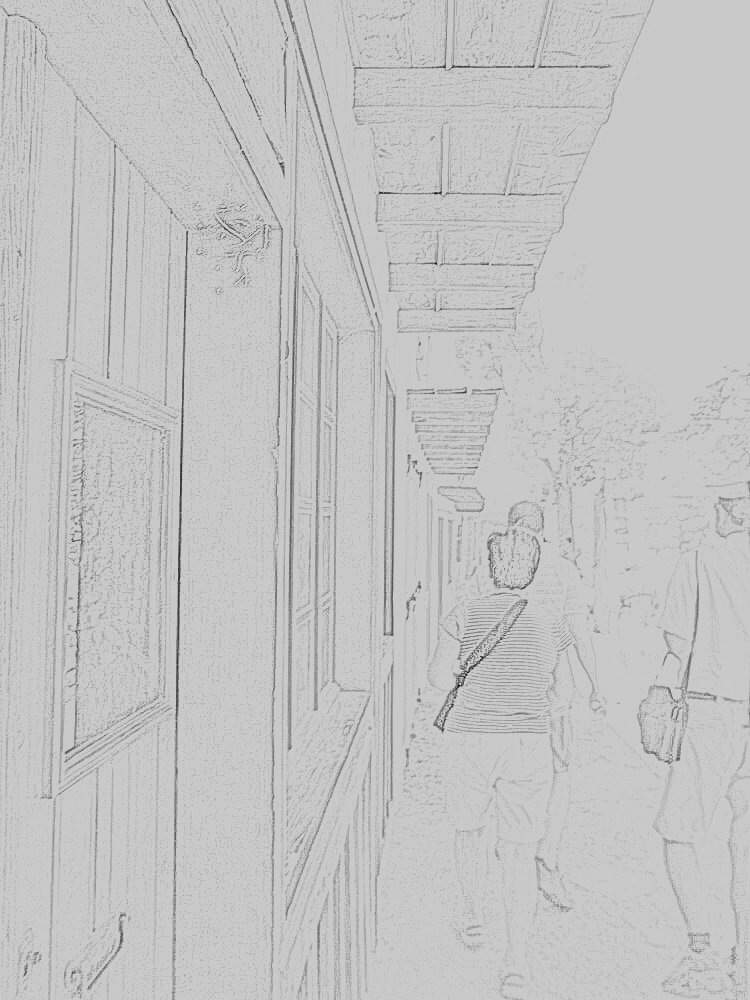
I don't know if I give already known information but there's a swift and easy way to make any kind of sketch from your photo. imageskill outliner does the work for you.
here's the link.
http://www.imageskill.com/outliner/outliner.html

after downloading and installing you still need to copy the "program" into the GIMP scripts-folder. works like a charm

Image
just a picture I made at Spinalonga run over by outliner. :)


Share on Facebook Share on Twitter Share on Orkut Share on Digg Share on MySpace Share on Delicious Share on Technorati
Top
 Post subject: Re: outliner
PostPosted: Mon Jul 30, 2012 10:41 am  (#2) 
Offline
Global Moderator
User avatar

Joined: May 16, 2010
Posts: 16158
Do you not also need the PSPI plugin?

_________________
Image


Top
 Post subject: Re: outliner
PostPosted: Mon Jul 30, 2012 10:42 am  (#3) 
Offline
GimpChat Member
User avatar

Joined: Sep 24, 2010
Posts: 12831
I like using Wavelet Denoise set to Grain Extract. I like Imageskill's plugins too by the way. :)

_________________
Lyle

Psalm 109:8

Image


Top
 Post subject: Re: outliner
PostPosted: Mon Jul 30, 2012 11:56 am  (#4) 
Offline
GimpChat Member
User avatar

Joined: Oct 29, 2010
Posts: 711
Location: Netherlands
Similar results can be had with Filters > Edge-Detect > Adaptive Edge Detect plug-in.
Gerard.

_________________
Gentoo Linux always up-to-date.
Kernel-3.17.4 Python-2.7.8/3.3.5
Gimp-2.8.14

I use Linux only.
And Virtualbox with Win 7


Top
 Post subject: Re: outliner
PostPosted: Mon Jul 30, 2012 12:03 pm  (#5) 
Offline
GimpChat Member
User avatar

Joined: Apr 07, 2010
Posts: 14182
Thanks Gerard, I have never tried that Adaptive Edge detect.

_________________
Image


Top
 Post subject: Re: outliner
PostPosted: Mon Jul 30, 2012 12:35 pm  (#6) 
Offline
GimpChat Member
User avatar

Joined: Oct 29, 2010
Posts: 711
Location: Netherlands
You're welcome.
The outliner program is Windows only.
W/o seeing the origial image the OP used it's hard to know which performs better.
I've used Edge detcct in the past to make a template.
Gerard.

_________________
Gentoo Linux always up-to-date.
Kernel-3.17.4 Python-2.7.8/3.3.5
Gimp-2.8.14

I use Linux only.
And Virtualbox with Win 7


Top
 Post subject: Re: outliner
PostPosted: Tue Jul 31, 2012 11:51 am  (#7) 
Offline
GimpChat Member

Joined: Jul 07, 2012
Posts: 18
I don't have that psp plugin, so it should work fine without... but I'm no tech geek, so I can't be sure.

ever tried combining the two gerard? make one with edge detect and one with outliner and then play with the layers? very nice and even surreal effects... :)


Top
 Post subject: Re: outliner
PostPosted: Tue Jul 31, 2012 12:22 pm  (#8) 
Offline
GimpChat Member
User avatar

Joined: Oct 29, 2010
Posts: 711
Location: Netherlands
@camamaja: I can't run MSWindows programs so I can't compare.
If you upload the original picture (before applying outliner) I could load it in my Gimp and run edge-detect.
Gerard.

_________________
Gentoo Linux always up-to-date.
Kernel-3.17.4 Python-2.7.8/3.3.5
Gimp-2.8.14

I use Linux only.
And Virtualbox with Win 7


Top
 Post subject: Re: outliner
PostPosted: Tue Jul 31, 2012 1:29 pm  (#9) 
Offline
GimpChat Member

Joined: Apr 12, 2010
Posts: 5870
For a similar but more detailed effect with gmic i often create 2 dup layers from the original, (more exactly i run gmic with the output option "create new layers" ) :
for the first i use BW pencil (or inkwash , lowering much the values for the blurring. ) , then i use level to darken the darkest grey in full black (curve also will work well )

For the second i use edge detect (also from gmic )

then i make the layer on top active , and run again gmic BUT with input option changed to "Active layer and below" to create a new layer from the merged

For the layer mode , i use "darken" if i want fill with more details the outline, multiply if i want also darken, soft light and overlay to ...

But i do from gmic because support more mode and may simlate layer swap when merging, so i always give a glance to the effect of many of the modes even (but Normal, Darken , Multiply, Soft light and Overlay are the most probable... i did not include Hard Light only because is identical to Overlay with swapped layers.

Well maybe seems much longer then run a PS filter but may give a more detailed line art

_________________
My 3D Gallery on Deviantart http://photocomix2.deviantart.com/
Main gallery http://www.flickriver.com/photos/photocomix-mandala/
Mandala and simmetry http://www.flickriver.com/photos/photocomix_mandala/

Image

Mrs Wilbress


Top
Post new topic Reply to topic  [ 9 posts ] 

All times are UTC - 5 hours [ DST ]


* Login  


Powered by phpBB3 © phpBB Group