It is currently Sat Aug 15, 2026 5:06 am


All times are UTC - 5 hours [ DST ]


Post new topic Reply to topic  [ 7 posts ] 
Author Message
 Post subject: Hoping for : Hypno Circles Animator script
PostPosted: Sun Feb 24, 2013 10:42 pm  (#1) 
Offline
GimpChat Member

Joined: Apr 12, 2010
Posts: 5870
It just popped out a topic on concentric circle viewtopic.php?f=9&t=4499&start=10 and it give me a idea for a very interesting animated effect

First use , no kidding here , could be to create looping animation to help enter in state of self hypnosis or trance

Basically the script should
(EDIT; maybe i explained better below if you found confusing , skip to the part in italic and blue )
1 ) create a image filled by concentric circles thickness and quantity should be user choice, default colours black on white, but any other couple of contrasting colours (red & green,yellow and violet..) may be chosen
This image must be bigger then final desired size

2) duplicate the layer

3) Default colour is black & white default layer mode for the dup on top is darken only:

4) According to the RADIUS chosen by the user the top layer is off setted BUT along a very strict spiral
you may have a poor idea of the effect by the 2 frames in the bottom message here viewtopic.php?f=9&t=4499 BUT animated effect is much more mesmerizing

5) When reached the max radius, then may start the inverted movement to create a ping pong loop

6) Everything should be crop , to cut out all not_overlapping area at the border

About colours and merging modes Black& White and Darken only will always give good results, but many other combinations are worth exploring

-----------------------------------------------------------------------

i hope i was clear ...maybe i did summarize better here the script should

1 ) Create 1 image with 2 layers of same size filled with same pattern of concentric circles :example colors Black & White and top layer in to Darken Only mode

2 ) at beginning the layers are perfectly aligned then the top layer start to offset spiralling away for the given range

3) the visible of each of this combinations of the 2 layers is saved as new layer in a new image ,in this new image the periphery where the 2 layers didn't overlap should be crop away

4) allow to loop back

5) Change layer mode to Lighten Only , will be no difference for the first frame of the new loop, where the identical layers are perfectly aligned but only when will start to offset ...

a similar script would make very mesmerising animations


_________________
My 3D Gallery on Deviantart http://photocomix2.deviantart.com/
Main gallery http://www.flickriver.com/photos/photocomix-mandala/
Mandala and simmetry http://www.flickriver.com/photos/photocomix_mandala/

Image

Mrs Wilbress


Share on Facebook Share on Twitter Share on Orkut Share on Digg Share on MySpace Share on Delicious Share on Technorati
Top
 Post subject: Re: Hoping for : Hypno Circles Animator script
PostPosted: Sun Feb 24, 2013 11:47 pm  (#2) 
Offline
GimpChat Member

Joined: Apr 12, 2010
Posts: 5870
A quick and very manual way to see the same effect (and understand what i talk about) require a printer that may print on transparent sheet, and 2 prints of same concentric pattern one of same size 1 with white background , the other black on transparency

the image with the transparent BG go on top

first align perfectly the 2 images ,
then move the top one with a smooth , slow spiralling movement , from the centre outward

That already create a cool optical effect
if done digitally , playing with the different colours and merging mode combinations possible with gimp or gmic would be much more mesmerising and trippy, and more powerful to create
hypnotic animated sequences

_________________
My 3D Gallery on Deviantart http://photocomix2.deviantart.com/
Main gallery http://www.flickriver.com/photos/photocomix-mandala/
Mandala and simmetry http://www.flickriver.com/photos/photocomix_mandala/

Image

Mrs Wilbress


Top
 Post subject: Re: Hoping for : Hypno Circles Animator script
PostPosted: Tue Feb 26, 2013 9:40 am  (#3) 
Offline
Script Coder
User avatar

Joined: Apr 23, 2010
Posts: 1553
Location: not from Guildford after all
http://chiselapp.com/user/saulgoode/rep ... hypmotized

_________________
Any sufficiently primitive technology is indistinguishable from a rock.


Top
 Post subject: Re: Hoping for : Hypno Circles Animator script
PostPosted: Tue Feb 26, 2013 12:54 pm  (#4) 
Offline
GimpChat Member

Joined: Apr 12, 2010
Posts: 5870
thank , downloading now i will add a test soon

_________________
My 3D Gallery on Deviantart http://photocomix2.deviantart.com/
Main gallery http://www.flickriver.com/photos/photocomix-mandala/
Mandala and simmetry http://www.flickriver.com/photos/photocomix_mandala/

Image

Mrs Wilbress


Top
 Post subject: Re: Hoping for : Hypno Circles Animator script
PostPosted: Tue Feb 26, 2013 7:09 pm  (#5) 
Offline
GimpChat Member

Joined: Apr 12, 2010
Posts: 5870
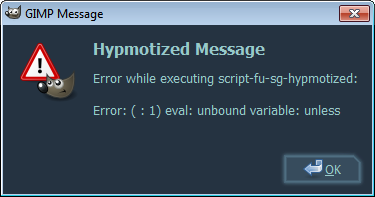
i got this error

Image

this were the setting

Image

EDIT

same with different settings

_________________
My 3D Gallery on Deviantart http://photocomix2.deviantart.com/
Main gallery http://www.flickriver.com/photos/photocomix-mandala/
Mandala and simmetry http://www.flickriver.com/photos/photocomix_mandala/

Image

Mrs Wilbress


Top
 Post subject: Re: Hoping for : Hypno Circles Animator script
PostPosted: Tue Feb 26, 2013 7:22 pm  (#6) 
Offline
Script Coder
User avatar

Joined: Apr 23, 2010
Posts: 1553
Location: not from Guildford after all
'unless' is a macro that should be defined in your script-fu.init file (located in the same folder as the rest of the default scripts). Double check your configuration and your download (the script runs fine for me).

Also, I haven't yet addressed ping-ponging or the darken-only mode. Currently the script displays the offset graphic merged with the original, centered graphic (it is not cumulative). I will try to address that in a day or so.

_________________
Any sufficiently primitive technology is indistinguishable from a rock.


Top
 Post subject: Re: Hoping for : Hypno Circles Animator script
PostPosted: Fri Mar 01, 2013 8:09 am  (#7) 
Offline
GimpChat Member

Joined: Apr 12, 2010
Posts: 5870
i tried on a different build and works wells

Alas i really can't figure out why doesn't do on the Gimp i used more often (that is more exactly a gimpainter build based on gimp 2.8.3) since all other scripts i try did worked

any idea of what may be the issue ? the script_fu.init file is where expected .


Quote:
Also, I haven't yet addressed ping-ponging or the darken-only mode. Currently the script displays the offset graphic merged with the original, centered graphic (it is not cumulative). I will try to address that in a day or so.


I would like much a option for mode and maybe even 2 colors selector to chose FG/BG colors

actually only 1 color selector would be strictly needed since in my concept the second colour should simply be the opposite
( black as opposite to white, red to green, yellow to violet ...) but i fear "opposite colours" may be a too vague indication, and even complex to code ...more complex then add a second colour selector

_________________
My 3D Gallery on Deviantart http://photocomix2.deviantart.com/
Main gallery http://www.flickriver.com/photos/photocomix-mandala/
Mandala and simmetry http://www.flickriver.com/photos/photocomix_mandala/

Image

Mrs Wilbress


Top
Post new topic Reply to topic  [ 7 posts ] 

All times are UTC - 5 hours [ DST ]


* Login  


Powered by phpBB3 © phpBB Group