It is currently Sat Aug 15, 2026 6:21 pm


All times are UTC - 5 hours [ DST ]


Post new topic Reply to topic  [ 11 posts ] 
Author Message
 Post subject: Deskew for win 32 bit
PostPosted: Wed Aug 28, 2013 7:45 am  (#1) 
Offline
Global Moderator
User avatar

Joined: May 16, 2010
Posts: 16158
I went ahead and re compiled the plugin from the GITHUB src here.
https://github.com/prokoudine/gimp-deskew-plugin

Seems to work fine in Gimp-2.8 win 32 bit.
Menu location - Layer>Transform>Deskew
The plugin has no interface widget/dialog window.

Deskew, also called auto straighten, is the automatic rotation of an image such that the text is vertically aligned. This is great for cleaning up scanned documents.

Attachment:
deskew_Gimp-2.8-win32_RD.zip [22.32 KiB]
Downloaded 338 times

_________________
Image


Share on Facebook Share on Twitter Share on Orkut Share on Digg Share on MySpace Share on Delicious Share on Technorati
Top
 Post subject: Re: Deskew for win 32 bit
PostPosted: Wed Aug 28, 2013 8:05 am  (#2) 
Offline
GimpChat Member
User avatar

Joined: Nov 09, 2011
Posts: 726
Hi Rod.

Rod wrote:
This is great for cleaning up scanned documents.


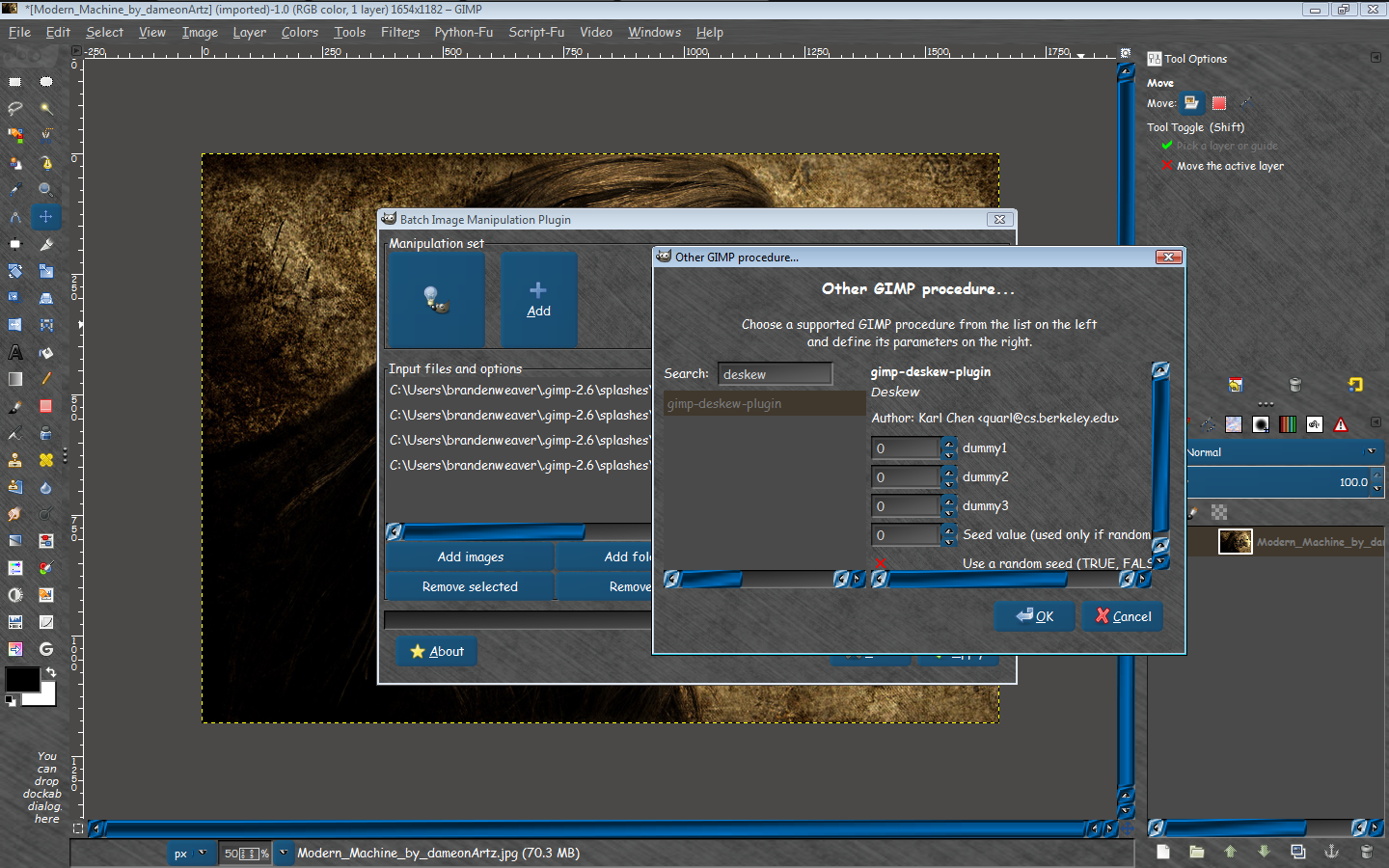
I wonder if this would work fine with BIMP to batch processing.

_________________
Image
Be patient, English is not my language.


Top
 Post subject: Re: Deskew for win 32 bit
PostPosted: Wed Aug 28, 2013 8:39 am  (#3) 
Offline
Global Moderator
User avatar

Joined: May 16, 2010
Posts: 16158
YAFU wrote:
Hi Rod.

Rod wrote:
This is great for cleaning up scanned documents.


I wonder if this would work fine with BIMP to batch processing.


Looks like it will. :)

Image

_________________
Image


Top
 Post subject: Re: Deskew for win 32 bit
PostPosted: Wed Aug 28, 2013 8:49 am  (#4) 
Offline
GimpChat Member
User avatar

Joined: Nov 09, 2011
Posts: 726
@Rod, I just try it and you can choose the plugin from BIMP (1.4). But when apply BIMP the images remain unchanged. I do not understand what those values ​​mean in BIMP regarding Deskew plugin.
I've tried with two skewed documents, and Deskew without BIMP works great.

_________________
Image
Be patient, English is not my language.


Last edited by YAFU on Wed Aug 28, 2013 8:59 am, edited 1 time in total.

Top
 Post subject: Re: Deskew for win 32 bit
PostPosted: Wed Aug 28, 2013 8:58 am  (#5) 
Offline
Global Moderator
User avatar

Joined: May 16, 2010
Posts: 16158
Can you attach those docs here YAFU and i will see what i can do. :)
Or i can send you an PM with my email if you prefer.
There is no documentation on this plugin as the website of the original author seems to be down.

_________________
Image


Top
 Post subject: Re: Deskew for win 32 bit
PostPosted: Wed Aug 28, 2013 9:05 am  (#6) 
Offline
GimpChat Member
User avatar

Joined: Nov 09, 2011
Posts: 726
Here they are, I had found with google images:
http://www.renewamerica.com/images/colu ... _large.jpg
http://www.ampercent.com/wp/wp-content/ ... cument.png

_________________
Image
Be patient, English is not my language.


Top
 Post subject: Re: Deskew for win 32 bit
PostPosted: Fri Aug 30, 2013 7:18 am  (#7) 
Offline
Script Coder
User avatar

Joined: Jun 22, 2010
Posts: 1171
Location: Here and there
Hmm...

I wonder if the problem calling it from BIMP is related to the inability to run the plug-in from a Python script:

http://gimpforums.com/thread-run-deskew ... fu-console
(One of many cross-postings, everywhere but here it seems ;) )

Now I was going to suggest that they try your version as it's been compiled from recent source BUT I just tried it and it gives up when loading GIMP with a failure to find libintl-8.dll and coupled with the BIMP problem I don't hold out much hope.

So if you're up for a challenge could you try calling it from the Python console as described in the GimpForums thread, and then if it doesn't work - trying to debug why.

Kevin


Top
 Post subject: Re: Deskew for win 32 bit
PostPosted: Fri Aug 30, 2013 1:03 pm  (#8) 
Offline
Script Coder
User avatar

Joined: Jun 22, 2010
Posts: 1171
Location: Here and there
Well we got running the plugin from Python problem solved:
pdb.gimp_deskew_plugin(image,drawable,0,0,0,0,0,run_mode=0)

by setting the run mode to interactive, but as this is completely backwards, I don't think you're going to get the plug-in working because BIMP is, understandably, going to be setting the run mode to non-interactive, which causes the plug-in to error.

If I had samj's compilation environment I'd have a go at fixing it, but that's not going to happen in the foreseeable future.

Kevin


Top
 Post subject: Re: Deskew for win 32 bit
PostPosted: Fri Aug 30, 2013 4:18 pm  (#9) 
Offline
GimpChat Member

Joined: May 09, 2012
Posts: 914
Bonjour,

Update Deskew after analyzing Paynekj :tyspin

Edit 20130831
Archive : viewtopic.php?f=7&t=6653&p=109046#p109046


*****

Modification procedure to work with Python.
Example call with python console :

image=gimp.image_list()[0]
drawable=image.active_layer
pdb.gimp_deskew_plugin(image, drawable)


Last edited by samj on Sat Aug 31, 2013 3:17 am, edited 1 time in total.

Top
 Post subject: Re: Deskew for win 32 bit
PostPosted: Fri Aug 30, 2013 4:56 pm  (#10) 
Offline
Global Moderator
User avatar

Joined: May 16, 2010
Posts: 16158
So you do not need the other parameters when running through python console?

_________________
Image


Top
 Post subject: Re: Deskew for win 32 bit
PostPosted: Fri Aug 30, 2013 6:10 pm  (#11) 
Offline
GimpChat Member

Joined: May 09, 2012
Posts: 914
@Rod

This plugin was written from "gimp-plugin-template".
The other parameters are not used.


Top
Post new topic Reply to topic  [ 11 posts ] 

All times are UTC - 5 hours [ DST ]


cron

* Login  


Powered by phpBB3 © phpBB Group