It is currently Fri Aug 14, 2026 4:22 pm


All times are UTC - 5 hours [ DST ]


Post new topic Reply to topic  [ 31 posts ]  Go to page 1, 2  Next
Author Message
 Post subject: Callouts and speech bubbles
PostPosted: Fri Dec 27, 2013 9:59 pm  (#1) 
Offline
GimpChat Member
User avatar

Joined: Oct 07, 2010
Posts: 439
Location: home/Nixnine/.gimp-2.0/scripts/nixnine.scm
Does anyone know of a script that can generate callouts and speech bubbles?

If not, can anyone here write a script for this?

_________________
I refuse to be confused, but am often confused at this refusal.


Share on Facebook Share on Twitter Share on Orkut Share on Digg Share on MySpace Share on Delicious Share on Technorati
Top
 Post subject: Re: Callouts and speech bubbles
PostPosted: Fri Dec 27, 2013 10:02 pm  (#2) 
Offline
GimpChat Member
User avatar

Joined: Nov 16, 2011
Posts: 5127
Location: Metro Vancouver, BC
Like this, Comix Text Bubble?

_________________
Image
Gimp 2.8.18, Linux, median user
Gimp Chat Tutorials Index
Spirit Bear (Kermode)


Top
 Post subject: Re: Callouts and speech bubbles
PostPosted: Fri Dec 27, 2013 10:13 pm  (#3) 
Offline
GimpChat Member
User avatar

Joined: Oct 07, 2010
Posts: 439
Location: home/Nixnine/.gimp-2.0/scripts/nixnine.scm
That is pretty good for speech, Odin. I also need something like these:

Attachment:
2.gif
2.gif [ 10.16 KiB | Viewed 7585 times ]
Attachment:
1.png
1.png [ 12.58 KiB | Viewed 7585 times ]

_________________
I refuse to be confused, but am often confused at this refusal.


Top
 Post subject: Re: Callouts and speech bubbles
PostPosted: Fri Dec 27, 2013 11:22 pm  (#4) 
Offline
Script Coder
User avatar

Joined: Feb 18, 2011
Posts: 4826
Location: Bendigo Vic. Australia
Nixnine I'm trying to find a way to create a sawtooth wave using only default plugins or any script

_________________
Image
No matter how much you push the envelope, it'll still be stationery.


Top
 Post subject: Re: Callouts and speech bubbles
PostPosted: Fri Dec 27, 2013 11:33 pm  (#5) 
Offline
GimpChat Member
User avatar

Joined: Oct 07, 2010
Posts: 439
Location: home/Nixnine/.gimp-2.0/scripts/nixnine.scm
oK. Thanks.

_________________
I refuse to be confused, but am often confused at this refusal.


Top
 Post subject: Re: Callouts and speech bubbles
PostPosted: Sat Dec 28, 2013 2:22 am  (#6) 
Offline
GimpChat Member
User avatar

Joined: Aug 30, 2012
Posts: 2174
Graechan & nixnine

Always up for a challenge and if it helps somebody out even better, Thought I would explore the type of speech bubble you proposed, this is my efforts so far.

Image

I don't think it is as random as it should be on the spikes but here is how I created it.

1. open a new image in gimp, I used 512px * 512px, then select the ellipse tool and draw a selection somewhere in the middle of your canvas, Create a new layer and select, fill selection with white then delete selection.

Image

2. Go>Filters>Distort>Polar Coordinates and run with settings shown below.

Image

3. Go>Filters>Distort>Ripple and run with settings shown below, the only critical setting here is the period value, The number you use here must be a value that can evenly divide the width of your image (e.g. 512/32=16), the reason for this is so the sawtooth will match back up correctly in the next step.

Image

4. The last step in this mini tut is to run the polar filter again to get our image back into an ellipse shape. Run with settings shown below.

Image

That my efforts, of course you could alpha select the images and stroke selection to get just a border.

_________________
Image


Top
 Post subject: Re: Callouts and speech bubbles
PostPosted: Sat Dec 28, 2013 4:22 am  (#7) 
Offline
GimpChat Member
User avatar

Joined: Apr 07, 2010
Posts: 14182
nice job he4rty

_________________
Image


Top
 Post subject: Re: Callouts and speech bubbles
PostPosted: Sat Dec 28, 2013 4:23 am  (#8) 
Offline
GimpChat Member
User avatar

Joined: May 10, 2013
Posts: 1435
Location: FInland
If You want simpler way, there are good scripts already for this.

Method 1.
shape paths:
http://registry.gimp.org/node/59

- create a canvas of your choice, for example 1000x1000px
- menu>script-Fu>Shape paths. Star

center X: 500
center Y: 500
outer radius: 400
inner radius 250
number of points: 12
fill path: yes, choose your color

Tweak shape further with transform tools, if needed.
Add stroke using Layer effects. It´s best to add stroke last if You warp/shear/transform the bubble.

Method 2.
Path waves plug-in:
http://sourceforge.net/projects/gimp-pa ... s/scripts/

- new image
- use ellipse selection tool to create an ellipse
- menu>select>to path
- Go to paths dialog box, right-click the path and choose: decorate/periodic wave/triangle

You might want to run with the default parameters first and then try again.

Right-click the new created path>path to selection.
Go to layers, use bucket fill for the selection.

Method 3. This is the easiest.

Use path tool to create your custom bubble. Takes 3 seconds to make similar to your example.
Right-click the new created path>path to selection.
Go to layers, use bucket fill for the selection.
Add stroke.


Top
 Post subject: Re: Callouts and speech bubbles
PostPosted: Sat Dec 28, 2013 5:46 am  (#9) 
Offline
Administrator
User avatar

Joined: Aug 10, 2012
Posts: 14155
Location: Native to NYC living in Arizona, Gimp 2.8 - 3.0, Win 11 PC.
How about some "speech bubble brushes", try saying that 10 times really fast. :hehe
Image


Attachments:
Gimp Speech Bubble Brushes By Geosammy (2).zip [20.83 KiB]
Downloaded 341 times

_________________
Image
"A wise man learns more from a foolish question than a fool can learn from a wise answer"
Image
Top
 Post subject: Re: Callouts and speech bubbles
PostPosted: Sat Dec 28, 2013 8:01 am  (#10) 
Offline
Script Coder
User avatar

Joined: Oct 25, 2010
Posts: 4812
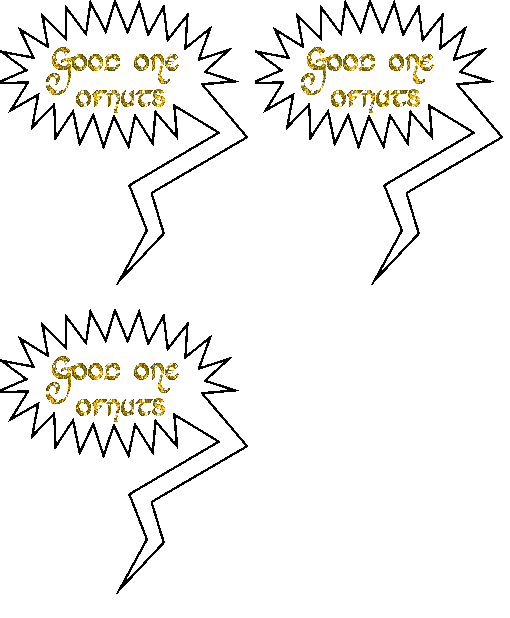
My path-waves script in "Triangle" mode over an elliptical path (Ellipse select, Select/To path). You can then edit the path to add the pointer before stroking:

Attachment:
SpeechBubble-PathWave.png
SpeechBubble-PathWave.png [ 27.63 KiB | Viewed 7466 times ]

_________________
Image


Top
 Post subject: Re: Callouts and speech bubbles
PostPosted: Sat Dec 28, 2013 8:37 am  (#11) 
Offline
GimpChat Member
User avatar

Joined: Apr 07, 2010
Posts: 14182
Image

_________________
Image


Top
 Post subject: Re: Callouts and speech bubbles
PostPosted: Sat Dec 28, 2013 8:41 am  (#12) 
ofnuts wrote:
My path-waves script in "Triangle" mode over an elliptical path (Ellipse select, Select/To path). You can then edit the path to add the pointer before stroking:

Attachment:
SpeechBubble-PathWave.png

I thought I had all of your path related scripts ofnuts, don't know how I missed this one.
:bigthup Thanks.


Top
 Post subject: Re: Callouts and speech bubbles
PostPosted: Sat Dec 28, 2013 9:03 am  (#13) 
Offline
GimpChat Member

Joined: Aug 05, 2011
Posts: 606
Location: limestone,ny
Rods post from 2011


Top
 Post subject: Re: Callouts and speech bubbles
PostPosted: Sat Dec 28, 2013 9:11 am  (#14) 
Offline
GimpChat Member
User avatar

Joined: Apr 07, 2010
Posts: 14182
The link on Post #7 doesn't open for me alc.
viewtopic.php?p=38318#p38318

_________________
Image


Top
 Post subject: Re: Callouts and speech bubbles
PostPosted: Sat Dec 28, 2013 9:15 am  (#15) 
Offline
GimpChat Member

Joined: Aug 05, 2011
Posts: 606
Location: limestone,ny
Strange, i linked to rods 1st post
opens right to rods zip attachment for me


Top
 Post subject: Re: Callouts and speech bubbles
PostPosted: Sat Dec 28, 2013 9:18 am  (#16) 
Offline
GimpChat Member
User avatar

Joined: Apr 07, 2010
Posts: 14182
I was referring to the link to the tutorial posted by Mr. Biggs. Post #7

This is the one I found!

Gimp Tutorial – Photo and Text Merge

_________________
Image


Top
 Post subject: Re: Callouts and speech bubbles
PostPosted: Sat Dec 28, 2013 9:36 am  (#17) 
Offline
GimpChat Founder
User avatar

Joined: May 22, 2008
Posts: 5241
Location: Gimpville
molly wrote:
The link on Post #7 doesn't open for me alc.
http://www.gimpchat.com/viewtopic.php?p=38318#p38318

I fixed this post, adding a PDF of the tutorial.

_________________
“If you reach for the stars, you just might land on a decently sized hill.” - Stuart Hill


Top
 Post subject: Re: Callouts and speech bubbles
PostPosted: Sat Dec 28, 2013 9:48 am  (#18) 
Offline
GimpChat Member
User avatar

Joined: Apr 07, 2010
Posts: 14182
ooops I meant thanks tux, I will check it out :oops:

_________________
Image


Top
 Post subject: Re: Callouts and speech bubbles
PostPosted: Sat Dec 28, 2013 10:08 am  (#19) 
Offline
GimpChat Member

Joined: Aug 05, 2011
Posts: 606
Location: limestone,ny
I see, i thought you were talking about the post for the speech bubble font, but you were talking about the other link on the post for photo text merge :pengy I didn't even try that..
been sick all week, still not thinking right i guess


Top
 Post subject: Re: Callouts and speech bubbles
PostPosted: Sat Dec 28, 2013 10:13 am  (#20) 
Offline
Script Coder
User avatar

Joined: Oct 25, 2010
Posts: 4812
Quote:
I thought I had all of your path related scripts ofnuts, don't know how I missed this one.
:bigthup Thanks.


The only person to have all my path scripts is yours truly :)

Path-waves is fairly old (summer 2011), you weren't there yet when I published it.

_________________
Image


Top
Post new topic Reply to topic  [ 31 posts ]  Go to page 1, 2  Next

All times are UTC - 5 hours [ DST ]


* Login  


Powered by phpBB3 © phpBB Group