It is currently Sun Aug 16, 2026 2:47 pm


All times are UTC - 5 hours [ DST ]


Post new topic Reply to topic  [ 18 posts ] 
Author Message
 Post subject: I lost Graechan "wallpaper" script
PostPosted: Wed Aug 14, 2013 2:05 pm  (#1) 
Offline
GimpChat Member

Joined: Apr 12, 2010
Posts: 5870
Time ago i ask for a script to automatize creation of wallpaper and from Graechan magic hat pop out a cool batch script that may :

scale the image(s) using normal scaling or liquid rescale
export as jpg or png adding as postfix to the original file name the new image size (i.e. "image" become "image_1600x1200")

Anyway i lost the script, i could not find using GC search (also because script name was not "wallpaper", that was my planned use
i hope are more copies around
-----------------------------------------------------------------------------------------------------------------------------------------
And ...would be possible modify the script ?

1) scale the image using gimp "scale" or "liquid rescale" OR gmic > testing>PhotoComix> Scale Down Neat
(it has a automatic option "automatic preblur" so may be used to call in not interactive way )

2) add 2 or 3 boxes for the most commune format
( i.e. for 4/3 screen:
"2048x1536"
"1600x1200"
"1200x900" )


[/b][/i]

_________________
My 3D Gallery on Deviantart http://photocomix2.deviantart.com/
Main gallery http://www.flickriver.com/photos/photocomix-mandala/
Mandala and simmetry http://www.flickriver.com/photos/photocomix_mandala/

Image

Mrs Wilbress


Share on Facebook Share on Twitter Share on Orkut Share on Digg Share on MySpace Share on Delicious Share on Technorati
Top
 Post subject: Re: I lost Graechan "wallpaper" script
PostPosted: Wed Aug 14, 2013 2:33 pm  (#2) 
Offline
Global Moderator
User avatar

Joined: May 16, 2010
Posts: 16161
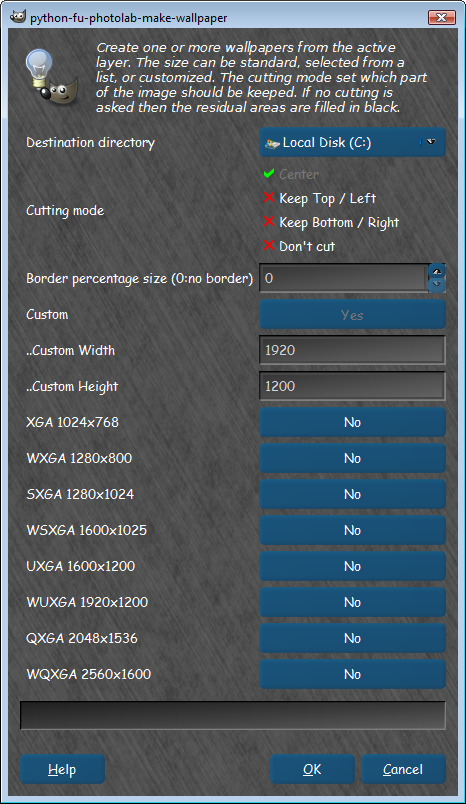
PC try http://registry.gimp.org/node/157 (PhotoLab Script Set)
Exceptional! :)

Image

Image

_________________
Image


Top
 Post subject: Re: I lost Graechan "wallpaper" script
PostPosted: Wed Aug 14, 2013 2:45 pm  (#3) 
Offline
New Member

Joined: May 07, 2010
Posts: 4
thx :)


Top
 Post subject: Re: I lost Graechan "wallpaper" script
PostPosted: Wed Aug 14, 2013 5:17 pm  (#4) 
Offline
GimpChat Member

Joined: Apr 12, 2010
Posts: 5870
@Rod
that doesn't allow to use Liquid Rescale, or Gmic>Scale Down Net to rescale
But for the rest would be perfect maybe could be modified to add options to call GMIC and/or Liquid Rescale

BEFORE I FORGOT THE LAST STEP OF THIS IDEAL WALLPAPER SCRIPT OR PLUGIN:

1) scale the image using gimp "scale" or "liquid rescale" OR gmic > testing>PhotoComix> Scale Down Neat
(it has a automatic option "automatic preblur" so may be used to call in not interactive way )

2) add a few boxes for the most commune format
( i.e. for 4/3 screen:
"2048x1536"
"1600x1200" )

3 apply a "frame+title+copyright" script
for the title user chose font and font size, the title is the image name
(the script is intended to be used in batch on series of already saved images , so they all have already a name

(

_________________
My 3D Gallery on Deviantart http://photocomix2.deviantart.com/
Main gallery http://www.flickriver.com/photos/photocomix-mandala/
Mandala and simmetry http://www.flickriver.com/photos/photocomix_mandala/

Image

Mrs Wilbress


Top
 Post subject: Re: I lost Graechan "wallpaper" script
PostPosted: Wed Aug 14, 2013 9:50 pm  (#5) 
Offline
Script Coder
User avatar

Joined: Feb 18, 2011
Posts: 4826
Location: Bendigo Vic. Australia
PhotoComix I still have the script and can post for you again, I'm also willing to work on it again adding 'scale down neat' and the preset sizes

_________________
Image
No matter how much you push the envelope, it'll still be stationery.


Top
 Post subject: Re: I lost Graechan "wallpaper" script
PostPosted: Thu Aug 15, 2013 7:51 am  (#6) 
Offline
Global Moderator
User avatar

Joined: May 16, 2010
Posts: 16161
Graechan wrote:
PhotoComix I still have the script and can post for you again, I'm also willing to work on it again adding 'scale down neat' and the preset sizes

Having a pre blur option before scaling would be excellent Graechan. :) :bigthup

_________________
Image


Top
 Post subject: Re: I lost Graechan "wallpaper" script
PostPosted: Thu Aug 15, 2013 8:05 am  (#7) 
Offline
GimpChat Member

Joined: Apr 12, 2010
Posts: 5870
Graechan wrote:
PhotoComix I still have the script and can post for you again, I'm also willing to work on it again adding 'scale down neat' and the preset sizes


:jumpclap :clap :coolthup :tyspin

_________________
My 3D Gallery on Deviantart http://photocomix2.deviantart.com/
Main gallery http://www.flickriver.com/photos/photocomix-mandala/
Mandala and simmetry http://www.flickriver.com/photos/photocomix_mandala/

Image

Mrs Wilbress


Top
 Post subject: Re: I lost Graechan "wallpaper" script
PostPosted: Thu Aug 15, 2013 3:08 pm  (#8) 
Offline
GimpChat Member
User avatar

Joined: Aug 30, 2012
Posts: 2174
I would be interested in this script, I'm also interested in robs mention of pre blur prior to scaling, this is a new method to me and could you possible explain further.

_________________
Image


Top
 Post subject: Re: I lost Graechan "wallpaper" script
PostPosted: Thu Aug 15, 2013 4:46 pm  (#9) 
Offline
GimpChat Member

Joined: Apr 12, 2010
Posts: 5870
he4rty wrote:
I would be interested in this script, I'm also interested in robs mention of pre blur prior to scaling, this is a new method to me and could you possible explain further.


I use the pre-blur in "Scale Down Neat" the filter was discussed here viewtopic.php?f=28&t=5343&start=30&hilit=scale+down+neat and there also link for a more generic discussion on pre blur and scaling

Testing i found the theoretical amount of pre-blur a bit excessive for the type of images i edit (3D renders and photo manipulation )

Less , as 2 px of gaussian blur to scale down 4:1 a 4,800X3,600 still minimize aliasing, but has a better effect on the very fine and sharp noise often present in 3d render :
it doesn't make the noise vanish but less intrusive, as a sort of vague texture that may even add the sensation of depth

"Automatic pre-blur" calculate and apply the blur according to the theory (2.00 to scale down 2:1, 3.00 to scale down 3:1 and so on
"Automatic pre-blur" may be switch off to allow manual fine tuning

_________________
My 3D Gallery on Deviantart http://photocomix2.deviantart.com/
Main gallery http://www.flickriver.com/photos/photocomix-mandala/
Mandala and simmetry http://www.flickriver.com/photos/photocomix_mandala/

Image

Mrs Wilbress


Top
 Post subject: Re: I lost Graechan "wallpaper" script
PostPosted: Thu Aug 15, 2013 8:26 pm  (#10) 
Offline
Script Coder
User avatar

Joined: Feb 18, 2011
Posts: 4826
Location: Bendigo Vic. Australia
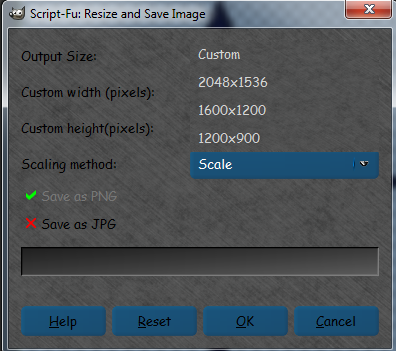
The menu so far has drop-down for size choice and scaling method

note! the Gimps scale can distort image

Image

If I post now it is still a work in progress i.e. I sill need to add Gmic's scale neat e.t.c.

_________________
Image
No matter how much you push the envelope, it'll still be stationery.


Top
 Post subject: Re: I lost Graechan "wallpaper" script
PostPosted: Thu Aug 15, 2013 9:59 pm  (#11) 
Offline
Global Moderator
User avatar

Joined: May 16, 2010
Posts: 16161
Looking good Graechan. :)

_________________
Image


Top
 Post subject: Re: I lost Graechan "wallpaper" script
PostPosted: Thu Aug 15, 2013 10:46 pm  (#12) 
Offline
Script Coder
User avatar

Joined: Feb 18, 2011
Posts: 4826
Location: Bendigo Vic. Australia
Just doing Gmic now then I'll post for people to play with it

_________________
Image
No matter how much you push the envelope, it'll still be stationery.


Top
 Post subject: Re: I lost Graechan "wallpaper" script
PostPosted: Thu Aug 15, 2013 10:52 pm  (#13) 
Offline
Global Moderator
User avatar

Joined: May 16, 2010
Posts: 16161
Graechan wrote:
Just doing Gmic now then I'll post for people to play with it


Goody Goody. :)

_________________
Image


Top
 Post subject: Re: I lost Graechan "wallpaper" script
PostPosted: Fri Aug 16, 2013 1:37 am  (#14) 
Offline
Script Coder
User avatar

Joined: Feb 18, 2011
Posts: 4826
Location: Bendigo Vic. Australia
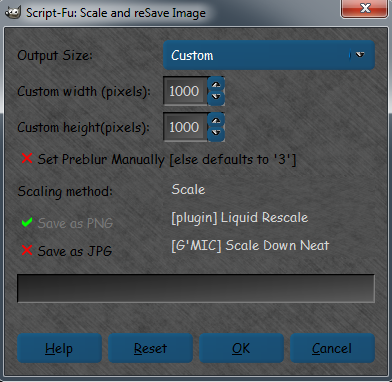
The Script works perfectly with Gmic and preblur added just have the batch file to do before launching on GimpChat :geek

Edit Batch file now OK will post Script tomorrow gotta have some Grub now

Image

Image

_________________
Image
No matter how much you push the envelope, it'll still be stationery.


Top
 Post subject: Re: I lost Graechan "wallpaper" script
PostPosted: Fri Aug 16, 2013 8:03 am  (#15) 
Offline
Global Moderator
User avatar

Joined: May 16, 2010
Posts: 16161
I can't wait to test it out. :)

_________________
Image


Top
 Post subject: Re: I lost Graechan "wallpaper" script
PostPosted: Sat Aug 17, 2013 12:55 am  (#16) 
Offline
Script Coder
User avatar

Joined: Feb 18, 2011
Posts: 4826
Location: Bendigo Vic. Australia
Scale and Re-Save Script has now been posted in it's own thread

_________________
Image
No matter how much you push the envelope, it'll still be stationery.


Top
 Post subject: Re: I lost Graechan "wallpaper" script
PostPosted: Sat Aug 17, 2013 8:47 am  (#17) 
Offline
Global Moderator
User avatar

Joined: May 16, 2010
Posts: 16161
Sweet! :)
I will test when i return from my hike.

Thank you.

_________________
Image


Top
 Post subject: Re: I lost Graechan "wallpaper" script
PostPosted: Sat Aug 17, 2013 7:52 pm  (#18) 
Offline
Script Coder
User avatar

Joined: Feb 18, 2011
Posts: 4826
Location: Bendigo Vic. Australia
Rod could you use other thread (or else I get confused)

_________________
Image
No matter how much you push the envelope, it'll still be stationery.


Top
Post new topic Reply to topic  [ 18 posts ] 

All times are UTC - 5 hours [ DST ]


* Login  


Powered by phpBB3 © phpBB Group