It is currently Wed Oct 07, 2026 2:07 pm


All times are UTC - 5 hours [ DST ]


Post new topic Reply to topic  [ 123 posts ]  Go to page Previous  1, 2, 3, 4, 5 ... 7  Next
Author Message
 Post subject: Re: "Interlacing Text" Tutorial
PostPosted: Wed Apr 02, 2014 4:06 pm  (#21) 
Offline
GimpChat Member
User avatar

Joined: Jun 02, 2013
Posts: 2090
GnuTux wrote:
The Warrior wrote:
have used the 3D Extrusion Script for this a few times.

Actually, the 3D Extrusion script started out as a modification to that old Make 3D Text Script, which didn't extrude alpha to selections. It had other problems, as well, specifically with the Bump Map code. I finally just abandoned the old code and rewrote it from scratch to create 3D Extrusion V2.0.

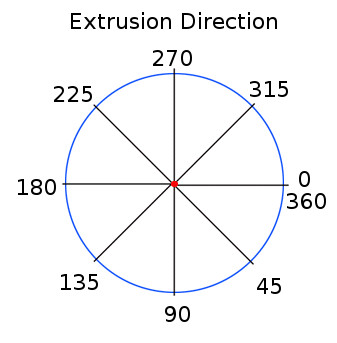
The 3D Extrusion script is much better, for sure, but I always forget the directional settings, haha. The other is top, bottom, right or left. Easier to remember for me. :mrgreen:

_________________
Image


Top
 Post subject: Re: "Interlacing Text" Tutorial
PostPosted: Wed Apr 02, 2014 4:19 pm  (#22) 
Offline
GimpChat Member
User avatar

Joined: Apr 07, 2010
Posts: 14182
Me too. Top, bottom, left, right works for me. I can't understand those other settings, never was any good at that stuff.

_________________
Image


Top
 Post subject: Re: "Interlacing Text" Tutorial
PostPosted: Wed Apr 02, 2014 4:28 pm  (#23) 
Offline
GimpChat Member
User avatar

Joined: Jun 02, 2013
Posts: 2090
molly wrote:
Me too. Top, bottom, left, right works for me. I can't understand those other settings, never was any good at that stuff.

I hear ya. I did study, and know that 0 is to the right, and progresses clockwise from there. I used GT's diagram:

Image

_________________
Image


Top
 Post subject: Re: "Interlacing Text" Tutorial
PostPosted: Wed Apr 02, 2014 4:37 pm  (#24) 
Offline
GimpChat Member
User avatar

Joined: Apr 07, 2010
Posts: 14182
I know, I have that thing on my desktop. Still doesn't make any sense to me.
I AM A NERD.

_________________
Image


Top
 Post subject: Re: "Interlacing Text" Tutorial
PostPosted: Wed Apr 02, 2014 4:41 pm  (#25) 
Offline
GimpChat Member
User avatar

Joined: Jun 02, 2013
Posts: 2090
molly wrote:
I know, I have that thing on my desktop. Still doesn't make any sense to me.
I AM A NERD.

Haha, I keep it on my desktop too. :mrgreen:

_________________
Image


Top
 Post subject: Re: "Interlacing Text" Tutorial
PostPosted: Wed Apr 02, 2014 5:08 pm  (#26) 
Offline
Administrator
User avatar

Joined: Aug 10, 2012
Posts: 14236
Location: Native to NYC living in Arizona, Gimp 2.8 - 3.0, Win 11 PC.
How's this interpretation?
Image

_________________
Image
"A wise man learns more from a foolish question than a fool can learn from a wise answer"
Image


Top
 Post subject: Re: "Interlacing Text" Tutorial
PostPosted: Wed Apr 02, 2014 5:14 pm  (#27) 
Offline
GimpChat Member
User avatar

Joined: Jun 02, 2013
Posts: 2090
Wallace wrote:
How's this interpretation?
[ Image ]

Haha, nice! :coolthup I was hoping to see a lot of creativity here, and I'm getting it. :bigthup

_________________
Image


Top
 Post subject: Re: "Interlacing Text" Tutorial
PostPosted: Wed Apr 02, 2014 5:15 pm  (#28) 
Offline
GimpChat Member

Joined: Mar 29, 2014
Posts: 21
Great texts, I as well like these words with letters that seem to be wrapped around the upper letters. I just finished doing this tutorial, but when I see these other nicely done creations, I already want to make another one haha. ( and actually, why not :) )

This I did:

Attachment:
Interlacing Text.gif
Interlacing Text.gif [ 562.32 KiB | Viewed 2215 times ]


Top
 Post subject: Re: "Interlacing Text" Tutorial
PostPosted: Wed Apr 02, 2014 5:46 pm  (#29) 
Offline
GimpChat Member
User avatar

Joined: Jun 02, 2013
Posts: 2090
Mathijs wrote:
Great texts, I as well like these words with letters that seem to be wrapped around the upper letters. I just finished doing this tutorial, but when I see these other nicely done creations, I already want to make another one haha. ( and actually, why not :) )

This I did:

Attachment:
Interlacing Text.gif

Nice work! :bigthup I don't know about you guys, but after I discovered this, I couldn't stop making things with this technique. It's addicting.

_________________
Image


Top
 Post subject: Re: "Interlacing Text" Tutorial
PostPosted: Wed Apr 02, 2014 5:50 pm  (#30) 
Offline
GimpChat Member
User avatar

Joined: Apr 07, 2010
Posts: 14182
Very nice guys. Wallace, I love you text and colors but I can't read what it says.
Mathijs, your colors blend beautifully

_________________
Image


Top
 Post subject: Re: "Interlacing Text" Tutorial
PostPosted: Wed Apr 02, 2014 5:55 pm  (#31) 
Offline
Script Coder
User avatar

Joined: Feb 18, 2011
Posts: 4826
Location: Bendigo Vic. Australia
Molly I was hoping you could post a PDF

_________________
Image
No matter how much you push the envelope, it'll still be stationery.


Top
 Post subject: Re: "Interlacing Text" Tutorial
PostPosted: Wed Apr 02, 2014 6:03 pm  (#32) 
Offline
Administrator
User avatar

Joined: Aug 10, 2012
Posts: 14236
Location: Native to NYC living in Arizona, Gimp 2.8 - 3.0, Win 11 PC.
molly wrote:
Very nice guys. Wallace, I love you text and colors but I can't read what it says.
Mathijs, your colors blend beautifully

Thanks, it says "Civil Unrest". :hehe

_________________
Image
"A wise man learns more from a foolish question than a fool can learn from a wise answer"
Image


Top
 Post subject: Re: "Interlacing Text" Tutorial
PostPosted: Wed Apr 02, 2014 6:03 pm  (#33) 
Offline
GimpChat Founder
User avatar

Joined: May 22, 2008
Posts: 5241
Location: Gimpville
Nice results, Everyone. :bigthup

I got the wrap around effect I was going for with this one.

Image

_________________
“If you reach for the stars, you just might land on a decently sized hill.” - Stuart Hill


Top
 Post subject: Re: "Interlacing Text" Tutorial
PostPosted: Wed Apr 02, 2014 6:04 pm  (#34) 
Offline
GimpChat Member
User avatar

Joined: Apr 07, 2010
Posts: 14182
Wow, that must have been a challenge.

_________________
Image


Top
 Post subject: Re: "Interlacing Text" Tutorial
PostPosted: Wed Apr 02, 2014 6:06 pm  (#35) 
Offline
GimpChat Founder
User avatar

Joined: May 22, 2008
Posts: 5241
Location: Gimpville
Not really. Just size and position the letters and it wraps. :hehe

_________________
“If you reach for the stars, you just might land on a decently sized hill.” - Stuart Hill


Top
 Post subject: Re: "Interlacing Text" Tutorial
PostPosted: Wed Apr 02, 2014 6:09 pm  (#36) 
Offline
GimpChat Member
User avatar

Joined: Apr 07, 2010
Posts: 14182
you mean it wraps by itself? Hmmmm. I was thinking of making a pole dancer wrapped around a pole. lol

_________________
Image


Top
 Post subject: Re: "Interlacing Text" Tutorial
PostPosted: Wed Apr 02, 2014 6:16 pm  (#37) 
Offline
GimpChat Founder
User avatar

Joined: May 22, 2008
Posts: 5241
Location: Gimpville
Once I had positioned the letters correctly and merged the two BRL'd images, I extruded at an angle of 270 degrees, which gave me the wrap effect.

_________________
“If you reach for the stars, you just might land on a decently sized hill.” - Stuart Hill


Top
 Post subject: Re: "Interlacing Text" Tutorial
PostPosted: Wed Apr 02, 2014 6:18 pm  (#38) 
Offline
GimpChat Member
User avatar

Joined: Apr 07, 2010
Posts: 14182
Thank you, I will have to ponder that a while then try it in the morning.

_________________
Image


Top
 Post subject: Re: "Interlacing Text" Tutorial
PostPosted: Wed Apr 02, 2014 6:19 pm  (#39) 
Offline
GimpChat Member
User avatar

Joined: Jun 02, 2013
Posts: 2090
Very cool GT. Here's another I just finished:

Image

_________________
Image


Top
 Post subject: Re: "Interlacing Text" Tutorial
PostPosted: Wed Apr 02, 2014 6:33 pm  (#40) 
Offline
GimpChat Member
User avatar

Joined: Apr 07, 2010
Posts: 14182
nice job Warrior. good thing that isn't a guillotine

_________________
Image


Top
Post new topic Reply to topic  [ 123 posts ]  Go to page Previous  1, 2, 3, 4, 5 ... 7  Next

All times are UTC - 5 hours [ DST ]


* Login  


Powered by phpBB3 © phpBB Group