It is currently Mon Aug 17, 2026 2:30 pm


All times are UTC - 5 hours [ DST ]


Post new topic Reply to topic  [ 39 posts ]  Go to page 1, 2  Next
Author Message
 Post subject: Multi Band Blending
PostPosted: Sat Apr 26, 2014 5:28 am  (#1) 
Offline
GimpChat Member

Joined: Mar 04, 2011
Posts: 2612
Multi Band Blending
http://registry.gimp.org/node/31957
Early days but it might be useful for those bad-hair replace background images.

Image

Took a little adjustment to get it to compile for 32 bit linux, but I got there.
This might be similar to the G'mic option blend-seamless.


Share on Facebook Share on Twitter Share on Orkut Share on Digg Share on MySpace Share on Delicious Share on Technorati
Top
 Post subject: Re: Multi Band Blending
PostPosted: Sat Apr 26, 2014 7:18 am  (#2) 
Offline
Global Moderator
User avatar

Joined: Apr 01, 2012
Posts: 8457
Location: On the other side of your screen
Looks good

_________________
Image
Free Fun Photo Editing & resources
Poems from the Lord
Gimp Newby
Gimp version 3.2.4 and GMIC-Qt 4.0.2 OS :- Windows 10 Home 64


Top
 Post subject: Re: Multi Band Blending
PostPosted: Sat Apr 26, 2014 7:36 am  (#3) 
Offline
GimpChat Member
User avatar

Joined: Apr 07, 2010
Posts: 14182
I downloaded the linux 64 bit one but it was for ubuntu and I placed it into my .gimp-2.8/plug-ins.
opened gimp and it shows under Scripts > Multi-band- blending.

Should the top layer be transparent?

_________________
Image


Top
 Post subject: Re: Multi Band Blending
PostPosted: Sat Apr 26, 2014 8:11 am  (#4) 
Offline
GimpChat Member

Joined: Mar 04, 2011
Posts: 2612
You need three layers; the new background, the foreground, and a mask to define what is to remain of the foreground.

There are some restrictions, all layers have alpha or none have alpha and all layers the same size.

Image

It does tend to alter the colours, depending on the new background, so not a universal fix.
I looked up the references and not the same algorithm as Gmic.
Looks like one to pull out of the toolbox when required.


Top
 Post subject: Re: Multi Band Blending
PostPosted: Sat Apr 26, 2014 8:44 am  (#5) 
Offline
GimpChat Member
User avatar

Joined: Jan 20, 2013
Posts: 14831
Location: roma, italy
very nice filter!!!

_________________
"Where am I ?"


Top
 Post subject: Re: Multi Band Blending
PostPosted: Sat Apr 26, 2014 9:05 am  (#6) 
Offline
GimpChat Member
User avatar

Joined: Apr 07, 2010
Posts: 14182
rich2005 wrote:
You need three layers; the new background, the foreground, and a mask to define what is to remain of the foreground.

There are some restrictions, all layers have alpha or none have alpha and all layers the same size.

[ Image ]

It does tend to alter the colours, depending on the new background, so not a universal fix.
I looked up the references and not the same algorithm as Gmic.
Looks like one to pull out of the toolbox when required.


Thanks Rich, I thought the filter added the mask. I will try it again.

_________________
Image


Top
 Post subject: Re: Multi Band Blending
PostPosted: Sat Apr 26, 2014 10:37 am  (#7) 
Offline
GimpChat Member
User avatar

Joined: Jun 02, 2013
Posts: 2090
Pretty cool:

Image

Image

Image

_________________
Image


Top
 Post subject: Re: Multi Band Blending
PostPosted: Sat Apr 26, 2014 11:45 am  (#8) 
Offline
GimpChat Member
User avatar

Joined: Apr 07, 2010
Posts: 14182
Nice job warrior. I just can't get it to copy to the mask. I made a transparent layer, added a white layer mast, I then put a background layer above that one, then at the top I have the picture that I want to add to the layer below it.
Did you make a selection, if so what layer did you make the selection and what layer did you run the filter.
My filter dialogue opens but it hasn't got any info on it ,
Image

_________________
Image


Top
 Post subject: Re: Multi Band Blending
PostPosted: Sat Apr 26, 2014 2:19 pm  (#9) 
Offline
GimpChat Member
User avatar

Joined: Dec 02, 2012
Posts: 203
Location: Cantabria, Spain
#Molly:
I had the same problem as you.
To solve it is better than you compile this plugin, but you'll must change somethings in the makefile file:

change the code lines
-I/usr/lib/x86_64-linux-gnu/glib-2.0/include -I/usr/lib/x86_64-linux-gnu/gtk-2.0/include

in the compiler by these ones
-I/usr/lib64/glib-2.0/include -I/usr/lib64/gtk-2.0/include

so, open makefile with gedit (or similar), erase and write. Save makefile and compile the plugin as it said in the Readme file.

_________________
Image


My Gimp rides on Antergos (Arch), Linux Mint, Debian and Fedora


Last edited by jamac4k on Sat Apr 26, 2014 6:16 pm, edited 1 time in total.

Top
 Post subject: Re: Multi Band Blending
PostPosted: Sat Apr 26, 2014 3:23 pm  (#10) 
Offline
GimpChat Member
User avatar

Joined: Apr 07, 2010
Posts: 14182
Ok, thanks, if will try it but I know nothing about compiling. At least if I mess it up, I can start over.

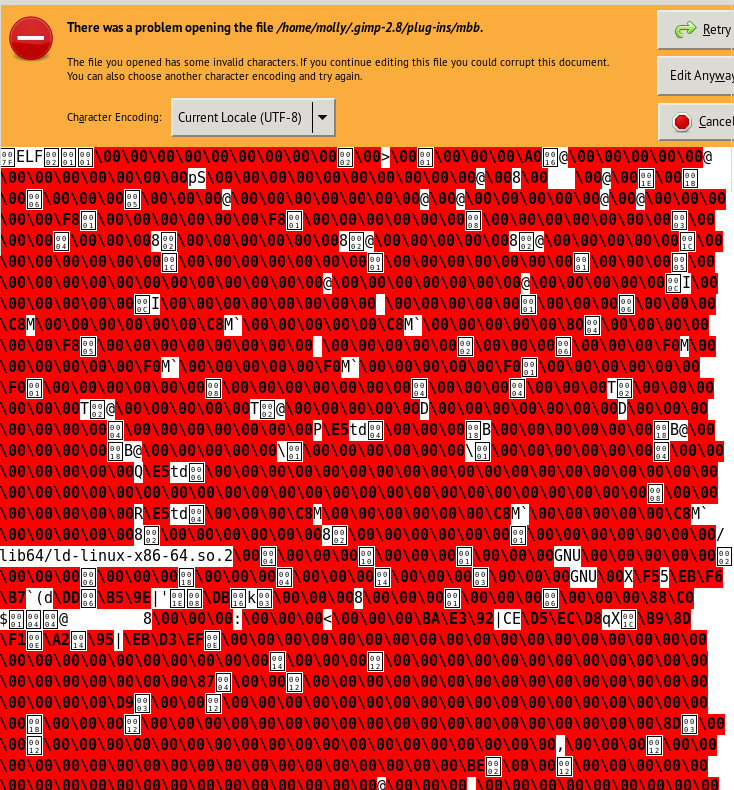
EDIT: @jamac4k, I tried opening the MBB plug-in with gedit, Kate and Geany. All 3 are coded in red with characters instead of text so I can't alter anything. This is the first time I have ever not been able to open a plug-in or scm.
Image

_________________
Image


Top
 Post subject: Re: Multi Band Blending
PostPosted: Sat Apr 26, 2014 4:11 pm  (#11) 
Offline
GimpChat Member
User avatar

Joined: Jun 02, 2013
Posts: 2090
molly wrote:
Nice job warrior. I just can't get it to copy to the mask. I made a transparent layer, added a white layer mast, I then put a background layer above that one, then at the top I have the picture that I want to add to the layer below it.
Did you make a selection, if so what layer did you make the selection and what layer did you run the filter.
My filter dialogue opens but it hasn't got any info on it ,
[ Image ]

Doesn't matter what layer is selected. It figures it out. Here's a test .xcf you can try.


Attachments:
blendtest.xcf [3.53 MiB]
Downloaded 134 times

_________________
Image
Top
 Post subject: Re: Multi Band Blending
PostPosted: Sat Apr 26, 2014 5:23 pm  (#12) 
Offline
GimpChat Member
User avatar

Joined: Dec 02, 2012
Posts: 203
Location: Cantabria, Spain
#Molly:
You must get the source code of MBB and download it. Can get it using git clone or download one zip folder with MBB inside. Unzip it where usually do it (desktop, download folder, etc).
Look for a file named MAKEFILE in this unzipped folder. Open MAKEFILE with gedit (or as you like).
Change the lines as I tell you upper.
Save MAKEFILE
Open Command-line console
Type cd /home/your_user/Folder/gimp-mbb-778e757fac14(this is the name of unzipped mbb that I got)
type make

As I'm thinking that you will be confuse with my explanation (english isn't my mother language) I have linked this to my mbb copy installed in fedora 19.
Copy it in ./gimp-2.8/plug-ins and verify permissions.

#Notice:
Everyone can compile without adjust MBB in Debian7 64bits.

_________________
Image


My Gimp rides on Antergos (Arch), Linux Mint, Debian and Fedora


Last edited by jamac4k on Sat Apr 26, 2014 6:17 pm, edited 2 times in total.

Top
 Post subject: Re: Multi Band Blending
PostPosted: Sat Apr 26, 2014 5:32 pm  (#13) 
Offline
GimpChat Member
User avatar

Joined: Mar 10, 2014
Posts: 845
rich2005 wrote:
Multi Band Blending
http://registry.gimp.org/node/31957
Early days but it might be useful for those bad-hair replace background images.

[ Image ]

Took a little adjustment to get it to compile for 32 bit linux, but I got there.
This might be similar to the G'mic option blend-seamless.

The filter is working fine! Thank you Windows32bit


Top
 Post subject: Re: Multi Band Blending
PostPosted: Sat Apr 26, 2014 6:17 pm  (#14) 
Offline
GimpChat Member
User avatar

Joined: Apr 07, 2010
Posts: 14182
jamac4k, I downloaded and installed your MBB plug-in and gave it permissions, deleted the old one, opened gimp and no sign of it. I tried all that make stuff and by the time I fooled with it until my head started to bang, I couldn't do it. I guess I will just have do do without it.

Image

_________________
Image


Top
 Post subject: Re: Multi Band Blending
PostPosted: Sat Apr 26, 2014 6:24 pm  (#15) 
Offline
GimpChat Member
User avatar

Joined: Apr 07, 2010
Posts: 14182
The Warrior wrote:
molly wrote:
Nice job warrior. I just can't get it to copy to the mask. I made a transparent layer, added a white layer mast, I then put a background layer above that one, then at the top I have the picture that I want to add to the layer below it.
Did you make a selection, if so what layer did you make the selection and what layer did you run the filter.
My filter dialogue opens but it hasn't got any info on it ,
[ Image ]

Doesn't matter what layer is selected. It figures it out. Here's a test .xcf you can try.

Warrior, I opened your xcf and the girl didn't blend into the background, was it supposed to, You can't see her unless you turn the background off then she isn't blended. Anyway, it is still annoying me that it isn't working for me.

_________________
Image


Top
 Post subject: Re: Multi Band Blending
PostPosted: Sat Apr 26, 2014 6:32 pm  (#16) 
Offline
GimpChat Member
User avatar

Joined: Dec 02, 2012
Posts: 203
Location: Cantabria, Spain
#Molly:
Look or check again for the permissions. Sometimes plugins not appear when haven't the permissions.
I just installed the mbb compiled in fedora on my debian and it works.

Try this:
delete mbb
reinstall my mbb again and give it permissions.
perhaps you delete all mbb when you delete the old.

_________________
Image


My Gimp rides on Antergos (Arch), Linux Mint, Debian and Fedora


Last edited by jamac4k on Sat Apr 26, 2014 6:36 pm, edited 1 time in total.

Top
 Post subject: Re: Multi Band Blending
PostPosted: Sat Apr 26, 2014 6:34 pm  (#17) 
Offline
Script Coder
User avatar

Joined: Feb 18, 2011
Posts: 4826
Location: Bendigo Vic. Australia
Molly you could always try it in your Windows partition :hehe

_________________
Image
No matter how much you push the envelope, it'll still be stationery.


Top
 Post subject: Re: Multi Band Blending
PostPosted: Sat Apr 26, 2014 6:39 pm  (#18) 
Offline
GimpChat Member
User avatar

Joined: Apr 07, 2010
Posts: 14182
You devil you... You know I hate windoze. I just might try it just to see how it works but I want it to work in fedora. I won't try it tonight though, it wore me down.

_________________
Image


Top
 Post subject: Re: Multi Band Blending
PostPosted: Sat Apr 26, 2014 6:44 pm  (#19) 
Offline
Script Coder
User avatar

Joined: Feb 18, 2011
Posts: 4826
Location: Bendigo Vic. Australia
Molly it does work well on Backgrounds
Image

_________________
Image
No matter how much you push the envelope, it'll still be stationery.


Top
 Post subject: Re: Multi Band Blending
PostPosted: Sat Apr 26, 2014 6:53 pm  (#20) 
Offline
GimpChat Member
User avatar

Joined: Apr 07, 2010
Posts: 14182
Show me one you did

_________________
Image


Top
Post new topic Reply to topic  [ 39 posts ]  Go to page 1, 2  Next

All times are UTC - 5 hours [ DST ]


* Login  


Powered by phpBB3 © phpBB Group