It is currently Thu Aug 13, 2026 8:23 am


All times are UTC - 5 hours [ DST ]


Post new topic Reply to topic  [ 14 posts ] 
Author Message
 Post subject: My try of enhancing...
PostPosted: Wed Nov 12, 2014 10:14 am  (#1) 
Offline
Global Moderator
User avatar

Joined: Apr 01, 2012
Posts: 8457
Location: On the other side of your screen
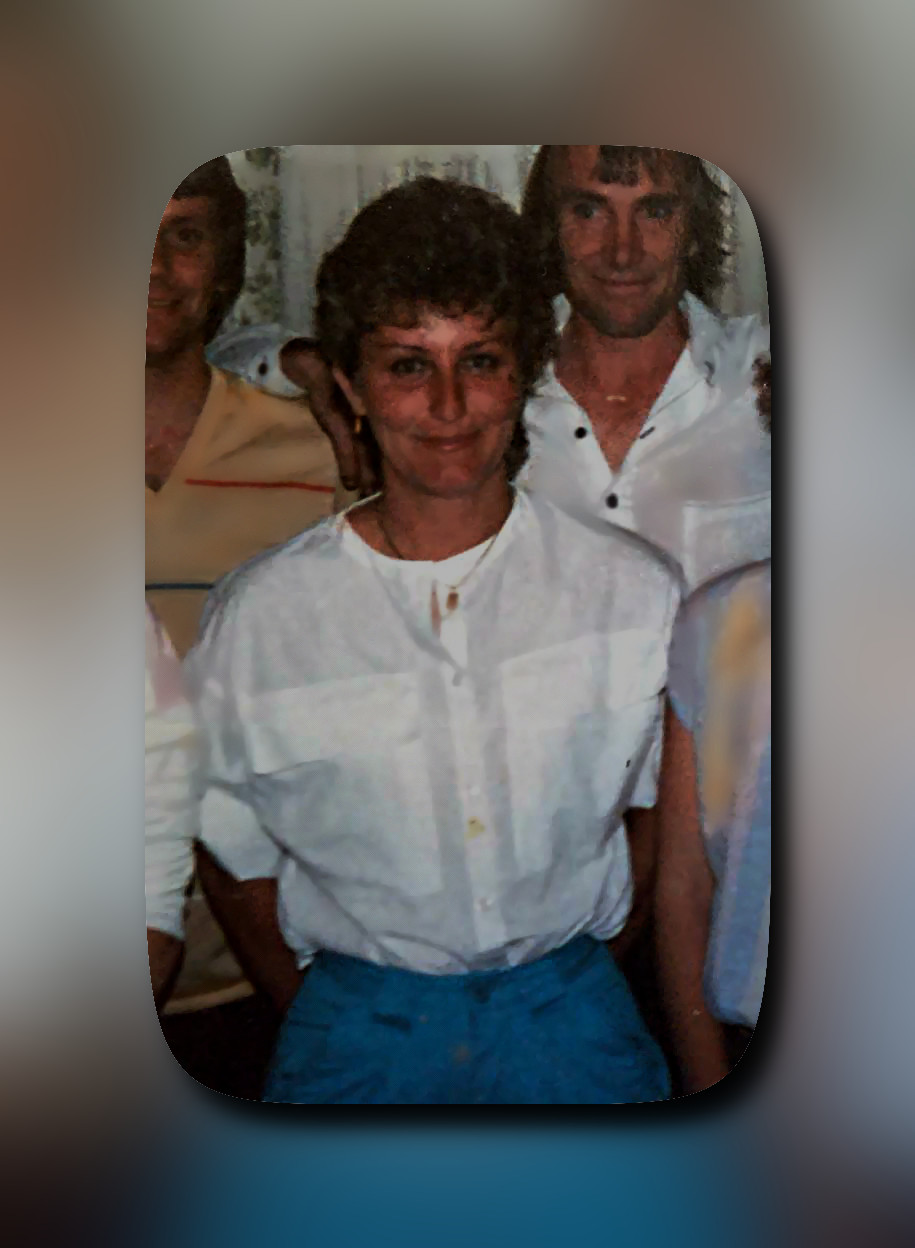
...an older colour photo.
I have the before and after together. Did I over do it?

Image
The girl in the centre was my teenage friend. She is twenty eight there and a couple of days ago was her 28th anniversary since she died.

_________________
Image
Free Fun Photo Editing & resources
Poems from the Lord
Gimp Newby
Gimp version 3.2.4 and GMIC-Qt 4.0.2 OS :- Windows 10 Home 64


Share on Facebook Share on Twitter Share on Orkut Share on Digg Share on MySpace Share on Delicious Share on Technorati
Top
 Post subject: Re: My try of enhancing...
PostPosted: Wed Nov 12, 2014 11:50 am  (#2) 
Offline
GimpChat Member
User avatar

Joined: Jan 20, 2013
Posts: 14831
Location: roma, italy
I gave a try too
applied smooth on faces
increased colours (multiply layers)
overlayed the original
+ some small manual retouch
Attachment:
1831_10256998_10152119361423106_8311573735587845339_nafter_DN.jpg
1831_10256998_10152119361423106_8311573735587845339_nafter_DN.jpg [ 91.88 KiB | Viewed 5783 times ]


do you like it?

_________________
"Where am I ?"


Top
 Post subject: Re: My try of enhancing...
PostPosted: Wed Nov 12, 2014 11:56 am  (#3) 
Offline
Administrator
User avatar

Joined: Aug 10, 2012
Posts: 14154
Location: Native to NYC living in Arizona, Gimp 2.8 - 3.0, Win 11 PC.
I think it came out great. You must let us know how you accomplished this.

_________________
Image
"A wise man learns more from a foolish question than a fool can learn from a wise answer"
Image


Top
 Post subject: Re: My try of enhancing...
PostPosted: Wed Nov 12, 2014 12:02 pm  (#4) 
Offline
GimpChat Member
User avatar

Joined: Jan 20, 2013
Posts: 14831
Location: roma, italy
I suppose you are talking to Sally, my further actions have been listed on top of the image

_________________
"Where am I ?"


Top
 Post subject: Re: My try of enhancing...
PostPosted: Wed Nov 12, 2014 12:04 pm  (#5) 
Offline
GimpChat Member
User avatar

Joined: Jan 20, 2013
Posts: 14831
Location: roma, italy
because recently I played with "fuzzy_frame" filter, here is the image with a "repeated" use of that one

Attachment:
1831_10256998_10152119361423106_8311573735587845339_nafter_DN+frame.jpg
1831_10256998_10152119361423106_8311573735587845339_nafter_DN+frame.jpg [ 151.79 KiB | Viewed 5781 times ]

_________________
"Where am I ?"


Top
 Post subject: Re: My try of enhancing...
PostPosted: Wed Nov 12, 2014 12:10 pm  (#6) 
Offline
Administrator
User avatar

Joined: Aug 10, 2012
Posts: 14154
Location: Native to NYC living in Arizona, Gimp 2.8 - 3.0, Win 11 PC.
dinasset wrote:
I suppose you are talking to Sally, my further actions have been listed on top of the image

Yes, sorry I didn't point that out. :oops:

_________________
Image
"A wise man learns more from a foolish question than a fool can learn from a wise answer"
Image


Top
 Post subject: Re: My try of enhancing...
PostPosted: Wed Nov 12, 2014 12:20 pm  (#7) 
Offline
GimpChat Member
User avatar

Joined: Jan 20, 2013
Posts: 14831
Location: roma, italy
a new try starting from original
finally applying "glass frame"

Attachment:
1831_10256998_10152119361423106_8311573735587845339_new_DN+glassframe.jpg
1831_10256998_10152119361423106_8311573735587845339_new_DN+glassframe.jpg [ 193.9 KiB | Viewed 5766 times ]

_________________
"Where am I ?"


Top
 Post subject: Re: My try of enhancing...
PostPosted: Wed Nov 12, 2014 12:29 pm  (#8) 
Offline
Global Moderator
User avatar

Joined: Apr 01, 2012
Posts: 8457
Location: On the other side of your screen
Don't think I spent a great deal of time on it Wallace. Thanks for asking. I did a few things but didn't like how they changed the photo and because it isn't a very big photo I had to be careful.
I remember doing auto white balance first.
There seemed to be a lot of 'snow' in the photo so I denoised with a G'MIC filter but am not 100% sure which one.
I still ended up with a couple of white specks that didn't belong on faces. They were only small but looked like the people had drops of paint on them. I painted them out with the colours that were nearby.
That's all I can remember for now. I didn't use any contrast or saturation or curves.


That is really nice dinasset, thanks.

_________________
Image
Free Fun Photo Editing & resources
Poems from the Lord
Gimp Newby
Gimp version 3.2.4 and GMIC-Qt 4.0.2 OS :- Windows 10 Home 64


Top
 Post subject: Re: My try of enhancing...
PostPosted: Wed Nov 12, 2014 12:43 pm  (#9) 
Offline
Global Moderator
User avatar

Joined: Apr 01, 2012
Posts: 8457
Location: On the other side of your screen
And another
Image

_________________
Image
Free Fun Photo Editing & resources
Poems from the Lord
Gimp Newby
Gimp version 3.2.4 and GMIC-Qt 4.0.2 OS :- Windows 10 Home 64


Top
 Post subject: Re: My try of enhancing...
PostPosted: Wed Nov 12, 2014 1:04 pm  (#10) 
Offline
Global Moderator
User avatar

Joined: Apr 01, 2012
Posts: 8457
Location: On the other side of your screen
If any one else wants to give it a go I will download them all later and send to her sister. Be nice for her to have a better photo than the original (I think).

_________________
Image
Free Fun Photo Editing & resources
Poems from the Lord
Gimp Newby
Gimp version 3.2.4 and GMIC-Qt 4.0.2 OS :- Windows 10 Home 64


Top
 Post subject: Re: My try of enhancing...
PostPosted: Wed Nov 12, 2014 2:14 pm  (#11) 
Offline
GimpChat Member
User avatar

Joined: Nov 03, 2014
Posts: 20
Location: Florida
I think you did a great job! :)

_________________
Image


"It can't rain all the time."
-Brandon Lee


Top
 Post subject: Re: My try of enhancing...
PostPosted: Wed Nov 12, 2014 3:01 pm  (#12) 
Offline
Global Moderator
User avatar

Joined: Apr 01, 2012
Posts: 8457
Location: On the other side of your screen
Thank you Laura

_________________
Image
Free Fun Photo Editing & resources
Poems from the Lord
Gimp Newby
Gimp version 3.2.4 and GMIC-Qt 4.0.2 OS :- Windows 10 Home 64


Top
 Post subject: Re: My try of enhancing...
PostPosted: Mon Nov 17, 2014 8:14 pm  (#13) 
Offline
GimpChat Member

Joined: Feb 23, 2011
Posts: 70
Here's my attempt. I used G'MIC easy skin retouch, a little cloning, and shaded the outside edges. Image

_________________
Image


Top
 Post subject: Re: My try of enhancing...
PostPosted: Tue Nov 18, 2014 5:12 am  (#14) 
Offline
Global Moderator
User avatar

Joined: Apr 01, 2012
Posts: 8457
Location: On the other side of your screen
Thanks you Grits :)

_________________
Image
Free Fun Photo Editing & resources
Poems from the Lord
Gimp Newby
Gimp version 3.2.4 and GMIC-Qt 4.0.2 OS :- Windows 10 Home 64


Top
Post new topic Reply to topic  [ 14 posts ] 

All times are UTC - 5 hours [ DST ]


* Login  


Powered by phpBB3 © phpBB Group