It is currently Fri Aug 14, 2026 4:20 pm


All times are UTC - 5 hours [ DST ]


Post new topic Reply to topic  [ 11 posts ] 
Author Message
 Post subject: Refresh Filters Error
PostPosted: Thu Nov 13, 2014 3:55 am  (#1) 
Offline
Global Moderator
User avatar

Joined: Oct 02, 2014
Posts: 5017
Location: Sydney Australia
Following posts in other threads concerning Garagecoders new emboss filter, I have been advised to log my problem here. I was originally advised to just refresh filters (with 'internet' selected) to auto download G'MIC updates.

However all I get is an error message -

Image

Apparently others have expererienced the same problem. I am using G'MIC 1.6.0.1 windows 64 bit version.

_________________
Image

Respect should be offered freely but hard earned


Share on Facebook Share on Twitter Share on Orkut Share on Digg Share on MySpace Share on Delicious Share on Technorati
Top
 Post subject: Re: Refresh Filters Error
PostPosted: Thu Nov 13, 2014 5:01 am  (#2) 
Offline
Global Moderator
User avatar

Joined: Apr 01, 2012
Posts: 8457
Location: On the other side of your screen
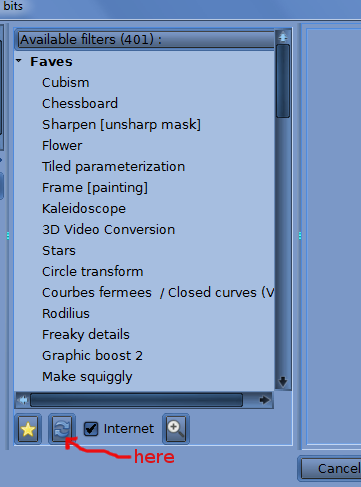
In G'MIC you refresh the 'filters' where the refresh icon is at the bottom of the menu list. Make sure you are conected to the internet at the time
Image


Are you using the latest G'MIC oldmangrumpy?

_________________
Image
Free Fun Photo Editing & resources
Poems from the Lord
Gimp Newby
Gimp version 3.2.4 and GMIC-Qt 4.0.2 OS :- Windows 10 Home 64


Last edited by sallyanne on Thu Nov 13, 2014 5:10 am, edited 1 time in total.

Top
 Post subject: Re: Refresh Filters Error
PostPosted: Thu Nov 13, 2014 5:06 am  (#3) 
Offline
Global Moderator
User avatar

Joined: Oct 02, 2014
Posts: 5017
Location: Sydney Australia
I believe so Sallyanne - I only downloaded it on 24/10. I am about to do another download and update GIMP to see if it makes any difference.

EDIT ... well that made no difference at all.

_________________
Image

Respect should be offered freely but hard earned


Top
 Post subject: Re: Refresh Filters Error
PostPosted: Thu Nov 13, 2014 5:22 am  (#4) 
Offline
GimpChat Member
User avatar

Joined: Jan 20, 2013
Posts: 14831
Location: roma, italy
I attach here (zipped) the file you are looking for
unzip it and place it under Appdata/Roaming


Attachments:
update1601.7z [447.94 KiB]
Downloaded 161 times

_________________
"Where am I ?"
Top
 Post subject: Re: Refresh Filters Error
PostPosted: Thu Nov 13, 2014 6:46 am  (#5) 
Offline
GimpChat Member
User avatar

Joined: Sep 22, 2012
Posts: 2089
Location: US
I was getting the same error message when
I had PeerBlock on my computer (with "Block HTTP" turned on).


Top
 Post subject: Re: Refresh Filters Error
PostPosted: Thu Nov 13, 2014 8:07 pm  (#6) 
Offline
GimpChat Member

Joined: Feb 23, 2011
Posts: 70
I am getting a similar error. The only difference is the number in the error text is 1593 instead of 1601. I haven't changed any security settings as far as I can remember.

_________________
Image


Top
 Post subject: Re: Refresh Filters Error
PostPosted: Thu Nov 13, 2014 9:02 pm  (#7) 
Offline
Script Coder
User avatar

Joined: Feb 18, 2011
Posts: 4826
Location: Bendigo Vic. Australia
Grits that is probably because you are using Gmic 1593, so I would suggest you update to 1601, you can download Gmic Pkg's from http://gmic.eu/

_________________
Image
No matter how much you push the envelope, it'll still be stationery.


Top
 Post subject: Re: Refresh Filters Error
PostPosted: Fri Nov 14, 2014 2:26 am  (#8) 
Offline
GimpChat Member

Joined: Feb 23, 2011
Posts: 70
Thanks Graechan. I downloaded the file.

G'MIC works for me if I install the gmic file in the plugins folder. it doesn't work when in appdata>roaming on my system. There are other G'MIC files in that location however. I am wondering if I actually need all of them. Any suggestions?

Oh, if anyone can shed light on what the "troll.options" file is, please let me know. I am no troll.


Attachments:
files in folder-.jpg
files in folder-.jpg [ 44.21 KiB | Viewed 3790 times ]

_________________
Image
Top
 Post subject: Re: Refresh Filters Error
PostPosted: Fri Nov 14, 2014 4:17 am  (#9) 
Offline
GimpChat Member
User avatar

Joined: Jan 03, 2011
Posts: 1656
You can actually remove all the *.gmic file, except update1601.gmic, if you have it.


Top
 Post subject: Re: Refresh Filters Error
PostPosted: Fri Nov 14, 2014 7:45 pm  (#10) 
Offline
GimpChat Member

Joined: Feb 23, 2011
Posts: 70
done, thanks!

_________________
Image


Top
 Post subject: Re: Refresh Filters Error
PostPosted: Thu Nov 20, 2014 4:48 pm  (#11) 
Offline
Global Moderator
User avatar

Joined: Oct 02, 2014
Posts: 5017
Location: Sydney Australia
I think I have now tried all avenues suggested above, even disabling AVG virus checker, but I still get an error message.

So just to prove a point I went to my Linux notebook, installed GIMP and G'MIC then attempted a G'MIC filter update.

And it worked AOK, so now I have the Emboss filter in GIMP on Linux - maybe I should change everything over to that platform! ;)

_________________
Image

Respect should be offered freely but hard earned


Top
Post new topic Reply to topic  [ 11 posts ] 

All times are UTC - 5 hours [ DST ]


* Login  


Powered by phpBB3 © phpBB Group