It is currently Tue Aug 18, 2026 2:07 pm


All times are UTC - 5 hours [ DST ]


Post new topic Reply to topic  [ 26 posts ]  Go to page 1, 2  Next
Author Message
 Post subject: GIMP-2.8.14 theme (Dynamic - Metallic Blue Licorice)
PostPosted: Sat Nov 15, 2014 2:30 pm  (#1) 
Offline
Global Moderator
User avatar

Joined: May 16, 2010
Posts: 16161
Image
viewtopic.php?f=12&t=4784

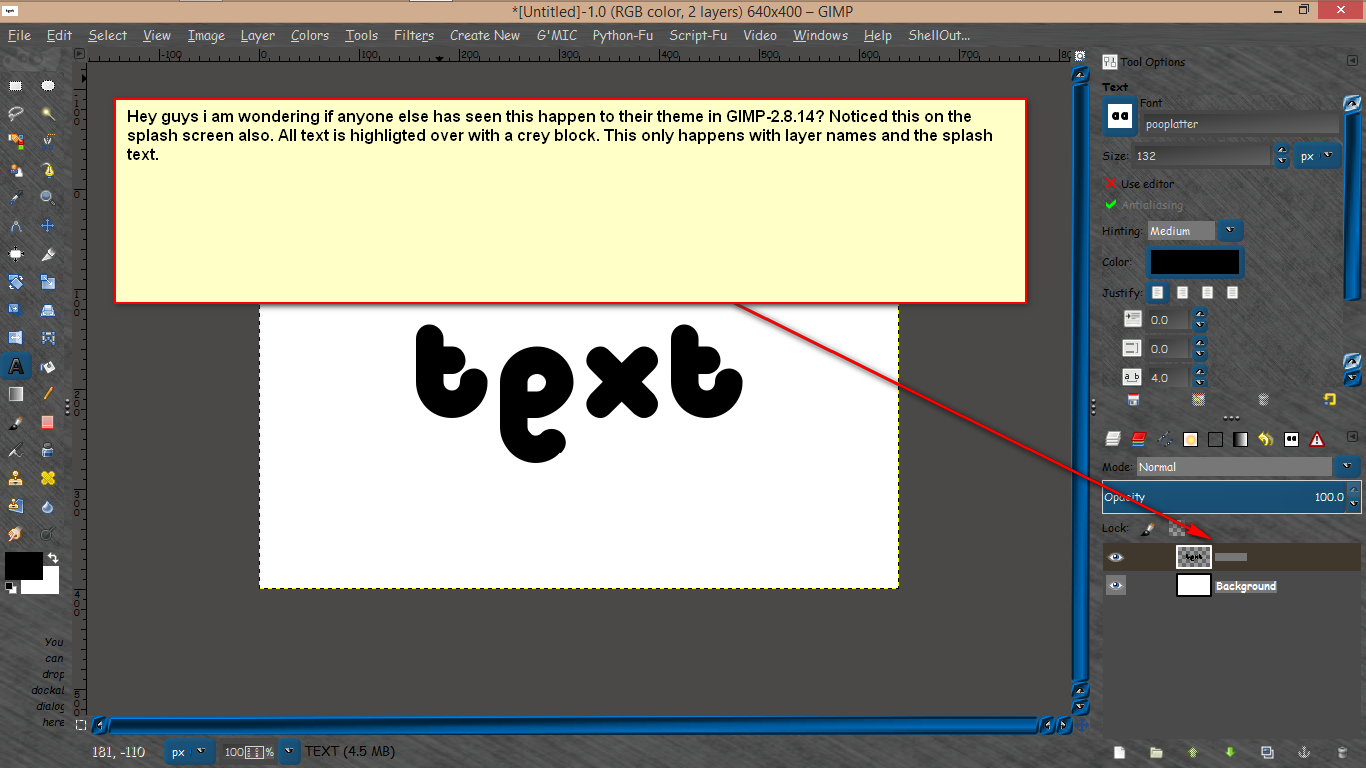
Grey block not "Crey" block. :lol

_________________
Image


Share on Facebook Share on Twitter Share on Orkut Share on Digg Share on MySpace Share on Delicious Share on Technorati
Top
 Post subject: Re: GIMP-2.8.14 theme (Dynamic - Metallic Blue Licorice)
PostPosted: Sun Nov 16, 2014 8:10 am  (#2) 
Offline
GimpChat Member

Joined: Feb 22, 2012
Posts: 295
Location: Germany
I think its related to Bug 736092 - "Some text strings in the UI have a strange background color problem (filled with whitish color)" and is related to the cairo bugs. As a workaround try to use the cairo version from gimp-2.8.10.
Unfortunately the bug in cairo is very hard to find and a volunteer (Jehan) who wanted to find and fix it has a virtual environment where this error does not occur, so he cannot find the bug.

Hatti


Top
 Post subject: Re: GIMP-2.8.14 theme (Dynamic - Metallic Blue Licorice)
PostPosted: Sun Nov 16, 2014 8:24 am  (#3) 
Offline
Global Moderator
User avatar

Joined: May 16, 2010
Posts: 16161
Thanks Hatti. Should i just use the cairo dll files from GIMP-2.8.10 then?

_________________
Image


Top
 Post subject: Re: GIMP-2.8.14 theme (Dynamic - Metallic Blue Licorice)
PostPosted: Sun Nov 16, 2014 11:14 am  (#4) 
Offline
GimpChat Member

Joined: Feb 22, 2012
Posts: 295
Location: Germany
Yes. It is just one file: libcairo-2.dll


Top
 Post subject: Re: GIMP-2.8.14 theme (Dynamic - Metallic Blue Licorice)
PostPosted: Sun Nov 16, 2014 6:04 pm  (#5) 
Offline
Script Coder
User avatar

Joined: Feb 18, 2011
Posts: 4826
Location: Bendigo Vic. Australia
Onkel Hatti libcairo-2.dll is in the bin and 32/bin folders for the 64bit 2.8.14, do we swap the both out with the files from 2.8.10

_________________
Image
No matter how much you push the envelope, it'll still be stationery.


Top
 Post subject: Re: GIMP-2.8.14 theme (Dynamic - Metallic Blue Licorice)
PostPosted: Mon Nov 17, 2014 12:21 am  (#6) 
Offline
GimpChat Member

Joined: Feb 22, 2012
Posts: 295
Location: Germany
Yes, they both can be exchanged. For the ui, the one in the /bin directory is important. The one in the /32/bin directory is just for the environment to run 32bit plug-ins.

Hatti


Top
 Post subject: Re: GIMP-2.8.14 theme (Dynamic - Metallic Blue Licorice)
PostPosted: Mon Nov 17, 2014 12:43 am  (#7) 
Offline
Script Coder
User avatar

Joined: Feb 18, 2011
Posts: 4826
Location: Bendigo Vic. Australia
when I changed the file in the /bin directory my gimp would not start

_________________
Image
No matter how much you push the envelope, it'll still be stationery.


Top
 Post subject: Re: GIMP-2.8.14 theme (Dynamic - Metallic Blue Licorice)
PostPosted: Mon Nov 17, 2014 7:23 am  (#8) 
Offline
Global Moderator
User avatar

Joined: May 16, 2010
Posts: 16161
Graechan wrote:
when I changed the file in the /bin directory my gimp would not start

Ok i won't try that then. :lol

_________________
Image


Top
 Post subject: Re: GIMP-2.8.14 theme (Dynamic - Metallic Blue Licorice)
PostPosted: Mon Nov 17, 2014 11:42 am  (#9) 
Offline
GimpChat Member

Joined: Feb 22, 2012
Posts: 295
Location: Germany
Graechan wrote:
when I changed the file in the /bin directory my gimp would not start

Whats the error message?


Top
 Post subject: Re: GIMP-2.8.14 theme (Dynamic - Metallic Blue Licorice)
PostPosted: Mon Nov 17, 2014 5:19 pm  (#10) 
Offline
Script Coder
User avatar

Joined: Feb 18, 2011
Posts: 4826
Location: Bendigo Vic. Australia
I don't understand the message
Image

_________________
Image
No matter how much you push the envelope, it'll still be stationery.


Top
 Post subject: Re: GIMP-2.8.14 theme (Dynamic - Metallic Blue Licorice)
PostPosted: Mon Nov 17, 2014 5:46 pm  (#11) 
Offline
Script Coder
User avatar

Joined: Feb 18, 2011
Posts: 4826
Location: Bendigo Vic. Australia
now I understand the message libpng15-15.dll was in my plugins folder instead of my bin I have shifted and now everything OK, thanks Onkel Hatti,Rod the bug has gone

_________________
Image
No matter how much you push the envelope, it'll still be stationery.


Top
 Post subject: Re: GIMP-2.8.14 theme (Dynamic - Metallic Blue Licorice)
PostPosted: Mon Nov 17, 2014 6:54 pm  (#12) 
Offline
GimpChat Member
User avatar

Joined: Apr 07, 2010
Posts: 14182
:roll: :teeth

_________________
Image


Top
 Post subject: Re: GIMP-2.8.14 theme (Dynamic - Metallic Blue Licorice)
PostPosted: Mon Nov 17, 2014 7:35 pm  (#13) 
Offline
Script Coder
User avatar

Joined: Feb 18, 2011
Posts: 4826
Location: Bendigo Vic. Australia
Molly Do you also have the abnormality described by Rod in 2.8.14

_________________
Image
No matter how much you push the envelope, it'll still be stationery.


Top
 Post subject: Re: GIMP-2.8.14 theme (Dynamic - Metallic Blue Licorice)
PostPosted: Mon Nov 17, 2014 10:36 pm  (#14) 
Offline
GimpChat Member
User avatar

Joined: Apr 07, 2010
Posts: 14182
I will. Check in the morning Graechan.

_________________
Image


Top
 Post subject: Re: GIMP-2.8.14 theme (Dynamic - Metallic Blue Licorice)
PostPosted: Tue Nov 18, 2014 6:51 am  (#15) 
Offline
Global Moderator
User avatar

Joined: May 16, 2010
Posts: 16161
Graechan wrote:
now I understand the message libpng15-15.dll was in my plugins folder instead of my bin I have shifted and now everything OK, thanks Onkel Hatti,Rod the bug has gone

Graechan as i do not have GIMP-2.8.10 installed any longer can you post a download link for the dll file (libcairo).
My libpng dll file was in the bin folder already. Thanks.

_________________
Image


Top
 Post subject: Re: GIMP-2.8.14 theme (Dynamic - Metallic Blue Licorice)
PostPosted: Tue Nov 18, 2014 8:16 am  (#16) 
Offline
GimpChat Member
User avatar

Joined: Apr 07, 2010
Posts: 14182
Is this any help..librairo-2dl


Attachments:
libcairo-2.zip [519.82 KiB]
Downloaded 111 times

_________________
Image
Top
 Post subject: Re: GIMP-2.8.14 theme (Dynamic - Metallic Blue Licorice)
PostPosted: Sat Nov 22, 2014 6:21 pm  (#17) 
Offline
Global Moderator
User avatar

Joined: May 16, 2010
Posts: 16161
molly wrote:
Is this any help..librairo-2dl

Molly is that the cairo dll file from GIMP-2.8.10 or GIMP-2.8.14? It also needs to be a 64 bit dll.
I need GIMP-2.8.10's 64 bit libcairo-2.dll file. Thanks. :)

EDIT: This dll file does not work for 64 bit. it may for 32 bit though. If you download and try it KEEP your original just in case.

_________________
Image


Top
 Post subject: Re: GIMP-2.8.14 theme (Dynamic - Metallic Blue Licorice)
PostPosted: Sat Nov 22, 2014 9:06 pm  (#18) 
Offline
GimpChat Member

Joined: Jul 13, 2014
Posts: 109
Hi Rod,

Attachment here of a 'libcairo-2.dll' for GIMP-2.8.10 64 bits.
Also if you want to experiment a 'libcairo-2.dll', that is more than 5 time the size of the former, for GIMP-2.8.15 64 bits from samj.
Regards.


Attachments:
' for GIMP-2-8-15 64 bits..zip [1.22 MiB]
Downloaded 124 times
' for GIMP-2.8.10 64 bits..zip [317.79 KiB]
Downloaded 116 times
Top
 Post subject: Re: GIMP-2.8.14 theme (Dynamic - Metallic Blue Licorice)
PostPosted: Sun Nov 23, 2014 9:06 am  (#19) 
Offline
Global Moderator
User avatar

Joined: May 16, 2010
Posts: 16161
rob_brz1 wrote:
Hi Rod,

Attachment here of a 'libcairo-2.dll' for GIMP-2.8.10 64 bits.
Also if you want to experiment a 'libcairo-2.dll', that is more than 5 time the size of the former, for GIMP-2.8.15 64 bits from samj.
Regards.

Thanks but i have gotten the correct one already. :) Thanks to Graechan. I haven't tested the 1mb libcairo-2.dll yet. Anyone tested this one compiled by Sam for GIMP-2.8.15?

_________________
Image


Top
 Post subject: Re: GIMP-2.8.14 theme (Dynamic - Metallic Blue Licorice)
PostPosted: Mon Nov 24, 2014 1:50 am  (#20) 
Offline
GimpChat Member
User avatar

Joined: Sep 24, 2010
Posts: 12832
Thanks for the info Rod; that worked. Molly's 32-bit version messed up PSPI for whatever reason so I replaced the 32-bit version with the one that installed for 2.14. All's well and now I have my biggy layer mode back again. lol

:)

_________________
Lyle

Psalm 109:8

Image


Top
Post new topic Reply to topic  [ 26 posts ]  Go to page 1, 2  Next

All times are UTC - 5 hours [ DST ]


* Login  


Powered by phpBB3 © phpBB Group