oldmangrumpy wrote:
Still trying to keep up with you 'gurus' so I followed the steps to download 'taprats' and 'shellout'. I then created the .bat file and added the extra line to shellout.
Shellout appears in my filters list and as a test I called MS-paint - AOK.
When I select 'TapRats' from the shellout menu and click OK, the green progress bar operates, but shellout disappears, the command window (I think) flashes before my eyes, a new 'visible' layer is created (as selected) but thats it, nothing else happens, no error message et al.
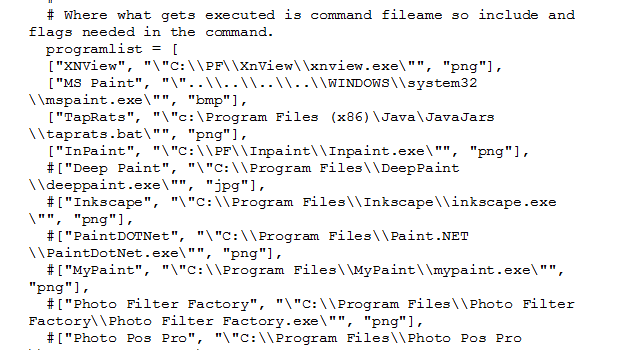
Here is a snap of each file I created.
[
Image ]
[
Image ]
Is there anything obviously wrong or is there something else I should add or do first?. Thankyou.
I had to copy the java file to my portables folder as so.
@echo off
echo *** Do Not Close this Window ***
echo Temp File: %1
C:\Portables\Java\jre7\bin\java.exe -jar c:\Portables\taprats.jar %1
And Shellout
["TapRats", "\"C:\\Portables\\taprats.bat\"", "png"],
This causes a file not found error to pop up but closing it starts the program. Then just add a pattern.


Unfortunately it will not draw though.


Traceback error dialog code-
Traceback (most recent call last):
  File "C:\Program Files\GIMP 2\32\lib\gimp\2.0\python\gimpfu.py", line 735, in response
    dialog.res = run_script(params)
  File "C:\Program Files\GIMP 2\32\lib\gimp\2.0\python\gimpfu.py", line 361, in run_script
    return apply(function, params)
  File "C:\Users\Rod\.gimp-2.8\plug-ins\ShellOut.py", line 141, in plugin_main
    tempimage.add_layer(newlayer2,-1)
UnboundLocalError: local variable 'newlayer2' referenced before assignment
 Login
Login Register
 Tweets
 FAQ
FAQ Advanced Search