It is currently Thu Aug 20, 2026 8:38 am


All times are UTC - 5 hours [ DST ]


Post new topic Reply to topic  [ 30 posts ]  Go to page Previous  1, 2
Author Message
 Post subject: Re: 'workflow_setup' plug-in
PostPosted: Sat Oct 03, 2015 10:27 pm  (#21) 
Offline
GimpChat Member
User avatar

Joined: Nov 16, 2011
Posts: 5127
Location: Metro Vancouver, BC
The Gimp UI for workflow seems to work on your system so it might be another plug-in unique to the 2.8.14 install is the issue.

_________________
Image
Gimp 2.8.18, Linux, median user
Gimp Chat Tutorials Index
Spirit Bear (Kermode)


Top
 Post subject: Re: 'workflow_setup' plug-in
PostPosted: Sat Oct 03, 2015 10:55 pm  (#22) 
Offline
Script Coder
User avatar

Joined: Feb 18, 2011
Posts: 4826
Location: Bendigo Vic. Australia
Odinbc wrote:
The Gimp UI for workflow seems to work on your system so it might be another plug-in unique to the 2.8.14 install is the issue.

I think your right and will run some tests later

_________________
Image
No matter how much you push the envelope, it'll still be stationery.


Top
 Post subject: Re: 'workflow_setup' plug-in
PostPosted: Sat Oct 03, 2015 11:34 pm  (#23) 
Offline
GimpChat Member
User avatar

Joined: Nov 16, 2011
Posts: 5127
Location: Metro Vancouver, BC
Graechan wrote:
Odinbc wrote:
The Gimp UI for workflow seems to work on your system so it might be another plug-in unique to the 2.8.14 install is the issue.

I think your right and will run some tests later
While debugging, eliminate by giving these a go.
Test for duplicate scripts
Need Help Testing A Simple Script

_________________
Image
Gimp 2.8.18, Linux, median user
Gimp Chat Tutorials Index
Spirit Bear (Kermode)


Top
 Post subject: Re: 'workflow_setup' plug-in
PostPosted: Sun Oct 04, 2015 6:14 am  (#24) 
Offline
Global Moderator
User avatar

Joined: May 16, 2010
Posts: 16164
It installed and registered fine for me in GIMP-2.8.14 version 64 bit. I did change the menu location to <Image>/workflow/ however.

register(
    "python_fu_menu_supp", 
    MS_blurb,
    "Group together call to your workflow procedure in a menu and manage them from the PDB",
    "R. Brizard",
    "(c) R. Brizard",
    "2015",
    _("Workflow menu..."),    # Routine-action
    "",
    [
    #(PF_IMAGE, "img", "IMAGE:", None),
    #(PF_DRAWABLE, "drw", "DRAWABLE:", None),
    ],
    [],
    menu_supp,
    menu = "<Image>/Workflow/Workflow setup",
    domain = ( "workflow_menu", locale_directory)
    )

register(
    "python_fu_workflow_action", 
    _("Generate two action files, one from the PDB and a workflow action dictionary as first utility to 'Workflow actions...'."),
    "It generate two action files one from the actual PDB who can RUN_INTERACTIF and a workflow action dictionary for 'Workflow actions...'.",
    "R. Brizard",
    "(c) R. Brizard",
    "2015",
    _("->workflow manager..."),
    "",
    [
    ],
    [],
    workflow_action,
    menu = "<Image>/Workflow/Workflow setup",
    domain = ( "workflow_action", locale_directory)
    )

main()
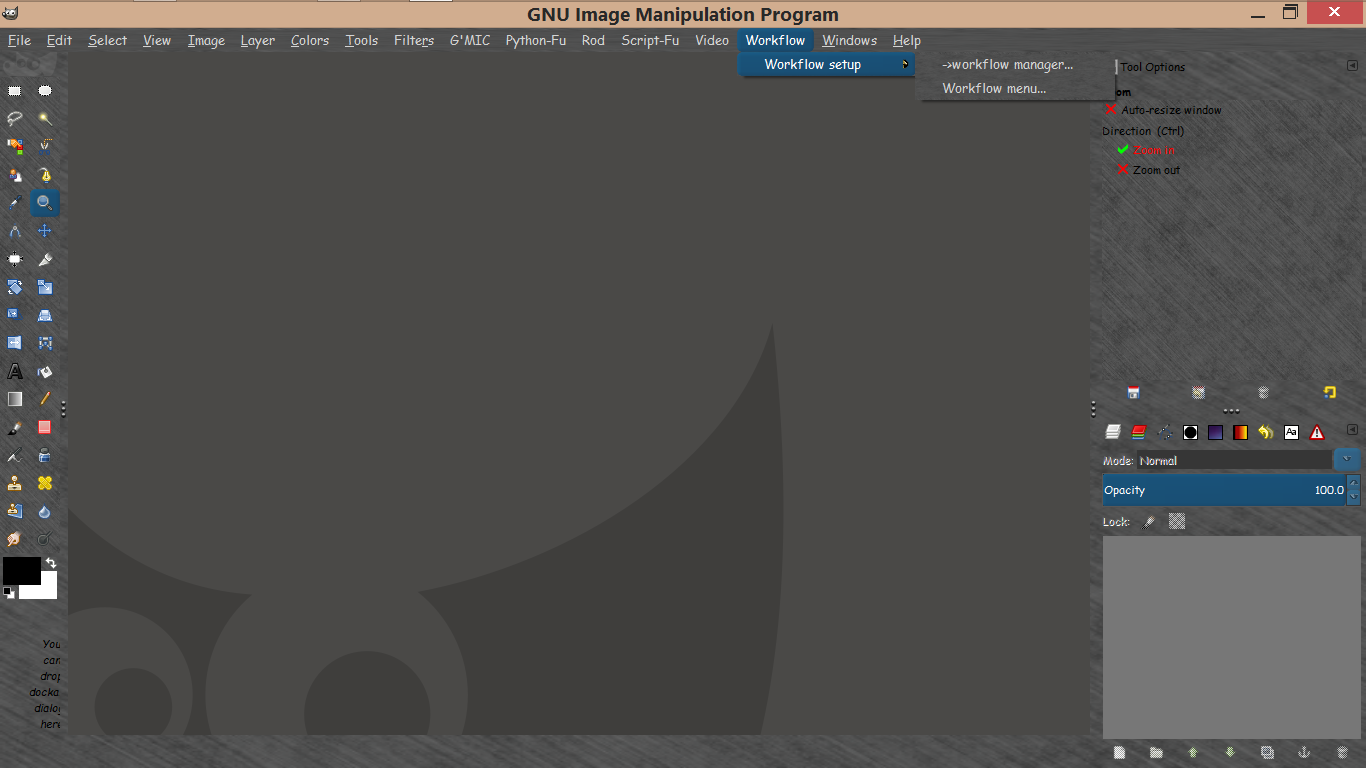

Image

_________________
Image


Top
 Post subject: Re: 'workflow_setup' plug-in
PostPosted: Sun Oct 04, 2015 12:24 pm  (#25) 
Offline
GimpChat Member

Joined: Jul 13, 2014
Posts: 109
Hi Greachan,
Graechan wrote:
I Installed the file in my user/plugins folder and restarted gimp but it doesn't appear

As to the why, after further thoughts: a possibility exist of a collision between global variable(s) of another plug-in, in the pre-registration phase?
That plug-in has many global variables and you have many plug-ins and scripts, but which one?
My test for Windows 7 was on GIMP 2.8.10 but Rod test install for it's Windows on GIMP 2.8.14.

Hi Odinbc,
Odinbc wrote:
A few initial observations from tinkering with the workflow_setup plug-in.
  1. The Workflow Manager appears takes over your Gimp session (note the bottom of the canvas window), until you restart Gimp.
  2. This might be wrong but; the only way I found to remove a procedure from your Workflow actions list is to overwrite it's blank space in the list. For example if it's the first item, backspace to make the second item first or if it's the last item backspace to overwrite the line it was formerly on. Use the Workflow actions button to verify.
  3. This is fairly obvious but do not include line numbers from the PDF actions list in your Workflow actions list.
  4. If you need a better look at the PDB actions list, search 'actions_all.lst' in a text editor.
...

Thanks for tinkering with the 'workflow_setup' plug-in.
You uses it as I think it should but the personalization could be pushed further as you probably realise. Here are my comments on your list ...
  1. GIMP seems more at ease with one 'shot' plug-in and script, that one is not, but could have forgotten something. For 'the bottom of the canvas window' exiting the plug-in seems sufficient.
  2. Correcting my own answer to 'Kimba': use the button 'save workflow' to actualize it before using 'Workflow actions' button.
  3. Correct.
  4. Good idea, find the scrolling window too small even if you try augmenting the size of the whole window.


Top
 Post subject: Re: 'workflow_setup' plug-in
PostPosted: Wed Oct 07, 2015 12:49 pm  (#26) 
Offline
GimpChat Member
User avatar

Joined: Jan 13, 2011
Posts: 2648
Location: Poland
Very interesting solution.
Dream: add from PDB to Worklowaction through clicking (though Ctrl + V are good solution also).
Thanks for sharing.
I'm looking forward to the next version.

PS. Graechan - This is probably a question of versions of Python and additives:

import sys, os, gettext, gtk, pygtk
pygtk.require('2.0')
import pango, gobject, time

_________________
Image


Top
 Post subject: Re: 'workflow_setup' plug-in
PostPosted: Wed Oct 07, 2015 2:22 pm  (#27) 
Offline
GimpChat Member

Joined: Jul 13, 2014
Posts: 109
Hi MareroQ,
Since I am not familiar with text in GTK and there is more pressing need, for this plug-in, your dream will have to wait, sorry ;) .
But not for a new version, see below!

Hi all,
There is a new version attach at the first post.
The 'folder' choice have been reinstalled to the "Workflow menu..." window, the treated files there are all converted to XCF files.
A reordering of the buttons in "->workflow manager..." because it seems a bit more logical.
Less usage of global variables in this version (0.1.1) of 'workflow_setup.py'.


Top
 Post subject: Re: 'workflow_setup' plug-in
PostPosted: Thu Oct 29, 2015 9:46 am  (#28) 
Offline
GimpChat Member

Joined: Jul 13, 2014
Posts: 109
Hi,
Trying the other way, with 'gimpplugin', to register a Python plug-in to have less clutter as remarked by 'Odinbc'. Also a couple of refinements, it's now version 0.1.2 in first post.
Should I have to introduce comments by the user between actions or not?


Top
 Post subject: Re: 'workflow_setup' plug-in
PostPosted: Mon Jan 04, 2016 11:28 am  (#29) 
Offline
GimpChat Member

Joined: Jul 13, 2014
Posts: 109
Hi,
Here are some improvements in version 0.1.3 .
In workflow manager:
- Put another button: 'workflow parameter list'; as a judge on the possible interactivity of a procedure (run_mode existence is not one by itself).
- Scrolled 'workflow characteristics' for more workflow actions.
- Colour refinement.
In workflow menu:
- Treat differently action argument type 'other' from 'nothing', by permitting user to view or enter some argument for 'other'.
- Auto. stop before a plug-in with argument type 'image' that has a working_state '3-...', to increase interactivity.
- Remove tutorial from 'exec type' as overly ambitious for me.
- Started with the 'exec type' multiple; example of usage: couple a procedure to remove group layers with one not aware of group.

Bye-bye


Top
 Post subject: Re: 'workflow_setup' plug-in
PostPosted: Tue Jan 05, 2016 7:30 am  (#30) 
Offline
Global Moderator
User avatar

Joined: May 16, 2010
Posts: 16164
rob_brz1 wrote:
Hi,
Here are some improvements in version 0.1.3 .
In workflow manager:
- Put another button: 'workflow parameter list'; as a judge on the possible interactivity of a procedure (run_mode existence is not one by itself).
- Scrolled 'workflow characteristics' for more workflow actions.
- Colour refinement.
In workflow menu:
- Treat differently action argument type 'other' from 'nothing', by permitting user to view or enter some argument for 'other'.
- Auto. stop before a plug-in with argument type 'image' that has a working_state '3-...', to increase interactivity.
- Remove tutorial from 'exec type' as overly ambitious for me.
- Started with the 'exec type' multiple; example of usage: couple a procedure to remove group layers with one not aware of group.

Bye-bye

Thank you very much for the updates Rob! :bigthup

_________________
Image


Top
Post new topic Reply to topic  [ 30 posts ]  Go to page Previous  1, 2

All times are UTC - 5 hours [ DST ]


* Login  


Powered by phpBB3 © phpBB Group



