It is currently Sat Aug 15, 2026 6:57 pm


All times are UTC - 5 hours [ DST ]


Post new topic Reply to topic  [ 33 posts ]  Go to page 1, 2  Next
Author Message
 Post subject: Adjustment layers
PostPosted: Thu Jan 21, 2016 10:12 pm  (#1) 
Offline
GimpChat Member
User avatar

Joined: Jul 06, 2013
Posts: 2662
Location: California
I found scripts for adjustment layers:
http://the-gimp.deviantart.com/art/Adju ... rs-1473128

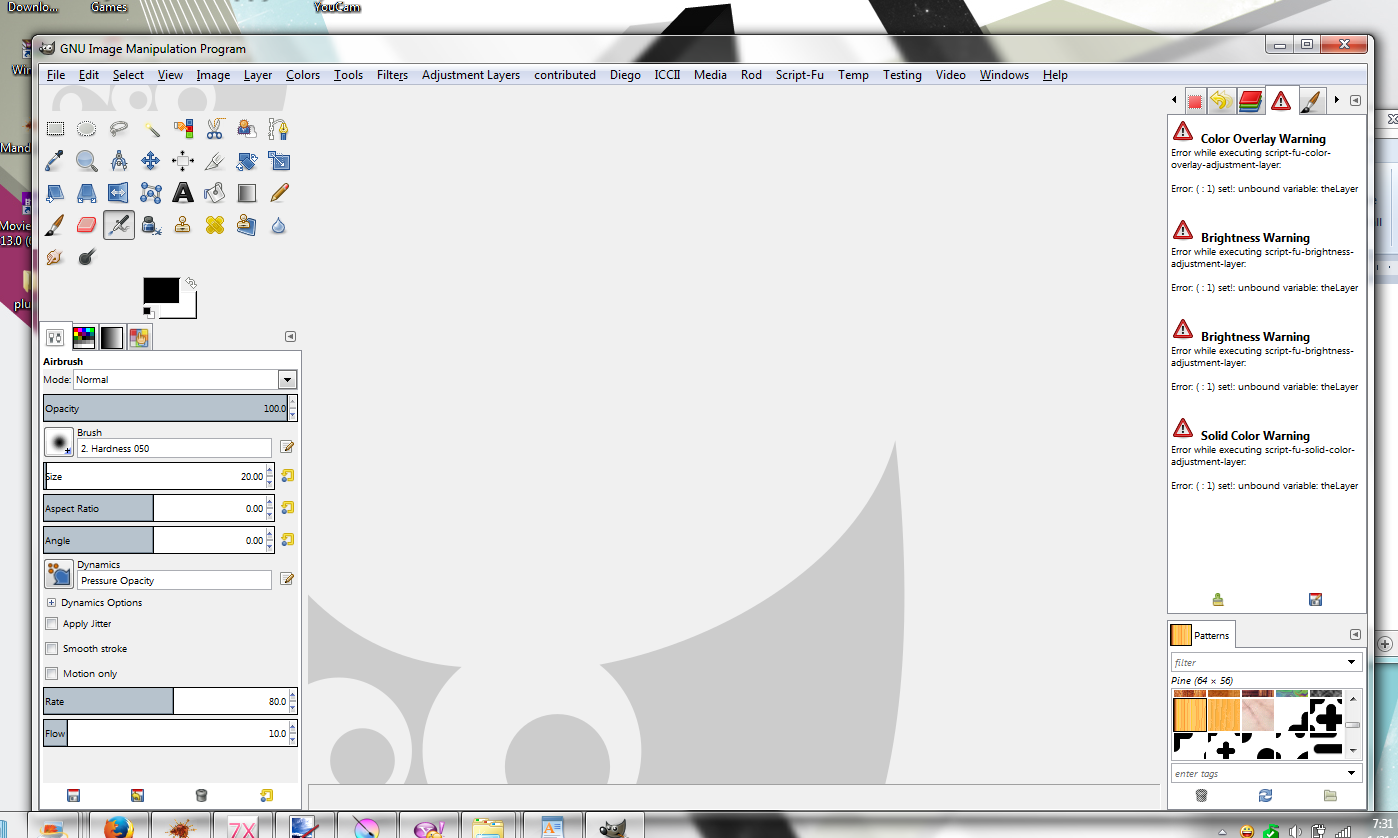
I'm testing them now and they don't work for me. I'm using the newest version of gimp on windows. When I say they don't work, by that I mean, I don't see an adjustment to the layer (duplicated or an added new one.) Maybe I'm doing something wrong. I also receive errors when running the scripts.

Here's a screen shot:
Image

There are 9 errors in all. It's too bad that these scripts aren't usable because I think they'd be very useful.


Share on Facebook Share on Twitter Share on Orkut Share on Digg Share on MySpace Share on Delicious Share on Technorati
Top
 Post subject: Re: Adjustment layers
PostPosted: Fri Jan 22, 2016 1:01 am  (#2) 
Offline
GimpChat Member
User avatar

Joined: Jan 20, 2013
Posts: 14831
Location: roma, italy
maybe, if I have time today, I can have a look and port them (or some of them) to the new gimp Scripting Language (tell me which one you do prefer to test as first).

_________________
"Where am I ?"


Top
 Post subject: Re: Adjustment layers
PostPosted: Fri Jan 22, 2016 1:57 am  (#3) 
Offline
GimpChat Member
User avatar

Joined: Jul 06, 2013
Posts: 2662
Location: California
dinasset wrote:
maybe, if I have time today, I can have a look and port them (or some of them) to the new gimp Scripting Language (tell me which one you do prefer to test as first).


When you download zip file and open it, all the files are there, so it doesn't matter to me which file you test since they all don't work. Apparently, they hadn't worked in 2.6 either. Not sure who created the plugins but maybe they can be revived.


Top
 Post subject: Re: Adjustment layers
PostPosted: Fri Jan 22, 2016 4:39 am  (#4) 
Offline
GimpChat Member
User avatar

Joined: Jan 20, 2013
Posts: 14831
Location: roma, italy
these scripts require a lot of modifications to run under the current gimp release; I did them just for the first one.
You may test it
Here an example of a selection with modified brightness
Attachment:
colorizationexample_adjustbrightness.png
colorizationexample_adjustbrightness.png [ 65.73 KiB | Viewed 10396 times ]


for the other ones, it will take time
Attachment:
brightness-adjustment-layer.scm [4.47 KiB]
Downloaded 439 times

_________________
"Where am I ?"


Top
 Post subject: Re: Adjustment layers
PostPosted: Fri Jan 22, 2016 4:58 am  (#5) 
Offline
GimpChat Member
User avatar

Joined: Jul 06, 2013
Posts: 2662
Location: California
dinasset wrote:
these scripts require a lot of modifications to run under the current gimp release; I did them just for the first one.
You may test it
Here an example of a selection with modified brightness
Attachment:
colorizationexample_adjustbrightness.png


for the other ones, it will take time
Attachment:
brightness-adjustment-layer.scm


With this one, do you have to have a selection in order for it to work?


Top
 Post subject: Re: Adjustment layers
PostPosted: Fri Jan 22, 2016 5:14 am  (#6) 
Offline
GimpChat Member
User avatar

Joined: Jan 20, 2013
Posts: 14831
Location: roma, italy
no, I just used it as an example (because it seems more significant to me), you may have no selection

_________________
"Where am I ?"


Top
 Post subject: Re: Adjustment layers
PostPosted: Fri Jan 22, 2016 5:19 am  (#7) 
Offline
GimpChat Member
User avatar

Joined: Jan 20, 2013
Posts: 14831
Location: roma, italy
examples for no selection

Attachment:
colorizationexample_B-127.png
colorizationexample_B-127.png [ 45.35 KiB | Viewed 10385 times ]

Attachment:
colorizationexampleB+127.png
colorizationexampleB+127.png [ 45.42 KiB | Viewed 10385 times ]

_________________
"Where am I ?"


Top
 Post subject: Re: Adjustment layers
PostPosted: Fri Jan 22, 2016 8:14 am  (#8) 
Offline
Global Moderator
User avatar

Joined: May 16, 2010
Posts: 16158
It would be cool to have a program you could run old filters through and have a nice new filter come out. :) Seems it would have to be a batch file or some such that replaced text like the Notepad ++ search and replace filter does. Only with all new GIMP PDB values for any GIMP version 2.6 to 2.8.

_________________
Image


Top
 Post subject: Re: Adjustment layers
PostPosted: Fri Jan 22, 2016 11:14 am  (#9) 
Offline
GimpChat Member
User avatar

Joined: Jan 20, 2013
Posts: 14831
Location: roma, italy
updated to gimp 2.8 the second one: Dodge or Burn.
Hope it works
Attachment:
burn-dodge-adjustment-layer.scm [4.53 KiB]
Downloaded 426 times

_________________
"Where am I ?"


Top
 Post subject: Re: Adjustment layers
PostPosted: Fri Jan 22, 2016 1:30 pm  (#10) 
Offline
GimpChat Member
User avatar

Joined: Jul 06, 2013
Posts: 2662
Location: California
I have tested the plugin for Dodge/Burn and it works.


Top
 Post subject: Re: Adjustment layers
PostPosted: Fri Jan 22, 2016 1:44 pm  (#11) 
Offline
GimpChat Member
User avatar

Joined: Jan 20, 2013
Posts: 14831
Location: roma, italy
thanks for testing
updated to gimp 2.8 the third one: Color Overlay.
Hope it works

Attachment:
color-overlay-adjustment-layer.scm [4.38 KiB]
Downloaded 346 times

_________________
"Where am I ?"


Top
 Post subject: Re: Adjustment layers
PostPosted: Sat Jan 23, 2016 12:55 am  (#12) 
Offline
GimpChat Member
User avatar

Joined: Jan 20, 2013
Posts: 14831
Location: roma, italy
updated to gimp 2.8 the fourth one: Desaturate.

Attachment:
desaturate-adjustment-layer.scm [4.2 KiB]
Downloaded 296 times

_________________
"Where am I ?"


Top
 Post subject: Re: Adjustment layers
PostPosted: Sat Jan 23, 2016 1:50 am  (#13) 
Offline
GimpChat Member
User avatar

Joined: Jan 20, 2013
Posts: 14831
Location: roma, italy
...and also Gradient Fill

Attachment:
gradient-fill-adjustment-layer.scm [7.87 KiB]
Downloaded 289 times

_________________
"Where am I ?"


Top
 Post subject: Re: Adjustment layers
PostPosted: Sat Jan 23, 2016 5:22 am  (#14) 
Offline
GimpChat Member
User avatar

Joined: Jan 20, 2013
Posts: 14831
Location: roma, italy
...and also Invert
Attachment:
invert-adjustment-layer.scm [4.08 KiB]
Downloaded 393 times


...and also Lightness
Attachment:
lightness-adjustment-layer.scm [4.27 KiB]
Downloaded 335 times

_________________
"Where am I ?"


Top
 Post subject: Re: Adjustment layers
PostPosted: Sat Jan 23, 2016 5:59 am  (#15) 
Offline
GimpChat Member
User avatar

Joined: Mar 23, 2012
Posts: 7388
Location: Göteborg at last!
Thank you very much for these dinasset. They will be so useful!


Top
 Post subject: Re: Adjustment layers
PostPosted: Sat Jan 23, 2016 7:50 am  (#16) 
Offline
GimpChat Member
User avatar

Joined: Jan 20, 2013
Posts: 14831
Location: roma, italy
it has been a request from Mackenzieh.
Glad someone else find them useful...

_________________
"Where am I ?"


Top
 Post subject: Re: Adjustment layers
PostPosted: Sat Jan 23, 2016 8:15 am  (#17) 
Offline
GimpChat Member
User avatar

Joined: Jan 20, 2013
Posts: 14831
Location: roma, italy
these are the last two

Attachment:
pattern-fill-adjustment-layer.scm [4.26 KiB]
Downloaded 337 times


Attachment:
solid-color-adjustment-layer.scm [4.12 KiB]
Downloaded 301 times


Who is interested in the use of all these filters, better to perform some in depth tests for all of them; it's very likely I omitted some "translation" to gimp 2.8....

_________________
"Where am I ?"


Top
 Post subject: Re: Adjustment layers
PostPosted: Sat Jan 23, 2016 8:17 am  (#18) 
Offline
GimpChat Member
User avatar

Joined: Aug 16, 2012
Posts: 4271
Location: Göteborg, Sweden
dinasset: i'll chime in with erisian on this - they really will come in handy, thank you.

_________________


Top
 Post subject: Re: Adjustment layers
PostPosted: Sat Jan 23, 2016 12:12 pm  (#19) 
Offline
GimpChat Member
User avatar

Joined: Jul 06, 2013
Posts: 2662
Location: California
Thanks Diego for reviving the plugins. They will definitely come in handy! :)


Top
 Post subject: Re: Adjustment layers
PostPosted: Sat Jan 23, 2016 1:10 pm  (#20) 
Offline
GimpChat Member

Joined: May 12, 2015
Posts: 4693
Thank you very much, Dinasset. Very kind of you to update the plug ins.


Top
Post new topic Reply to topic  [ 33 posts ]  Go to page 1, 2  Next

All times are UTC - 5 hours [ DST ]


* Login  


Powered by phpBB3 © phpBB Group