It is currently Sun Oct 04, 2026 7:10 am


All times are UTC - 5 hours [ DST ]


Post new topic Reply to topic  [ 91 posts ]  Go to page Previous  1, 2, 3, 4, 5
Author Message
 Post subject: Re: BRL Easy Map
PostPosted: Sat Sep 27, 2014 6:41 pm  (#81) 
Offline
GimpChat Member
User avatar

Joined: Apr 07, 2010
Posts: 14182
Very nice, I like the gold with the green.

_________________
Image


Top
 Post subject: Re: BRL Easy Map
PostPosted: Sat Sep 27, 2014 11:34 pm  (#82) 
Offline
Retired Staff
User avatar

Joined: May 22, 2008
Posts: 6946
Location: Somewhere in GIMP
:tyspin Molly

_________________
Image
World War IV will be fought with sticks and stones. - Albert Einstein


Top
 Post subject: Re: BRL Easy Map
PostPosted: Mon Sep 29, 2014 1:38 am  (#83) 
Offline
GimpChat Founder
User avatar

Joined: May 22, 2008
Posts: 5241
Location: Gimpville
Nice work on these maps. They've produced some really cool results. :gimp

_________________
“If you reach for the stars, you just might land on a decently sized hill.” - Stuart Hill


Top
 Post subject: Re: BRL Easy Map
PostPosted: Mon Oct 13, 2014 4:39 am  (#84) 
Offline
Global Moderator
User avatar

Joined: Oct 02, 2014
Posts: 5059
Location: Sydney Australia
Its all about leaders and followers and I am the latter ... just tried the BRL Easy Map tutorial and used only green and gold, but thought I went overboard with the effects therein. The results, using different output settings, looked OK though. They delivered the transparent backgrounds but I just put flat black behind them for emphasis.

Thanks once again for the leadership GnuTux - I am certainly loving learning GIMP!


Attachments:
File comment: map file
flatmap.png
flatmap.png [ 628.65 KiB | Viewed 3298 times ]
File comment: test BRL 2
flatmap2.png
flatmap2.png [ 88.1 KiB | Viewed 3298 times ]
File comment: testBRL 1
flatmap.png
flatmap.png [ 362.23 KiB | Viewed 3298 times ]

_________________
Image

Respect should be offered freely but hard earned
Top
 Post subject: Re: BRL Easy Map
PostPosted: Mon Oct 13, 2014 5:41 am  (#85) 
Offline
GimpChat Founder
User avatar

Joined: May 22, 2008
Posts: 5241
Location: Gimpville
You're getting better all the time, grumpy. Sometimes with these maps, less is more. :hehe

You might also want to try selecting "Run Interactive" under the "Bevel - Slope Options" dropdown.

From there, you can easily preview the various slope options, along with their depths (and smoothing for the flat slope) for a given map. You can actually load in several maps before you begin. In the interactive dialog that appears, just click "Spherical Map" (on the right) and select one of the maps you previously loaded. Note that all loaded images will be listed in that dropdown.

Each time you make an option change interactively, you'll have to wait a little bit to give the plug-in time to update the preview window. :cool

_________________
“If you reach for the stars, you just might land on a decently sized hill.” - Stuart Hill


Top
 Post subject: Re: BRL Easy Map
PostPosted: Sun May 22, 2016 5:55 am  (#86) 
Offline
GimpChat Member
User avatar

Joined: Apr 09, 2016
Posts: 580
Location: Sheffield UK
Thanx GnuTux, I have no previous experience with graphics, I just trawl the internet for tuts on gimp, is there a beginners tut or webpage you ,know of, that could help me understand maps and their use? - in Peace RJKDImage

_________________
Image


Top
 Post subject: Re: BRL Easy Map
PostPosted: Sun May 22, 2016 11:44 am  (#87) 
Offline
Administrator
User avatar

Joined: Aug 10, 2012
Posts: 14227
Location: Native to NYC living in Arizona, Gimp 2.8 - 3.0, Win 11 PC.
RJKD wrote:
Thanx GnuTux, I have no previous experience with graphics, I just trawl the internet for tuts on gimp, is there a beginners tut or webpage you ,know of, that could help me understand maps and their use? - in Peace RJKD


You can take a look at this thread here on Gimp Chat.

Bevel Reflect Logo

_________________
Image
"A wise man learns more from a foolish question than a fool can learn from a wise answer"
Image


Top
 Post subject: Re: BRL Easy Map
PostPosted: Sun May 22, 2016 7:30 pm  (#88) 
Offline
GimpChat Member

Joined: May 12, 2015
Posts: 4693
Wallace: I might have missed it but what size is the flat or spherical emap supposed to be?


Top
 Post subject: Re: BRL Easy Map
PostPosted: Mon May 23, 2016 2:06 am  (#89) 
Offline
Administrator
User avatar

Joined: Aug 10, 2012
Posts: 14227
Location: Native to NYC living in Arizona, Gimp 2.8 - 3.0, Win 11 PC.
Pat625 wrote:
Wallace: I might have missed it but what size is the flat or spherical emap supposed to be?

That's a good question.
To my knowledge,
this really hasn't been determined yet.
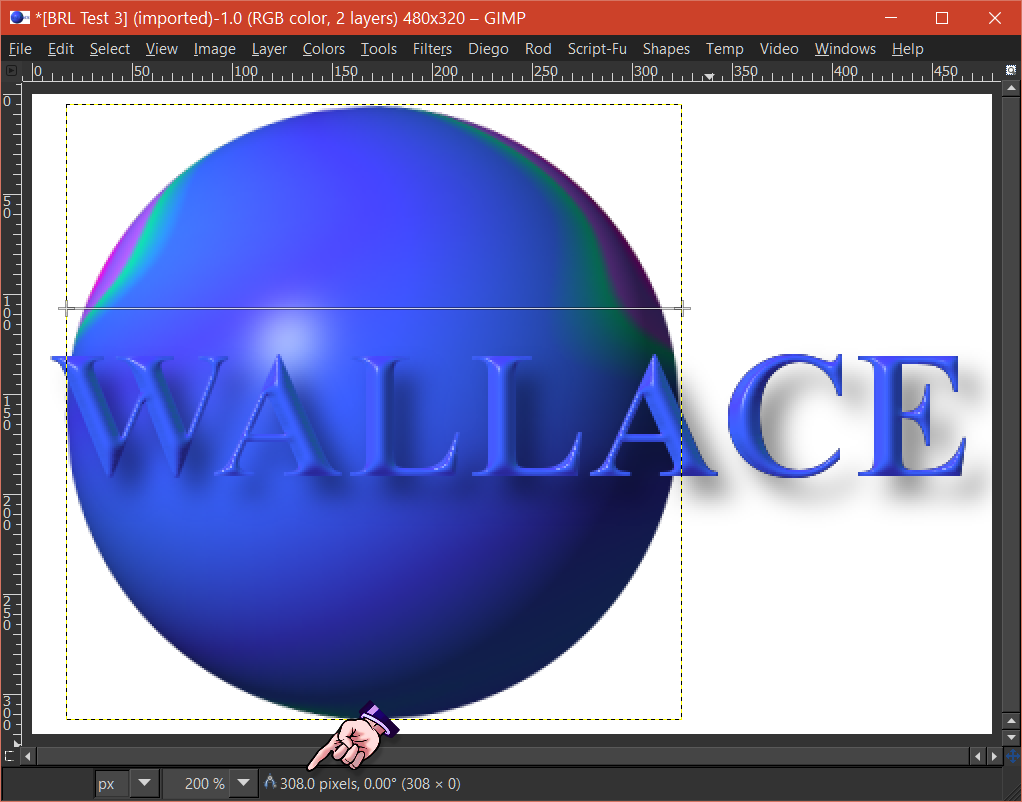
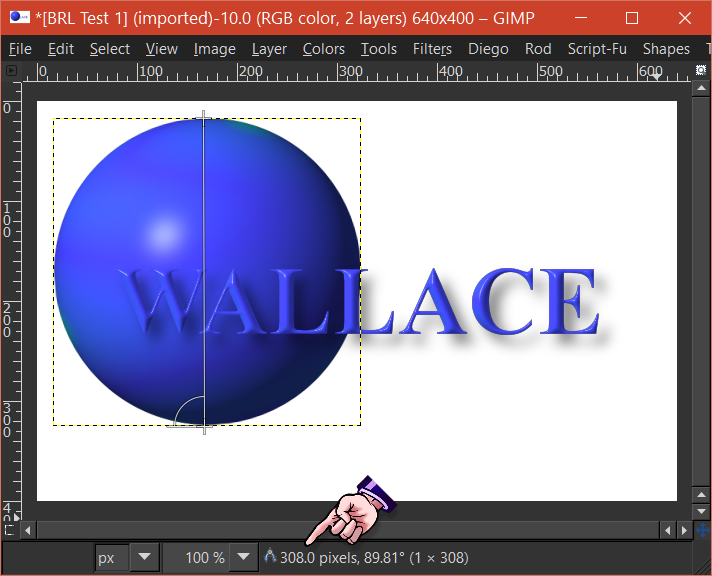
BRL makes it's own e-map when a gradient is selected.
From the 3 different size examples below.
You can see the maps that were generated are each about 308 pixels each in size.
Although these maps are the same size.
Some have more detail then others.
The amount of details in each map,
or lack of detail.
With the maps being basically the same size.
I can't explain.
I would conclude,
that if you were to make your own spherical environment map,
or e-map for short.
I wouldn't make them any smaller the 308x308.
Image

Image

Image

I believe that unlike spherical environment map.
Flat e-maps should be roughly the same size as the image they'll be use on.
For instance,
if I had an image that was 800x400.
When using a flat e-map.
The flat e-map should be equal to or slightly larger in size then the image.
This doesn't seems to apply when using a spherical environment map.

I made this image using the flat e-map below.

Image

Attachment:
File comment: Flat e-map test map
flat e-map test.png
flat e-map test.png [ 92.66 KiB | Viewed 2915 times ]

_________________
Image
"A wise man learns more from a foolish question than a fool can learn from a wise answer"
Image


Top
 Post subject: Re: BRL Easy Map
PostPosted: Tue May 24, 2016 7:42 am  (#90) 
Offline
GimpChat Member

Joined: May 12, 2015
Posts: 4693
Thanks, Wallace. I'll play with that a bit.


Top
 Post subject: Re: BRL Easy Map
PostPosted: Tue May 24, 2016 8:33 am  (#91) 
Offline
Administrator
User avatar

Joined: Aug 10, 2012
Posts: 14227
Location: Native to NYC living in Arizona, Gimp 2.8 - 3.0, Win 11 PC.
Pat625 wrote:
Thanks, Wallace. I'll play with that a bit.

:bigthup

_________________
Image
"A wise man learns more from a foolish question than a fool can learn from a wise answer"
Image


Top
Post new topic Reply to topic  [ 91 posts ]  Go to page Previous  1, 2, 3, 4, 5

All times are UTC - 5 hours [ DST ]


* Login  


Powered by phpBB3 © phpBB Group






