It is currently Sun Aug 16, 2026 5:27 pm


All times are UTC - 5 hours [ DST ]


Post new topic Reply to topic  [ 8 posts ] 
Author Message
 Post subject: to make the color values of a picture uniform
PostPosted: Sat Sep 10, 2016 1:52 am  (#1) 
Offline
GimpChat Member

Joined: Mar 27, 2014
Posts: 11
Hi,
I have many of these drawings (see file attached) and would like to know if there is a trick to make all the lines the same or similar dark?
thank you :)


Attachments:
ff.jpg
ff.jpg [ 30.74 KiB | Viewed 5674 times ]
Share on Facebook Share on Twitter Share on Orkut Share on Digg Share on MySpace Share on Delicious Share on Technorati
Top
 Post subject: Re: to make the color values of a picture uniform
PostPosted: Sat Sep 10, 2016 2:31 am  (#2) 
Offline
Script Coder
User avatar

Joined: Oct 25, 2010
Posts: 4812
Try the Threshold tool (with possibly several selections to use different thresholds for different image parts (such as the cross).

Attachment:
ScanThreshold.jpg
ScanThreshold.jpg [ 18.77 KiB | Viewed 5668 times ]


But is this is the original image or a scaled down version? The original image could have more information to play with and better techniques could possibly be used.

_________________
Image


Top
 Post subject: Re: to make the color values of a picture uniform
PostPosted: Sat Sep 10, 2016 2:58 am  (#3) 
Offline
GimpChat Member

Joined: Mar 27, 2014
Posts: 11
thanks for your answer (PS: that's the only size I have, they were all small small drawings)


Top
 Post subject: Re: to make the color values of a picture uniform
PostPosted: Sat Sep 10, 2016 3:20 am  (#4) 
Offline
GimpChat Member

Joined: Mar 27, 2014
Posts: 11
There is also that picture which is in color (see attachment :"blues"),
is there a possibility to make the blues of the picture in a similar darkness?
for example the arm came out too dark.


Attachments:
blues.jpg
blues.jpg [ 262.16 KiB | Viewed 5654 times ]
Top
 Post subject: Re: to make the color values of a picture uniform
PostPosted: Sat Sep 10, 2016 6:47 am  (#5) 
Offline
Global Moderator
User avatar

Joined: May 16, 2010
Posts: 16161
GuyBrush wrote:
Hi,
I have many of these drawings (see file attached) and would like to know if there is a trick to make all the lines the same or similar dark?
thank you :)

1) Right click the layer the image is on and select "Add Alpha Channel"
2) Go to Colors>Colors to Alpha and select the color "white"
3) Now just keep duplicating the drawing layer until you see what you like contrast wise.
4) Right click the layer and select > "Merge Visible Layers" Use expand as necessary
5) Right click the layer and select "Alpha To Selection"
6) Go to Edit>Fill with FG color (black)
7) Go to Colors>Threshold and just use 127 and 255
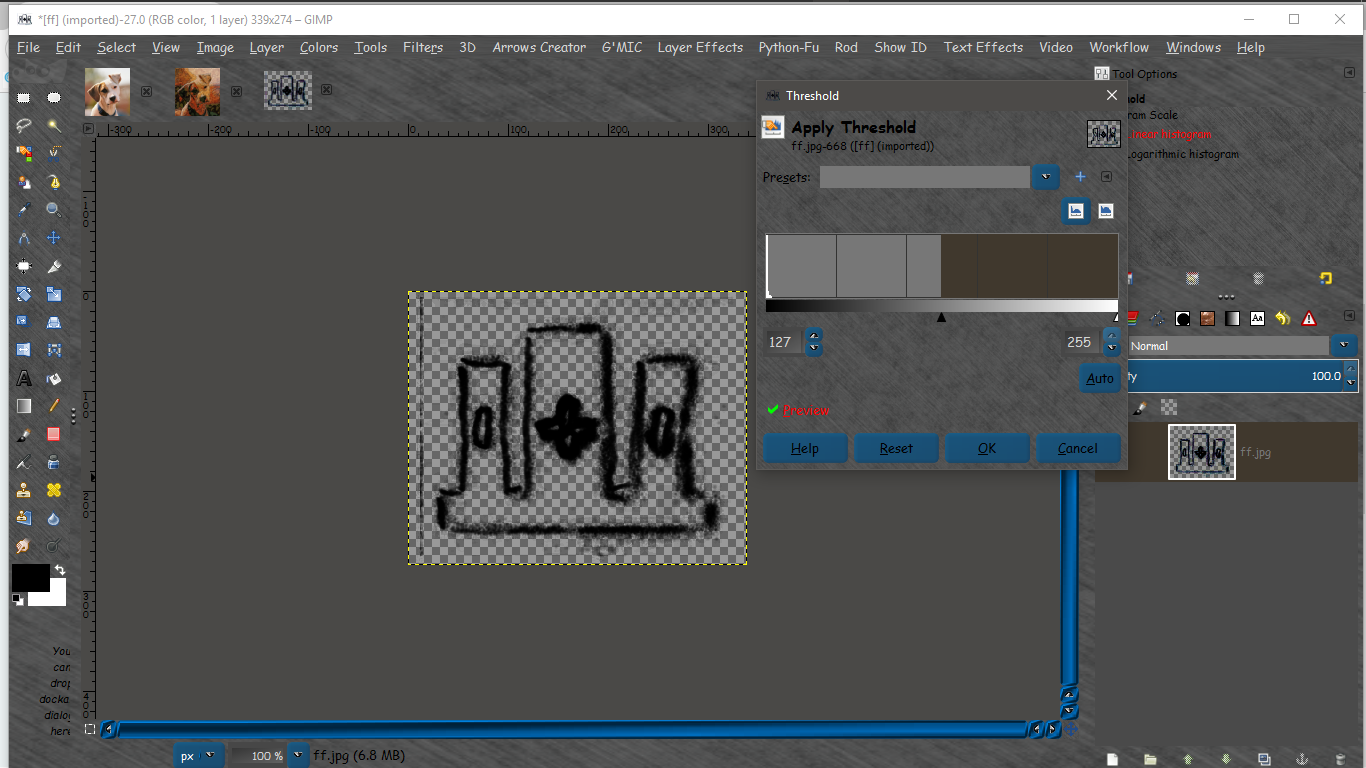
Image

This could probably be scripted to use on batch images. :)

_________________
Image


Top
 Post subject: Re: to make the color values of a picture uniform
PostPosted: Sat Sep 10, 2016 8:26 am  (#6) 
Offline
GimpChat Member

Joined: Mar 27, 2014
Posts: 11
also quite a good idea, worked for the pencil drawings
but for the painting I couldnt get it to kind of balance the blues in there so they come to a similar darkness


Top
 Post subject: Re: to make the color values of a picture uniform
PostPosted: Sat Sep 10, 2016 8:35 am  (#7) 
Offline
GimpChat Member
User avatar

Joined: Jan 20, 2013
Posts: 14831
Location: roma, italy
my try
select by color the area with a too intense cyan
decrease saturation, increase brightness
Attachment:
blues-dn.jpg
blues-dn.jpg [ 263.54 KiB | Viewed 5584 times ]

_________________
"Where am I ?"


Top
 Post subject: Re: to make the color values of a picture uniform
PostPosted: Sat Sep 10, 2016 10:04 am  (#8) 
Offline
GimpChat Member

Joined: Mar 27, 2014
Posts: 11
Yep, good solution :)


Top
Post new topic Reply to topic  [ 8 posts ] 

All times are UTC - 5 hours [ DST ]


* Login  


Powered by phpBB3 © phpBB Group