It is currently Tue Aug 25, 2026 2:25 am


All times are UTC - 5 hours [ DST ]


Post new topic Reply to topic  [ 8 posts ] 
Author Message
 Post subject: Does exist an anti-aliasing script?
PostPosted: Sun Jan 14, 2018 4:49 pm  (#1) 
Offline
GimpChat Member
User avatar

Joined: Apr 15, 2017
Posts: 1837
I'm wondering if there exist an ant-aliasing script for Gimp? Example: Alpha to selection layer-shrink selection 1 pixel-invert selection-feather selection 5 pixels, then delete.

Sure I can do this manually, but a simple script to do those functions would be a big time saver...


Share on Facebook Share on Twitter Share on Orkut Share on Digg Share on MySpace Share on Delicious Share on Technorati
Top
 Post subject: Re: Does exist an anti-aliasing script?
PostPosted: Sun Jan 14, 2018 6:14 pm  (#2) 
Offline
Administrator
User avatar

Joined: Aug 10, 2012
Posts: 14172
Location: Native to NYC living in Arizona, Gimp 2.8 - 3.0, Win 11 PC.
Would seem like a simple script to create.
Perhaps trandoductin will chime in and offer his assistance with this.

_________________
Image
"A wise man learns more from a foolish question than a fool can learn from a wise answer"
Image


Top
 Post subject: Re: Does exist an anti-aliasing script?
PostPosted: Mon Jan 15, 2018 4:23 am  (#3) 
Offline
GimpChat Member
User avatar

Joined: Nov 04, 2015
Posts: 1467
Hi racer, I recently used G'Mic > Repair > remove hot pixels to do an antialiasing-type task.
There is also Filters > Enhance > Antialias but it's almost a no show.
Cheers. :)


Top
 Post subject: Re: Does exist an anti-aliasing script?
PostPosted: Mon Jan 15, 2018 5:18 am  (#4) 
Offline
GimpChat Member
User avatar

Joined: Apr 15, 2017
Posts: 1837
The "remove hot pixels" filter does the trick. Thanks..


Top
 Post subject: Re: Does exist an anti-aliasing script?
PostPosted: Mon Jun 11, 2018 10:15 pm  (#5) 
Offline
New Member

Joined: Jun 11, 2018
Posts: 2
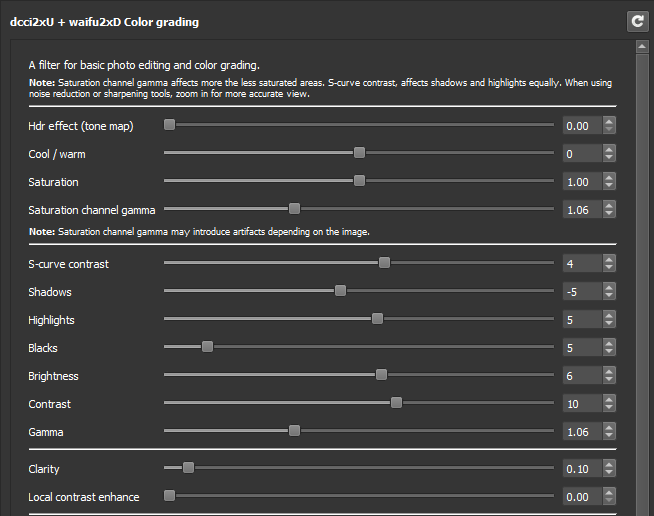
You can try using G'Mic > Repair > Upscale [dcci2x] and then downscale to the original resolution (I suggest using waifu2x to do this). You will have to adjust with the color grading option afterwards (G'mix > Color > Color grading) because for some reason the image becomes dimmer after downscaling from the upscaled version (Do a side-by-side comparison of original before upscaling with dcci2x).

Here are my settings. I didn't use the color grading, just the value and saturation adjustments (this works fairly well).
Image


Top
 Post subject: Re: Does exist an anti-aliasing script?
PostPosted: Tue Jun 12, 2018 3:52 am  (#6) 
Offline
New Member

Joined: Jun 11, 2018
Posts: 2
Better yet, use the LUT method described here https://discuss.pixls.us/t/gimp-how-to- ... lut/1567/3


Top
 Post subject: Re: Does exist an anti-aliasing script?
PostPosted: Wed Jun 13, 2018 5:24 am  (#7) 
Offline
GimpChat Member
User avatar

Joined: Aug 08, 2016
Posts: 2861
Location: East Midlands of England
Here is some code in python-fu to turn your idea into a plugin.

I thought it might amuse you to have your very own filter entry in your own copy of Gimp.

Copy the lines into a text editor, save the file (perhaps as Racer_Anitalias_Selection) with the extension .py and save it to your plugin folder.

#!/usr/bin/env python
#-*- coding: utf-8 -*-

# Anti-alias request from Racer_X
# A very literal coding of the steps requested
# It works, but can easily go wrong if the user
# tries to apply the plugin with a selection
# on the non-active layer.

from gimpfu import *

def plugin_main(image, layer, shrink_amount, feather_amount):

    # Store the GIMP's settings so they can be later restored
    gimp.context_push()

    # Set start undo point
    pdb.gimp_image_undo_group_start(image)


    # active_layer = pdb.gimp_image_get_active_layer(image)
   
    # Find out if there is already a selection with
    has_selection_original,sx1,sy1,sx2,sy2 = pdb.gimp_selection_bounds(image)
   
   
    if not has_selection_original:
        # if there is not already a selection
      # find the currently active layer with
        active_layer = pdb.gimp_image_get_active_layer(image)
      
        if active_layer:
            # if there is an active layer
            # create a selection from the contents of the active layer with
            pdb.gimp_image_select_item(image, CHANNEL_OP_REPLACE, active_layer)
    else:
        # otherwise if there is an existing selection
        # make a note of it with
        current_selection = pdb.gimp_image_get_selection(image)
      
    # now that we have a selection
    # shrink the selection by the amount entered in the dialog UI with
    pdb.gimp_selection_shrink(image, shrink_amount)
    # and invert the selection with
    pdb.gimp_selection_invert(image)
    # then feather selection by the amount entered in the dialog UI with
    pdb.gimp_selection_feather(image, feather_amount)
   
    if not has_selection_original:
        # if there was no selection to begin with
        # cut the inverted selection
        is_successful = pdb.gimp_edit_cut(active_layer)
    else:
        # and if there was an initial selection
        # Find the currently active layer with
        active_layer = pdb.gimp_image_get_active_layer(image)
        # cut the inverted selection
        is_successful = pdb.gimp_edit_cut(active_layer)
      
    # Finally remove the selection outline with
    pdb.gimp_selection_none(image)
   
    # Remove undo point
    pdb.gimp_image_undo_group_end(image)
      
    # Restore the GIMP's settings to their original status
    gimp.context_pop()


register(
    "python_fu_Racer_AntiAliasing",
    "Simple Anti-aliasing",
    "Simple Anti-aliasing for selection on the active layer",
    "Skinnyhouse",
    "GPL",
    "2018",
    "<Image>/Filters/Racer Anti-alias selection on active layer...",
    "*",
    [
    (PF_SPINNER, "pf_shrink", "Shrink selection by:", 1, (1, 3000, 1)),
    (PF_SPINNER, "pf_feather", "Feather radius:", 5, (1, 3000, 1)),
    ],
    [],
    plugin_main)
main()


_________________
Image
"Let no one steal your dreams."
Paul Cookson

Custom Font Links
2.10 Tools
Character Paths
White Bases


Top
 Post subject: Re: Does exist an anti-aliasing script?
PostPosted: Wed Jun 13, 2018 5:47 pm  (#8) 
Offline
GimpChat Member
User avatar

Joined: Apr 15, 2017
Posts: 1837
Thanks Skinnyhouse, that script works perfectly for what I want to do.


Top
Post new topic Reply to topic  [ 8 posts ] 

All times are UTC - 5 hours [ DST ]


* Login  


Powered by phpBB3 © phpBB Group