It is currently Tue Aug 25, 2026 11:10 am


All times are UTC - 5 hours [ DST ]


Post new topic Reply to topic  [ 11 posts ] 
Author Message
 Post subject: Resynthesize Plug-In Error Messages(NOT a coder...please help!)
PostPosted: Sat Jun 23, 2018 3:07 pm  (#1) 
Offline
New Member

Joined: Jun 23, 2018
Posts: 4


Hi,
I just installed the newest version of GIMP, and I am trying to create a seamless texture.
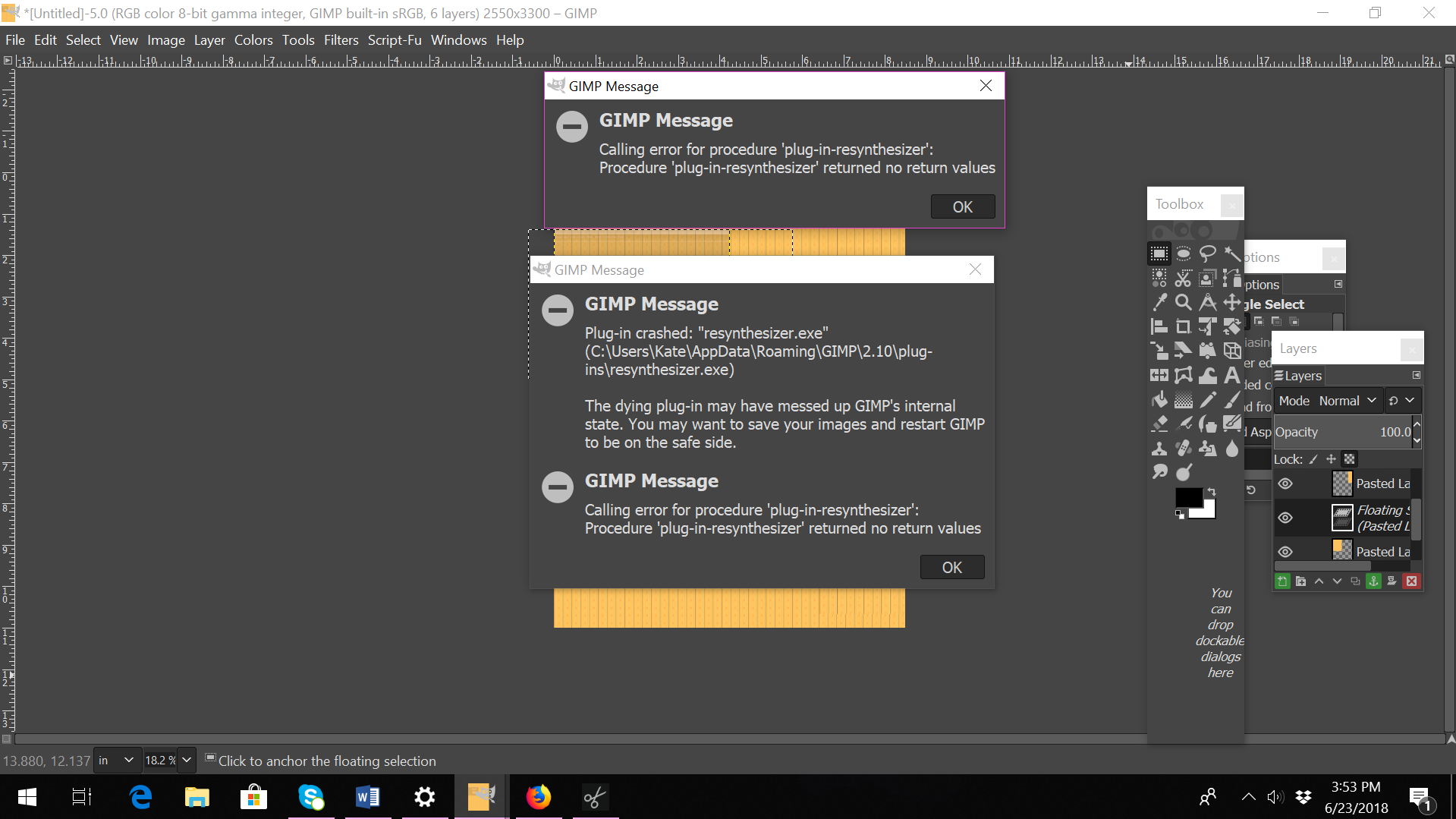
When I run the RE SYNTHESIZE Plug-in, however, I am getting several error messages that I don't understand(see image).

I am NOT a coder and know absolutely nothing about the subject.
Some translation of this "computer-ese" would be appreciated!
Image


Share on Facebook Share on Twitter Share on Orkut Share on Digg Share on MySpace Share on Delicious Share on Technorati
Top
 Post subject: Re: Resynthesize Plug-In Error Messages(NOT a coder...please help!)
PostPosted: Sat Jun 23, 2018 4:18 pm  (#2) 
Offline
GimpChat Member
User avatar

Joined: Apr 15, 2017
Posts: 1837
I can't help, because you are running Windows. If you were running Linux, then I'd recommend the latest Gimp 2.10.3 AppImage: https://github.com/aferrero2707/gimp-appimage/releases

It already comes with Re-Synthesize Pre-Installed and ready to go. I know nothing about that plugin, so I can't help anyway...


Top
 Post subject: Re: Resynthesize Plug-In Error Messages(NOT a coder...please help!)
PostPosted: Sun Jun 24, 2018 3:38 am  (#3) 
Offline
GimpChat Member

Joined: Mar 04, 2011
Posts: 2613
Did you get the resynthesizer plugin from http://registry.gimp.org/node/27986 = version 1

You need version 2

Packed this long time ago but works.

http://www.mediafire.com/file/gwc928wmw ... _32_64.zip

Unzip it. Take the resynthesizer.exe resynthesizer.gui files from either 32/64 bit folder as appropriate for your Windows + any of the python plugins you want, usually heal-selection.py

Pop them in your Gimp 2.10 profile. C:\Users\your-name\AppData\Roaming\GIMP\2.10\plug-ins replacing the ones you already have there.


Top
 Post subject: Re: Resynthesize Plug-In Error Messages(NOT a coder...please help!)
PostPosted: Sun Jun 24, 2018 1:02 pm  (#4) 
Offline
New Member

Joined: Jun 23, 2018
Posts: 4
You need version 2

Packed this long time ago but works.


Unzip it. Take the resynthesizer.exe resynthesizer.gui files from either 32/64 bit folder as appropriate for your Windows + any of the python plugins you want, usually heal-selection.py

Pop them in your Gimp 2.10 profile. C:\Users\your-name\AppData\Roaming\GIMP\2.10\plug-ins replacing the ones you already have there.[/quote]

Hi Rich2005,
Thanks for your reply!
I am not sure if I even have version 1. How would I determine this?
Yes, see THIS is the thing I have trouble with...unzipping compressed files. My file extractor program is called 7zip, which I find very confusing to operate, but don’t know any other file extractor program.
Would you happen to know of a “step-step” extraction tutorial?
(I know techies usually have limited patience for non-techies...sorry!)


Top
 Post subject: Re: Resynthesize Plug-In Error Messages(NOT a coder...please help!)
PostPosted: Sun Jun 24, 2018 1:37 pm  (#5) 
Offline
GimpChat Member

Joined: Mar 04, 2011
Posts: 2613
Windows has built in support for zip files.

Easiest way (for me to show ;) ) Put the zip file on your desktop. Click on it to open it. It opens as a folder like this:

Image

You should use the appropriate 32/64 bit version for your system. How can you tell? An easy way is in Windows Explorer. If there is Program Files and Program Files (x86) it is 64 bit. Just Program Files, then only 32 bit.

Drag the 2 files from the (64 bit or 32 bit) folder into your Gimp 2.10 profile. If there are existing files Windows will ask if you want to overwrite them - Yes

Image

Thats me for the night - bye


Top
 Post subject: Re: Resynthesize Plug-In Error Messages(NOT a coder...please help!)
PostPosted: Sun Jun 24, 2018 1:40 pm  (#6) 
Offline
New Member

Joined: Jun 23, 2018
Posts: 4
Thanks Rich2005,
Oh, I didn’t know Windows had support for zip files!
The screenshots were very helpful!


Top
 Post subject: Re: Resynthesize Plug-In Error Messages(NOT a coder...please help!)
PostPosted: Sun Jun 24, 2018 10:53 pm  (#7) 
Offline
GimpChat Member
User avatar

Joined: Sep 24, 2010
Posts: 12837
Yes; unfortunately the old version of Resynthesizer no longer works in 2.10x (both worked in 2.8x and I had need of the old version for certain things since it did a better job at such as blending borders for seamless textures). Anyway, the python version (new) as stated above works will in 2.10x. :)

_________________
Lyle

Psalm 109:8

Image


Top
 Post subject: Re: Resynthesize Plug-In Error Messages(NOT a coder...please help!)
PostPosted: Mon Jun 25, 2018 12:29 am  (#8) 
Offline
New Member

Joined: Jun 23, 2018
Posts: 4
Hi lylejk,
Yes, I have heard that v. 2.8 does a better job with certain program functions...not sure I will EVER understand unpacking scripts, but I appreciate your response! :)


Top
 Post subject: Re: Resynthesize Plug-In Error Messages(NOT a coder...please help!)
PostPosted: Mon Jun 25, 2018 10:33 am  (#9) 
Offline
GimpChat Member
User avatar

Joined: Sep 24, 2014
Posts: 11
Hi,
I also have some trouble using Heal Selection on GIMP 2.9 upwards.
Usually I select the area to be healed with the "Free Select Tool" (Lasso) and always get the message "You must first select a region to heal". Rectangle, Ellipse and even Fuzzy Selection are working fine but they are less usable for healing :(

edit: problem appears on Partha's GIMP builds 2.9.x and 2.10.2 running on Win10


Attachments:
no-healing.png
no-healing.png [ 5.52 KiB | Viewed 4722 times ]
Top
 Post subject: Re: Resynthesize Plug-In Error Messages(NOT a coder...please help!)
PostPosted: Mon Jun 25, 2018 11:33 am  (#10) 
Offline
GimpChat Member

Joined: Mar 04, 2011
Posts: 2613
You do not show the selection but probably looks like this

Image

In Gimp 2.10 that is not yet an active selection. Hit the Enter key and you get the crawling ants indicating active.

Now it works

Image

Edit: had to revert to my more usual linux/Gimp 2.10.2 to show the cursor icon. There is a notification bottom of the Gimp Window (notification area)

Image


Top
 Post subject: Re: Resynthesize Plug-In Error Messages(NOT a coder...please help!)
PostPosted: Mon Jun 25, 2018 12:35 pm  (#11) 
Offline
GimpChat Member
User avatar

Joined: Sep 24, 2014
Posts: 11
That was fast, Rich!
Thank you very much, that's exactly what I did wrong :tyspin
... should read the hints being shown on the screen


Top
Post new topic Reply to topic  [ 11 posts ] 

All times are UTC - 5 hours [ DST ]


* Login  


Powered by phpBB3 © phpBB Group