It is currently Mon Aug 10, 2026 5:54 pm


All times are UTC - 5 hours [ DST ]


Post new topic Reply to topic  [ 10 posts ] 
Author Message
 Post subject: Kijkeline
PostPosted: Thu Jun 17, 2021 3:24 am  (#1) 
Offline
GimpChat Member

Joined: Jun 17, 2021
Posts: 5
Hi everybody ! I´m Sandy, live in South Germany but my heart belongs to Vlaanderen and Syldavia

Excuse my bad English , I´m try to learn and understand Gimp, it´s really a great software !

I use Windows 10 64 bit and Linux Mint 20 Ulyssa, dualboot

Gimp 2.10.24 on Windows , Gimp 2.10.18 on Linux , I can´t install the 10.24 version on Linux and I don´t know why

I hoppe, I can realize lovely pictures before I´m 50 lol !

Have a nice day !


Share on Facebook Share on Twitter Share on Orkut Share on Digg Share on MySpace Share on Delicious Share on Technorati
Top
 Post subject: Re: Kijkeline
PostPosted: Thu Jun 17, 2021 4:46 am  (#2) 
Offline
GimpChat Member
User avatar

Joined: Apr 15, 2017
Posts: 1837
Kijkeline wrote:
I use Windows 10 64 bit and Linux Mint 20 Ulyssa, dualboot

Gimp 2.10.24 on Windows , Gimp 2.10.18 on Linux , I can´t install the 10.24 version on Linux and I don´t know why


Welcome to GimpChat.

I run Linux Mint 20 and Gimp 2.10.24. There are two ways that I know of. I'm running the PPA version, but the AppImage version may be easier to use and no installation required.

AppImages: https://github.com/aferrero2707/gimp-appimage/releases

UbuntoHandBook PPA: https://ubuntuhandbook.org/index.php/20 ... ntu-20-04/


Top
 Post subject: Re: Kijkeline
PostPosted: Thu Jun 17, 2021 5:10 am  (#3) 
Offline
GimpChat Member
User avatar

Joined: May 24, 2021
Posts: 859
Location: SEA - South East Asia
racer-x wrote:
Kijkeline wrote:
I use Windows 10 64 bit and Linux Mint 20 Ulyssa, dualboot
AppImages: https://github.com/aferrero2707/gimp-appimage/releases
UbuntoHandBook PPA: https://ubuntuhandbook.org/index.php/20 ... ntu-20-04/

Welcome to gimpchat!
Like @racer-x I'm using the PPA from Ubuntu handbook and the Appimage from ferrero continuous release with plugins-x86-64 https://github.com/aferrero2707/gimp-ap ... continuous (scroll down until GIMP_AppImage-git-2.10.25-20210610-withplugins-x86_64.AppImage as of today)
appimage is GIMP 2.10.25 (no worries it's a 2.10.24 with perhaps bug fixes)
and the PPA is the stable 2.10.24 (you do need to purge the PPA from Otto kesselgulasch if you have it, as it is not anymore updated from a year or two then just "sudo add-apt-repository ppa:ubuntuhandbook1/gimp" and you will got the latest 2.10.24 ;) on our Linux Mint)

_________________
Patrice


Top
 Post subject: Re: Kijkeline
PostPosted: Thu Jun 17, 2021 8:25 am  (#4) 
Offline
GimpChat Member

Joined: Jun 17, 2021
Posts: 5
Thank you very much for your answers !
And what about G'mic when I decide to download the Appimage version ?
Can I conserve Gimp 2.10.18 or must I remove it ?


Top
 Post subject: Re: Kijkeline
PostPosted: Thu Jun 17, 2021 8:42 am  (#5) 
Offline
GimpChat Member
User avatar

Joined: Apr 14, 2021
Posts: 488
Location: Belgium
Welcome to GimpChat Kijkeline.

I hope to discover soon your beautiful creations.

_________________
Gimp 2.10.30 - Windows 10 Home 64 bits - Gmic 3.0.2


Top
 Post subject: Re: Kijkeline
PostPosted: Fri Jun 18, 2021 3:24 pm  (#6) 
Offline
GimpChat Member
User avatar

Joined: Mar 01, 2014
Posts: 14119
Location: Spain, Aragón
Welcome to Gimp Chat, Kijkeline. :)


Attachments:
marguerite-Welcome.jpg
marguerite-Welcome.jpg [ 353.59 KiB | Viewed 4758 times ]

_________________
Image

Gimp 2.10.30(samj) portable _ OS Windows 10 Home_ 64bits
Don’t be afraid to start over. It’s a new chance to rebuild what you want.
Top
 Post subject: Re: Kijkeline
PostPosted: Fri Jun 18, 2021 5:24 pm  (#7) 
Offline
GimpChat Member
User avatar

Joined: Jul 06, 2013
Posts: 2662
Location: California
Welcome to Gimp Chat. :)


Top
 Post subject: Re: Kijkeline
PostPosted: Fri Jun 18, 2021 6:18 pm  (#8) 
Offline
GimpChat Member
User avatar

Joined: Apr 15, 2017
Posts: 1837
Kijkeline wrote:
And what about G'mic when I decide to download the Appimage version ?
Can I conserve Gimp 2.10.18 or must I remove it ?

If you download the "AppImage with Plugins" it will include G'mic. You can run the AppImage in parallel with Gimp 2.10.18 without issues. Be sure to make the Gimp AppImage executable in order to run it.


Top
 Post subject: Re: Kijkeline
PostPosted: Fri Jun 18, 2021 8:09 pm  (#9) 
Offline
GimpChat Member
User avatar

Joined: May 24, 2021
Posts: 859
Location: SEA - South East Asia
Kijkeline wrote:
Thank you very much for your answers !
And what about G'mic when I decide to download the Appimage version ?
Can I conserve Gimp 2.10.18 or must I remove it ?

Why would you want to keep 2.10.18? you will miss the new vignette, long shadow and so added in 2.10.20

About G'MIC for the GIMP appimage see racer-x above post
both GIMP will work separately (appimage or handbook package), but not at the same time ;)
Having those 2 GIMP is nice as you can setup the dockable dialogues, the tools, and so, completely differently from one GIMP to the other one (let say 1 for drawing, and 1 for photo), also the history docker will recall what you've open on the other GIMP (which is cool, no need to search for what you've opened previously in the other GIMP)

Be very careful, having 2 different GIMP with 2 different config, you will become very addicted!! :hehe :hehe

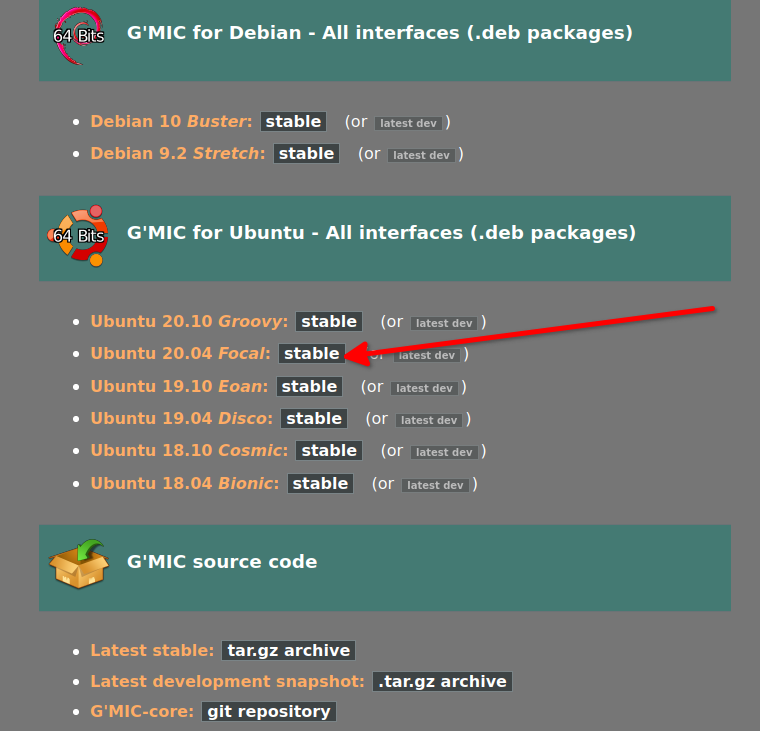
for my 2.10.24 (from handbook) I use the G'MIC .deb from gmic.eu (scrolldown on gmic.eu) as my *buntu distro is a LTS
Image

_________________
Patrice


Top
 Post subject: Re: Kijkeline
PostPosted: Sat Jun 19, 2021 4:40 am  (#10) 
Offline
Global Moderator
User avatar

Joined: Apr 01, 2012
Posts: 8454
Location: On the other side of your screen
Welcome to Gimp Chat Kijkline. Lovely to have you here. :)

_________________
Image
Free Fun Photo Editing & resources
Poems from the Lord
Gimp Newby
Gimp version 3.2.4 and GMIC-Qt 4.0.2 OS :- Windows 10 Home 64


Top
Post new topic Reply to topic  [ 10 posts ] 

All times are UTC - 5 hours [ DST ]


* Login  


Powered by phpBB3 © phpBB Group