It is currently Tue Aug 11, 2026 1:49 am


All times are UTC - 5 hours [ DST ]


Post new topic Reply to topic  [ 7 posts ] 
Author Message
 Post subject: Never have I had trouble using pencil or brush but now??!?!
PostPosted: Sat Jun 14, 2025 11:23 am  (#1) 
Offline
New Member

Joined: Jun 14, 2025
Posts: 4
GIMP Version: 3.0.4
Operating System: Windows
GIMP Experience: Basic Level

List any relevant plug-ins or scripts:
No

List any ERROR messages you received:
No


I have used Gimp off and on, mostly on recently for about 7 years or so. I have never had trouble using the pencil or brush. I loaded up a simple image. It's RGB. I wanted to take out a blemish and so I used the color sampler, it sampled, that worked. I switched to brush and that Circle thing that means "no go" with a red slash. In other words, pencil or brush is not going to work there. I've never had this trouble before. I can select a small box, sample the color and bucket fill works, but not pencil or brush.

Do you have a solution, I'd be thankful for it. In the meantime I'll continue to work on the problem. I"ll come back if I find the correction.

Thanks!! :gaah


Share on Facebook Share on Twitter Share on Orkut Share on Digg Share on MySpace Share on Delicious Share on Technorati
Top
 Post subject: Re: Never have I had trouble using pencil or brush but now??!?!
PostPosted: Sat Jun 14, 2025 11:49 am  (#2) 
Offline
Administrator
User avatar

Joined: Aug 10, 2012
Posts: 14150
Location: Native to NYC living in Arizona, Gimp 2.8 - 3.0, Win 11 PC.
Hi jackdashack and welcome to Gimp Chat.
You could try create a new layer (Layer → New from Visible or just New Layer).
Make sure nothing is selected (Select → None) and try painting on this new layer.
If that works,
something was up with your original layer.

_________________
Image
"A wise man learns more from a foolish question than a fool can learn from a wise answer"
Image


Top
 Post subject: Re: Never have I had trouble using pencil or brush but now??!?!
PostPosted: Sat Jun 14, 2025 12:41 pm  (#3) 
Offline
New Member

Joined: Jun 14, 2025
Posts: 4
Wallace wrote:
Hi jackdashack and welcome to Gimp Chat. ~ If that works,
something was up with your original layer.


Thank you, I will work that asap and get back. :tyspin


Top
 Post subject: Re: Never have I had trouble using pencil or brush but now??!?!
PostPosted: Sun Jun 15, 2025 6:07 am  (#4) 
Offline
Script Coder
User avatar

Joined: Oct 25, 2010
Posts: 4812
jackdashack wrote:
GIMP Version: 3.0.4
Operating System: Windows
GIMP Experience: Basic Level

List any relevant plug-ins or scripts:
No

List any ERROR messages you received:
No


I have used Gimp off and on, mostly on recently for about 7 years or so. I have never had trouble using the pencil or brush. I loaded up a simple image. It's RGB. I wanted to take out a blemish and so I used the color sampler, it sampled, that worked. I switched to brush and that Circle thing that means "no go" with a red slash. In other words, pencil or brush is not going to work there. I've never had this trouble before. I can select a small box, sample the color and bucket fill works, but not pencil or brush.

Do you have a solution, I'd be thankful for it. In the meantime I'll continue to work on the problem. I"ll come back if I find the correction.

Thanks!! :gaah


Screenshot of the whole UI?

_________________
Image


Top
 Post subject: Re: Never have I had trouble using pencil or brush but now??!?!
PostPosted: Mon Jun 16, 2025 2:41 pm  (#5) 
Offline
New Member

Joined: Jun 14, 2025
Posts: 4
Wallace wrote:
Hi jackdashack and welcome to Gimp Chat. If that works, something was up with your original layer.


Very frustrating ... I've used Gimp for years and never had this until upgrading. I can select a rectangle, bucket fill and works. Trying a paint or pen doesn't work. I've followed you suggestions and at this point several days later still a no-go. Twerks you when you want to get started on a new project and can't. BTW I did even start a new blank image and nothing. smh


Top
 Post subject: Re: Never have I had trouble using pencil or brush but now??!?!
PostPosted: Mon Jun 16, 2025 2:47 pm  (#6) 
Offline
New Member

Joined: Jun 14, 2025
Posts: 4
Wallace wrote:
Hi jackdashack and welcome to Gimp Chat.


No sooner. I got it back to normal and I was clicking here and there. And since I didn't take the time to write down the precise steps I won't attempt to try. That could be misleading. But thanks again for your attention. If there's a way I've missed to give kudos or answered pls let me know!! :yr


Top
 Post subject: Re: Never have I had trouble using pencil or brush but now??!?!
PostPosted: Tue Jun 17, 2025 9:56 am  (#7) 
Offline
Administrator
User avatar

Joined: Aug 10, 2012
Posts: 14150
Location: Native to NYC living in Arizona, Gimp 2.8 - 3.0, Win 11 PC.
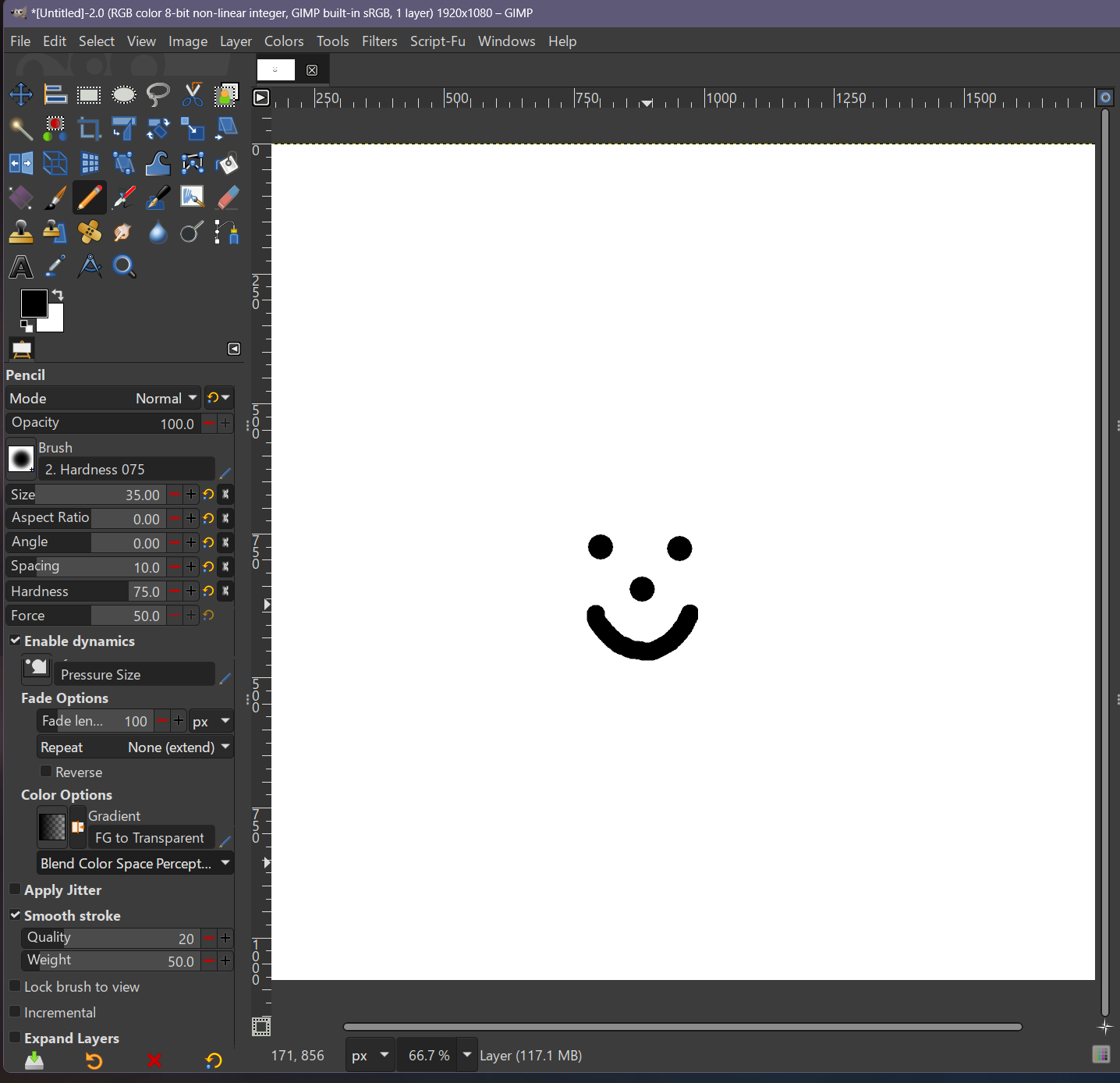
These are my setting for the pencil.
I also hit the reset button to show some of the default setting within the dialog.
Maybe take a look at what you have and compare it to this screenshot?


Image

_________________
Image
"A wise man learns more from a foolish question than a fool can learn from a wise answer"
Image


Top
Post new topic Reply to topic  [ 7 posts ] 

All times are UTC - 5 hours [ DST ]


* Login  


Powered by phpBB3 © phpBB Group