It is currently Sat Jun 13, 2026 1:13 am


All times are UTC - 5 hours [ DST ]


Post new topic Reply to topic  [ 23 posts ]  Go to page 1, 2  Next
Author Message
 Post subject: How to enhance old black and white photos
PostPosted: Thu Aug 28, 2025 4:05 pm  (#1) 
Offline
GimpChat Member

Joined: Aug 28, 2025
Posts: 10
GIMP 2.10.34 on Linux
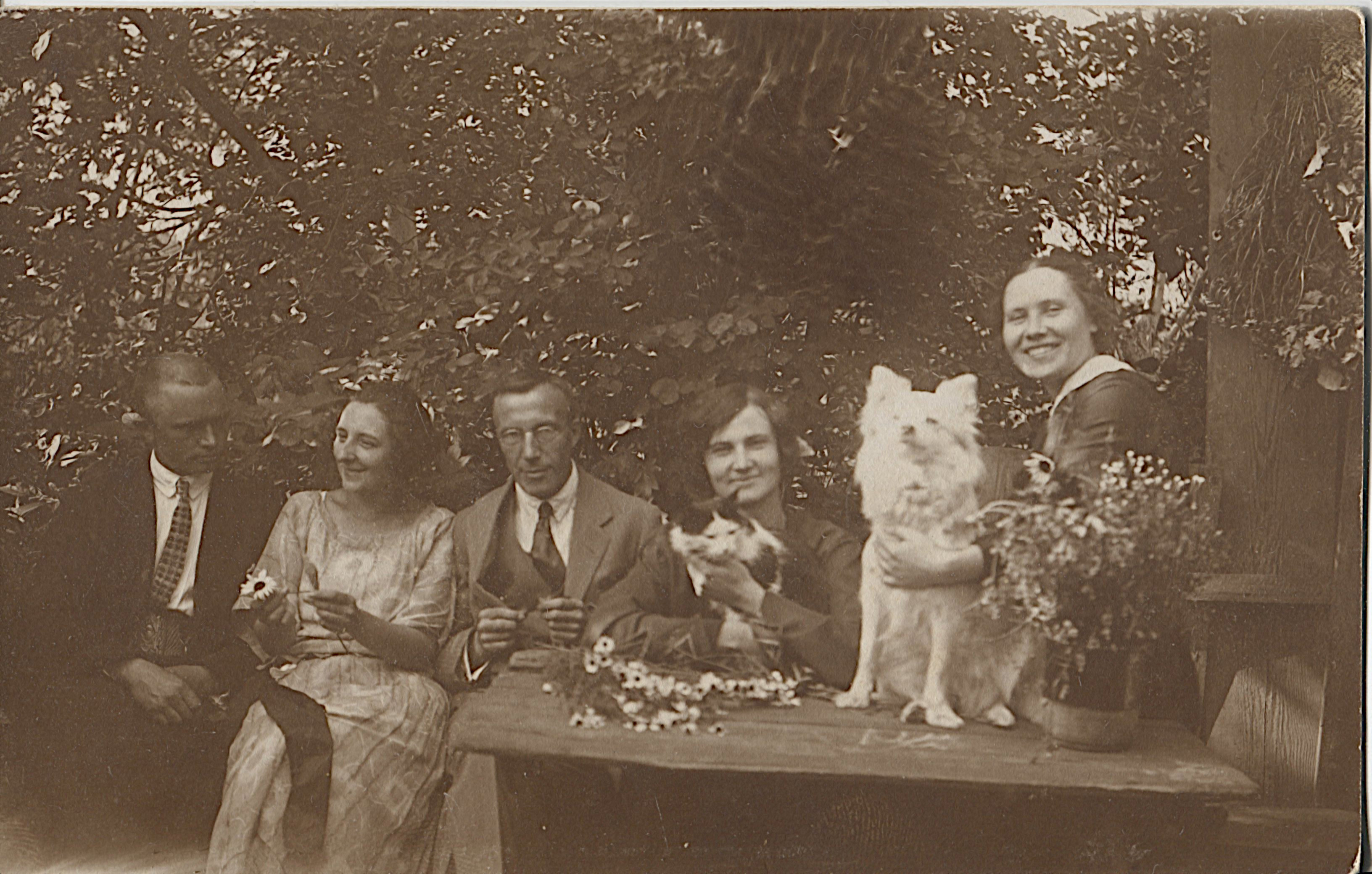
How to enhance old black and white photos, for printing? Original cards scanned to tiff or jpg. Many photos have a brownish tint.


Attachments:
img2.jpg
img2.jpg [ 951.02 KiB | Viewed 9041 times ]


Last edited by renke on Sat Aug 30, 2025 9:27 am, edited 1 time in total.
Share on Facebook Share on Twitter Share on Orkut Share on Digg Share on MySpace Share on Delicious Share on Technorati
Top
 Post subject: Re: How to enhance old black and white photos
PostPosted: Thu Aug 28, 2025 7:28 pm  (#2) 
Offline
Global Moderator
User avatar

Joined: Apr 01, 2012
Posts: 8364
Location: On the other side of your screen
Depends what your photo needs. Can you post it here?
Maybe some contrast, sharpening, denoising. Does the photo need repairing at all? For printing it is good to have it at least 300ppi

_________________
Image
Free Fun Photo Editing & resources
Poems from the Lord
Gimp Newby
Gimp version 3.2.0 and GMIC-Qt 3.7.5 OS :- Windows 10 Home 64


Top
 Post subject: Re: How to enhance old black and white photos
PostPosted: Sat Aug 30, 2025 9:31 am  (#3) 
Offline
GimpChat Member

Joined: Aug 28, 2025
Posts: 10
photo size 88 x 138 mm, scanned at 600 dpi, jpeg and tiff format.


Top
 Post subject: Re: How to enhance old black and white photos
PostPosted: Sat Aug 30, 2025 12:40 pm  (#4) 
Offline
GimpChat Member
User avatar

Joined: Mar 01, 2014
Posts: 14020
Location: Spain, Aragón
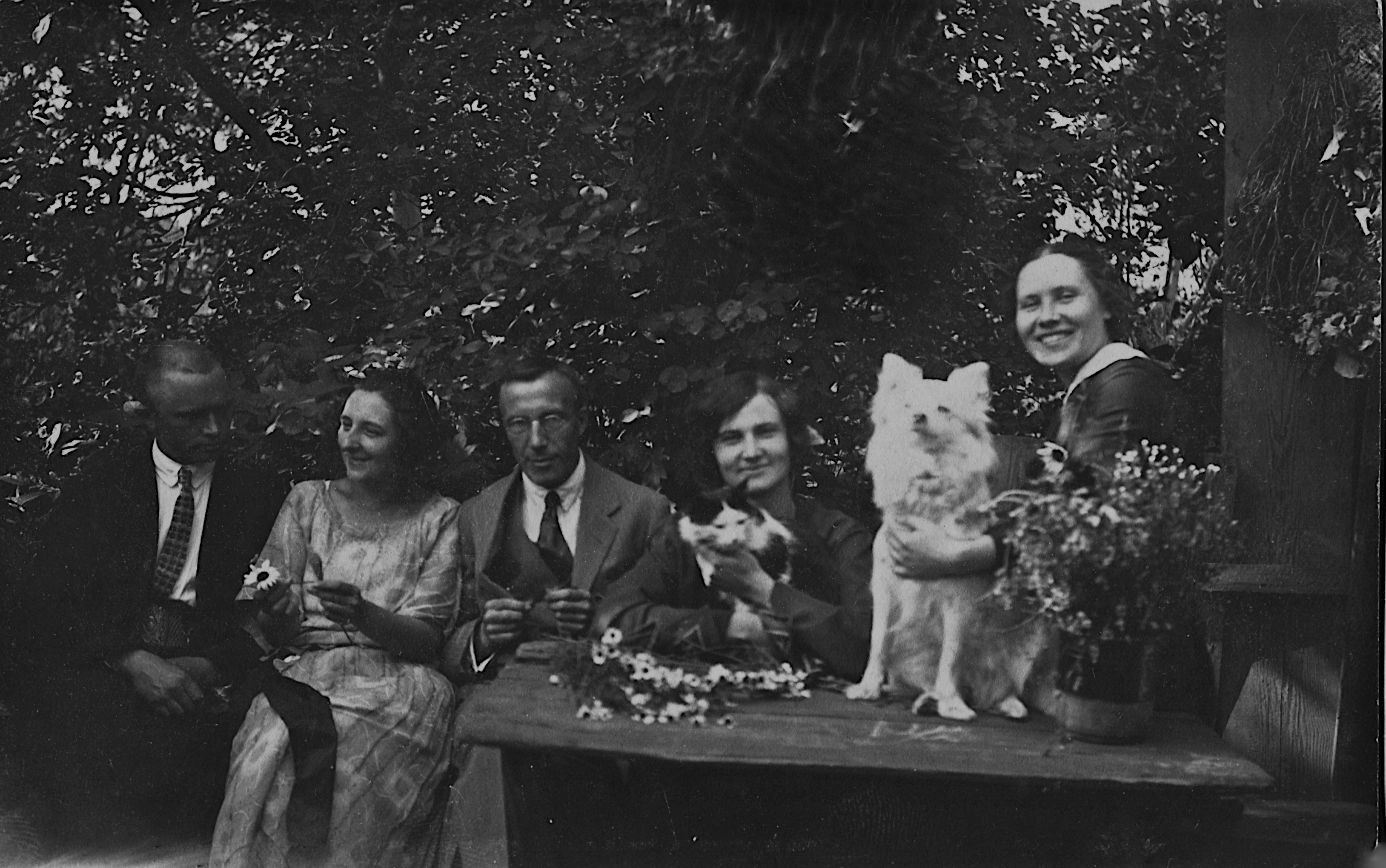
my try


Attachments:
img2-B&W.jpg
img2-B&W.jpg [ 1.46 MiB | Viewed 9035 times ]

_________________
Image

Gimp 2.10.30(samj) portable _ OS Windows 10 Home_ 64bits
Don’t be afraid to start over. It’s a new chance to rebuild what you want.
Top
 Post subject: Re: How to enhance old black and white photos
PostPosted: Sat Aug 30, 2025 2:06 pm  (#5) 
Offline
GimpChat Member

Joined: Mar 04, 2011
Posts: 2603
Nice old photograph.

A couple of possibilities

There are plenty of dust speckles, try Filters -> Enhance -> Noise Reduction. It is slow at higher values do be patient.

Use Colors -> Levels and "Auto Input Levels" Then go straight into Color Curves and adjust the value curve. Make sure you have the Merge filter enabled.

Gimp 3.0.4 (kubuntu 24.04 - Appimage) is bit lacking in sharpen filters (install the gmic plugin for more), but using Filters -> Enhance -> Wavelet Decompose gets me this:

Attachment:
2a.jpg
2a.jpg [ 994.08 KiB | Viewed 9027 times ]


A one-and-a half minute video of that: https://i.imgur.com/8cPWR8D.mp4


Top
 Post subject: Re: How to enhance old black and white photos
PostPosted: Sat Aug 30, 2025 3:05 pm  (#6) 
Offline
Global Moderator
User avatar

Joined: May 16, 2010
Posts: 16023
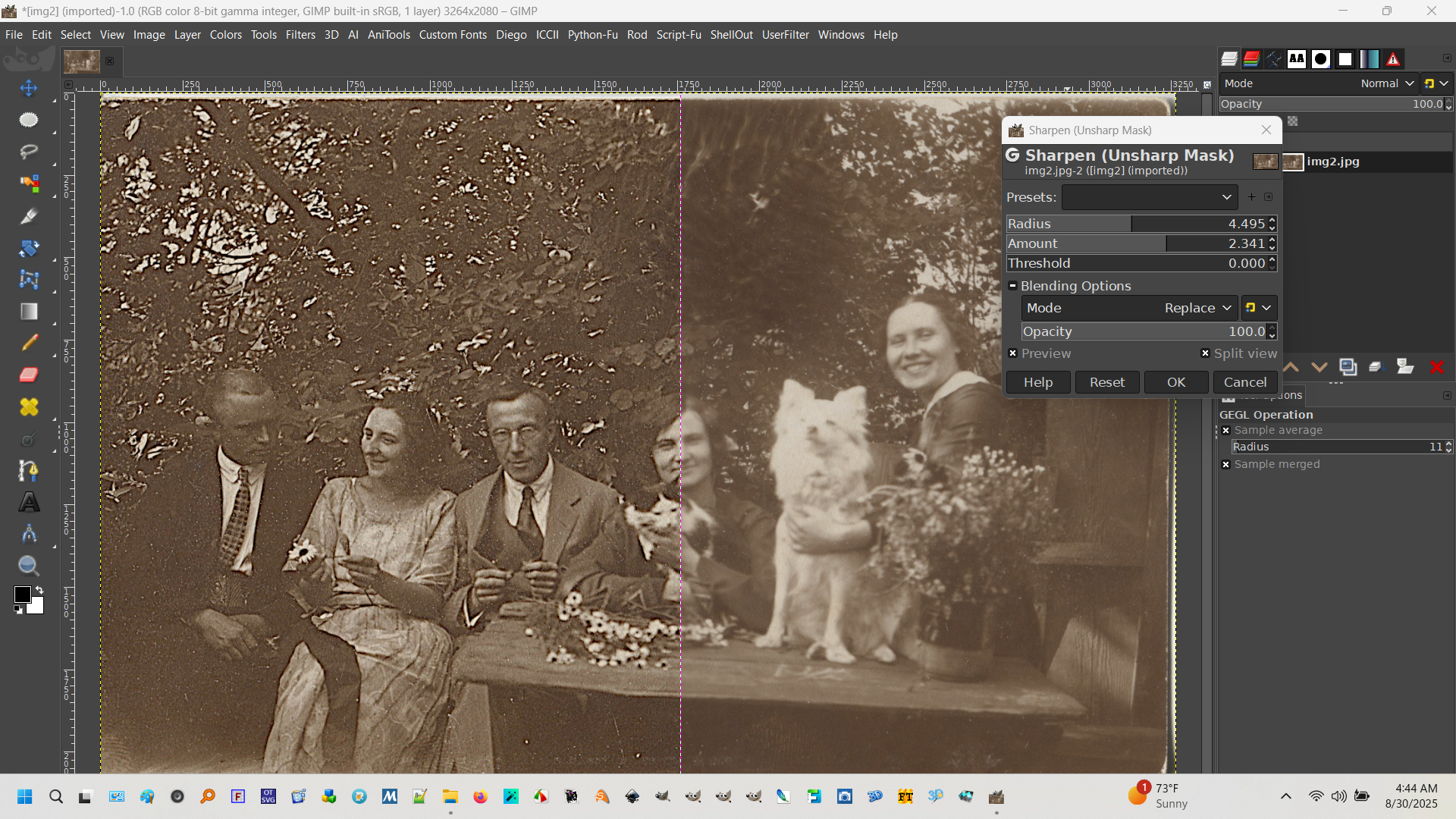
I just ran it through Filters>Enhance>sharpen unsharp mask (GEGL with preview).

Image

After that you may want to remove the noise as Rich stated.

_________________
Image


Top
 Post subject: Re: How to enhance old black and white photos
PostPosted: Sat Aug 30, 2025 3:12 pm  (#7) 
Offline
Global Moderator
User avatar

Joined: May 16, 2010
Posts: 16023
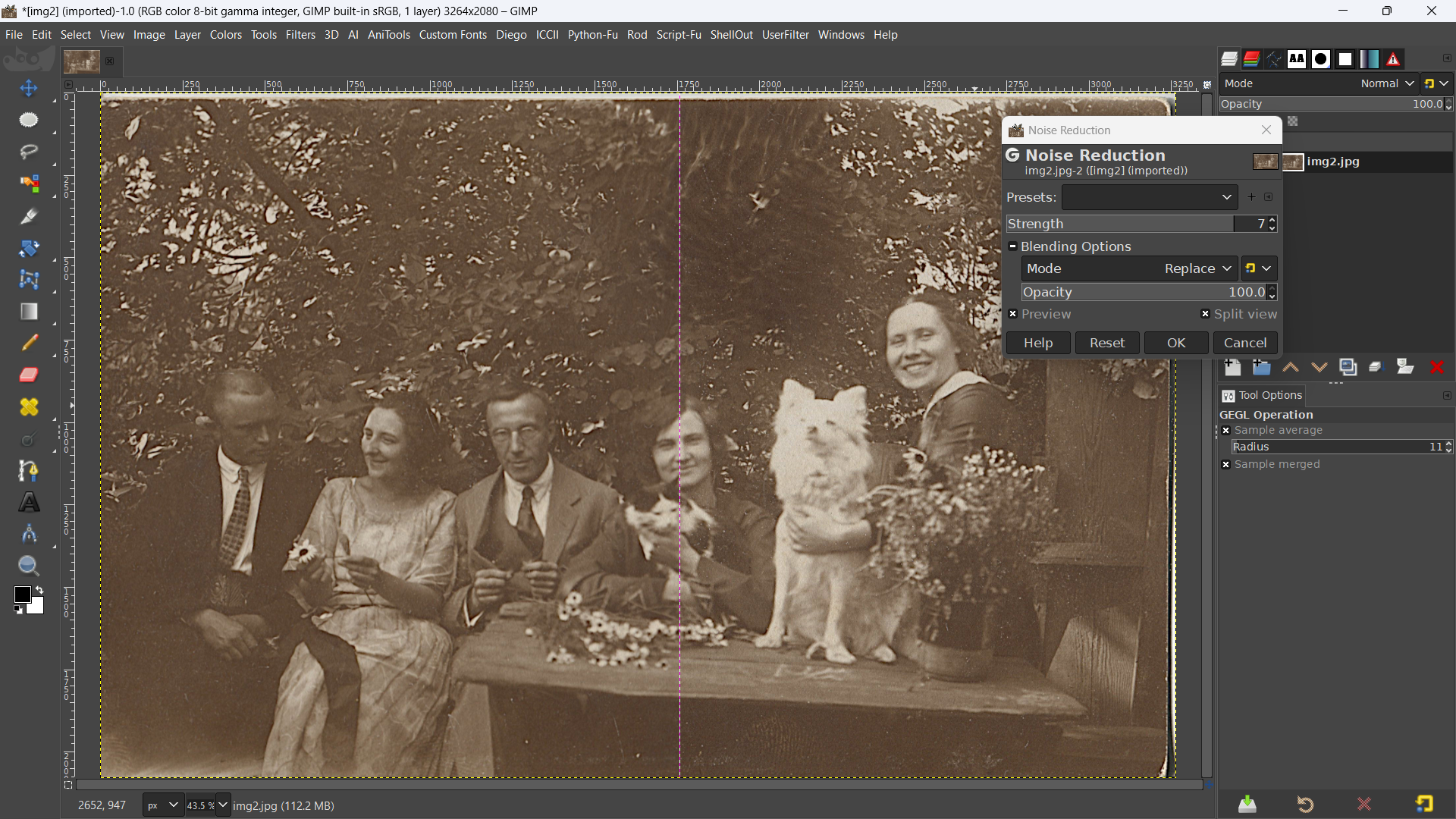
Or perhaps Filters>Enhance>Noise Reduction. After sharpen unsharp mask.

Image

_________________
Image


Top
 Post subject: Re: How to enhance old black and white photos
PostPosted: Sat Aug 30, 2025 3:15 pm  (#8) 
Offline
Global Moderator
User avatar

Joined: May 16, 2010
Posts: 16023
Results

Image

_________________
Image


Top
 Post subject: Re: How to enhance old black and white photos
PostPosted: Sat Aug 30, 2025 5:03 pm  (#9) 
Offline
GimpChat Member

Joined: Aug 28, 2025
Posts: 10
Thanks for tips! I haven't used GIMP before. All the results look very good, but I liked Rich's result a little better. (and thanks for video, too) However, which version will look better on paper can only be seen after printing. Is it better work with jpeg or tiff?


Top
 Post subject: Re: How to enhance old black and white photos
PostPosted: Sat Aug 30, 2025 7:10 pm  (#10) 
Offline
GimpChat Member
User avatar

Joined: Sep 14, 2018
Posts: 29
Location: Nederland
Wow!
I never saw that Wavelet-decompose before! Looks like a very strong tool.


Top
 Post subject: Re: How to enhance old black and white photos
PostPosted: Sun Aug 31, 2025 3:14 am  (#11) 
Offline
GimpChat Member

Joined: Mar 04, 2011
Posts: 2603
renke wrote:
...snip... Is it better work with jpeg or tiff?


Jpeg was made for photographs and it is a lossy format, Image information is lost depending on the amount of compression That is not linear, 95 down to about 75 - not much loss in quality but large change in file size. Under compression about 50 and lower, not much change in file size but noticeable loss in quality. You get jpeg edge artifacts.

Tiff is a wrapper and comes in many variations. In Gimp you can have a lossless Tiff which makes large file size or a variety of lossless but compressed tiff files. Often you get a tiff from a scanner by default.

Always Save your work initially as a Gimp .xcf file, it is lossless and keeps layers, masks, selections..all sorts which are lost with other formats.


Top
 Post subject: Re: How to enhance old black and white photos
PostPosted: Sun Aug 31, 2025 4:22 am  (#12) 
Offline
Global Moderator
User avatar

Joined: Apr 01, 2012
Posts: 8364
Location: On the other side of your screen
My try
Desaturate using luminance - under - colours - desaturate
Despeckle to get rid of extra dots. - under iflters - enhance
Duplicate your image and layer mode multiply 90% on top layer Should get rid of the haze.
Merge down then duplicate again and this time do High pass - under filters - enhance at 55-56
Overlay layer mode then merge down.
For a sharper image unsharp mask. Under Filter - Enhance
Rectangle select - crop image to selection to get rid of the white borders. If you want more borders there is border under decor.
If the image is too dark now lighten a little with curves. A slight S should do. - Under colours curves. Leave on value.
Also give it some contrast. (which I didn't do to this one) Not too much or you will blow out the whites. About 9. Under colour as well.
Unless stated all things are at default
Image

_________________
Image
Free Fun Photo Editing & resources
Poems from the Lord
Gimp Newby
Gimp version 3.2.0 and GMIC-Qt 3.7.5 OS :- Windows 10 Home 64


Top
 Post subject: Re: How to enhance old black and white photos
PostPosted: Sun Aug 31, 2025 1:18 pm  (#13) 
Offline
GimpChat Member

Joined: Aug 28, 2025
Posts: 10
there is a some dark spot on the top right on card, it's unclear whether this is a natural appearance of the leaves from sunlight, or this is an artifact, perhaps from touching with a finger.


Top
 Post subject: Re: How to enhance old black and white photos
PostPosted: Sun Aug 31, 2025 7:08 pm  (#14) 
Offline
Global Moderator
User avatar

Joined: Apr 01, 2012
Posts: 8364
Location: On the other side of your screen
I think if is was from a finger you would see some 'finger mark' texture

_________________
Image
Free Fun Photo Editing & resources
Poems from the Lord
Gimp Newby
Gimp version 3.2.0 and GMIC-Qt 3.7.5 OS :- Windows 10 Home 64


Top
 Post subject: Re: How to enhance old black and white photos
PostPosted: Mon Sep 01, 2025 8:07 am  (#15) 
Offline
GimpChat Member

Joined: Jan 07, 2025
Posts: 11
My try with gimp 3 and G'Mic-Qt :
Quality jpg 58%
Attachment:
fam Q58.jpg
fam Q58.jpg [ 495.72 KiB | Viewed 8909 times ]

Quality jpg 98%
Attachment:
fam cr.jpg
fam cr.jpg [ 383.09 KiB | Viewed 8909 times ]


Top
 Post subject: Re: How to enhance old black and white photos
PostPosted: Mon Sep 01, 2025 4:02 pm  (#16) 
Offline
GimpChat Member

Joined: Aug 28, 2025
Posts: 10
denzjos, can you specify the detailed steps you used? (with quality 100%)


Top
 Post subject: Re: How to enhance old black and white photos
PostPosted: Tue Sep 02, 2025 7:53 am  (#17) 
Offline
GimpChat Member

Joined: Jan 07, 2025
Posts: 11
A lot of work and experimentation. See the xcf file (zipped)
https://e.pcloud.link/publink/show?code ... xO4BsibJzX


Top
 Post subject: Re: How to enhance old black and white photos
PostPosted: Sat Jan 10, 2026 10:19 am  (#18) 
Offline
GimpChat Member
User avatar

Joined: Jan 01, 2026
Posts: 472
Attachment:
Fixed-with-Blending-modes.jpg
Fixed-with-Blending-modes.jpg [ 4.66 MiB | Viewed 7931 times ]

Used Blending mode and Cloning Tool and Gaussian Blur!

_________________
Image
Gimp 3.2.4 with Nik Collection and G'mic-QT
Windows 11 Pro with 32 Gigs of RAM
Intel(R) Core(TM) Ultra 7
Previous Paint Shop Pro User v9 - 2023


Top
 Post subject: Re: How to enhance old black and white photos
PostPosted: Sun Jan 11, 2026 10:48 am  (#19) 
Offline
GimpChat Member

Joined: Mar 27, 2025
Posts: 5
My fun GIMP and GMIC


Attachments:
img2 GIMP and GMIC.jpg
img2 GIMP and GMIC.jpg [ 4.18 MiB | Viewed 7886 times ]
Top
 Post subject: Re: How to enhance old black and white photos
PostPosted: Sun Jan 11, 2026 12:09 pm  (#20) 
Offline
GimpChat Member

Joined: Mar 27, 2025
Posts: 5
You can color in:


Attachments:
img2 GIMP and GMIC_https_online.visual-paradigm.complphoto-effects-studioold-photo-colorizer.jpg
img2 GIMP and GMIC_https_online.visual-paradigm.complphoto-effects-studioold-photo-colorizer.jpg [ 2.71 MiB | Viewed 7877 times ]
img2 GIMP and GMIC_https_online.visual-paradigm.complphoto-effects-studioold-photo-colorizer.jpg
img2 GIMP and GMIC_https_online.visual-paradigm.complphoto-effects-studioold-photo-colorizer.jpg [ 2.71 MiB | Viewed 7877 times ]
Top
Post new topic Reply to topic  [ 23 posts ]  Go to page 1, 2  Next

All times are UTC - 5 hours [ DST ]


* Login  


Powered by phpBB3 © phpBB Group