It is currently Thu Aug 20, 2026 2:13 am


All times are UTC - 5 hours [ DST ]


Post new topic Reply to topic  [ 14 posts ] 
Author Message
 Post subject: Displacement filter is different in Gimpv2.8
PostPosted: Thu Oct 11, 2012 10:22 pm  (#1) 
Offline
Retired Staff
User avatar

Joined: May 22, 2008
Posts: 6946
Location: Somewhere in GIMP
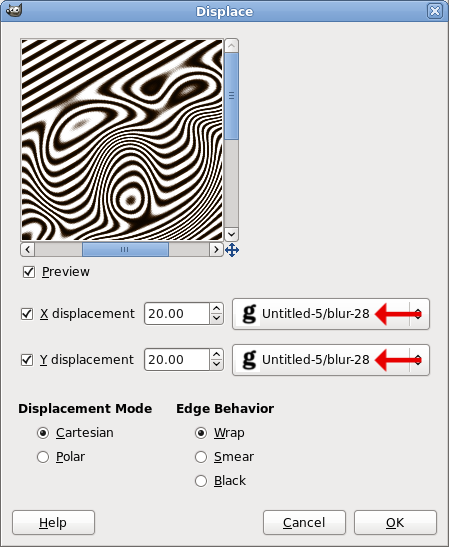
In v2.6 if you brought up the displacement filter (Filters > Map > Displace) and used default settings and set the filter to a blurred black & white layer, the displacement worked. This image is from a tutorial I did.
Image

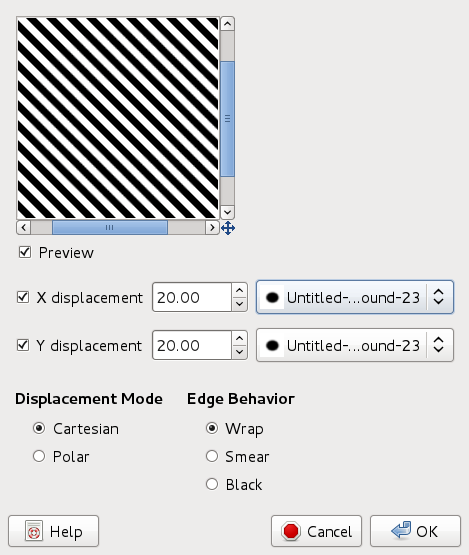
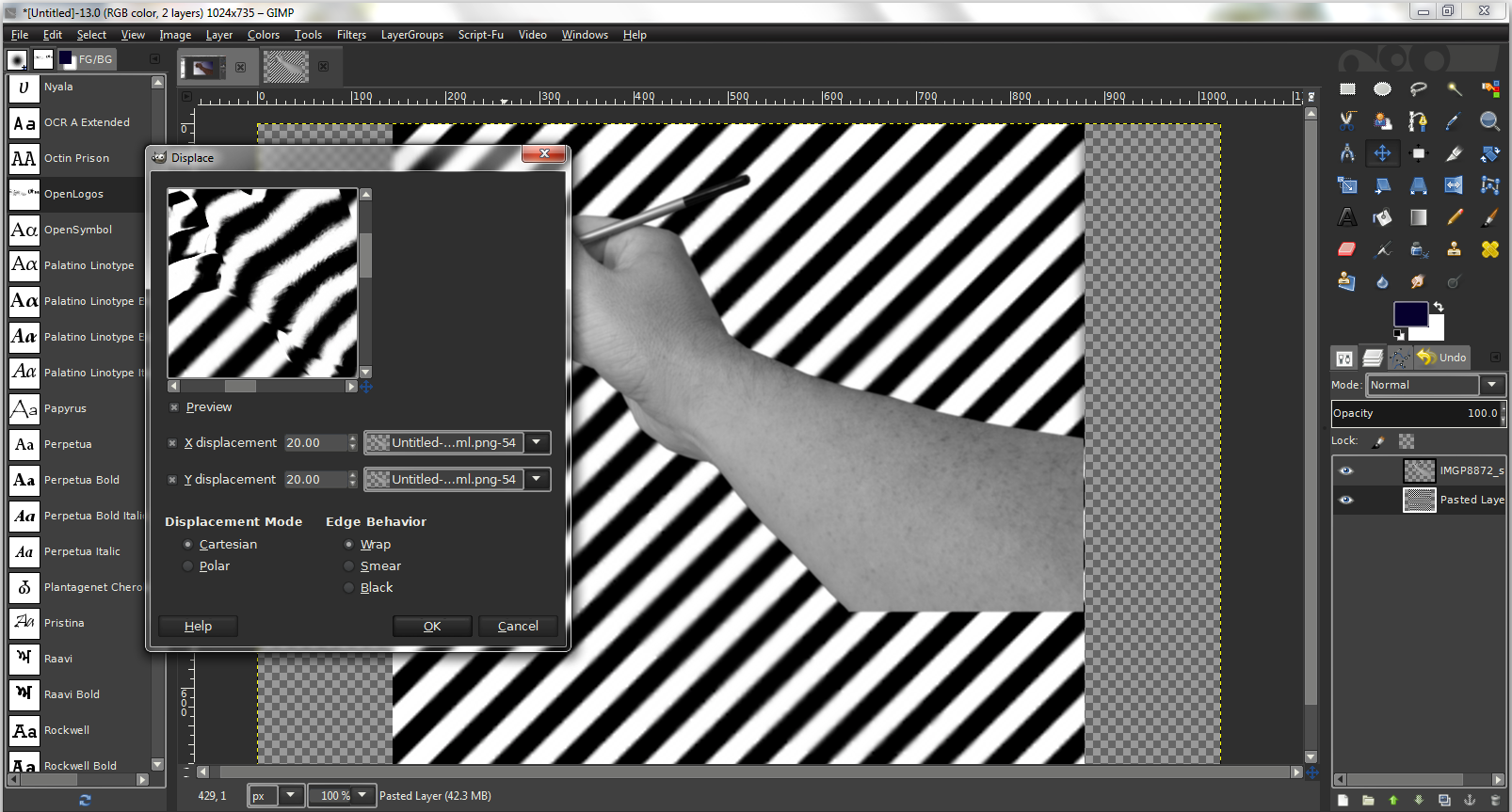
Now if I try to do it the same way, I get no displacement with the default settings. I have to change the X or Y displacement amount.

Image.....Image

_________________
Image
World War IV will be fought with sticks and stones. - Albert Einstein


Share on Facebook Share on Twitter Share on Orkut Share on Digg Share on MySpace Share on Delicious Share on Technorati
Top
 Post subject: Re: Displacement filter is different in Gimpv2.8
PostPosted: Thu Oct 11, 2012 10:42 pm  (#2) 
Offline
GimpChat Member
User avatar

Joined: Aug 30, 2012
Posts: 2174
Just a quick question but has it got anything to do with the fact your using a circle, have you tried it on another shape.

_________________
Image


Top
 Post subject: Re: Displacement filter is different in Gimpv2.8
PostPosted: Thu Oct 11, 2012 11:17 pm  (#3) 
Offline
Script Coder
User avatar

Joined: Apr 23, 2010
Posts: 1553
Location: not from Guildford after all
Oregonian wrote:
Now if I try to do it the same way, I get no displacement with the default settings. I have to change the X or Y displacement amount.

One thing to check is whether clicking on the OK button without changing any of the settings will result in your image's layer being modified. It may just be that the plugins' preview window is not being initially drawn properly but gets updated whenever you change any of the options (this would still be a bug, but such testing can be helpful to the developers when reporting it).

_________________
Any sufficiently primitive technology is indistinguishable from a rock.


Top
 Post subject: Re: Displacement filter is different in Gimpv2.8
PostPosted: Thu Oct 11, 2012 11:49 pm  (#4) 
Offline
Retired Staff
User avatar

Joined: May 22, 2008
Posts: 6946
Location: Somewhere in GIMP
First I tried it with a dingbat, then text, and resorted to a circle and they all came out flat in the preview window and the results unless I changed one of the settings as shown in the examples.

Has anyone else tried it?

_________________
Image
World War IV will be fought with sticks and stones. - Albert Einstein


Top
 Post subject: Re: Displacement filter is different in Gimpv2.8
PostPosted: Fri Oct 12, 2012 9:03 am  (#5) 
Offline
GimpChat Member

Joined: Aug 05, 2011
Posts: 606
Location: limestone,ny
Seems to show with defaults for me 2.8.2 win7

Image
Image


Top
 Post subject: Re: Displacement filter is different in Gimpv2.8
PostPosted: Fri Oct 12, 2012 9:36 am  (#6) 
Offline
Retired Staff
User avatar

Joined: May 22, 2008
Posts: 6946
Location: Somewhere in GIMP
Thanks for your input, Alc. I should have mentioned that I am using gimpv2.8.2 on Fedora 17, Linux.

Here is using the letter g and clicking the OK button using the default settings. There is an inset of the layers. This is after my computer was off for the night and booted up this morning.

Image

_________________
Image
World War IV will be fought with sticks and stones. - Albert Einstein


Top
 Post subject: Re: Displacement filter is different in Gimpv2.8
PostPosted: Fri Oct 12, 2012 10:03 am  (#7) 
Offline
GimpChat Member

Joined: Aug 05, 2011
Posts: 606
Location: limestone,ny
your stripes didn't work for me either until i rotated them 90...strange

Image
Image


Top
 Post subject: Re: Displacement filter is different in Gimpv2.8
PostPosted: Fri Oct 12, 2012 10:11 am  (#8) 
Offline
Retired Staff
User avatar

Joined: May 22, 2008
Posts: 6946
Location: Somewhere in GIMP
Hm. That's interesting that rotating it would work. I was using this tutorial with orange and black stripes using a jack o'lantern dingbat and when it didn't work, I just did the tutorial with the regular black and white gradient.

If anyone wants the "g" in the tutorial, it is the Century Schoolbook Bold "g" that comes with gimp.

Using alc's method, I flipped the stripes layer and displacement worked with default settings. This gets a bit weirder now. I will need to do that with my orange and black gradient also as displacement didn't work with it either.

Interestingly enough, I used the yellow and black warning stripes in the patterns and displacement worked fine.

_________________
Image
World War IV will be fought with sticks and stones. - Albert Einstein


Top
 Post subject: Re: Displacement filter is different in Gimpv2.8
PostPosted: Fri Oct 12, 2012 11:25 am  (#9) 
Offline
Retired Staff
User avatar

Joined: May 22, 2008
Posts: 6946
Location: Somewhere in GIMP
OK, I think it has been narrowed down to gradients being the culprit. Making a narrow, 45-degree gradient, bilinear, triangular wave with adaptive supersampling, seems to make it not work. If the gradient is flipped either vertically or horizontally, the displace filter works.

Image

_________________
Image
World War IV will be fought with sticks and stones. - Albert Einstein


Top
 Post subject: Re: Displacement filter is different in Gimpv2.8
PostPosted: Fri Oct 12, 2012 1:18 pm  (#10) 
Offline
GimpChat Member
User avatar

Joined: Apr 07, 2010
Posts: 14182
I just went through the tutorial and I am running into the same problem. I have to flip the stripes in order to get the displace to work.

_________________
Image


Top
 Post subject: Re: Displacement filter is different in Gimpv2.8
PostPosted: Fri Oct 12, 2012 5:06 pm  (#11) 
Offline
GimpChat Member
User avatar

Joined: Apr 07, 2010
Posts: 14182
I tried another one with Jennifer Hudson and instead of using the gradient, I used a newsprint pattern. The displace worked perfectly with that.

Image

_________________
Image


Top
 Post subject: Re: Displacement filter is different in Gimpv2.8
PostPosted: Sat Oct 13, 2012 2:54 pm  (#12) 
Offline
Script Coder
User avatar

Joined: Jul 14, 2010
Posts: 697
It is because you are trying to displace a 45deg stripe by equal x and Y amounts!? Every point just gets slid at a 45deg angle (same x and y) so there is no apparent change.

That's why rotating the stripes makes a difference.

-RobA>

_________________
Image
Fantasy Cartography and Mapping by RobA


Top
 Post subject: Re: Displacement filter is different in Gimpv2.8
PostPosted: Sat Oct 13, 2012 3:39 pm  (#13) 
Offline
GimpChat Member
User avatar

Joined: Apr 07, 2010
Posts: 14182
Thanks RobA

_________________
Image


Top
 Post subject: Re: Displacement filter is different in Gimpv2.8
PostPosted: Sat Oct 13, 2012 3:42 pm  (#14) 
Offline
Retired Staff
User avatar

Joined: May 22, 2008
Posts: 6946
Location: Somewhere in GIMP
That makes sense. I see the one I did in gimp v2.6 had the angle at 45 degrees and that is probably why it worked. Image below.
Image

This one in v2.8 is at -45 degrees and it didn't work.
Image

I just tried it in v2.8.2 with the stripes at 45 and at -45 and the stripes at -45 didn't work.

Thanks RobA! At least I can lay that one to rest. It was bugging me. :hehe

_________________
Image
World War IV will be fought with sticks and stones. - Albert Einstein


Top
Post new topic Reply to topic  [ 14 posts ] 

All times are UTC - 5 hours [ DST ]


* Login  


Powered by phpBB3 © phpBB Group