It is currently Sun Aug 09, 2026 2:11 am


All times are UTC - 5 hours [ DST ]


Post new topic Reply to topic  [ 159 posts ]  Go to page Previous  1, 2, 3, 4, 5, 6, 7, 8  Next
Author Message
 Post subject: Re: The RGGJAN Portable
PostPosted: Sat Oct 15, 2011 5:53 pm  (#61) 
Offline
GimpChat Member

Joined: Jul 11, 2010
Posts: 349
When I install the RGGJAN, Python isn't active in this version, although I see a folder for it. What files do I need to move from this version into the other version to have it in the other version?


Top
 Post subject: Re: The RGGJAN Portable
PostPosted: Sat Oct 15, 2011 6:10 pm  (#62) 
Offline
GimpChat Member
User avatar

Joined: Apr 07, 2010
Posts: 14182
You would have to install Python, you can't just move it from one version to another. There is a very good tutorial in the tutorial section by Rod how to install Python and also has the links to download.

_________________
Image


Top
 Post subject: Re: The RGGJAN Portable
PostPosted: Sat Oct 15, 2011 6:29 pm  (#63) 
Offline
GimpChat Member

Joined: Jul 11, 2010
Posts: 349
Molly,
Thank you for the reply. I seem to have misstated what I want. I want to move the RGGJAN tool into the main build.


Top
 Post subject: Re: The RGGJAN Portable
PostPosted: Sat Oct 15, 2011 6:30 pm  (#64) 
Offline
GimpChat Member
User avatar

Joined: Apr 07, 2010
Posts: 14182
I don't know if anyone has been able to do that but you could ask Partha, he would know.

_________________
Image


Top
 Post subject: Re: The RGGJAN Portable
PostPosted: Sat Oct 15, 2011 8:27 pm  (#65) 
Offline
GimpChat Member

Joined: Apr 12, 2010
Posts: 5870
I don't think you may do with this version because is not based on gimp 2.7
if i understand well is ready a updated code but is not yet compiled..

what you plan to do ,combine 2 different version working at binary level (in more simple words just by moving exe. ,dll and other files and folders )is not easy and maybe not even possible

look easier (but not easy ...i would wait for Partha to do ) compile the code of the newer version of reggjan that is based on gimp 2.7.4

_________________
My 3D Gallery on Deviantart http://photocomix2.deviantart.com/
Main gallery http://www.flickriver.com/photos/photocomix-mandala/
Mandala and simmetry http://www.flickriver.com/photos/photocomix_mandala/

Image

Mrs Wilbress


Top
 Post subject: Re: The RGGJAN Portable
PostPosted: Sat Oct 15, 2011 9:41 pm  (#66) 
Offline
GimpChat Member

Joined: Jul 11, 2010
Posts: 349
By regular I meant Partha's regular 2.7.4 version. Sorry!

I want to move the RGGJAN plugin from Partha's 2.7.4 RGGJAN to Partha's standard 2.7.4 version.


Top
 Post subject: Re: The RGGJAN Portable
PostPosted: Sat Oct 15, 2011 10:19 pm  (#67) 
Offline
GimpChat Member
User avatar

Joined: Jul 04, 2011
Posts: 395
Location: Indianapolis, IN
I tried it and it works for me although I'm still getting some of the background when the new layer is created.

I'm guessing it has something to do with the "Starting Percentage?" I didn't even touch it from the default of 70. How can I gauge were that should be. Also, when I paint the foreground how close to I need to get to the edge.

The other problem I have is letting go of the mouse while painting. I guess you have to pick your brush size before painting, no switching mid flight.

This is still really cool!

_________________
"That which does not kill us makes us stronger." ~ Friedrich Nietzsche


Top
 Post subject: Re: The RGGJAN Portable
PostPosted: Sun Oct 16, 2011 5:44 am  (#68) 
Offline
GimpChat Member
User avatar

Joined: Apr 22, 2010
Posts: 126
bilbo9955 wrote:
When I install the RGGJAN, Python isn't active in this version, although I see a folder for it. What files do I need to move from this version into the other version to have it in the other version?


Hi bilbo9955
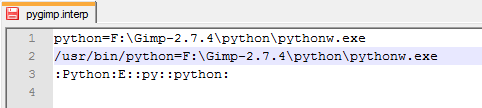
Change the path in the file pygimp.interp (F: \ Gimp-2.7.4 \ lib \ gimp \ 2.0 \ interpreters \ pygimp.interp)
I have a python in GIMP-rggjan after changing path to Image
F: - This is the name of my removable disk. :)

_________________
Image


Top
 Post subject: Re: The RGGJAN Portable
PostPosted: Tue Oct 18, 2011 11:16 am  (#69) 
Offline
GimpChat Member
User avatar

Joined: Jul 04, 2011
Posts: 395
Location: Indianapolis, IN
MrBiggz wrote:
I tried it and it works for me although I'm still getting some of the background when the new layer is created.

I'm guessing it has something to do with the "Starting Percentage?" I didn't even touch it from the default of 70. How can I gauge were that should be. Also, when I paint the foreground how close to I need to get to the edge.

The other problem I have is letting go of the mouse while painting. I guess you have to pick your brush size before painting, no switching mid flight.


?

_________________
"That which does not kill us makes us stronger." ~ Friedrich Nietzsche


Top
 Post subject: Re: The RGGJAN Portable
PostPosted: Wed Oct 19, 2011 6:29 pm  (#70) 
Offline
GimpChat Member

Joined: Jul 11, 2010
Posts: 349
pogogogo wrote:
bilbo9955 wrote:
When I install the RGGJAN, Python isn't active in this version, although I see a folder for it. What files do I need to move from this version into the other version to have it in the other version?


Hi bilbo9955
Change the path in the file pygimp.interp (F: \ Gimp-2.7.4 \ lib \ gimp \ 2.0 \ interpreters \ pygimp.interp)
I have a python in GIMP-rggjan after changing path to Image
F: - This is the name of my removable disk. :)


Thank you pogogogo, that solved my problem!

Actually what I did was install Partha's standard 2.7.4 portable. I than installed the RGGJAN version over the one I just installed. Finialy, I did your fix.

I now have the RGGJAN version with all the plugins.

Thanks again!


Top
 Post subject: Re: The RGGJAN Portable
PostPosted: Wed May 02, 2012 5:09 am  (#71) 
Offline
GimpChat Member

Joined: Apr 27, 2012
Posts: 11
Hai,

Any news about this amazing feature into version 2.8

Thanks


Top
 Post subject: Re: The RGGJAN Portable
PostPosted: Wed May 02, 2012 6:33 pm  (#72) 
Offline
Global Moderator
User avatar

Joined: May 16, 2010
Posts: 16152
I have heard hints that it will be added into the stable Final Gimp-2.8 build but who knows.
I would also like to see the new Clone Tool ported into stable Gimp-2.8.
Much has been ported to GEGL so its a big guess as to what will work and what will not.
Some patches created here for Gimp-2.8 (Tiff for one) were refused for code changes by the devs.
Also i believe GTK-3 still needs to be added into the mix.
Gimp-2.8 RC-1 handles older plugins quite well imo but the last final release of Gimp-2.8 may not.
I really am not sure if PSPI that handles Adobe plug-ins will even be working by then.

_________________
Image


Top
 Post subject: Re: The RGGJAN Portable
PostPosted: Wed Aug 29, 2012 9:53 am  (#73) 
Offline
GimpChat Member

Joined: Oct 02, 2010
Posts: 106
Hallo, can I get Version of the "new foreground extraction tool" for Gimp 2.8.2 ? The Version I found was for Gimp 2.7.4. :) thank you
Andrew Braess


Top
 Post subject: Re: The RGGJAN Portable
PostPosted: Wed Aug 29, 2012 10:19 am  (#74) 
Offline
GimpChat Member
User avatar

Joined: Apr 07, 2010
Posts: 14182
Actually I don't think the RGGJAN is out in 2.8. If it is I am not aware of it. I would like it too if it is. Try Partha's site. www.partha.com/ he would know for sure

_________________
Image


Top
 Post subject: Re: The RGGJAN Portable
PostPosted: Wed Aug 29, 2012 10:35 am  (#75) 
Offline
GimpChat Member

Joined: Oct 02, 2010
Posts: 106
Hallo,
the 2.7.4 version is version form www.partha.com/. But I´m not know if could this also in Gimp 2.8.2.
In this point I`m stupid User of Gimp. :D
thank you
Andrew Braess


Top
 Post subject: Re: The RGGJAN Portable
PostPosted: Wed Aug 29, 2012 12:31 pm  (#76) 
Offline
Global Moderator
User avatar

Joined: May 16, 2010
Posts: 16152
If you downloaded the RGGJAN version from Parthas site its the correct one.
Just install and run it.Make sure you have the correct one for your system 32 or 64 bit.
The only thing changed is the Foreground Tool.

_________________
Image


Top
 Post subject: Re: The RGGJAN Portable
PostPosted: Thu Oct 25, 2012 11:28 am  (#77) 
Offline
GimpChat Member

Joined: Feb 22, 2012
Posts: 295
Location: Germany
Finally I did it.
I implemented this very fantastic tool to gimp-2.8.3 (from git), and made a diff-patch from the changes.
I cannot find contact to the original author Jan Ruegg, so I don't know, wheather it is allowed to provide
the patch to the community. Does somebody have a contact to him?

The foreground select tool will not go into official gimp-2.8.x - fork, there will be no new things implemented,
only in gimp-2.9.x, there will be a new tool, realized as a gegl operation (matting-global). I don't know, how to use it,
it doesn't work for me, so I decided to implement his tool in gimp-2.8.3.


Top
 Post subject: Re: The RGGJAN Portable
PostPosted: Thu Oct 25, 2012 2:04 pm  (#78) 
Offline
Script Coder
User avatar

Joined: Jun 22, 2010
Posts: 1171
Location: Here and there
Onkel Hatti wrote:
I cannot find contact to the original author Jan Ruegg, so I don't know, wheather it is allowed to provide
the patch to the community. Does somebody have a contact to him?


A quick bit of Googling "RGGJAN" lead me to a GEGL developers mailing list posting: http://www.gimpusers.com/forums/gegl-de ... -operation which in turn lead to the git commit for the GEGL operation, with Jan's e-mail address on it: http://git.gnome.org/browse/gegl/commit ... ecc67c3684

Kevin


Top
 Post subject: Re: The RGGJAN Portable
PostPosted: Sat Oct 27, 2012 1:00 pm  (#79) 
Offline
GimpChat Member

Joined: Jul 11, 2010
Posts: 349
I had emailed the author some time ago on the status of the tool. He replied that he was now too busy to put any time into it and would no longer be working on it.

He also mentioned that the main part of the tool was complete and he was looking for someone to take over finishing the GUI. That is the only part left to be completed.

Anyone out there who would like to finish the project or know somebody that can do it??


Top
 Post subject: Re: The RGGJAN Portable
PostPosted: Sat Oct 27, 2012 1:26 pm  (#80) 
Offline
GimpChat Member

Joined: Apr 12, 2010
Posts: 5870
Onkel Hatti wrote:
Finally I did it.
I implemented this very fantastic tool to gimp-2.8.3 (from git), and made a diff-patch from the changes.
I cannot find contact to the original author Jan Ruegg, so I don't know, wheather it is allowed to provide
the patch to the community. Does somebody have a contact to him?

The foreground select tool will not go into official gimp-2.8.x - fork, there will be no new things implemented,
only in gimp-2.9.x, there will be a new tool, realized as a gegl operation (matting-global). I don't know, how to use it,
it doesn't work for me, so I decided to implement his tool in gimp-2.8.3.


From what bilbo9955 wrote

Quote:
I had emailed the author some time ago on the status of the tool. He replied that he was now too busy to put any time into it and would no longer be working on it.

He also mentioned that the main part of the tool was complete and he was looking for someone to take over finishing the GUI. That is the only part left to be completed
.

he will be glad for the patch:geek

and we will too be very happy of some binary :jumpclap :jumpclap :jumpclap

_________________
My 3D Gallery on Deviantart http://photocomix2.deviantart.com/
Main gallery http://www.flickriver.com/photos/photocomix-mandala/
Mandala and simmetry http://www.flickriver.com/photos/photocomix_mandala/

Image

Mrs Wilbress


Top
Post new topic Reply to topic  [ 159 posts ]  Go to page Previous  1, 2, 3, 4, 5, 6, 7, 8  Next

All times are UTC - 5 hours [ DST ]


cron

* Login  


Powered by phpBB3 © phpBB Group