It is currently Tue Aug 18, 2026 2:10 pm


All times are UTC - 5 hours [ DST ]


Post new topic Reply to topic  [ 39 posts ]  Go to page Previous  1, 2
Author Message
 Post subject: Re: Font Display Script Rel2
PostPosted: Sun Nov 18, 2012 7:50 pm  (#21) 
Offline
GimpChat Member
User avatar

Joined: Aug 16, 2012
Posts: 4271
Location: Göteborg, Sweden
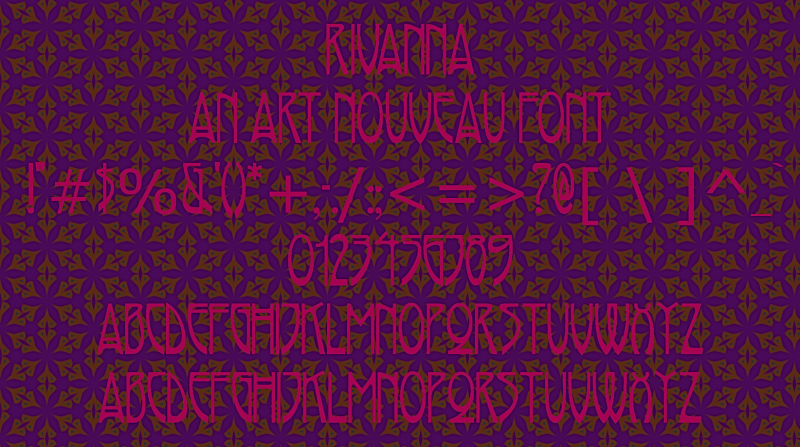
graechan: wow, thank you for adding this! i can now easily make neat font maps on patterned backgrounds and what more could a woman possibly want :mrgreen: ?
Image

_________________


Top
 Post subject: Re: Font Display Script Rel2
PostPosted: Mon Nov 19, 2012 12:49 am  (#22) 
Offline
Script Coder
User avatar

Joined: Feb 18, 2011
Posts: 4826
Location: Bendigo Vic. Australia
Anmal the font would have displayed better if the text color was white otherwise you Gals seem to collect lots of fonts and patterns.

_________________
Image
No matter how much you push the envelope, it'll still be stationery.


Top
 Post subject: Re: Font Display Script Rel2
PostPosted: Tue Nov 20, 2012 12:54 am  (#23) 
Offline
GimpChat Member
User avatar

Joined: Oct 07, 2011
Posts: 180
I have some extravagant fancy Fonts that appear squished together and entwined around each other, making it difficult to determine the full extent of each letter. (Especially Capitol letters).
So for these fonts they need a space in between each letter. I Spaced the numbers and other characters too.
So I changed my Layout-2 to this:


(layout-2 (string-append font "\n" your-text "\n" " ! \" # $ % & ' ( ) * + , - . >\n: ; < = ? @ / [ \\ ] ^ _ `\n0 1 2 3 4 5 6 7 8 9\nA B C D E F G H I J K L M\nN O P Q R S T U V W X Y Z\na b c d e f g h i j k l m\nn o p q r s t u v w x y z"))


●And I might change the label from Layout-2 to "Layout-2 Spaces".
●Maybe Graechan could add this as a Layout-3 for that choice for others???
●Or maybe an added option that you can select the letter spacing? ( because two spaces between each capitol letter in some fonts is even better).
Thanks Graechan!


Examples:

Left:NO SPACES Right:WITH SPACES between each letter, number, character
Image Image

Left:NO SPACES Right:WITH SPACES between each letter, number, character
Image Image

NO SPACES
Image

WITH SPACES between each letter, number, character.
Image


Top
 Post subject: Re: Font Display Script Rel2
PostPosted: Tue Nov 20, 2012 1:27 am  (#24) 
Offline
GimpChat Member
User avatar

Joined: Aug 16, 2012
Posts: 4271
Location: Göteborg, Sweden
barbie: that's another tweak i'll have to steal from you :). :thanku - that's for sharing your changes to the script, that was the last push i needed to finally get over my fear of making changes in a script file.

_________________


Top
 Post subject: Re: Font Display Script Rel2
PostPosted: Tue Nov 20, 2012 4:45 am  (#25) 
Offline
Script Coder
User avatar

Joined: Feb 18, 2011
Posts: 4826
Location: Bendigo Vic. Australia
I am delighted that people have discovered how easy it is to adapt the file to individual requirements

_________________
Image
No matter how much you push the envelope, it'll still be stationery.


Top
 Post subject: Re: Font Display Script Rel2
PostPosted: Tue Nov 20, 2012 7:20 pm  (#26) 
Offline
Script Coder
User avatar

Joined: Feb 18, 2011
Posts: 4826
Location: Bendigo Vic. Australia
I have amended the script to have a Letter Spacing adjustment in Rel3 as this is a better way of adjusting letter spacing

_________________
Image
No matter how much you push the envelope, it'll still be stationery.


Top
 Post subject: Re: Font Display Script Rel3
PostPosted: Tue Nov 20, 2012 8:29 pm  (#27) 
Offline
Script Coder
User avatar

Joined: Feb 18, 2011
Posts: 4826
Location: Bendigo Vic. Australia
Rel3 with letter spacing now posted

_________________
Image
No matter how much you push the envelope, it'll still be stationery.


Top
 Post subject: Re: Font Display Script Rel3
PostPosted: Tue Nov 20, 2012 9:23 pm  (#28) 
Offline
GimpChat Member
User avatar

Joined: Nov 16, 2011
Posts: 5127
Location: Metro Vancouver, BC
I have a little suggestion/request, Graechan. Is there anyway you can capture the font that we used from the font menu to activate the script? It's not a problem, it would just save a step in the dialog.

_________________
Image
Gimp 2.8.18, Linux, median user
Gimp Chat Tutorials Index
Spirit Bear (Kermode)


Top
 Post subject: Re: Font Display Script Rel3
PostPosted: Wed Nov 21, 2012 4:11 am  (#29) 
Offline
Script Coder
User avatar

Joined: Feb 18, 2011
Posts: 4826
Location: Bendigo Vic. Australia
Quote:
I have a little suggestion/request, Graechan. Is there anyway you can capture the font that we used from the font menu to activate the script? It's not a problem, it would just save a step in the dialog.

Odin, I am not sure on what your asking, but if you select the font in the font menu it becomes the active font and would by default be the font used by the script.Having the option of assigning a font permanently was more for my convenience as I have always used this script to create a font file to test another script

_________________
Image
No matter how much you push the envelope, it'll still be stationery.


Top
 Post subject: Re: Font Display Script Rel3
PostPosted: Wed Nov 21, 2012 4:52 am  (#30) 
Offline
GimpChat Member
User avatar

Joined: Nov 16, 2011
Posts: 5127
Location: Metro Vancouver, BC
Graechan wrote:
Quote:
I have a little suggestion/request, Graechan. Is there anyway you can capture the font that we used from the font menu to activate the script? It's not a problem, it would just save a step in the dialog.

Odin, I am not sure on what your asking, but if you select the font in the font menu it becomes the active font and would by default be the font used by the script.Having the option of assigning a font permanently was more for my convenience as I have always used this script to create a font file to test another script
It all good, I was just thinking if you right select a font to bring up "Font Display" that font will be selected in the "Font Display" dialog. On my Win machine I have to change the font in the "Font Display" dialog. It's not a problam but I thought it might be slick if the font you right selected in the font menu was already in the dialog. For example, if I right select, "Sans Bold", choose the "Font Display" menu, in the "Font Display" dialog I have "JasmineUPC Bold" from a previous use. My Gimp selected font at the time was "Segoe Print Bold".

_________________
Image
Gimp 2.8.18, Linux, median user
Gimp Chat Tutorials Index
Spirit Bear (Kermode)


Top
 Post subject: Re: Font Display Script Rel4
PostPosted: Wed Dec 05, 2012 8:37 pm  (#31) 
Offline
Script Coder
User avatar

Joined: Feb 18, 2011
Posts: 4826
Location: Bendigo Vic. Australia
Just uploaded Rel4, where I've changed the displayed fontname to be in the 'Sans' font

This was done to give all fonts a readable header e.g. 'Wingdings e.t.c.'

Image

_________________
Image
No matter how much you push the envelope, it'll still be stationery.


Top
 Post subject: Re: Font Display Script Rel5 (now optionally Dingbat friedly)
PostPosted: Thu Dec 06, 2012 7:34 pm  (#32) 
Offline
Script Coder
User avatar

Joined: Feb 18, 2011
Posts: 4826
Location: Bendigo Vic. Australia
Upgraded to release 5 that optionally uses the 'Sans' font for a header which is useful for dingbats

See new menu below

Image

_________________
Image
No matter how much you push the envelope, it'll still be stationery.


Top
 Post subject: Re: Font Display Script Rel5 (now optionally Dingbat friedly)
PostPosted: Thu Dec 06, 2012 7:49 pm  (#33) 
Offline
GimpChat Member
User avatar

Joined: Nov 16, 2011
Posts: 5127
Location: Metro Vancouver, BC
Nice touch, Graechan!

_________________
Image
Gimp 2.8.18, Linux, median user
Gimp Chat Tutorials Index
Spirit Bear (Kermode)


Top
 Post subject: Re: Font Display Script Rel5 (now optionally Dingbat friedly)
PostPosted: Thu Dec 06, 2012 7:51 pm  (#34) 
Offline
GimpChat Member
User avatar

Joined: Apr 07, 2010
Posts: 14182
:tyspin Graechan, :jumpclap

_________________
Image


Top
 Post subject: Re: Font Display Script Rel5 (now optionally Dingbat friedly)
PostPosted: Thu Dec 06, 2012 8:28 pm  (#35) 
Offline
Script Coder
User avatar

Joined: Feb 18, 2011
Posts: 4826
Location: Bendigo Vic. Australia
Thanks Odin and Molly I think it was 'O' who said it would be to complicated to to apply 2 different fonts but it wasn't that hard at all

Quote:
I don't regard that as a shortcoming. It would be horribly complicated to use another font in the script. I use a lot of dingbats and this is a very quick way to see all the dingbats in a font so I can find what I'm looking for. I know I'll use it a lot in that regard. I love the script.

_________________
Image
No matter how much you push the envelope, it'll still be stationery.


Top
 Post subject: Re: Font Display Script Rel5 (now optionally Dingbat friedly)
PostPosted: Thu Dec 06, 2012 8:37 pm  (#36) 
Offline
Retired Staff
User avatar

Joined: May 22, 2008
Posts: 6946
Location: Somewhere in GIMP
Graechan wrote:
I think it was 'O' who said it would be to complicated to to apply 2 different fonts but it wasn't that hard at all.
Way, way cool Graechan. Nice work!

Image

_________________
Image
World War IV will be fought with sticks and stones. - Albert Einstein


Top
 Post subject: Re: Font Display Script Rel5 (now optionally Dingbat friedly)
PostPosted: Thu Dec 06, 2012 8:57 pm  (#37) 
Offline
Script Coder
User avatar

Joined: Feb 18, 2011
Posts: 4826
Location: Bendigo Vic. Australia
'O' love your xmas cartoon font looking for it now 'found it on dafont'

_________________
Image
No matter how much you push the envelope, it'll still be stationery.


Top
 Post subject: Re: Font Display Script Rel5 (now optionally Dingbat friedly)
PostPosted: Thu Dec 06, 2012 9:40 pm  (#38) 
Offline
GimpChat Founder
User avatar

Joined: May 22, 2008
Posts: 5241
Location: Gimpville
Thanks for the script, Graechan. :bigthup

I just want to say that I've always tried to be dingbat friendly too. :lol

_________________
“If you reach for the stars, you just might land on a decently sized hill.” - Stuart Hill


Top
 Post subject: Re: Font Display Script Rel5 (now optionally Dingbat friendly)
PostPosted: Thu Dec 06, 2012 10:29 pm  (#39) 
Offline
Script Coder
User avatar

Joined: Feb 18, 2011
Posts: 4826
Location: Bendigo Vic. Australia
GnuTux thats Evident by the way you tolerate me :rofl

_________________
Image
No matter how much you push the envelope, it'll still be stationery.


Top
Post new topic Reply to topic  [ 39 posts ]  Go to page Previous  1, 2

All times are UTC - 5 hours [ DST ]


* Login  


Powered by phpBB3 © phpBB Group