It is currently Sat Aug 15, 2026 4:34 pm


All times are UTC - 5 hours [ DST ]


Post new topic Reply to topic  [ 70 posts ]  Go to page Previous  1, 2, 3, 4  Next
Author Message
 Post subject: Re: Ask here help for GIMP_PhotoComix_Lab -2.8 (32 or 64bit )
PostPosted: Tue Dec 25, 2012 1:34 pm  (#41) 
Offline
GimpChat Member

Joined: Sep 13, 2011
Posts: 77
Thanks for the package.

Have been trying it and it looks wonderful. Still, expected errors occurred.
I tried the Python-fu AquaButt text creator and an error specifying that a floating point value was received instead of the expected integer. Weird, because the value was an integer (14).

What made the whole GIMP crash, was the GEGLE tool, after choosing 'grey' and also later 'fractal'.

_________________
Using Windows Vista 32 bits, 3GBRAM, Intel core 2 Quad Q6600 2.4Ghz, Radeon HD 3450 graphics card, Lambda Lexicon USB audio interface.


Top
 Post subject: Re: Ask here help for GIMP_PhotoComix_Lab -2.8 (32 or 64bit )
PostPosted: Tue Dec 25, 2012 7:01 pm  (#42) 
Offline
Script Coder
User avatar

Joined: Feb 18, 2011
Posts: 4826
Location: Bendigo Vic. Australia
I've tried this python file in 2.6 and it's OK, but in 2.832bit and 2.8.2 32bit it fails with the error below↓

Image

I know nothing about Python but maybe this is where the error is referring to?
Quote:
# Set new selections for the fore and background-color.
gimp.set_foreground(colorfg)
gimp.set_background((0xff,0xff,0xff))
background = gimp.Layer(image, "Background", width, height, RGBA_IMAGE, 100, NORMAL_MODE)
base = gimp.Layer(image, "Base", width, height, RGBA_IMAGE, 90, NORMAL_MODE)
shadow = gimp.Layer(image, "Shadow", width, height, RGBA_IMAGE, 70, NORMAL_MODE)
reflection = gimp.Layer(image, "Top Reflect", width, height, RGBA_IMAGE, optical_top, SCREEN_MODE)
light = gimp.Layer(image, "light", width, height, RGBA_IMAGE, 100, OVERLAY_MODE)

_________________
Image
No matter how much you push the envelope, it'll still be stationery.


Top
 Post subject: Re: Ask here help for GIMP_PhotoComix_Lab -2.8 (32 or 64bit )
PostPosted: Tue Dec 25, 2012 9:30 pm  (#43) 
Offline
Script Coder
User avatar

Joined: Feb 18, 2011
Posts: 4826
Location: Bendigo Vic. Australia
I've just done a crash course in python and changed gimp.Layer to pdb.gimp_layer_new it now tests OK in all my gimps (i have several)

modified file is below↓
Attachment:
aquabutt-2.1-mod.zip [2.32 KiB]
Downloaded 307 times

_________________
Image
No matter how much you push the envelope, it'll still be stationery.


Top
 Post subject: Re: Ask here help for GIMP_PhotoComix_Lab -2.8 (32 or 64bit )
PostPosted: Wed Dec 26, 2012 4:18 am  (#44) 
Offline
GimpChat Member

Joined: Sep 13, 2011
Posts: 77
In fact, how could it find it if the namespace(module) was not specified.

_________________
Using Windows Vista 32 bits, 3GBRAM, Intel core 2 Quad Q6600 2.4Ghz, Radeon HD 3450 graphics card, Lambda Lexicon USB audio interface.


Top
 Post subject: Re: Ask here help for GIMP_PhotoComix_Lab -2.8 (32 or 64bit )
PostPosted: Wed Dec 26, 2012 6:01 am  (#45) 
Offline
GimpChat Member

Joined: Sep 13, 2011
Posts: 77
It worked for me now, thanks.

_________________
Using Windows Vista 32 bits, 3GBRAM, Intel core 2 Quad Q6600 2.4Ghz, Radeon HD 3450 graphics card, Lambda Lexicon USB audio interface.


Top
 Post subject: Re: Ask here help for GIMP_PhotoComix_Lab -2.8 (32 or 64bit )
PostPosted: Fri Jan 25, 2013 5:28 pm  (#46) 
Offline
GimpChat Member

Joined: Sep 13, 2011
Posts: 77
Any idea how I can modify a keyboard shortcut, I tried ctrl+shift+alt+right for GAP next frame and ctrl+shift+alt+left for previous frame, to no avail. The error in the log simply specified that it was not possible.

_________________
Using Windows Vista 32 bits, 3GBRAM, Intel core 2 Quad Q6600 2.4Ghz, Radeon HD 3450 graphics card, Lambda Lexicon USB audio interface.


Top
 Post subject: Re: Ask here help for GIMP_PhotoComix_Lab -2.8 (32 or 64bit )
PostPosted: Sat Jan 26, 2013 6:51 am  (#47) 
Offline
GimpChat Member

Joined: Apr 12, 2010
Posts: 5870
Do you think this problem specific for my version ?

Anyway

1) Windows OS "lock" several keyboard shortcut, that means are pre-assigned to some function and can't be (easily) reassigned to other function

2) your shortcut looks very complex with several modifier keys i am not sure that more then 2 modifier
(i.e CTRL and Shift are already 2 ) could be used.
I admit to be to lazy now to check in the Gimp Doc, but try is easy, you may try if more simple combination work

Here will be useful have a list of the keys shortcut already "locked" by Windows that could be not reassigned (or not too easily, not without change something in Windows deault) but i am not sure how to get such list

_________________
My 3D Gallery on Deviantart http://photocomix2.deviantart.com/
Main gallery http://www.flickriver.com/photos/photocomix-mandala/
Mandala and simmetry http://www.flickriver.com/photos/photocomix_mandala/

Image

Mrs Wilbress


Top
 Post subject: Re: Ask here help for GIMP_PhotoComix_Lab -2.8 (32 or 64bit )
PostPosted: Sat Jan 26, 2013 4:10 pm  (#48) 
Offline
GimpChat Member

Joined: Sep 13, 2011
Posts: 77
Assigning keyboard shortcuts of any alt, ctrl, and shift permutations was not an issue with version 2.6.12

I figured out that the arrow keys and modifier keys permutation shortcuts must be set up at the Input device configuration->Main Keyboard dialog rather than the Keyboard shortcuts dialog. That way it can be set.

_________________
Using Windows Vista 32 bits, 3GBRAM, Intel core 2 Quad Q6600 2.4Ghz, Radeon HD 3450 graphics card, Lambda Lexicon USB audio interface.


Last edited by gasto on Sat Jan 26, 2013 5:12 pm, edited 1 time in total.

Top
 Post subject: Re: Ask here help for GIMP_PhotoComix_Lab -2.8 (32 or 64bit )
PostPosted: Sat Jan 26, 2013 5:04 pm  (#49) 
Offline
GimpChat Member

Joined: Sep 13, 2011
Posts: 77
Another question, do you know when will the DirectX input device will ever work to map joypad buttons to functionality in GIMP?
The error message:
IDirectInputDevice8::SetDataFormat failed: incorrect Parameter

Appears at the 'state' section in Configure input device dialog.

_________________
Using Windows Vista 32 bits, 3GBRAM, Intel core 2 Quad Q6600 2.4Ghz, Radeon HD 3450 graphics card, Lambda Lexicon USB audio interface.


Top
 Post subject: Re: Ask here help for GIMP_PhotoComix_Lab -2.8 (32 or 64bit )
PostPosted: Sat Jan 26, 2013 5:33 pm  (#50) 
Offline
GimpChat Member

Joined: Apr 12, 2010
Posts: 5870
no sorry you should ask to the core developers i.e on the gimp developer mail list or , maybe better for a quick reply, on the gimp irc channel

_________________
My 3D Gallery on Deviantart http://photocomix2.deviantart.com/
Main gallery http://www.flickriver.com/photos/photocomix-mandala/
Mandala and simmetry http://www.flickriver.com/photos/photocomix_mandala/

Image

Mrs Wilbress


Top
 Post subject: Re: Ask here help for GIMP_PhotoComix_Lab -2.8 (32 or 64bit )
PostPosted: Sun Feb 17, 2013 5:28 pm  (#51) 
Offline
GimpChat Member

Joined: Sep 13, 2011
Posts: 77
Does alt-clicking on a layer icon on the layers dialog create a selection from the alpha channel?

According to the 2.8 new features, it should.

_________________
Using Windows Vista 32 bits, 3GBRAM, Intel core 2 Quad Q6600 2.4Ghz, Radeon HD 3450 graphics card, Lambda Lexicon USB audio interface.


Top
 Post subject: Re: Ask here help for GIMP_PhotoComix_Lab -2.8 (32 or 64bit )
PostPosted: Sun Feb 17, 2013 10:45 pm  (#52) 
Offline
GimpChat Member

Joined: Apr 12, 2010
Posts: 5870
never used
anyway i am already testing a newer version, i may check if does the same

_________________
My 3D Gallery on Deviantart http://photocomix2.deviantart.com/
Main gallery http://www.flickriver.com/photos/photocomix-mandala/
Mandala and simmetry http://www.flickriver.com/photos/photocomix_mandala/

Image

Mrs Wilbress


Top
 Post subject: Re: Ask here help for GIMP_PhotoComix_Lab -2.8 (32 or 64bit )
PostPosted: Sun Feb 17, 2013 11:01 pm  (#53) 
Offline
GimpChat Member
User avatar

Joined: Nov 16, 2011
Posts: 5127
Location: Metro Vancouver, BC
gasto wrote:
Does alt-clicking on a layer icon on the layers dialog create a selection from the alpha channel?

According to the 2.8 new features, it should.
It works for me :bigthup
You can test by checking, Windows | Dockable Dialogs | Undo History.

_________________
Image
Gimp 2.8.18, Linux, median user
Gimp Chat Tutorials Index
Spirit Bear (Kermode)


Top
 Post subject: Re: Ask here help for GIMP_PhotoComix_Lab -2.8 (32 or 64bit )
PostPosted: Sun Feb 17, 2013 11:48 pm  (#54) 
Offline
GimpChat Member

Joined: Apr 12, 2010
Posts: 5870
yes i tried it does...so where is the problem ?
do you want change key or it doesn't work for you ?

_________________
My 3D Gallery on Deviantart http://photocomix2.deviantart.com/
Main gallery http://www.flickriver.com/photos/photocomix-mandala/
Mandala and simmetry http://www.flickriver.com/photos/photocomix_mandala/

Image

Mrs Wilbress


Top
 Post subject: Re: Ask here help for GIMP_PhotoComix_Lab -2.8 (32 or 64bit )
PostPosted: Mon Feb 18, 2013 12:05 pm  (#55) 
Offline
GimpChat Member

Joined: Sep 13, 2011
Posts: 77
It does not work in my system.
Could it be that I have some specific keyboard shortcuts set in my preferences? It shouldn't affect though.

Edit:
I just realized that one has to alt+click the thumbnail, clicking the name of the layer will not suffice.

_________________
Using Windows Vista 32 bits, 3GBRAM, Intel core 2 Quad Q6600 2.4Ghz, Radeon HD 3450 graphics card, Lambda Lexicon USB audio interface.


Last edited by gasto on Sat Feb 23, 2013 10:15 am, edited 1 time in total.

Top
 Post subject: Re: Ask here help for GIMP_PhotoComix_Lab -2.8 (32 or 64bit )
PostPosted: Tue Feb 19, 2013 4:04 am  (#56) 
Offline
GimpChat Member
User avatar

Joined: Jan 10, 2013
Posts: 863
I hope I am not posting in the wrong place.

Hey PhotoComix,

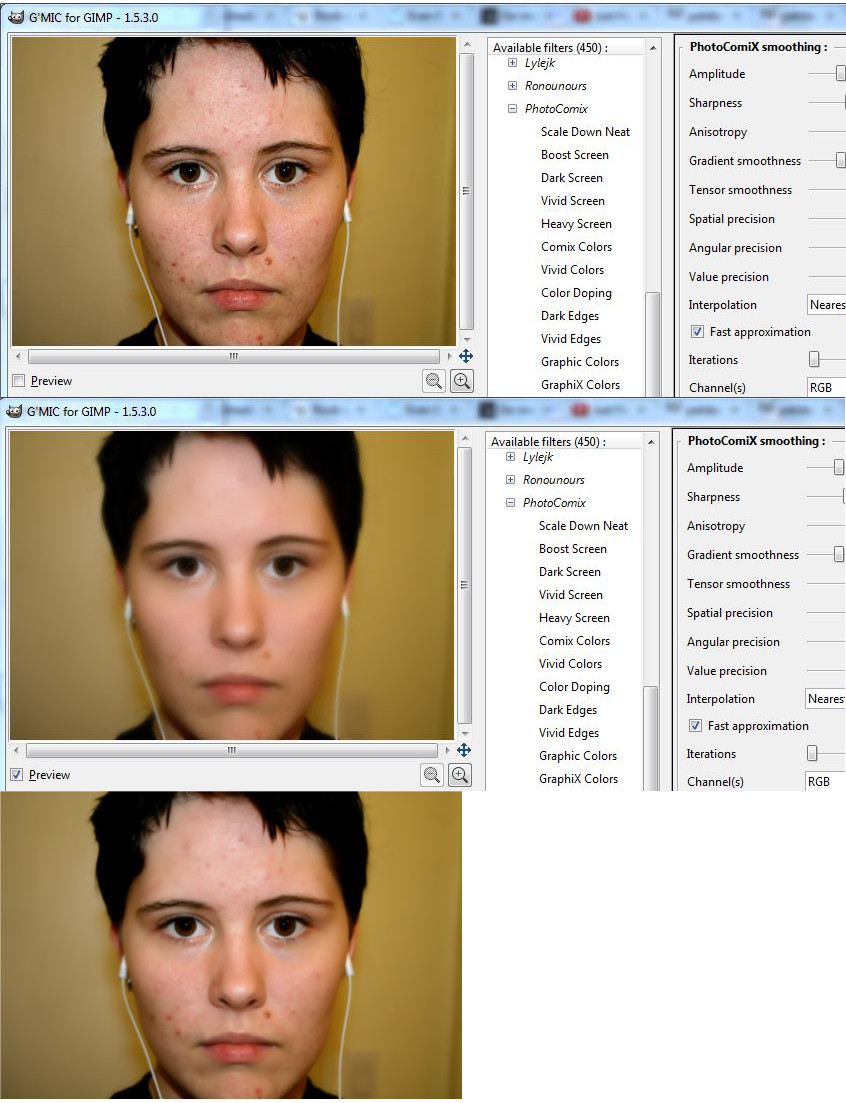
My doubt is about the filter in Testing> PhotoComiX> photocomixSmoothing

In the preview the result that appears is different from the actual result obtained. :hoh :(

I was impressed with the result that this filter promised to do when I predicted would result. Truly a wonderful result! :jumpclap :clap :coolthup

But when I click OK, and confer the result, the change is far from what the preview suggested. Much lower. :shock: :bawl

Please, if you can get the same result as the preview displays, this filter will be one of the top favorites of gimpers! :vic

If you can give a confirmed what I'm describing, and make the correction, since you already have my thanks! :tyspin

_________________
bbbbbbbbbbbImage
bbbbbbbbbbb Be patient, English is not my language.


Top
 Post subject: Re: Ask here help for GIMP_PhotoComix_Lab -2.8 (32 or 64bit )
PostPosted: Tue Feb 19, 2013 5:19 am  (#57) 
Offline
GimpChat Member
User avatar

Joined: Jan 20, 2013
Posts: 14831
Location: roma, italy
Just to give another view.
I tried the mentioned plug-in on a noisy picture of mines (using default parameters) and the result is very good; what I noticed is that after applying the plug-in to the real image ("apply") the preview showed an "exaggerated" smooth, probably because it was showing the expected result of the plug-in if re-applied on the already smoothed picture.
So, for me it's a very good plug-in

_________________
"Where am I ?"


Top
 Post subject: Re: Ask here help for GIMP_PhotoComix_Lab -2.8 (32 or 64bit )
PostPosted: Tue Feb 19, 2013 8:56 am  (#58) 
Offline
GimpChat Member

Joined: Apr 12, 2010
Posts: 5870
The Gmic preview it is not too trust when you zoom in/out the preview Ronounours even considered to disable the zoom to avoid complain

The default preview for the filter set to 1:1 should be correct but only to that size

There is another thing to consider even if don't impact the preview:
the filter use "anisotropic smoothing" that work on a local scale, in other word the image size is a important variable ; if applied to smaller or bigger copy the result will be very different

personally i use most of times on image larger then final desired size

Last i am quite frustrated that gmic doesn't support well preset (more then a very few screw up usability of the filter list ) because the default is only one of the many interesting possibilities, and presets will be a good guide to explore them...there is so much possible combination of merging modes and post/pre smoothing all creating very different effect

In general a effect that may look far to extreme and dramatic if applied to a medium size image may instead be much more delicate if applied to a large image.

I use often on my camera image , just converted from raw to png but not scaled down, for the rest i seldom edit images under wallpaper size ...i may scale down the final result but i love work at big size and the filter may somehow be tuned in that direction

_________________
My 3D Gallery on Deviantart http://photocomix2.deviantart.com/
Main gallery http://www.flickriver.com/photos/photocomix-mandala/
Mandala and simmetry http://www.flickriver.com/photos/photocomix_mandala/

Image

Mrs Wilbress


Top
 Post subject: Re: Ask here help for GIMP_PhotoComix_Lab -2.8 (32 or 64bit )
PostPosted: Wed Feb 20, 2013 4:26 am  (#59) 
Offline
GimpChat Member
User avatar

Joined: Jan 10, 2013
Posts: 863
Dinasset, yah, for me it's a very good plug-in too.
Just do not get the expected result by setting is a little frustrating.

PhotoComix, i love work at big size too!
The more resolution options are best for editing, and gives more taste to work on the image.
But even in 1:1 zoom (100%), there is a result equivalent to the preview.

I may have to do several repetitions of the filter to obtain that result. Having a preview or blurred excess so that the result is close to what was expected.

But ok, the filter remains an excellent tool!

_________________
bbbbbbbbbbbImage
bbbbbbbbbbb Be patient, English is not my language.


Top
 Post subject: Re: Ask here help for GIMP_PhotoComix_Lab -2.8 (32 or 64bit )
PostPosted: Fri Feb 22, 2013 3:05 am  (#60) 
Offline
GimpChat Member
User avatar

Joined: Jan 10, 2013
Posts: 863
See the difference.
The third image is the result after clicked ok.
Image

_________________
bbbbbbbbbbbImage
bbbbbbbbbbb Be patient, English is not my language.


Top
Post new topic Reply to topic  [ 70 posts ]  Go to page Previous  1, 2, 3, 4  Next

All times are UTC - 5 hours [ DST ]


* Login  


Powered by phpBB3 © phpBB Group