It is currently Wed Aug 19, 2026 3:37 pm


All times are UTC - 5 hours [ DST ]


Post new topic Reply to topic  [ 53 posts ]  Go to page Previous  1, 2, 3  Next
Author Message
 Post subject: Re: Lace Script [sorry inserted wrong scrript]
PostPosted: Sun Jun 09, 2013 11:25 pm  (#21) 
Offline
GimpChat Member
User avatar

Joined: Jan 20, 2013
Posts: 14831
Location: roma, italy
this is my xcf, with layers


Attachments:
default-lace-with-layers.7z [325.39 KiB]
Downloaded 89 times

_________________
"Where am I ?"
Top
 Post subject: Re: Lace Script [sorry inserted wrong scrript]
PostPosted: Sun Jun 09, 2013 11:25 pm  (#22) 
Offline
GimpChat Member
User avatar

Joined: Jan 20, 2013
Posts: 14831
Location: roma, italy
do we have different script versions?

_________________
"Where am I ?"


Top
 Post subject: Re: Lace Script [sorry inserted wrong scrript]
PostPosted: Sun Jun 09, 2013 11:32 pm  (#23) 
Offline
GimpChat Member
User avatar

Joined: Jan 20, 2013
Posts: 14831
Location: roma, italy
I guess I'm on the way to understand:
the script (at least my version) does not take the colour of the lace from the "lace colour" parameter, but from the active gradient (??!!??)
changing the active gradient to something having white in it I get a lace almost white.. is there a problem in the script?

_________________
"Where am I ?"


Top
 Post subject: Re: Lace Script [sorry inserted wrong scrript]
PostPosted: Mon Jun 10, 2013 12:06 am  (#24) 
Offline
GimpChat Member
User avatar

Joined: Jan 20, 2013
Posts: 14831
Location: roma, italy
Graechan wrote:
appologies about that but I put my PC Lab file in instead of the correct one :oops:


well, I'm a bit curious how did come out enthusiastic comments from the originally posted script which did not work...did it work in some specific environment?

_________________
"Where am I ?"


Top
 Post subject: Re: Lace Script [sorry inserted wrong scrript]
PostPosted: Mon Jun 10, 2013 12:08 am  (#25) 
Offline
Retired Staff
User avatar

Joined: May 22, 2008
Posts: 6946
Location: Somewhere in GIMP
@ dinasset: There has been more than one script posted. You may need to download the most recent one. I looked at your xcf file ... very strange.

Are you using gimp v2.8.2?

_________________
Image
World War IV will be fought with sticks and stones. - Albert Einstein


Top
 Post subject: Re: Lace Script [sorry inserted wrong scrript]
PostPosted: Mon Jun 10, 2013 12:11 am  (#26) 
Offline
GimpChat Member
User avatar

Joined: Jan 20, 2013
Posts: 14831
Location: roma, italy
I'm using 2.8.4 and I downloaded the last post on page one (edited on Sun by Graechan)
also consider my subsequent posts, the script uses the active gradient(!) instead of the "lace colour"....

_________________
"Where am I ?"


Top
 Post subject: Re: Lace Script [sorry inserted wrong scrript]
PostPosted: Mon Jun 10, 2013 12:15 am  (#27) 
Offline
Retired Staff
User avatar

Joined: May 22, 2008
Posts: 6946
Location: Somewhere in GIMP
I can't imagine that you are not using the script correctly. Here is a screen print of the lace script dialog with settings at default you can use for comparison.
Image

_________________
Image
World War IV will be fought with sticks and stones. - Albert Einstein


Top
 Post subject: Re: Lace Script [sorry inserted wrong scrript]
PostPosted: Mon Jun 10, 2013 12:18 am  (#28) 
Offline
Retired Staff
User avatar

Joined: May 22, 2008
Posts: 6946
Location: Somewhere in GIMP
I also have the lace brush as a grayscale brush in my brushes. I'm pretty sure it isn't needed but I'm attaching it so you can stick it in your brushes. I have both brushes in mine but I think the script uses the one simply named lace.gbr


Attachments:
lace-gs.gbr [68.1 KiB]
Downloaded 82 times

_________________
Image
World War IV will be fought with sticks and stones. - Albert Einstein
Top
 Post subject: Re: Lace Script [sorry inserted wrong scrript]
PostPosted: Mon Jun 10, 2013 12:22 am  (#29) 
Offline
GimpChat Member
User avatar

Joined: Jan 20, 2013
Posts: 14831
Location: roma, italy
I have exactly the same default screen.
Could you try to set active gradient to Abstract1 and see whether also in your environment it uses that instead of white for the lace?
I will now try adding the second lace you provided and let you know about

_________________
"Where am I ?"


Top
 Post subject: Re: Lace Script [sorry inserted wrong scrript]
PostPosted: Mon Jun 10, 2013 12:24 am  (#30) 
Offline
Retired Staff
User avatar

Joined: May 22, 2008
Posts: 6946
Location: Somewhere in GIMP
Aha! This may be what is happening to you, dinasset. Check your dynamics and make sure they are off. I just ran the script with Random Color on in Dynamics and got lace the color of the active gradient.

Image

_________________
Image
World War IV will be fought with sticks and stones. - Albert Einstein


Top
 Post subject: Re: Lace Script [sorry inserted wrong scrript]
PostPosted: Mon Jun 10, 2013 12:39 am  (#31) 
Offline
GimpChat Member
User avatar

Joined: Jan 20, 2013
Posts: 14831
Location: roma, italy
you got it Oregonian!
setting dynamics to basic instead of random colour I get white lace around.
Well, I guess Graechan should improve the script so that it does not force the user to change dynamics, it should be a matter of the script itself to set dynamics as required by the script then restore dynamics to previous user set-up, don't you think so? (or having dynamics set-up as a script additional parameter)

_________________
"Where am I ?"


Top
 Post subject: Re: Lace Script [sorry inserted wrong scrript]
PostPosted: Mon Jun 10, 2013 12:42 am  (#32) 
Offline
Retired Staff
User avatar

Joined: May 22, 2008
Posts: 6946
Location: Somewhere in GIMP
Whoa! Yes, conbagui, the airbrush makes it come out strange too. Graechan, your script needs some changes.

I think the script should call for the Paintbrush and to ignore Dynamics. Stroking a path with a paintbrush gives you the choice to ignore or use the current Dynamics.

_________________
Image
World War IV will be fought with sticks and stones. - Albert Einstein


Top
 Post subject: Re: Lace Script Rel2 [with Alpha-to-Logo]
PostPosted: Mon Jun 10, 2013 2:20 am  (#33) 
Offline
Script Coder
User avatar

Joined: Feb 18, 2011
Posts: 4826
Location: Bendigo Vic. Australia
Just updated to Rel2 see initial post

logo script now has outline only option and an Alpha-to-Logo has been added

_________________
Image
No matter how much you push the envelope, it'll still be stationery.


Top
 Post subject: Re: Lace Script Rel2 [with Alpha-to-Logo]
PostPosted: Mon Jun 10, 2013 2:30 am  (#34) 
Offline
Global Moderator
User avatar

Joined: May 16, 2010
Posts: 16164
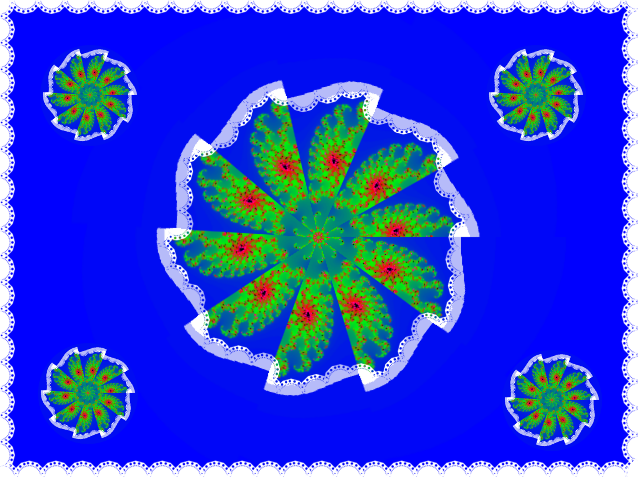
Sams transform script and lace alpha to logo. :bigthup

Image

_________________
Image


Top
 Post subject: Re: Lace Script Rel2 [with Alpha-to-Logo]
PostPosted: Mon Jun 10, 2013 2:43 am  (#35) 
Offline
Global Moderator
User avatar

Joined: Apr 01, 2012
Posts: 8457
Location: On the other side of your screen
Thank you graechan
Image

_________________
Image
Free Fun Photo Editing & resources
Poems from the Lord
Gimp Newby
Gimp version 3.2.4 and GMIC-Qt 4.0.2 OS :- Windows 10 Home 64


Top
 Post subject: Re: Lace Script Rel2 [with Alpha-to-Logo]
PostPosted: Mon Jun 10, 2013 3:18 am  (#36) 
Offline
GimpChat Member
User avatar

Joined: Jan 20, 2013
Posts: 14831
Location: roma, italy
Thanks for the Alpha-to-Logo!
Did you read previous conversation between me and Oregonian (+Conbagui)?
Release 2 (both using Logo as well as using Alpha-to-Logo) still uses the active gradient for the lace instead of the Lace colour when Dynamic is on (in my case: Random Colours).
Could you enhance the script to save current set-up + set Dynamics off (at the beginning) and restore user set-up (at the end)?

_________________
"Where am I ?"


Top
 Post subject: Re: Lace Script Rel2 [with Alpha-to-Logo]
PostPosted: Mon Jun 10, 2013 3:28 am  (#37) 
Offline
Global Moderator
User avatar

Joined: Apr 01, 2012
Posts: 8457
Location: On the other side of your screen
Image

_________________
Image
Free Fun Photo Editing & resources
Poems from the Lord
Gimp Newby
Gimp version 3.2.4 and GMIC-Qt 4.0.2 OS :- Windows 10 Home 64


Top
 Post subject: Re: Lace Script Rel2 [with Alpha-to-Logo]
PostPosted: Mon Jun 10, 2013 4:44 am  (#38) 
Offline
GimpChat Member
User avatar

Joined: Apr 07, 2010
Posts: 14182
Very pretty Sallyanne...your work is getting nicer all the time.

_________________
Image


Top
 Post subject: Re: Lace Script Rel2 [with Alpha-to-Logo]
PostPosted: Mon Jun 10, 2013 5:00 am  (#39) 
Offline
Global Moderator
User avatar

Joined: Apr 01, 2012
Posts: 8457
Location: On the other side of your screen
Thank you Molly. You may recognise the Julia pattern. I used kaleidescope on it then the lace script rel 2

_________________
Image
Free Fun Photo Editing & resources
Poems from the Lord
Gimp Newby
Gimp version 3.2.4 and GMIC-Qt 4.0.2 OS :- Windows 10 Home 64


Top
 Post subject: Re: Lace Script Rel2 [with Alpha-to-Logo]
PostPosted: Mon Jun 10, 2013 5:03 am  (#40) 
Offline
GimpChat Member
User avatar

Joined: Aug 16, 2012
Posts: 4271
Location: Göteborg, Sweden
yay, alpha to logo!
sallyanne: i love your fractals-and-lace image, really cool :).

_________________


Top
Post new topic Reply to topic  [ 53 posts ]  Go to page Previous  1, 2, 3  Next

All times are UTC - 5 hours [ DST ]


* Login  


Powered by phpBB3 © phpBB Group