It is currently Fri Nov 20, 2026 6:40 pm


All times are UTC - 5 hours [ DST ]


Post new topic Reply to topic  [ 5 posts ] 
Author Message
 Post subject: Recycle symbol
PostPosted: Sun Oct 16, 2016 11:09 am  (#1) 
Offline
GimpChat Member
User avatar

Joined: Oct 06, 2010
Posts: 4050
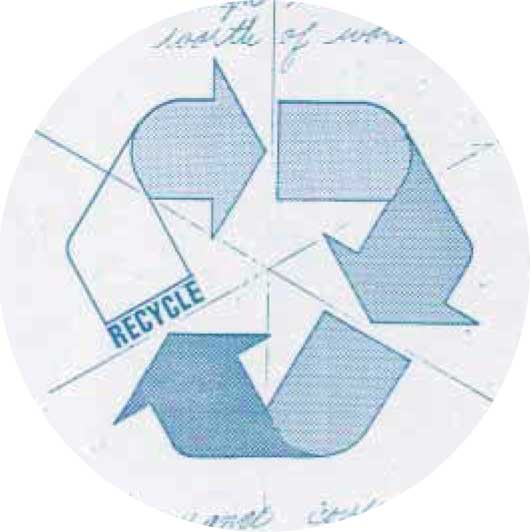
I love (not really) how some photo and artist sites online try to lay claim to the recycle logo as if it belonged to them. Fortunately, it does not, and since the current rendition of the logo is online for all use (Public Domain). Interestingly enough, the winning image entry by Gary Anderson isn't shown in Wikipedia. I believe the actual winning image should be shown, as well. This is what the actual image looks like:

Image


It seems we have flipped the logo vertically, not that it makes any difference. The motto is the same, irrespective of its positioning.

I created a variant from the drawing and then created six separate path layers. The result gives me more leverage over applying gradients and strokes to give the logo more POP!

Should make for some interesting examples down the road.

Image

_________________
"In order to attain the impossible, one must attempt the absurd."
~ Miguel de Cervantes


Share on Facebook Share on Twitter Share on Orkut Share on Digg Share on MySpace Share on Delicious Share on Technorati
Top
 Post subject: Re: Recycle symbol
PostPosted: Sun Oct 16, 2016 1:23 pm  (#2) 
Offline
Script Coder
User avatar

Joined: May 07, 2014
Posts: 4561
Location: Canada
While i was playing with recycle symbol posted on the other MareroQ's simple path thread.
I had situations where i only wanted to select 1 of the 3 arrows.
So i thought what if i could extract one of the 3 arrows path into its own vectors layer.
I wonder if such script would be useful.
Like it wouldn't be anything fancy such as cutting exactly where the selection is...but basically it would look at the active path and see if a stroke's point is inside selection. if it is it uses to add a new vector.
So the result is if you made a selection around one of the arrows and then use this fictional script it would grab the strokes that draw this arrow and extract it into another new vectors/path.
What do you think of such a simple script? have any use for it? I don't even know if GIMP has functions right now that allow you to do that...

_________________
Image
Visualize your and others dreams coming true.


Top
 Post subject: Re: Recycle symbol
PostPosted: Sun Oct 16, 2016 3:58 pm  (#3) 
Offline
GimpChat Member
User avatar

Joined: Oct 06, 2010
Posts: 4050
While I can certainly approve of having a script that makes user experience easier, in this case, I'm not sure what the answer is until I try it out. I inverted my selections on the full path and it didn't pan out, which lead me to breaking the entire logo into 6 paths. Actually, just 2 that were duplicated and rotated 120 degrees.

_________________
"In order to attain the impossible, one must attempt the absurd."
~ Miguel de Cervantes


Top
 Post subject: Re: Recycle symbol
PostPosted: Sun Oct 16, 2016 4:38 pm  (#4) 
Offline
Script Coder
User avatar

Joined: May 07, 2014
Posts: 4561
Location: Canada
Try this out and see if it is useful or not.
-> Breakout Vectors In Selection...

_________________
Image
Visualize your and others dreams coming true.


Last edited by trandoductin on Wed Nov 28, 2018 12:55 pm, edited 1 time in total.

Top
 Post subject: Re: Recycle symbol
PostPosted: Sun Oct 16, 2016 5:46 pm  (#5) 
Offline
GimpChat Member
User avatar

Joined: May 26, 2015
Posts: 410
Location: United Kingdom
Nice work Mahvin, I'm loving the gradients on this - gives it a kind of metallic feel.

_________________
“Today, give a stranger one of your smiles. It might be the only sunshine he sees all day.” -- H. Jackson Brown Jr.


Top
Post new topic Reply to topic  [ 5 posts ] 

All times are UTC - 5 hours [ DST ]


* Login  


Powered by phpBB3 © phpBB Group