It is currently Sun Aug 23, 2026 9:17 am


All times are UTC - 5 hours [ DST ]


Post new topic Reply to topic  [ 11 posts ] 
Author Message
 Post subject: Can Some 1 *pls* script this watercolour sketch, see examples! WOW!
PostPosted: Thu Feb 09, 2017 5:06 am  (#1) 
Offline
GimpChat Member

Joined: Feb 09, 2017
Posts: 14
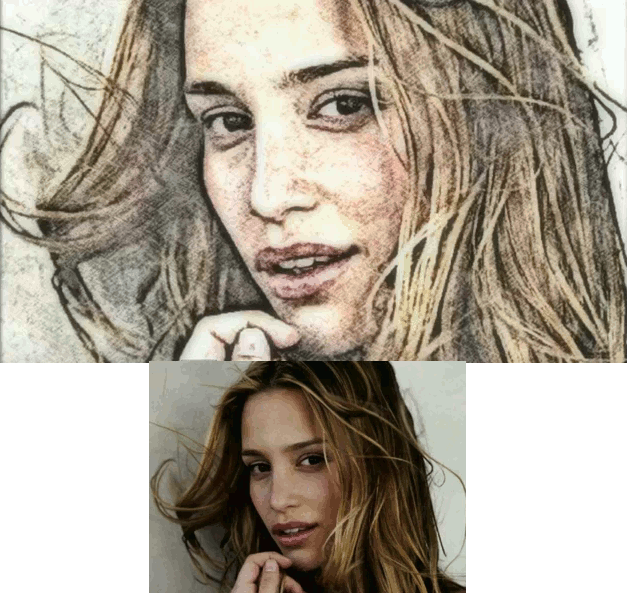
Please look at this video on Youtube. It shows a magnificent scripting effect. I have literally hundreds of files I need to do this for a children's storybook website, and for the life of me I completely cracked yesterday with sadness and grief realising I have not the faintest idea on how to script.

PLEASE watch the video, its not very long. I have written down the commands here. I have also attached 2 screenshots so you can see the quality of this effect and if its to be scripted, how wonderful it would be. It is THE HIGHEST QUALITY picture I've ever seen, it really is very good.
I can't attach it since I'm a new user here and I'm told by the site my post looks too spammy with the youtube link, but if you search for:
GIMP Tutorial - Turn Photo into Soft Colour Pencil Drawing by Billy Kerr you will find it.

In any event the images provided here and the list of instructions are exact and the video isn't necessary.

Attachment:
watercolor-sketch-effect.gif
watercolor-sketch-effect.gif [ 209.88 KiB | Viewed 4729 times ]

Attachment:
colourcurves.gif
colourcurves.gif [ 236.48 KiB | Viewed 4729 times ]


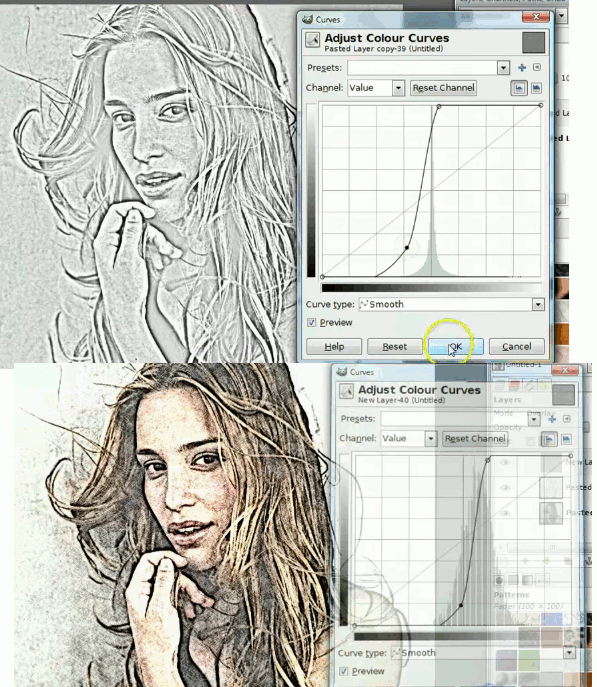
I have written down the sequence of commands. I think the color curves might present a problem.

Sequence of commands:
0. Duplicate layer, again duplicate so 3 layers of original.
1. Gaussian blur 15 radius both
2 Grain extract (in layers mode, in layers toolbar).
3. Layer merge down
4. Colour desaturate lightness
5. Colour curves (make an S from the straight line so it goes over the straight midline with the S of the curves in the first box units next to the midline.
6. Grain merge (in layers mode, in layers toolbar)
7. New layer.
8. Fill with paper gradient pattern
9. overlay (change layer mode)
10. redo (5) but the color curve is tighter and tucked much closer to the straight midline.
11. Layer: New from visible
12. Filters blur, gaussian blurr 20 20
13. Opacity in layers toolbar set to 47.6

DONE. Here are the results...

And for interest sake the two pics of the color curves for reference, in case you don't want to watch the 2:36 minute long video.

Someone please script this. It will help me understand scripting a lot I think... I would really appreciate help because I cannot
do this and I have hundreds of images to edit this way. If someone doesn't help with making a script I will literally spend months editing each of the images, and that has already made me cry and cringe thinking about it...

Other than that, don't you think it looks fantastic? I think it deserves to be scripted although I may not perhaps deserve it, but I hope my little write-up helps someone for whom scripting is "a breeze" (very easy) - there's my little English teacher doing his thing...


Share on Facebook Share on Twitter Share on Orkut Share on Digg Share on MySpace Share on Delicious Share on Technorati
Top
 Post subject: Re: Can Some 1 *pls* script this watercolour sketch, see examples! WOW
PostPosted: Thu Feb 09, 2017 5:20 am  (#2) 
Offline
Script Coder
User avatar

Joined: Oct 25, 2010
Posts: 4812
Be careful with video tutorials. They of course work very well with the image they pick for the demo. They may not work as well with other images. Did you try the whole process with 4-5 images of yours, sufficiently different?

_________________
Image


Top
 Post subject: Re: Can Some 1 *pls* script this watercolour sketch, see examples! WOW
PostPosted: Thu Feb 09, 2017 5:21 am  (#3) 
Offline
GimpChat Member

Joined: Feb 09, 2017
Posts: 14
I've just edited and I think the batch of images should all conform to the levels of brightness contrast similar to the sample image for the script. I did find that adjusting the colour curves to compensate is key to getting the best possible effect, and also to neglect the final gaussian blur and opacity commands to make it look more sketchy in pictures lacking in "sketchiness" detail...

To answer your question yes it would work well given the initial images are first remastered so they have similar colour and light ranges as with the sample image used, but a script may be tweaked to reattempt failed remasterings...

I just can't write the script.. I'm just a dummy. The cat doesn't look too splendin but then again it lacks the linear graces of the girl's hair.

Attachment:
furry-sketch-almost2.jpeg
furry-sketch-almost2.jpeg [ 94.82 KiB | Viewed 4706 times ]


For my mention of premastering the batch of images I would suggest reducing colour saturation, then reducing lightness somewhat while slightly increasing contrast so that the effects will have similar effect as per sample provided.

Now, with the second cat picture, I implemented my suggestion. I reduced the colour saturation and reduced lightness so it was a more dull image but still retained its initial contrast. I widenend the colour curve and also reduced the final amount of opacity of the last gaussian blur layer to get results closer to the original sample.

again I really think batches of files could benefit from this, and failed transformations could be regrouped and remastered with altered variables in the script. I love this effect!

Attachment:
furry-sketch-almost2.jpeg
furry-sketch-almost2.jpeg [ 94.82 KiB | Viewed 4706 times ]


Here's another I did and it does create that ghostly old school effect I am looking for. Anyone can help with a script, I would appreciate it so I can learn how to script from a sample, not from a tutorial... *please*!

Attachment:
kids-watercolour.jpeg
kids-watercolour.jpeg [ 410.52 KiB | Viewed 4697 times ]


I also think my samples suck compared to the original because it has more linear activity and contrasting tonality going on for the various effects to interact more cogently than my samples...

Attachment:
kids2.jpeg
kids2.jpeg [ 202.78 KiB | Viewed 4694 times ]


Last edited by smoofzilla on Thu Feb 09, 2017 6:41 am, edited 3 times in total.

Top
 Post subject: Re: Can Some 1 *pls* script this watercolour sketch, see examples! WOW
PostPosted: Thu Feb 09, 2017 6:19 am  (#4) 
Offline
Script Coder
User avatar

Joined: Oct 25, 2010
Posts: 4812
smoofzilla wrote:
I did find that adjusting the colour curves to compensate is key to getting the best possible effect

This is typically not so easy to do in a script... You see the result of curves, the script doesn't. At best it can tell if some measures (average R/G/B values and such like) are in some specified range...

Did you check the various artistic filters in GMIC?

_________________
Image


Top
 Post subject: Re: Can Some 1 *pls* script this watercolour sketch, see examples! WOW
PostPosted: Thu Feb 09, 2017 6:59 am  (#5) 
Offline
GimpChat Member

Joined: Feb 09, 2017
Posts: 14
I have never heard of it... and don't know how I would apply that to a batch of files. But I have been playing with gimp for hours now and am beginning to see how powerful it is.

A pity there isn't an "action recorder" to script the changes done to an image that can be duplicated with a button.
Nor also a video editor to do this to videos which should be treated like layers,too... This program has so much untapped potential with these two additions, nevermind what it can do already given a better understanding of layering tricks...!

But thank you for the heads up on GMIC, I will try that out for sure! Sincerely appreciated!
Any help on batch processing multiple images would be appreciated, not sure where to look for answers. ImageMagick has its limitations, of course (!)

Is there any way to create videos with these effects of GMIC to apply the layering tricks and so on to videos/ that would be utterly wonderful for little animation loops.
Sorry to bother! :paint


Top
 Post subject: Re: Can Some 1 *pls* script this watercolour sketch, see examples! WOW
PostPosted: Thu Feb 09, 2017 8:08 am  (#6) 
Offline
Global Moderator
User avatar

Joined: May 16, 2010
Posts: 16167
This may be of some use.
viewtopic.php?f=9&t=13339

_________________
Image


Top
 Post subject: Re: Can Some 1 *pls* script this watercolour sketch, see examples! WOW
PostPosted: Thu Feb 09, 2017 8:14 am  (#7) 
Offline
GimpChat Member
User avatar

Joined: Jan 20, 2013
Posts: 14831
Location: roma, italy
You can also have a look at some possible outcomes of the filter "DrawingFantasy" available under Gimp Scripts & Plug-Ins
http://gimpscripts.com/2017/01/drawingfantasy/

some examples
Attachment:
c1d37ab131ebb5eac60a2cfa967eb002, sketch method 1, on white paper (mid colours).jpg
c1d37ab131ebb5eac60a2cfa967eb002, sketch method 1, on white paper (mid colours).jpg [ 1.63 MiB | Viewed 4669 times ]

Attachment:
c1d37ab131ebb5eac60a2cfa967eb002, sketch method 2, on white paper (mid colours).jpg
c1d37ab131ebb5eac60a2cfa967eb002, sketch method 2, on white paper (mid colours).jpg [ 844.09 KiB | Viewed 4669 times ]

Attachment:
c1d37ab131ebb5eac60a2cfa967eb002, sketch method 3, on white paper (mid colours).jpg
c1d37ab131ebb5eac60a2cfa967eb002, sketch method 3, on white paper (mid colours).jpg [ 1.49 MiB | Viewed 4669 times ]

_________________
"Where am I ?"


Top
 Post subject: Re: Can Some 1 *pls* script this watercolour sketch, see examples! WOW
PostPosted: Thu Feb 09, 2017 3:32 pm  (#8) 
Offline
GimpChat Member

Joined: Feb 09, 2017
Posts: 14
How would i implement the same sketch method simultaneously on say 50 images with one command? I.e. in terminal say? Not sure Bout this. The irony is i think it would be simple for a programmer to connect files together in the gui to allow simultaneous editing.


Top
 Post subject: Re: Can Some 1 *pls* script this watercolour sketch, see examples! WOW
PostPosted: Thu Feb 09, 2017 4:06 pm  (#9) 
Offline
GimpChat Member

Joined: Feb 09, 2017
Posts: 14
I downloaded the plugin, how do i install it in GIMP as ive never done this before..


Top
 Post subject: Re: Can Some 1 *pls* script this watercolour sketch, see examples! WOW
PostPosted: Thu Feb 09, 2017 4:27 pm  (#10) 
Offline
Administrator
User avatar

Joined: Aug 10, 2012
Posts: 14166
Location: Native to NYC living in Arizona, Gimp 2.8 - 3.0, Win 11 PC.
smoofzilla wrote:
I downloaded the plugin, how do i install it in GIMP as ive never done this before..


This particular plugin is a python plugin,
with the file extension of .py and it gets installed into your Gimp User Plug-ins folder.

On my machine the Gimp User Plug-ins folder is located at,
C:\Users\Wallace\.gimp-2.8

The file in question is named,
DIEGO_ARTISTIC_DrawingFantasy.py
and looks something like this...

Image

_________________
Image
"A wise man learns more from a foolish question than a fool can learn from a wise answer"
Image


Top
 Post subject: Re: Can Some 1 *pls* script this watercolour sketch, see examples! WOW
PostPosted: Thu Feb 09, 2017 4:38 pm  (#11) 
Offline
GimpChat Member

Joined: Feb 09, 2017
Posts: 14
Thanks guys. I have found some scripts and I will in the coming weeks at some stage script this watercolour effect by Mr. Kerr as seen int he original post. Just busy with other stuff at the moment but I have a reasonable insight into how to script now after I saw a few samples and so on, and how to implement it in terminal!

I will post the script here and some samples of the results :D
Later!

Great community, btw!
:gimp :paint


Top
Post new topic Reply to topic  [ 11 posts ] 

All times are UTC - 5 hours [ DST ]


* Login  


Powered by phpBB3 © phpBB Group