Please look at this video on Youtube. It shows a magnificent scripting effect. I have literally hundreds of files I need to do this for a children's storybook website, and for the life of me I completely cracked yesterday with sadness and grief realising I have not the faintest idea on how to script.
PLEASE watch the video, its not very long. I have written down the commands here. I have also attached 2 screenshots so you can see the quality of this effect and if its to be scripted, how wonderful it would be. It is THE HIGHEST QUALITY picture I've ever seen, it really is very good.
I can't attach it since I'm a new user here and I'm told by the site my post looks too spammy with the youtube link, but if you search for:
GIMP Tutorial - Turn Photo into Soft Colour Pencil Drawing by Billy Kerr you will find it.
In any event the images provided here and the list of instructions are exact and the video isn't necessary.
Attachment:
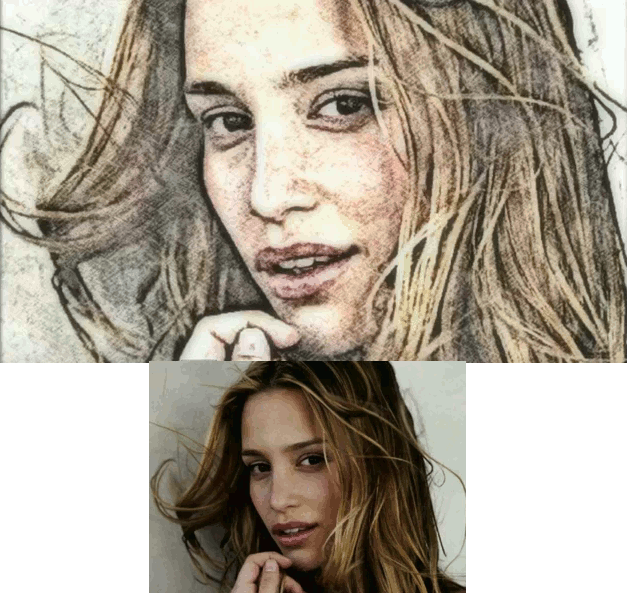 watercolor-sketch-effect.gif [ 209.88 KiB | Viewed 4733 times ]
Attachment:
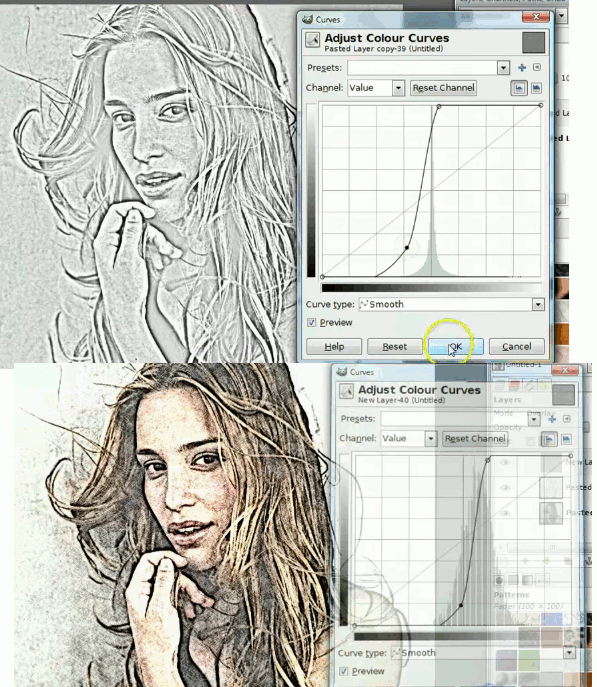 colourcurves.gif [ 236.48 KiB | Viewed 4733 times ]
I have written down the sequence of commands. I think the color curves might present a problem.
Sequence of commands:
0. Duplicate layer, again duplicate so 3 layers of original.
1. Gaussian blur 15 radius both
2 Grain extract (in layers mode, in layers toolbar).
3. Layer merge down
4. Colour desaturate lightness
5. Colour curves (make an S from the straight line so it goes over the straight midline with the S of the curves in the first box units next to the midline.
6. Grain merge (in layers mode, in layers toolbar)
7. New layer.
8. Fill with paper gradient pattern
9. overlay (change layer mode)
10. redo (5) but the color curve is tighter and tucked much closer to the straight midline.
11. Layer: New from visible
12. Filters blur, gaussian blurr 20 20
13. Opacity in layers toolbar set to 47.6
DONE. Here are the results...
And for interest sake the two pics of the color curves for reference, in case you don't want to watch the 2:36 minute long video.
Someone please script this. It will help me understand scripting a lot I think... I would really appreciate help because I cannot
do this and I have hundreds of images to edit this way. If someone doesn't help with making a script I will literally spend months editing each of the images, and that has already made me cry and cringe thinking about it...
Other than that, don't you think it looks fantastic? I think it deserves to be scripted although I may not perhaps deserve it, but I hope my little write-up helps someone for whom scripting is "a breeze" (very easy) - there's my little English teacher doing his thing...
 Login
Login Register
 Tweets
 FAQ
FAQ Advanced Search