It is currently Sun Sep 27, 2026 3:15 pm


All times are UTC - 5 hours [ DST ]


Post new topic Reply to topic  [ 49 posts ]  Go to page Previous  1, 2, 3  Next
Author Message
 Post subject: Re: improving quality of photo (pixilation)
PostPosted: Sun Jul 28, 2013 12:10 pm  (#21) 
Offline
GimpChat Member

Joined: Jul 27, 2013
Posts: 32
Esper wrote:
lucymay, are you saying you have no toolbox, no layertabs, just the image and the menu ?
no docks ?
how do you do anything at all ? ;)

if you accidentally closed them, you can find them under 'Windows -> Recently Closed Docks'

you can change docks under 'windows' in the menu
if you just hid them, you can press 'Tab'


Thank you - I've opened them now using recently closed docs - I was just using the options along the top! I'm not much good at things like this although still have just about managed to improve my photo :mrgreen:


Top
 Post subject: Re: improving quality of photo (pixilation)
PostPosted: Sun Jul 28, 2013 12:17 pm  (#22) 
Offline
GimpChat Member
User avatar

Joined: Jul 17, 2012
Posts: 2769
it seems to me you are picking up very quickly :bigthup

pretty normal to go through a learning phase


Top
 Post subject: Re: improving quality of photo (pixilation)
PostPosted: Sun Jul 28, 2013 12:48 pm  (#23) 
Offline
GimpChat Member

Joined: Jul 27, 2013
Posts: 32
well I've now managed to lose the window on the left - well not lose it but I clicked on colour picker and it put that there instead! I've tried setting back to default and going into recently closed docs but it only brings up the colour picker now. Please can you tell me how I can get back what I had which was the same (or very similar) to the you tube one! (from the link I posted on the previous post) Thanks :roll:


Top
 Post subject: Re: improving quality of photo (pixilation)
PostPosted: Sun Jul 28, 2013 12:57 pm  (#24) 
Offline
GimpChat Member
User avatar

Joined: Jan 20, 2013
Posts: 14835
Location: roma, italy
Lucy,
maybe I'm asking something stupid, in which case please ignore my post, but:
did you click on "windows" and then select "single-window-mode"?
What the you-tube video for which you entered the link shows, is just that: a Gimp set up in single window mode

_________________
"Where am I ?"


Top
 Post subject: Re: improving quality of photo (pixilation)
PostPosted: Sun Jul 28, 2013 1:00 pm  (#25) 
Offline
GimpChat Member
User avatar

Joined: Jul 17, 2012
Posts: 2769
yeah its annoying when you learn a program, and it doesnt do what you want or even fights you

first of all, never click the X on the docks
if you want to quit Gimp, use 'File -> Quit'

my guess about your colourpicker is that you have the Tool Options Dialogue open ?

Image

you can click on the symbol before 'Colour Picker' and then click-drag it into your Toolbox, where it will dock


maybe you should also have a look at this link:

http://docs.gimp.org/en/gimp-concepts-main-windows.html


Top
 Post subject: Re: improving quality of photo (pixilation)
PostPosted: Sun Jul 28, 2013 1:24 pm  (#26) 
Offline
GimpChat Member

Joined: Jul 27, 2013
Posts: 32
Yes it was the tool options there. I've somehow got rid of that - not really sure what I did! Now its just blank and says 'you can drop dockable dialogues here.' Is it the toolbox that should be there? Do you know how I can put it back please? I clicked on single window mode to try and get it back but still nothing! Thank you for your help - I'm very grateful! :tyspin


Top
 Post subject: Re: improving quality of photo (pixilation)
PostPosted: Sun Jul 28, 2013 1:32 pm  (#27) 
Offline
GimpChat Member
User avatar

Joined: Jan 20, 2013
Posts: 14835
Location: roma, italy
if I remember correctly what happened also to me some time ago, open the toolbox dockable window on the right side of the screen, then "move" it to the left until you see it "docked"

_________________
"Where am I ?"


Top
 Post subject: Re: improving quality of photo (pixilation)
PostPosted: Sun Jul 28, 2013 1:36 pm  (#28) 
Offline
GimpChat Member
User avatar

Joined: Jul 17, 2012
Posts: 2769
lucymay wrote:
Yes it was the tool options there. I've somehow got rid of that - not really sure what I did!

you probably just clicked the X

Quote:
Now its just blank and says 'you can drop dockable dialogues here.' Is it the toolbox that should be there? Do you know how I can put it back please?

no it is the toolbox and you can put the Tool Options Dialogue there by clicking on the symbold before the name, holding the mousebutton and dragging it where it says: 'you can drop dockable dialogues here'

told you the same thing in my last post ;)

this is probably very confusing
just think of it like this: you have a toolbox with all your tools, like brushes, colourpickers, selection tools, etc.
for each tool you have a tool options dialogue, that lets you customise the tool to your needs
so when you use a tool, you want the tool options as well right ?!

ImageImage


Top
 Post subject: Re: improving quality of photo (pixilation)
PostPosted: Sun Jul 28, 2013 2:11 pm  (#29) 
Offline
GimpChat Member

Joined: Jul 27, 2013
Posts: 32
Thank you, thats making more sense! I've got most of it back now but not fully! I can't work out which is the one I originally had (in the toolbox). Think it was the same as in the you tube video and says eraser? Its the bit with the mode, brush type, opacity, scale etc in - can't fully read if it says eraser above that in bold letters! Sorry I'm losing the plot a bit with it now! Once I get that part back I'll be happy! :mrgreen:


Top
 Post subject: Re: improving quality of photo (pixilation)
PostPosted: Sun Jul 28, 2013 2:40 pm  (#30) 
Offline
GimpChat Member

Joined: Jul 27, 2013
Posts: 32
Yipppeeeee I've worked out what to do! Thanks again for all your help - all restored back to where it was :jumpclap.


Top
 Post subject: Re: improving quality of photo (pixilation)
PostPosted: Sun Jul 28, 2013 2:45 pm  (#31) 
Offline
GimpChat Member
User avatar

Joined: Jul 17, 2012
Posts: 2769
:hi5


Top
 Post subject: Re: improving quality of photo (pixilation)
PostPosted: Sun Jul 28, 2013 5:22 pm  (#32) 
Offline
GimpChat Member

Joined: Jul 11, 2010
Posts: 349
lucymay wrote:
Yipppeeeee I've worked out what to do! Thanks again for all your help - all restored back to where it was.


Have you been able to get G'Mic installed?


Top
 Post subject: Re: improving quality of photo (pixilation)
PostPosted: Mon Jul 29, 2013 2:47 am  (#33) 
Offline
GimpChat Member
User avatar

Joined: Jan 20, 2013
Posts: 14835
Location: roma, italy
about GMIC
in your last post, Lucy, you said you put all four files unzipped under plug-in, that's not correct:
1-only gmic_gimp.exe and _gmic folder should stay under plugins
2-the two .dll should be put into the bin folder of gimp

_________________
"Where am I ?"


Top
 Post subject: Re: improving quality of photo (pixilation)
PostPosted: Tue Jul 30, 2013 11:53 am  (#34) 
Offline
GimpChat Member

Joined: Jul 27, 2013
Posts: 32
Hi, Sorry I only just noticed the last 2 posts. No I haven't managed to get G'MIC working yet but I'll give it another try with the tip from the last post and let you know how I get on :) - thanks!


Top
 Post subject: Re: improving quality of photo (pixilation)
PostPosted: Wed Jul 31, 2013 2:37 am  (#35) 
Offline
GimpChat Member

Joined: Jul 27, 2013
Posts: 32
I've deleted the 2 dll files from the plug ins folder and just left the other 2 in. Please can you tell me where I will find the bin folder of gimp so that I can put the dll files in there? Thanks! :mrgreen:


Top
 Post subject: Re: improving quality of photo (pixilation)
PostPosted: Wed Jul 31, 2013 3:20 am  (#36) 
Offline
GimpChat Member
User avatar

Joined: Jan 20, 2013
Posts: 14835
Location: roma, italy
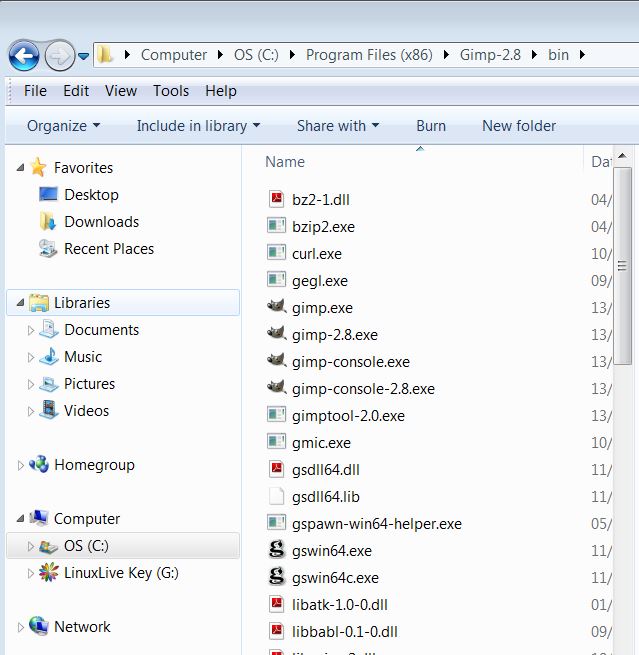
C:\Programs\Gimp-2.8\bin
that is: is one of the folders created directly under the folder Gimp-2.8 once installed

_________________
"Where am I ?"


Top
 Post subject: Re: improving quality of photo (pixilation)
PostPosted: Wed Jul 31, 2013 10:23 am  (#37) 
Offline
GimpChat Member

Joined: Jul 27, 2013
Posts: 32
I couldn't find that folder when I typed it into the 'search programs and files' box. However I have found the gimp 2.8 folder but there doesn't seem to be a bin folder in there?! There are these folders - brushes, curves, dynamics, environ, fonts, fractalexplorer, gfig, gflare, gimpressionist, gradients, interpreters, levels, modules, palettes, patterns, plug ins, scripts, templates, themes, tmp, tool options and tool presets but no bin! Are any of these other names for the bin folder?! I'm on version 2.8.6. Thanks very much


Top
 Post subject: Re: improving quality of photo (pixilation)
PostPosted: Wed Jul 31, 2013 11:10 am  (#38) 
Offline
GimpChat Member
User avatar

Joined: Apr 07, 2010
Posts: 14182
Try C:\ProgramFiles(86)\Gimp-2.8.6\bin

Image

_________________
Image


Top
 Post subject: Re: improving quality of photo (pixilation)
PostPosted: Wed Jul 31, 2013 12:30 pm  (#39) 
Offline
GimpChat Member

Joined: Jul 27, 2013
Posts: 32
Hi Molly, Thanks for the reply. I still can't find it - I've looked in the Program Files (x86) but Gimp isn't in there on mine!


Top
 Post subject: Re: improving quality of photo (pixilation)
PostPosted: Wed Jul 31, 2013 12:36 pm  (#40) 
Offline
GimpChat Member
User avatar

Joined: Jan 20, 2013
Posts: 14835
Location: roma, italy
please, send us the list of what you find under C:
also, please install a search program (free) like "Search Everything",
http://www.voidtools.com/download.php
then you can enter for instance "bin" and see all the "bin" folders you have in your system

_________________
"Where am I ?"


Top
Post new topic Reply to topic  [ 49 posts ]  Go to page Previous  1, 2, 3  Next

All times are UTC - 5 hours [ DST ]


* Login  


Powered by phpBB3 © phpBB Group