It is currently Mon Aug 17, 2026 4:50 am


All times are UTC - 5 hours [ DST ]


Post new topic Reply to topic  [ 12 posts ] 
Author Message
 Post subject: 3D Shape Script or Plugin Anywhere?
PostPosted: Sat Aug 17, 2013 2:04 pm  (#1) 
Offline
GimpChat Member
User avatar

Joined: Jul 06, 2013
Posts: 2662
Location: California
I'm not sure if this question was asked, so I'll go on and ask. Is there a 3D Shape Script or Plugin anywhere for GIMP users? It might come in handy if we don't want to draw things by hand.


Share on Facebook Share on Twitter Share on Orkut Share on Digg Share on MySpace Share on Delicious Share on Technorati
Top
 Post subject: Re: 3D Shape Script or Plugin Anywhere?
PostPosted: Sat Aug 17, 2013 2:37 pm  (#2) 
Offline
GimpChat Member
User avatar

Joined: Jul 17, 2012
Posts: 2769
viewtopic.php?f=9&t=5173&start=0


Top
 Post subject: Re: 3D Shape Script or Plugin Anywhere?
PostPosted: Sat Aug 17, 2013 2:40 pm  (#3) 
Offline
GimpChat Member
User avatar

Joined: Jul 06, 2013
Posts: 2662
Location: California
Esper wrote:
http://www.gimpchat.com/viewtopic.php?f=9&t=5173&start=0


Thanks, Esper! :) I checked out the link and it's for 3D Text.. not shapes like circles, triangles, or squares. Is there a plugin for 3D Shapes?


Top
 Post subject: Re: 3D Shape Script or Plugin Anywhere?
PostPosted: Sat Aug 17, 2013 2:49 pm  (#4) 
Offline
Script Coder
User avatar

Joined: Oct 25, 2010
Posts: 4812
mackenzieh wrote:
I'm not sure if this question was asked, so I'll go on and ask. Is there a 3D Shape Script or Plugin anywhere for GIMP users? It might come in handy if we don't want to draw things by hand.


What do you really expect the script to do? You type "tea pot" in it and it renders a 3D tea pot?

_________________
Image


Top
 Post subject: Re: 3D Shape Script or Plugin Anywhere?
PostPosted: Sat Aug 17, 2013 2:53 pm  (#5) 
Offline
GimpChat Member
User avatar

Joined: Jul 17, 2012
Posts: 2769
lol ofnuts, i really like tea
can you write one for me that does teapots ?!


Top
 Post subject: Re: 3D Shape Script or Plugin Anywhere?
PostPosted: Sat Aug 17, 2013 3:02 pm  (#6) 
Offline
GimpChat Member
User avatar

Joined: Jul 06, 2013
Posts: 2662
Location: California
ofnuts wrote:
mackenzieh wrote:
I'm not sure if this question was asked, so I'll go on and ask. Is there a 3D Shape Script or Plugin anywhere for GIMP users? It might come in handy if we don't want to draw things by hand.


What do you really expect the script to do? You type "tea pot" in it and it renders a 3D tea pot?


Something like that, yes but instead of a tea pot; it renders shapes.


Top
 Post subject: Re: 3D Shape Script or Plugin Anywhere?
PostPosted: Sat Aug 17, 2013 3:15 pm  (#7) 
Offline
GimpChat Member
User avatar

Joined: Feb 17, 2011
Posts: 225
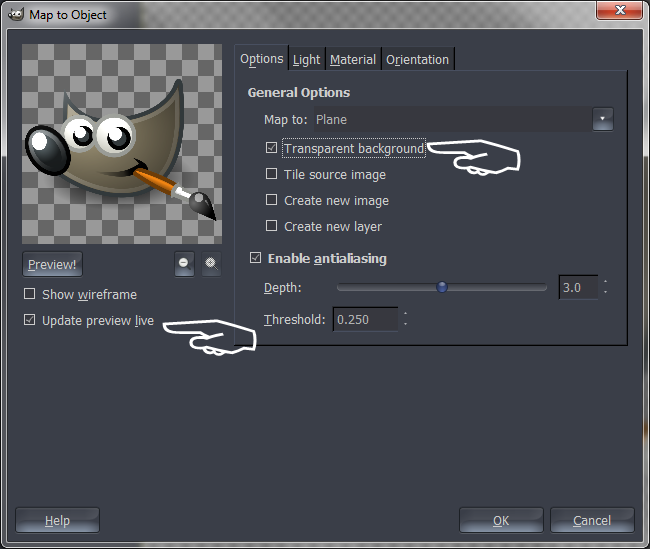
Filters->Map->Map Object might be your thing; remember to try with existing image, because otherwise you don't see a thing. :D

Also, Sphere Designer might be useful.

If you want the real thing, use Blender (free app, not Gimp plugin...).

Dang, conbagui :ninja


Top
 Post subject: Re: 3D Shape Script or Plugin Anywhere?
PostPosted: Sat Aug 17, 2013 3:16 pm  (#8) 
Offline
GimpChat Founder
User avatar

Joined: May 22, 2008
Posts: 5241
Location: Gimpville
mackenzieh wrote:
..shapes like circles, triangles, or squares. Is there a plugin for 3D Shapes?

Hi mackenzieh,

You can simulate 3D objects by using various scripts, like the one Esper mentioned, to give a 3D look to your flat image. Some scripts use extrusion to get the 3D effect, while others use beveling and shadowing to give you a 3D effect. You may also have to do some manual editing to create the highlights and reflections you need for a more realistic effect.

Most of the scripts work from a selection or path, so you should take a look at the this thread for help creating the shape, then using the various scripts at your disposal to create a 3D effect.

Don't forget about G'MIC. ;) Here are some relevant threads for you to look over..

viewtopic.php?f=8&t=2893

viewtopic.php?f=9&t=3020

Hope that helps!

_________________
“If you reach for the stars, you just might land on a decently sized hill.” - Stuart Hill


Top
 Post subject: Re: 3D Shape Script or Plugin Anywhere?
PostPosted: Sat Aug 17, 2013 3:32 pm  (#9) 
Offline
GimpChat Member
User avatar

Joined: Jul 06, 2013
Posts: 2662
Location: California
GnuTux wrote:
mackenzieh wrote:
..shapes like circles, triangles, or squares. Is there a plugin for 3D Shapes?

Hi mackenzieh,

You can simulate 3D objects by using various scripts, like the one Esper mentioned, to give a 3D look to your flat image. Some scripts use extrusion to get the 3D effect, while others use beveling and shadowing to give you a 3D effect. You may also have to do some manual editing to create the highlights and reflections you need for a more realistic effect.

Most of the scripts work from a selection or path, so you should take a look at the this thread for help creating the shape, then using the various scripts at your disposal to create a 3D effect.

Don't forget about G'MIC. ;) Here are some relevant threads for you to look over..

viewtopic.php?f=8&t=2893

viewtopic.php?f=9&t=3020

Hope that helps!


Thanks, I'll take a look at the threads. I also use G'MIC as well. :)


Top
 Post subject: Re: 3D Shape Script or Plugin Anywhere?
PostPosted: Sat Aug 17, 2013 4:20 pm  (#10) 
Offline
GimpChat Member
User avatar

Joined: Jul 06, 2013
Posts: 2662
Location: California
Thanks for your suggestions everyone. I will try to incorporate them all and then see what I come up with. :)


Top
 Post subject: Re: 3D Shape Script or Plugin Anywhere?
PostPosted: Sat Aug 17, 2013 5:30 pm  (#11) 
Offline
GimpChat Member
User avatar

Joined: Sep 24, 2010
Posts: 12832
Don't forget, G'MIC has a lot of support for 3D objects. Don't have time to elaborate (about to get ready for work), but other's here may. :)

_________________
Lyle

Psalm 109:8

Image


Top
 Post subject: Re: 3D Shape Script or Plugin Anywhere?
PostPosted: Sat Aug 17, 2013 7:23 pm  (#12) 
Offline
GimpChat Member

Joined: Aug 15, 2013
Posts: 125
conbagui wrote:
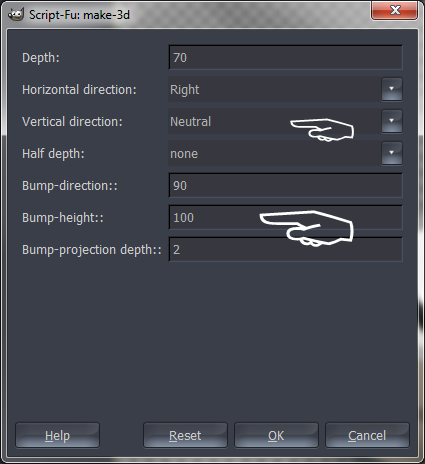
the 3D text filter work with shapes too.
[ Image ]

For the best angle use Render>Map>Map Object first
[ Image ]

[ Image ]

then apply 3D settings. I do it like this
[ Image ]

This is what I get
[ Image ]


Wilbeard! Hahaha. Nice result. Very clean compared to a lot of the ones I've seen.


Top
Post new topic Reply to topic  [ 12 posts ] 

All times are UTC - 5 hours [ DST ]


* Login  


Powered by phpBB3 © phpBB Group