It is currently Tue Aug 18, 2026 10:40 am


All times are UTC - 5 hours [ DST ]


Post new topic Reply to topic  [ 14 posts ] 
Author Message
 Post subject: Is there a way to add code to a script for a different colored text?
PostPosted: Wed Aug 21, 2013 10:46 am  (#1) 
Offline
Global Moderator
User avatar

Joined: May 16, 2010
Posts: 16161
I want to be able to see which filters i added and which are default with GIMP. :)
I thought maybe if i could change the text for menu location to a different color using code in the scripts that would work. Is there any way to do this?

_________________
Image


Share on Facebook Share on Twitter Share on Orkut Share on Digg Share on MySpace Share on Delicious Share on Technorati
Top
 Post subject: Re: Is there a way to add code to a script for a different colored tex
PostPosted: Wed Aug 21, 2013 11:19 am  (#2) 
Offline
Script Coder
User avatar

Joined: Jun 22, 2010
Posts: 1171
Location: Here and there
I'm not understanding what you want to be a different colour.

Do you want the menu entry to be a different colour for non-supplied scripts?
For example, if "Fuzzy Border..." was a script you've added later, you would want it in Blue?
Attachment:
Untitled.png
Untitled.png [ 19.56 KiB | Viewed 2432 times ]

Not to get your hopes up but I don't think that's possible. The best you could do would be to prefix/postfix the menu label with something - an asterisk for example.

Kevin


Top
 Post subject: Re: Is there a way to add code to a script for a different colored tex
PostPosted: Wed Aug 21, 2013 11:23 am  (#3) 
Offline
GimpChat Founder
User avatar

Joined: May 22, 2008
Posts: 5241
Location: Gimpville
I always keep the scripts and plug-in I manually add in folders in my home directory, rather then mix them in with the the default scripts and plug-in the global access folder. That way, I can easily see which are the defaults and which aren't.

You ask an interesting question though. It would be kinda cool to be to do as you stated.

_________________
“If you reach for the stars, you just might land on a decently sized hill.” - Stuart Hill


Top
 Post subject: Re: Is there a way to add code to a script for a different colored tex
PostPosted: Wed Aug 21, 2013 11:40 am  (#4) 
Offline
Script Coder
User avatar

Joined: Jun 22, 2010
Posts: 1171
Location: Here and there
There was a question some time ago on one of the mailing lists about plug-ins having their own icons like the standard tools do:
Attachment:
Untitled.png
Untitled.png [ 7.78 KiB | Viewed 2422 times ]

But I don't recall there being any response to the question.

My solution to the problem is to keep add-ons in separate folders, then modify their menu registrations to put them in a separate menu:
Attachment:
Untitled1.png
Untitled1.png [ 16.75 KiB | Viewed 2419 times ]


Kevin


Last edited by paynekj on Wed Aug 21, 2013 11:45 am, edited 1 time in total.

Top
 Post subject: Re: Is there a way to add code to a script for a different colored tex
PostPosted: Wed Aug 21, 2013 11:42 am  (#5) 
Offline
Global Moderator
User avatar

Joined: May 16, 2010
Posts: 16161
paynekj wrote:
I'm not understanding what you want to be a different colour.

Do you want the menu entry to be a different colour for non-supplied scripts?
For example, if "Fuzzy Border..." was a script you've added later, you would want it in Blue?
Attachment:
Untitled.png

Not to get your hopes up but I don't think that's possible. The best you could do would be to prefix/postfix the menu label with something - an asterisk for example.

Kevin


Yes that is exactly what i wanted Kevin. :bigthup
I guess adding an asterisk would work or maybe 3 to make it stand out.
Or how about
~ my new script menu name here ~

Thanks Tux but i wanted to be able to see at a glance if the menu items were added or not by me. I think with tutorials this would help also because if i am doing a tutorial and use a script i added i can see right away that it was. Maybe then i could use an alternate default way or inform the person doing the tutorial that they would have to download that particular script or filter.
I know this could be possible with scm and python filters but c plugins would have to be edited before compilation. Which would be easy enough for me to do. :)

Is it possible to add a small image like that to scripts for an image to show in the menu list? I know it can be done for C plugins. Example Gimp Sharp.

_________________
Image


Top
 Post subject: Re: Is there a way to add code to a script for a different colored tex
PostPosted: Wed Aug 21, 2013 11:49 am  (#6) 
Offline
GimpChat Member

Joined: Apr 12, 2010
Posts: 5870
i don't think may possible change colours but may be well possible add a prefix as "_" to the menu entry to all default script and plugin (and then recompile...)

I think to "_" because that should keep them on top even if have no a reserved menu ,but i think may be any other prefix .

Edit and recompile all extra script and plugin seems much more complex almost hopeless, would be a eternal work in progress

But the other way around, compile a modified Gimp version where the default script /plugin have a added prefix is possible ...maybe a bit tedious but doable

Quote:
There was a question some time ago on one of the mailing lists about plug-ins having their own icons like the standard tools do


I fear will be a mess , may work for few, if generalized gimp will be full of the most cryptic and bizarre icons

But thinking better should be already doable, i remember a icon in the menu entries of the filters included in GIMP#

_________________
My 3D Gallery on Deviantart http://photocomix2.deviantart.com/
Main gallery http://www.flickriver.com/photos/photocomix-mandala/
Mandala and simmetry http://www.flickriver.com/photos/photocomix_mandala/

Image

Mrs Wilbress


Top
 Post subject: Re: Is there a way to add code to a script for a different colored tex
PostPosted: Wed Aug 21, 2013 11:53 am  (#7) 
Offline
Global Moderator
User avatar

Joined: May 16, 2010
Posts: 16161
I decided to utilize Kevins suggestion. Thank you sir. :)

Image

Going to take me a while to change all these :lol
As i use them i guess. :bigthup

Thanks folks!

_________________
Image


Top
 Post subject: Re: Is there a way to add code to a script for a different colored tex
PostPosted: Wed Aug 21, 2013 11:57 am  (#8) 
Offline
GimpChat Founder
User avatar

Joined: May 22, 2008
Posts: 5241
Location: Gimpville
Rod wrote:
I guess adding an asterisk would work or maybe 3 to make it stand out.

That's a great idea, Rod, especially if you wanted to keep all scripts organized by function and not have a separate menu panel for the add-ons. :bigthup

_________________
“If you reach for the stars, you just might land on a decently sized hill.” - Stuart Hill


Top
 Post subject: Re: Is there a way to add code to a script for a different colored tex
PostPosted: Wed Aug 21, 2013 12:00 pm  (#9) 
Offline
GimpChat Member

Joined: Apr 12, 2010
Posts: 5870
Are you sure is not easier the other way around, add the prefix to the default script and plugin before compile ?

So you will have no to edit again each new added script or plugin ?

_________________
My 3D Gallery on Deviantart http://photocomix2.deviantart.com/
Main gallery http://www.flickriver.com/photos/photocomix-mandala/
Mandala and simmetry http://www.flickriver.com/photos/photocomix_mandala/

Image

Mrs Wilbress


Top
 Post subject: Re: Is there a way to add code to a script for a different colored tex
PostPosted: Wed Aug 21, 2013 12:10 pm  (#10) 
Offline
Global Moderator
User avatar

Joined: May 16, 2010
Posts: 16161
GnuTux wrote:
Rod wrote:
I guess adding an asterisk would work or maybe 3 to make it stand out.

That's a great idea, Rod, especially if you wanted to keep all scripts organized by function and not have a separate menu panel for the add-ons. :bigthup

I have all of them either in Script-Fu or Python-Fu except those that are in file>create and the filters menu. I change them to the new menu listings as i use them. I also use the script manager so i have a bazillion still not loaded. :lol .

I also still need to change the descriptions to include exact file names and then i also know which file is which.
Image

We talked about that before. :)

PC if i compile a new plugin i will definitely add something for the menus to signify the same thing probably a triplet asterisk also. :bigthup ***

_________________
Image


Top
 Post subject: Re: Is there a way to add code to a script for a different colored tex
PostPosted: Wed Aug 21, 2013 12:25 pm  (#11) 
Offline
GimpChat Member
User avatar

Joined: Nov 16, 2011
Posts: 5127
Location: Metro Vancouver, BC
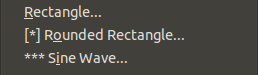
Rod, Maybe try [*] it uses less space. Here's your method next to mine.
Image
[*] R_ounded Rectangle...
*** S_ine Wave...

_________________
Image
Gimp 2.8.18, Linux, median user
Gimp Chat Tutorials Index
Spirit Bear (Kermode)


Top
 Post subject: Re: Is there a way to add code to a script for a different colored tex
PostPosted: Wed Aug 21, 2013 12:33 pm  (#12) 
Offline
Script Coder
User avatar

Joined: Oct 25, 2010
Posts: 4812
Rod wrote:
Thanks Tux but i wanted to be able to see at a glance if the menu items were added or not by me. I think with tutorials this would help also because if i am doing a tutorial and use a script i added i can see right away that it was. Maybe then i could use an alternate default way or inform the person doing the tutorial that they would have to download that particular script or filter.

"Help/Plugin browser" lets you find quickly which script/plugin file a menu entry comes from.

_________________
Image


Top
 Post subject: Re: Is there a way to add code to a script for a different colored tex
PostPosted: Wed Aug 21, 2013 12:35 pm  (#13) 
Offline
Global Moderator
User avatar

Joined: May 16, 2010
Posts: 16161
Odinbc wrote:
Rod, Maybe try [*] it uses less space. Here's your method next to mine.
[ Image ]
[*] R_ounded Rectangle...
*** S_ine Wave...


That is a great idea also Odin. :) I think i am going to use just 1 asterisk and that should be good. I don't think any scripts utilize that code form yet. At least i have not seen any. :ninja

ofnuts thanks but i wanted to be able to get all the information from one spot. The menu location itself. :bigthup

_________________
Image


Top
 Post subject: Re: Is there a way to add code to a script for a different colored tex
PostPosted: Wed Aug 21, 2013 12:44 pm  (#14) 
Offline
GimpChat Member
User avatar

Joined: Nov 16, 2011
Posts: 5127
Location: Metro Vancouver, BC
It's pretty close, it uses the same amount of characters but stand out nicely. I can't remember for sure but didn't Gimp use something similar for GEGL enabled filters?

_________________
Image
Gimp 2.8.18, Linux, median user
Gimp Chat Tutorials Index
Spirit Bear (Kermode)


Top
Post new topic Reply to topic  [ 14 posts ] 

All times are UTC - 5 hours [ DST ]


* Login  


Powered by phpBB3 © phpBB Group