It is currently Thu Oct 08, 2026 7:45 am


All times are UTC - 5 hours [ DST ]


Post new topic Reply to topic  [ 5 posts ] 
Author Message
 Post subject: comic strip
PostPosted: Fri Apr 30, 2010 8:05 pm  (#1) 
Offline
GimpChat Member
User avatar

Joined: Apr 08, 2010
Posts: 5420
Location: Northwest Ohio
I have an idea to do a poster that will look like a four-box comic strip, but I don't really know how to go about it. I will mess around, but does anyone have any suggestions on how to make lines around the boxes that look hand-drawn (no tablet!), a good font, and how to make photos look like a cartoon/comics? I have seen a tut somewhere to make a pic a comic, but if I recall, it was rather complicated...I am not very good at complicated! Anyway, I could def use some suggestions.


Share on Facebook Share on Twitter Share on Orkut Share on Digg Share on MySpace Share on Delicious Share on Technorati
Top
 Post subject: Re: comic strip
PostPosted: Fri Apr 30, 2010 10:40 pm  (#2) 
Offline
Retired Staff
User avatar

Joined: May 22, 2008
Posts: 6946
Location: Somewhere in GIMP
2-ton, I have tried to do what you want to do several times. I can't seem to make it look hand drawn no matter what I do. I did this one using the paths tool and stroking the path. The brush is Circle (03), and I applied a very slight amount of jitter (0.20)

I still haven't found the perfect comic strip font but I have two that i like. That's a nonending quest too. I have put paths to the two I have below.

Image

SF Cartoonist Hand SC
http://www.shyfoundry.com/fonts/free/sfcartooni.html

Comic Strip MN
http://www.abstractfonts.com/font/5563

_________________
Image
World War IV will be fought with sticks and stones. - Albert Einstein


Top
 Post subject: Re: comic strip
PostPosted: Sat May 01, 2010 6:41 am  (#3) 
Offline
GimpChat Member

Joined: Apr 11, 2010
Posts: 545
Location: In the mini-chat, saying silly things
Draw it on a piece of paper, scan it and then use threshold to make it perfectly black.

In the middle of this tutorial there is a good technique on how to make lines have smooth edges if you want that.

www.youtube.com Video from : www.youtube.com

_________________
Image


Top
 Post subject: Re: comic strip
PostPosted: Sat May 01, 2010 7:39 am  (#4) 
Offline
Retired Staff
User avatar

Joined: May 22, 2008
Posts: 6946
Location: Somewhere in GIMP
Thanks for that video. Another way to smooth out stuff.
What I do with something that has pixelly edges:
  • Alpha to Selection
  • Select > To Path
  • Unselect
  • Press Delete on the layer
  • Select > From Path
  • Fill the selection with the Bucket tool
That will also add antialiasing to the image.

Image

_________________
Image
World War IV will be fought with sticks and stones. - Albert Einstein


Top
 Post subject: Re: comic strip
PostPosted: Sat May 01, 2010 11:58 am  (#5) 
Offline
GimpChat Member
User avatar

Joined: Apr 08, 2010
Posts: 5420
Location: Northwest Ohio
Thanks for the tips, guys. I might have to be spending a bit of time trying things out! I really didn't want to have to scan, but I might have to, lol.
*editing as I go along
why can't I ... duplicate the layer that I stroked a path on and move it???
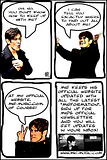
well, I'm done. I used the tips on stroking the path, the comic font, and I looked up Jolie's speech bubble vid. It''s a bit lame, as I sort of had to make up the look of the comic on my own. One of these days I will hunt up all the instructions to make a pic look more like a cartoon and how to make the background look like newsprint...the distort filter didnt seem to want to work on the white background. Here is my result, it looks pretty good in the thumbnail size, not so hot full size, lol, yes it's another in my poster series that I make for my fav singer.
Image


Top
Post new topic Reply to topic  [ 5 posts ] 

All times are UTC - 5 hours [ DST ]


* Login  


Powered by phpBB3 © phpBB Group
