It is currently Thu Aug 13, 2026 4:33 am


All times are UTC - 5 hours [ DST ]


Post new topic Reply to topic  [ 66 posts ]  Go to page Previous  1, 2, 3, 4
Author Message
 Post subject: Re: Graphic Boost Preset Gallery
PostPosted: Wed Feb 16, 2011 8:19 pm  (#61) 
Offline
Global Moderator
User avatar

Joined: May 16, 2010
Posts: 16158
That's weird though because all my presets still run fine.
Is there a newer G'MIC i do not know about :lol
I am running 1.4.8

_________________
Image


Top
 Post subject: Re: Graphic Boost Preset Gallery
PostPosted: Wed Feb 16, 2011 8:49 pm  (#62) 
Offline
GimpChat Member
User avatar

Joined: Oct 06, 2010
Posts: 4050
No, Rod. I don't see how your .gmic filter version of (Graphic Boost II) survived the G'MIC update. It broke everyone else's. Perhaps you don't have the older version (the first version) on your G'MIC, but a later version?

_________________
"In order to attain the impossible, one must attempt the absurd."
~ Miguel de Cervantes


Top
 Post subject: Re: Graphic Boost Preset Gallery
PostPosted: Thu Feb 17, 2011 8:49 am  (#63) 
Offline
Global Moderator
User avatar

Joined: May 16, 2010
Posts: 16158
Not sure - is this the old or new one? It looks like the old one to me.
Image

_________________
Image


Top
 Post subject: Re: Graphic Boost Preset Gallery
PostPosted: Thu Feb 17, 2011 10:26 am  (#64) 
Offline
GimpChat Member

Joined: Apr 12, 2010
Posts: 5870
no it is the last
the difference is mainly the swap layers box (and different chose of merging option)-

i just get adsl back , now i try to fix all cumulated problems ( flickr and DA account expired, pw for DA boxnet and gimptalk to be recovered

_________________
My 3D Gallery on Deviantart http://photocomix2.deviantart.com/
Main gallery http://www.flickriver.com/photos/photocomix-mandala/
Mandala and simmetry http://www.flickriver.com/photos/photocomix_mandala/

Image

Mrs Wilbress


Top
 Post subject: Re: Graphic Boost Preset Gallery
PostPosted: Thu Feb 17, 2011 5:53 pm  (#65) 
Offline
Global Moderator
User avatar

Joined: May 16, 2010
Posts: 16158
Great - thanks for clearing that up PC! :)
Good luck with your account updating.

_________________
Image


Top
 Post subject: Re: Graphic Boost Preset Gallery
PostPosted: Sun Feb 20, 2011 8:34 am  (#66) 
Offline
Retired Staff
User avatar

Joined: May 22, 2008
Posts: 6946
Location: Somewhere in GIMP
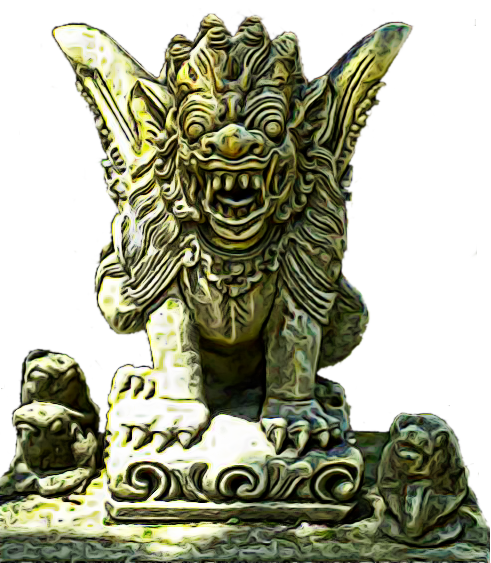
I got this PSP tube of a Chinese dragon statue (I love dragons) in the Annex Cafe PSP tubes newsgroup. I ran the soft color burn preset on it. I love the way that the detail of the statue is enhanced and stands out better.

Image

After running the Soft Color Burn preset.

Image

_________________
Image
World War IV will be fought with sticks and stones. - Albert Einstein


Top
Post new topic Reply to topic  [ 66 posts ]  Go to page Previous  1, 2, 3, 4

All times are UTC - 5 hours [ DST ]


* Login  


Powered by phpBB3 © phpBB Group